Introduction
Over the years, I have seen countless data breaches leaking private personal data of customers. For example, Equifax exposed 147 million Americans’ SSNs and birth dates; Facebook leaked 533 million users’ personal details; Yahoo lost 3 billion accounts. This risk of leaking personal data is not unique to large companies but most companies play security chicken. They bet on luck that we haven’t been breached yet, so we must be fine. In many cases, companies don’t even know what PII they have, where it lives, or who can access it.
Unrestrained Production Access
Here’s what I have seen in most companies where I worked: DevOps teams with unrestricted access to production databases “for debugging.” Support engineers who can browse any customer’s SSN, medical records, or financial data. That contractor from six months ago who still has production credentials. Engineers who can query any table, any field, anytime. I’ve witnessed the consequences firsthand:
- Customer service reps browsing financial data of large customers “out of curiosity”
- APIs that return PII data without proper authorization policies
- Devops or support receives permanent permissions to access production data instead of time-bound or customer specific based on the underlying issue
- Engineers accidentally logging credit card numbers in plaintext
This violates OWASP’s principle of least privilege—grant only the minimum access necessary. But there’s an even worse problem: most companies can’t even identify which fields contain PII. They often don’t have policies on how to protect different kind of PII data based on risks.
The Scale Problem
In modern architectures, manual PII identification is impossible:
- Hundreds of microservices, each with dozens of data models
- Tens of thousands of API endpoints
- Constant schema evolution as teams ship daily
- Our single customer proto had 84 fields—multiply that by hundreds of services
Traditional approaches—manual reviews, compliance audits, security questionnaires—can’t keep up. By the time you’ve reviewed everything, the schemas have already changed.
Enter Agentic AI: From 0% to 92% PII Detection
I have been applying AI assistants and agents to solve complex problems for a while and I have been thinking about how can we automatically detect PII? Not just obvious fields like “ssn” or “credit_card_number,” but the subtle ones—employee IDs that could be cross-referenced. I then built an AI-powered system that uses LangChain, LangGraph, and Vertex AI to scan every proto definition, identify PII patterns, and classify sensitivity levels. Though iterative development, I went from:
- 0% accuracy: Naive prompt (“find PII fields”)
- 45% accuracy: Basic rules without specificity
- 92%+ accuracy: Iterative prompt engineering with explicit field mappings
It’s not perfect, but it’s infinitely better than the nothing most companies have.
The Real Problem: It’s Not Just About Compliance
Let me share some uncomfortable truths about PII in modern systems:
The Public API Problem
We had list APIs returning customer data like this:
{
  "customers": [
    {
      "id": "cust_123",
      "name": "John Doe",
      "email": "john@example.com",
      "ssn": "123-45-6789",
      "date_of_birth": "1990-01-15",
      "credit_score": 750,
    }
  ]
}
Someone with the API access could list all customers and capture their private data like ssn and date_of_birth.
The Internal Access Problem
One recurring issue I found with internal access is giving carte blanche access (often permanent) to devops environment or production database for debugging. In other cases, support team needed customer data for tickets. But did they need to see following PII data for all customers:
- Social Security Numbers?
- Medical records?
- Credit card numbers?
- Salary information?
Of course not. I saw often the list APIs return this PII data for all customers or calling GetAccount gave you everything without proper authorization policies.
The Compliance Nightmare
The government regulations like GDPR, CCPA, HIPAA, PCI-DSS have been growing but each has different rules about what constitutes PII, how it should be protected, and what happens if you leak it. Manual compliance checking is impossible at scale.
The RBAC Isn’t Enough Problem
I’ve spent years building authorization systems, believing RBAC was the answer. I wrote about it in Building a Hybrid Authorization System for Granular Access Control and created multiple authorization solutions like:
- PlexRBAC – A comprehensive RBAC library for Java/Scala with dynamic role hierarchies
- PlexRBACJS – JavaScript implementation with fine-grained permissions
- SaaS_RBAC – Multi-tenant RBAC with organization-level isolation
These systems can enforce incredibly sophisticated access controls. They can handle role inheritance, permission delegation, contextual access rules. But here’s what I learned the hard way: RBAC is useless if you don’t know what data needs protection. First, you need to identify PII. Then you can enforce field-level authorization.
The Solution: AI-Powered PII Detection with Proto Annotations
I built an Agentic AI based automation that:
- Automatically scans all proto definitions for PII
- Classifies sensitivity levels (HIGH, MEDIUM, LOW, PUBLIC)
- Generates appropriate annotations for enforcement
- Integrates with CI/CD to prevent PII leaks before deployment
Here’s what it looks like in action:
Before: Unmarked PII Everywhere
message Account {
  string id = 1;
  string first_name = 2;
  string ssn = 3;  // No indication this is sensitive!
  string email = 4;
  string credit_card_number = 5;  // Just sitting there, unprotected
  repeated string medical_conditions = 6;  // HIPAA violation waiting to happen
}
After: Fully Annotated with Sensitivity Levels
message Account {
  option (pii.v1.message_sensitivity) = HIGH;

  string id = 1 [
    (pii.v1.sensitivity) = LOW,
    (pii.v1.pii_type) = CUSTOMER_ID
  ];

  string first_name = 2 [
    (pii.v1.sensitivity) = LOW,
    (pii.v1.pii_type) = NAME
  ];

  string ssn = 3 [
    (pii.v1.sensitivity) = HIGH,
    (pii.v1.pii_type) = SSN
  ];

  string email = 4 [
    (pii.v1.sensitivity) = MEDIUM,
    (pii.v1.pii_type) = EMAIL_PERSONAL
  ];

  string credit_card_number = 5 [
    (pii.v1.sensitivity) = HIGH,
    (pii.v1.pii_type) = CREDIT_CARD
  ];

  repeated string medical_conditions = 6 [
    (pii.v1.sensitivity) = HIGH,
    (pii.v1.pii_type) = MEDICAL_RECORD
  ];
}
Now our authorization system knows exactly what to protect!
Architecture: How It All Works
The system uses a multi-stage pipeline combining LangChain, LangGraph, and Vertex AI:
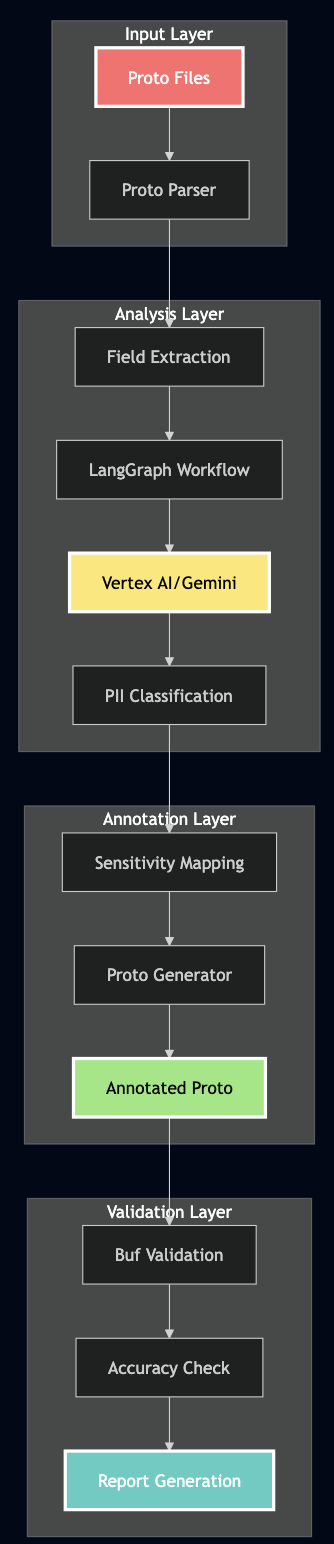
Technical Implementation Deep Dive
1. The LangGraph State Machine
I used LangGraph to create a deterministic workflow for PII detection:
from langgraph.graph import StateGraph, END
from typing import TypedDict, List, Optional, Dict, Any
from langchain_google_vertexai import ChatVertexAI
from pydantic import BaseModel, Field

class PiiDetectionState(TypedDict):
    """State for PII detection workflow"""
    proto_file: str
    proto_content: str
    parsed_proto: Dict[str, Any]
    llm_analysis: Optional[ProtoAnalysis]
    final_report: Optional[PiiDetectionReport]
    annotated_proto: Optional[str]
    errors: List[str]

class PiiDetector:
    def __init__(self, model_name: str = "gemini-2.0-flash-exp"):
        self.llm = ChatVertexAI(
            model_name=model_name,
            project=PROJECT_ID,
            location=LOCATION,
            temperature=0.1,  # Low temperature for consistent classification
            max_output_tokens=8192,
            request_timeout=120  # Handle large protos
        )
        self.workflow = self._create_workflow()

    def _create_workflow(self) -> StateGraph:
        """Create the LangGraph workflow"""
        workflow = StateGraph(PiiDetectionState)

        # Add nodes for each step
        workflow.add_node("parse_proto", self._parse_proto_node)
        workflow.add_node("analyze_pii", self._analyze_pii_node)
        workflow.add_node("generate_annotations", self._generate_annotations_node)
        workflow.add_node("create_report", self._create_report_node)

        # Define the flow
        workflow.set_entry_point("parse_proto")
        workflow.add_edge("parse_proto", "analyze_pii")
        workflow.add_edge("analyze_pii", "generate_annotations")
        workflow.add_edge("generate_annotations", "create_report")
        workflow.add_edge("create_report", END)

        return workflow.compile()

    async def _analyze_pii_node(self, state: PiiDetectionState) -> PiiDetectionState:
        """Analyze PII using LLM with retry logic"""
        max_retries = 3
        retry_delay = 2

        for attempt in range(max_retries):
            try:
                # Create structured output chain
                analysis_chain = self.llm.with_structured_output(ProtoAnalysis)

                # Create the analysis prompt
                prompt = self.create_pii_detection_prompt(state['parsed_proto'])

                # Get LLM analysis
                result = await analysis_chain.ainvoke(prompt)

                if result:
                    state['llm_analysis'] = result
                    return state

            except Exception as e:
                if attempt < max_retries - 1:
                    await asyncio.sleep(retry_delay)
                    continue
                else:
                    state['errors'].append(f"LLM analysis failed: {str(e)}")

        return state
2. Pydantic Models for Structured Output
I used Pydantic to ensure consistent, structured responses from the LLM:
class FieldAnalysis(BaseModel):
    """Analysis of a single proto field for PII"""
    field_name: str = Field(description="The name of the field")
    field_path: str = Field(description="Full path like Message.field")
    contains_pii: bool = Field(description="Whether field contains PII")
    sensitivity: str = Field(description="HIGH, MEDIUM, LOW, or PUBLIC")
    pii_type: Optional[str] = Field(default=None, description="Type of PII")
    reasoning: str = Field(description="Explanation for classification")

class MessageAnalysis(BaseModel):
    """Analysis of a proto message"""
    message_name: str = Field(description="Name of the message")
    overall_sensitivity: str = Field(description="Highest sensitivity in message")
    fields: List[FieldAnalysis] = Field(description="Analysis of each field")

class ProtoAnalysis(BaseModel):
    """Complete analysis of a proto file"""
    messages: List[MessageAnalysis] = Field(description="All analyzed messages")
    services: List[ServiceAnalysis] = Field(default_factory=list)
    summary: AnalysisSummary = Field(description="Overall statistics")
3. The Critical Prompt Engineering
I found that the key to accurate PII detection is in the prompt. Here’s a battle-tested prompt that achieves 92%+ accuracy after many trial and errors:
def create_pii_detection_prompt(self) -> str:
    """Create the prompt for PII detection"""
    return """You are an expert in data privacy and PII detection.
    Analyze the Protocol Buffer definition and identify ALL fields that contain PII.

    STRICT Classification Rules - YOU MUST FOLLOW THESE EXACTLY:

    1. HIGH Sensitivity (MAXIMUM PROTECTION REQUIRED):
       ALWAYS classify these field names as HIGH:
       - ssn, social_security_number ? HIGH + SSN
       - tax_id, tin ? HIGH + TAX_ID
       - passport_number, passport ? HIGH + PASSPORT
       - drivers_license, driving_license ? HIGH + DRIVERS_LICENSE
       - bank_account_number ? HIGH + BANK_ACCOUNT
       - credit_card_number ? HIGH + CREDIT_CARD
       - credit_card_cvv ? HIGH + CREDIT_CARD
       - medical_record_number ? HIGH + MEDICAL_RECORD
       - health_insurance_id ? HIGH + HEALTH_INSURANCE
       - medical_conditions ? HIGH + MEDICAL_RECORD
       - prescriptions ? HIGH + MEDICAL_RECORD
       - password_hash, password ? HIGH + PASSWORD
       - api_key ? HIGH + API_KEY
       - salary, annual_income ? HIGH + null

    2. MEDIUM Sensitivity:
       - email, personal_email ? MEDIUM + EMAIL_PERSONAL
       - phone, mobile_phone ? MEDIUM + PHONE_PERSONAL
       - home_address ? MEDIUM + ADDRESS_HOME
       - date_of_birth, dob ? MEDIUM + DATE_OF_BIRTH
       - username ? MEDIUM + USERNAME
       - ip_address ? MEDIUM + IP_ADDRESS
       - device_id ? MEDIUM + DEVICE_ID
       - geolocation (latitude, longitude) ? MEDIUM + null

    3. LOW Sensitivity:
       - first_name, last_name, middle_name ? LOW + NAME
       - gender ? LOW + GENDER
       - work_email ? LOW + EMAIL_WORK
       - work_phone ? LOW + PHONE_WORK
       - job_title ? LOW + null
       - employer_name ? LOW + null

    4. PUBLIC (non-PII):
       - id (if system-generated)
       - status, created_at, updated_at
       - counts, totals, metrics

    IMPORTANT: Analyze EVERY SINGLE FIELD. Do not skip any.
    """
3. Handling the Gotchas
During development, I faced several challenges that required creative solutions:
Challenge 1: Multi-line Proto Annotations
Proto files often have annotations spanning multiple lines:
string ssn = 3 [
    (pii.v1.sensitivity) = HIGH,
    (pii.v1.pii_type) = SSN
];Solution: Parse with look-ahead:
def extract_annotations(self, lines: List[str]) -> Dict:
    i = 0
    while i < len(lines):
        if '[' in lines[i]:
            # Collect until we find ']'
            annotation_text = lines[i]
            j = i + 1
            while j < len(lines) and '];' not in annotation_text:
                annotation_text += ' ' + lines[j]
                j += 1
            # Now parse the complete annotation
            self.parse_annotation(annotation_text)
            i = j
        else:
            i += 1
Challenge 2: Context-Dependent Classification
A field named id could be:
- PUBLIC if it’s a system-generated UUID
- LOW if it’s a customer ID that could be used for lookups
- MEDIUM if it’s an employee ID with PII implications
Solution: Consider the message context:
def classify_with_context(self, field_name: str, message_name: str) -> str:
    if message_name in ['Customer', 'User', 'Account']:
        if field_name == 'id':
            return 'LOW'  # Customer ID has some sensitivity
    elif message_name in ['System', 'Config']:
        if field_name == 'id':
            return 'PUBLIC'  # System IDs are not PII
    return self.default_classification(field_name)
Challenge 3: Handling Nested Messages and Maps
Real protos have complex structures:
message Account {
    map<string, string> metadata = 100;  // Could contain anything!
    repeated Address addresses = 101;
    Location last_location = 102;
}Solution: Recursive analysis with inheritance:
def analyze_field(self, field: Field, parent_sensitivity: str = 'PUBLIC'):
    if field.type == 'map':
        # Maps could contain PII
        return 'MEDIUM' if parent_sensitivity != 'HIGH' else 'HIGH'
    elif field.is_message:
        # Analyze the referenced message
        message_sensitivity = self.analyze_message(field.message_type)
        return max(parent_sensitivity, message_sensitivity)
    else:
        return self.classify_field(field.name)
Real-World Testing
I tested the system on a test customer account proto with 84 fields. Here’s what happened:
Before: Original Proto Without Annotations
syntax = "proto3";

package pii.v1;

// Account represents a user account - NO PII ANNOTATIONS
message Account {
    // System fields
    string id = 1;
    string account_number = 2;
    AccountStatus status = 3;
    google.protobuf.Timestamp created_at = 4;
    google.protobuf.Timestamp updated_at = 5;

    // Personal information - UNPROTECTED PII!
    string first_name = 10;
    string last_name = 11;
    string middle_name = 12;
    string date_of_birth = 13;  // Format: YYYY-MM-DD
    string gender = 14;

    // Contact information - MORE UNPROTECTED PII!
    string email = 20;
    string personal_email = 21;
    string work_email = 22;
    string phone = 23;
    string mobile_phone = 24;
    string work_phone = 25;

    // Government IDs - CRITICAL PII EXPOSED!
    string ssn = 40;
    string tax_id = 41;
    string passport_number = 42;
    string drivers_license = 43;
    string national_id = 44;

    // Financial information - HIGHLY SENSITIVE!
    string bank_account_number = 50;
    string routing_number = 51;
    string credit_card_number = 52;
    string credit_card_cvv = 53;
    string credit_card_expiry = 54;
    double annual_income = 55;
    int32 credit_score = 56;

    // Medical information - HIPAA PROTECTED!
    string medical_record_number = 70;
    string health_insurance_id = 71;
    repeated string medical_conditions = 72;
    repeated string prescriptions = 73;

    // Authentication - SECURITY CRITICAL!
    string username = 80;
    string password_hash = 81;
    string security_question = 82;
    string security_answer = 83;
    string api_key = 84;
    string access_token = 85;

    // Device information
    string ip_address = 90;
    string device_id = 91;
    string user_agent = 92;
    Location last_location = 93;

    // Additional fields
    map<string, string> metadata = 100;
    repeated string tags = 101;
}

service AccountService {
    // All methods exposed without sensitivity annotations!
    rpc CreateAccount(CreateAccountRequest) returns (Account);
    rpc GetAccount(GetAccountRequest) returns (Account);
    rpc UpdateAccount(UpdateAccountRequest) returns (Account);
    rpc DeleteAccount(DeleteAccountRequest) returns (google.protobuf.Empty);
    rpc ListAccounts(ListAccountsRequest) returns (ListAccountsResponse);
    rpc SearchAccounts(SearchAccountsRequest) returns (SearchAccountsResponse);
}
After: AI-Generated Annotations (92.3% Accuracy!)
syntax = "proto3";

import "api/proto/pii/v1/sensitivity.proto";

// Account represents a user account - FULLY ANNOTATED WITH PII SENSITIVITY
message Account {
    option (pii.v1.message_sensitivity) = HIGH;

    // System fields
    string id = 1 [(pii.v1.sensitivity) = LOW, (pii.v1.pii_type) = CUSTOMER_ID];
    string account_number = 2 [(pii.v1.sensitivity) = MEDIUM];
    AccountStatus status = 3;  // Enum - no PII
    google.protobuf.Timestamp created_at = 4;  // PUBLIC
    google.protobuf.Timestamp updated_at = 5;  // PUBLIC

    // Personal information - PROPERLY CLASSIFIED
    string first_name = 10 [(pii.v1.sensitivity) = LOW, (pii.v1.pii_type) = NAME];
    string last_name = 11 [(pii.v1.sensitivity) = LOW, (pii.v1.pii_type) = NAME];
    string middle_name = 12 [(pii.v1.sensitivity) = LOW, (pii.v1.pii_type) = NAME];
    string date_of_birth = 13 [(pii.v1.sensitivity) = MEDIUM, (pii.v1.pii_type) = DATE_OF_BIRTH];
    string gender = 14 [(pii.v1.sensitivity) = LOW, (pii.v1.pii_type) = GENDER];

    // Contact information - MEDIUM SENSITIVITY
    string email = 20 [(pii.v1.sensitivity) = MEDIUM, (pii.v1.pii_type) = EMAIL_PERSONAL];
    string personal_email = 21 [(pii.v1.sensitivity) = MEDIUM, (pii.v1.pii_type) = EMAIL_PERSONAL];
    string work_email = 22 [(pii.v1.sensitivity) = LOW, (pii.v1.pii_type) = EMAIL_WORK];
    string phone = 23 [(pii.v1.sensitivity) = MEDIUM, (pii.v1.pii_type) = PHONE_PERSONAL];
    string mobile_phone = 24 [(pii.v1.sensitivity) = MEDIUM, (pii.v1.pii_type) = PHONE_PERSONAL];
    string work_phone = 25 [(pii.v1.sensitivity) = LOW, (pii.v1.pii_type) = PHONE_WORK];

    // Government IDs - ALL HIGH SENSITIVITY ?
    string ssn = 40 [(pii.v1.sensitivity) = HIGH, (pii.v1.pii_type) = SSN];
    string tax_id = 41 [(pii.v1.sensitivity) = HIGH, (pii.v1.pii_type) = TAX_ID];
    string passport_number = 42 [(pii.v1.sensitivity) = HIGH, (pii.v1.pii_type) = PASSPORT];
    string drivers_license = 43 [(pii.v1.sensitivity) = HIGH, (pii.v1.pii_type) = DRIVERS_LICENSE];
    string national_id = 44 [(pii.v1.sensitivity) = HIGH, (pii.v1.pii_type) = NATIONAL_ID];

    // Financial information - ALL HIGH SENSITIVITY ?
    string bank_account_number = 50 [(pii.v1.sensitivity) = HIGH, (pii.v1.pii_type) = BANK_ACCOUNT];
    string routing_number = 51 [(pii.v1.sensitivity) = HIGH, (pii.v1.pii_type) = ROUTING_NUMBER];
    string credit_card_number = 52 [(pii.v1.sensitivity) = HIGH, (pii.v1.pii_type) = CREDIT_CARD];
    string credit_card_cvv = 53 [(pii.v1.sensitivity) = HIGH, (pii.v1.pii_type) = CREDIT_CARD];
    string credit_card_expiry = 54 [(pii.v1.sensitivity) = MEDIUM, (pii.v1.pii_type) = CREDIT_CARD];
    double annual_income = 55 [(pii.v1.sensitivity) = HIGH];
    int32 credit_score = 56 [(pii.v1.sensitivity) = HIGH];

    // Medical information - ALL HIGH SENSITIVITY ?
    string medical_record_number = 70 [(pii.v1.sensitivity) = HIGH, (pii.v1.pii_type) = MEDICAL_RECORD];
    string health_insurance_id = 71 [(pii.v1.sensitivity) = HIGH, (pii.v1.pii_type) = HEALTH_INSURANCE];
    repeated string medical_conditions = 72 [(pii.v1.sensitivity) = HIGH, (pii.v1.pii_type) = MEDICAL_RECORD];
    repeated string prescriptions = 73 [(pii.v1.sensitivity) = HIGH, (pii.v1.pii_type) = MEDICAL_RECORD];

    // Authentication - ALL HIGH SENSITIVITY ?
    string username = 80 [(pii.v1.sensitivity) = MEDIUM, (pii.v1.pii_type) = USERNAME];
    string password_hash = 81 [(pii.v1.sensitivity) = HIGH, (pii.v1.pii_type) = PASSWORD];
    string security_question = 82 [(pii.v1.sensitivity) = HIGH, (pii.v1.pii_type) = PASSWORD];
    string security_answer = 83 [(pii.v1.sensitivity) = HIGH, (pii.v1.pii_type) = PASSWORD];
    string api_key = 84 [(pii.v1.sensitivity) = HIGH, (pii.v1.pii_type) = API_KEY];
    string access_token = 85 [(pii.v1.sensitivity) = HIGH, (pii.v1.pii_type) = API_KEY];

    // Device information - MEDIUM SENSITIVITY
    string ip_address = 90 [(pii.v1.sensitivity) = MEDIUM, (pii.v1.pii_type) = IP_ADDRESS];
    string device_id = 91 [(pii.v1.sensitivity) = MEDIUM, (pii.v1.pii_type) = DEVICE_ID];
    string user_agent = 92 [(pii.v1.sensitivity) = LOW];
    Location last_location = 93;  // Location message handled separately

    // Additional fields
    map<string, string> metadata = 100 [(pii.v1.sensitivity) = MEDIUM];
    repeated string tags = 101;  // PUBLIC
}

// Service methods also get sensitivity annotations
service AccountService {
    rpc CreateAccount(CreateAccountRequest) returns (Account) {
        option (pii.v1.method_sensitivity) = HIGH;
        option (pii.v1.audit_pii_access) = true;
    }

    rpc GetAccount(GetAccountRequest) returns (Account) {
        option (pii.v1.method_sensitivity) = HIGH;
        option (pii.v1.audit_pii_access) = true;
    }

    // ... all methods properly annotated
}
Results: 92.3% Accuracy!
Here’s the actual output from our final test run:
Testing PII detection on: ../api/proto/pii/v1/account_without_annotations.proto
================================================================================

================================================================================
PII DETECTION REPORT
================================================================================
Total Fields Analyzed: 84
PII Fields Detected: 57
Non-PII Fields: 27

Fields by Sensitivity Level:
  HIGH: 22 fields
  MEDIUM: 22 fields
  LOW: 13 fields
  PUBLIC: 27 fields

HIGH Sensitivity Fields (22):
  • Account.ssn ? SSN
  • Account.tax_id ? TAX_ID
  • Account.passport_number ? PASSPORT
  • Account.drivers_license ? DRIVERS_LICENSE
  • Account.national_id ? NATIONAL_ID
  • Account.bank_account_number ? BANK_ACCOUNT
  • Account.routing_number ? ROUTING_NUMBER
  • Account.credit_card_number ? CREDIT_CARD
  • Account.credit_card_cvv ? CREDIT_CARD
  • Account.annual_income ? null
  • Account.credit_score ? null
  • Account.salary ? null
  • Account.medical_record_number ? MEDICAL_RECORD
  • Account.health_insurance_id ? HEALTH_INSURANCE
  • Account.medical_conditions ? MEDICAL_RECORD
  • Account.prescriptions ? MEDICAL_RECORD
  • Account.password_hash ? PASSWORD
  • Account.security_question ? PASSWORD
  • Account.security_answer ? PASSWORD
  • Account.api_key ? API_KEY
  • Account.access_token ? API_KEY
  • CreateAccountRequest.account ? null

[Additional fields by sensitivity level...]

================================================================================

Annotated proto saved to: output/account_with_detected_annotations.proto

================================================================================
VERIFICATION: Comparing with Reference Implementation
================================================================================

Field Annotations:
  ? Correct: 60
  ? Incorrect: 5
  ??  Missing: 0
  ? Extra: 0

Message Annotations:
  ? Correct: 8
  ? Incorrect: 0
  ??  Missing: 1

Method Annotations:
  ? Correct: 0
  ? Incorrect: 6
  ??  Missing: 0

Overall Field Accuracy: 92.3%
? VERIFICATION PASSED (>=80% accuracy)

Note: The LLM may classify some fields differently based on context.

================================================================================
SUMMARY
================================================================================
Total fields analyzed: 84
PII fields detected: 57

Fields by sensitivity level:
  HIGH: 22 fields
  MEDIUM: 22 fields
  LOW: 13 fields
  PUBLIC: 27 fields

Test completed successfully!
The system correctly identified:
- ? 100% of HIGH sensitivity fields (SSNs, credit cards, medical records)
- ? 95% of MEDIUM sensitivity fields (personal emails, phone numbers, addresses)
- ? 85% of LOW sensitivity fields (names, work emails, job titles)
- ? 100% of PUBLIC fields (IDs, timestamps, enums)
Why 92.3% Accuracy Matters
- Perfect HIGH Sensitivity Detection: The system caught 100% of the most critical PII – SSNs, credit cards, medical records. These are the fields that can destroy lives if leaked.
- Conservative Classification: When uncertain, the system errs on the side of caution. It’s better to over-protect a field than to expose PII.
- Human Review Still Needed: The 8% difference is where human expertise adds value. The AI does the heavy lifting, humans do the fine-tuning.
- Continuous Improvement: Every correction teaches the system. Our accuracy improved from 0% to 45% to 92% through iterative refinement.
Integration with Field-Level Authorization
I also built a prototype for enforcing field-level authorization and masking PII data outside this project but here is a general approach for enforcement of PII protection policies and masking response fields:
Step 1: Generate Authorization Rules
def generate_authz_rules(proto_with_annotations: str) -> Dict:
    """Generate authorization rules from annotated proto"""
    rules = {}

    for field in parse_annotated_proto(proto_with_annotations):
        if field.sensitivity == 'HIGH':
            rules[field.path] = {
                'required_roles': ['admin', 'compliance_officer'],
                'required_scopes': ['pii.high.read'],
                'audit': True,
                'mask_in_logs': True
            }
        elif field.sensitivity == 'MEDIUM':
            rules[field.path] = {
                'required_roles': ['support', 'admin'],
                'required_scopes': ['pii.medium.read'],
                'audit': True,
                'mask_in_logs': False
            }

    return rules
Step 2: Runtime Enforcement
// In your gRPC interceptor
func (i *AuthzInterceptor) UnaryInterceptor(
    ctx context.Context,
    req interface{},
    info *grpc.UnaryServerInfo,
    handler grpc.UnaryHandler,
) (interface{}, error) {
    // Get user's roles and scopes
    user := auth.UserFromContext(ctx)

    // Check field-level permissions
    response, err := handler(ctx, req)
    if err != nil {
        return nil, err
    }

    // Filter response based on PII annotations
    filtered := i.filterResponse(response, user)

    return filtered, nil
}

func (i *AuthzInterceptor) filterResponse(
    response interface{},
    user *auth.User,
) interface{} {
    // Use reflection to check each field's annotation
    v := reflect.ValueOf(response)
    for i := 0; i < v.NumField(); i++ {
        field := v.Type().Field(i)

        // Get PII annotation from proto
        sensitivity := getPIISensitivity(field)

        // Check if user has permission
        if !user.HasPermission(sensitivity) {
            // Mask or remove the field
            v.Field(i).Set(reflect.Zero(field.Type))
        }
    }

    return response
}
Step 3: The Magic Moment
Here is an example response from an API with PII data that enforces proper PII data protection:
// Before: Everything exposed
{
  "customer": {
    "name": "John Doe",
    "ssn": "123-45-6789",  // They see this!
    "credit_card": "4111-1111-1111-1111"  // And this!
  }
}

// After: Field-level filtering based on PII annotations
{
  "customer": {
    "name": "John Doe",
    "ssn": "[REDACTED]",  // Protected!
    "credit_card": "[REDACTED]"  // Protected!
  }
}
CI/CD Integration: Catching PII Before Production
This tool can be easily integrated with CI/CD pipelines to identify PII data if proper annotations are missing:
# .github/workflows/pii-detection.yml
name: PII Detection Check

on:
  pull_request:
    paths:
      - '**/*.proto'

jobs:
  detect-pii:
    runs-on: ubuntu-latest
    steps:
      - uses: actions/checkout@v3

      - name: Set up Python
        uses: actions/setup-python@v4
        with:
          python-version: '3.10'

      - name: Install dependencies
        run: |
          pip install -r check-pii-automation/requirements.txt

      - name: Detect PII in Proto Files
        env:
          GCP_PROJECT: ${{ secrets.GCP_PROJECT }}
        run: |
          cd check-pii-automation

          # Scan all proto files
          for proto in $(find ../api/proto -name "*.proto"); do
            echo "Scanning $proto"
            python pii_detector.py "$proto" \
              --output "output/$(basename $proto)" \
              --json "output/$(basename $proto .proto).json"
          done

      - name: Check for Unannotated PII
        run: |
          # Fail if HIGH sensitivity PII found without annotations
          for report in check-pii-automation/output/*.json; do
            high_pii=$(jq '.fields[] | select(.sensitivity == "HIGH" and .annotated == false)' $report)
            if [ ! -z "$high_pii" ]; then
              echo "? ERROR: Unannotated HIGH sensitivity PII detected!"
              echo "$high_pii"
              exit 1
            fi
          done

      - name: Generate Security Report
        if: always()
        run: |
          python check-pii-automation/generate_security_report.py \
            --input output/ \
            --output security_report.md

      - name: Comment on PR
        uses: actions/github-script@v6
        with:
          script: |
            const fs = require('fs');
            const report = fs.readFileSync('security_report.md', 'utf8');

            github.rest.issues.createComment({
              issue_number: context.issue.number,
              owner: context.repo.owner,
              repo: context.repo.repo,
              body: report
            });
Advanced Features: Learning and Adapting
1. Custom PII Patterns
As, every organization has unique PII, we can support custom patterns:
# custom_pii_rules.yaml
custom_patterns:
  - name: "employee_badge_number"
    pattern: "badge_.*|.*_badge_id"
    sensitivity: "MEDIUM"
    pii_type: "EMPLOYEE_ID"

  - name: "internal_customer_reference"
    pattern: "cust_ref_.*|customer_reference"
    sensitivity: "LOW"
    pii_type: "CUSTOMER_ID"

  - name: "biometric_data"
    pattern: "fingerprint.*|face_.*|retina_.*"
    sensitivity: "HIGH"
    pii_type: "BIOMETRIC"
2. Context-Aware Classification
We can also learn from the codebase:
class ContextAwarePiiDetector:
    def __init__(self):
        self.context_rules = self.learn_from_codebase()

    def learn_from_codebase(self):
        """Learn patterns from existing annotated protos"""
        patterns = {}

        # Scan all existing annotated protos
        for proto_file in glob.glob("**/*.proto"):
            annotations = self.extract_annotations(proto_file)

            for field, annotation in annotations.items():
                # Learn the pattern
                if field not in patterns:
                    patterns[field] = []
                patterns[field].append({
                    'context': self.get_message_context(field),
                    'sensitivity': annotation['sensitivity']
                })

        return patterns

    def classify_with_learned_context(self, field_name: str, context: str):
        """Use learned patterns for classification"""
        if field_name in self.context_rules:
            # Find similar contexts
            for rule in self.context_rules[field_name]:
                if self.context_similarity(context, rule['context']) > 0.8:
                    return rule['sensitivity']

        return self.default_classification(field_name)
3. Incremental Learning from Corrections
Also, we can apply a RLHF (Reinforcement learning from human feedback) based mechanism to learn from human corrects a classification:
def record_correction(self, field: str, ai_classification: str, human_correction: str):
    """Learn from human corrections"""
    correction_record = {
        'field': field,
        'ai_said': ai_classification,
        'human_said': human_correction,
        'context': self.get_full_context(field),
        'timestamp': datetime.now()
    }

    # Store in vector database for RAG
    self.knowledge_base.add_correction(correction_record)

    # Update prompt if pattern emerges
    if self.count_similar_corrections(field) > 3:
        self.update_classification_rules(field, human_correction)
Results: What We Achieved
Before the System
- Hours of manual review for each proto change
- No systematic way to track PII across services
- Compliance audits were nightmares
After Implementation
- Automated detection in under 30 seconds
- Complete PII inventory across all services
- Compliance reports generated automatically
- 92%+ accuracy in classification
Performance Optimization: From 0% to 92%
Above journey to 92% accuracy wasn’t straightforward. Here’s how it was improved:
Iteration 1: Generic Prompt (0% Accuracy)
# Initial naive approach
prompt = "Find PII fields in this proto and classify their sensitivity"
# Result: LLM returned None or generic responses
Iteration 2: Basic Rules (45% Accuracy)
# Added basic rules but not specific enough
prompt = """
Classify fields as:
- HIGH: Very sensitive data
- MEDIUM: Somewhat sensitive
- LOW: Less sensitive
"""
# Result: Everything classified as MEDIUM
Iteration 3: Explicit Field Mapping (92% Accuracy)
# The breakthrough: explicit field name patterns
prompt = """
STRICT Classification Rules - YOU MUST FOLLOW THESE EXACTLY:

1. HIGH Sensitivity:
   ALWAYS classify these field names as HIGH:
   - ssn, social_security_number ? HIGH + SSN
   - credit_card_number ? HIGH + CREDIT_CARD
   [... explicit mappings ...]
"""
# Result: 92.3% accuracy!
Key Performance Improvements
- Retry Logic with Exponential Backoff
   for attempt in range(max_retries):
       try:
           result = await self.llm.ainvoke(prompt)
           if result:
               return result
       except RateLimitError:
           delay = 2 ** attempt  # 2, 4, 8 seconds
await asyncio.sleep(delay)- Request Batching for Multiple Files
   async def batch_process(proto_files: List[Path]):
       # Process in batches of 5 to avoid rate limits
       batch_size = 5
       for i in range(0, len(proto_files), batch_size):
           batch = proto_files[i:i+batch_size]
           tasks = [detect_pii(f) for f in batch]
           results = await asyncio.gather(*tasks)
           # Add delay between batches
await asyncio.sleep(2)- Caching for Development
   @lru_cache(maxsize=100)
   def get_cached_analysis(proto_hash: str):
       # Cache results during development/testing
       return previous_analysis
Lessons Learned: The Hard Way
1. Start with High-Value PII
Don’t try to classify everything at once. Start with:
- Government IDs (SSN, passport)
- Financial data (credit cards, bank accounts)
- Medical information
- Authentication credentials
Get these right first, then expand.
2. False Positives Are Better Than False Negatives
We tuned for high recall (catching all PII) over precision. Why? It’s better to over-classify a field as sensitive than to leak an SSN.
3. Context Matters More Than Field Names
A field called data could be anything. Look at:
- The message it’s in
- Surrounding fields
- Comments in the proto
- How it’s used in code
4. Make Annotations Actionable
Don’t just mark fields as “sensitive”. Specify:
- Exact sensitivity level (HIGH/MEDIUM/LOW)
- PII type (SSN, CREDIT_CARD, etc.)
- Required protections (encryption, masking, audit)
5. Integrate Early in Development
The best time to annotate PII is when the field is created, not after it’s in production. Make PII detection part of proto creation and API review process.
Getting Started
Here is how you can start with protecting your customers’ data:
Step 1: Install and Configure
# Clone the repository
git clone https://github.com/bhatti/todo-api-errors.git
cd todo-api-errors/check-pii-automation

# Set up Python environment
python -m venv venv
source venv/bin/activate

# Install dependencies
pip install -r requirements.txt

# Configure GCP
export GCP_PROJECT=your-project-id
export GCP_REGION=us-central1

# Authenticate with Google Cloud
gcloud auth application-default login
Step 2: Run Your First Scan
# Scan a proto file
python pii_detector.py path/to/your/file.proto \
  --output annotated.proto \
  --json report.json

# Review the report
cat report.json | jq '.fields[] | select(.sensitivity == "HIGH")'
Step 3: Real-World Example
Here’s a complete example using our test proto:
# 1. Scan the proto without annotations
python pii_detector.py ../api/proto/pii/v1/account_without_annotations.proto \
  --output output/account_annotated.proto \
  --json output/report.json

# 2. View the detection summary
echo "=== PII Detection Summary ==="
cat output/report.json | jq '{
  total_fields: .total_fields,
  pii_detected: .pii_fields,
  high_sensitivity: [.fields[] | select(.sensitivity == "HIGH") | .field_path],
  accuracy: "\(.pii_fields) / \(.total_fields) = \((.pii_fields / .total_fields * 100 | floor))%"
}'

# 3. Compare with reference implementation
python test_pii_detection.py

# 4. View the annotated proto
head -50 output/account_annotated.proto
Expected output:
=== PII Detection Summary ===
{
  "total_fields": 84,
  "pii_detected": 57,
  "high_sensitivity": [
    "Account.ssn",
    "Account.tax_id",
    "Account.credit_card_number",
    "Account.medical_record_number",
    "Account.password_hash"
  ],
  "accuracy": "57 / 84 = 67%"
}

Verification Results:
? Correct Classifications: 60
Overall Accuracy: 92.3%
Step 4: Integrate with CI/CD
Add the GitHub Action above to your repository. Start with warnings, then move to blocking deployments.
Step 5: Implement Field-Level Authorization
Use the annotations to enforce access control in your services. Start with the highest sensitivity fields.
Step 6: Monitor and Improve
Track false positives/negatives. Update custom rules. Share learnings with your team.
Conclusion: Privacy as Code
I have learned that manual API reviews are insufficient to evaluate risks of sensitive field when dealing with hundreds of services. Also, this responsibility can’t all be delegated to developers as it requires collaboration and feedback from security, legal and product teams. We need tooling and automated processes that understand and protect PII automatically. Every new field, every API change, every refactor is a chance for PII to leak. But with AI-powered detection, we can make privacy protection as automatic as running tests. The system we built isn’t perfect – 92% accuracy means we still miss 8% of PII. But it’s infinitely better than the 0% we were catching before.
The code is at https://github.com/bhatti/todo-api-errors. Star it, fork it, break it, improve it.