Shahzad Bhatti Welcome to my ramblings and rants!

October 30, 2025

Agentic AI for Personal Productivity: Building a Daily Minutes Assistant with RAG, MCP, and ReAct

Filed under: Agentic AI — admin @ 8:20 pm

Over the last year, I have been applying Agentic AI to various problems at work and to improve personal productivity. For example, every morning, I faced the same challenge: information overload.

My typical morning looked like this:

  • ? Check emails and sort out what’s important
  • ? Check my calendar and figure out which ones are critical
  • ? Skim HackerNews, TechCrunch, newsletters for any important insight
  • ? Check Slack for any critical updates
  • ?? Look up weather ? Should I bring an umbrella or jacket?
  • ? Already lost 45 minutes just gathering information!

I needed an AI assistant that could digest all this information while I shower, then present me with a personalized 3-minute brief highlighting what actually matters. Also, following were key constraints for this assistant:

  • ? Complete privacy – My emails and calendar shouldn’t leave my laptop and I didn’t want to run any MCP servers in cloud that could expose my private credentials
  • ? Zero ongoing costs – Running complex Agentic workflow on the hosted environments could easily cost me hundreds of dollars a month
  • ? Fast iteration – Test changes instantly during development
  • ? Flexible deployment – Start local, deploy to cloud when ready

I will walk through my journey of building Daily Minutes with Claude Code – a fully functional agentic AI system that runs on my laptop using local LLMs, saves me 30 minutes every morning.


Agentic Building Blocks

I applied following building blocks to create this system:

  1. MCP (Model Context Protocol) – connecting to data sources discoverable by AI
  2. RAG (Retrieval-Augmented Generation) – give AI long-term memory
  3. ReAct Pattern – teach AI to reason before acting
  4. RLHF (Reinforcement Learning from Human Feedback) – teach AI from my preferences
  5. LangGraph – orchestrate complex multi-agent workflows
  6. 3-Layer Architecture – building easily extensible systems

Full source code: github.com/bhatti/daily-minutes

Let me walk you through how I built each piece, the problems I encountered, and how I solved them.


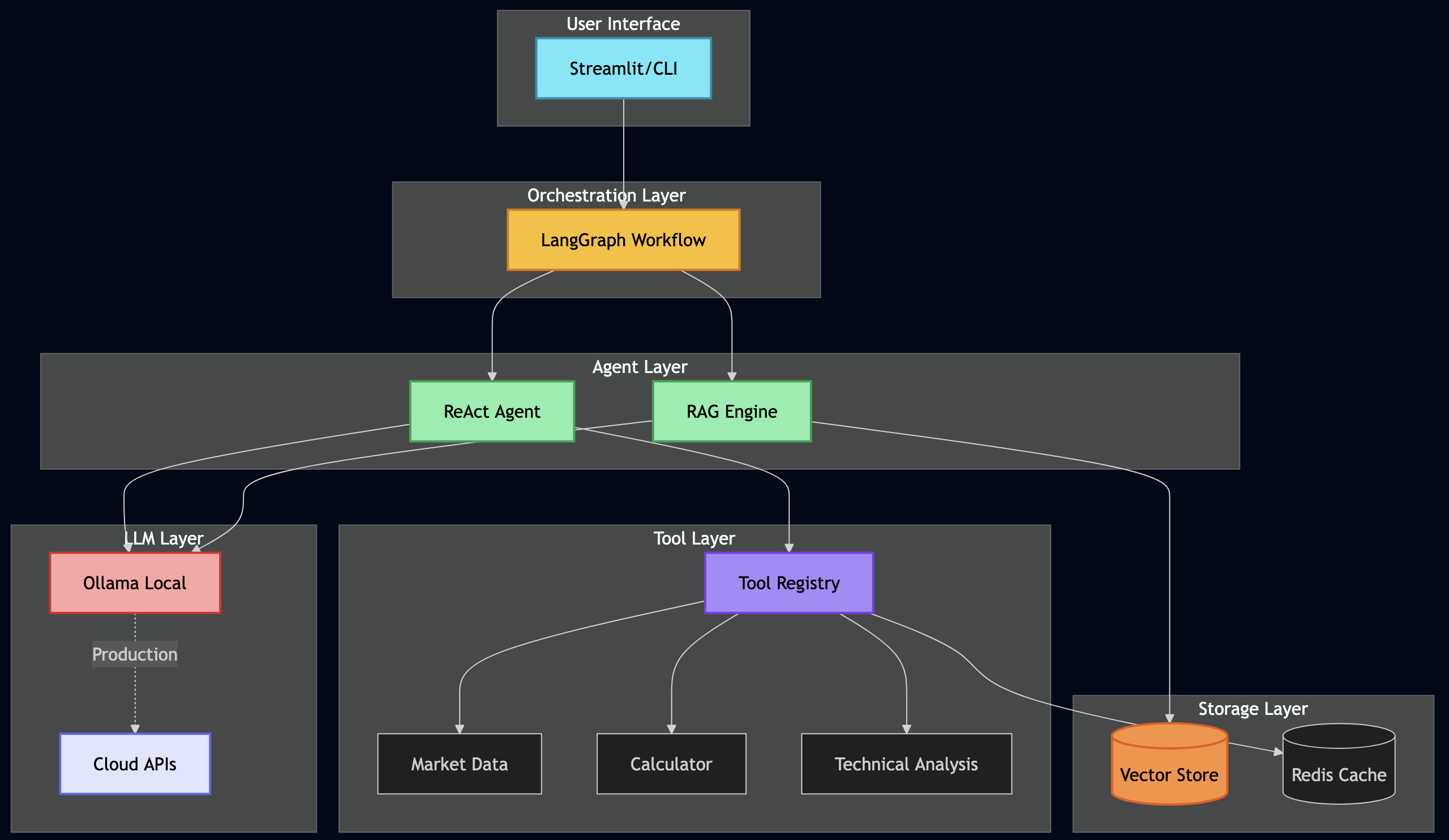
High-level Architecture

After several iterations, I landed on a clean 3-layer architecture:
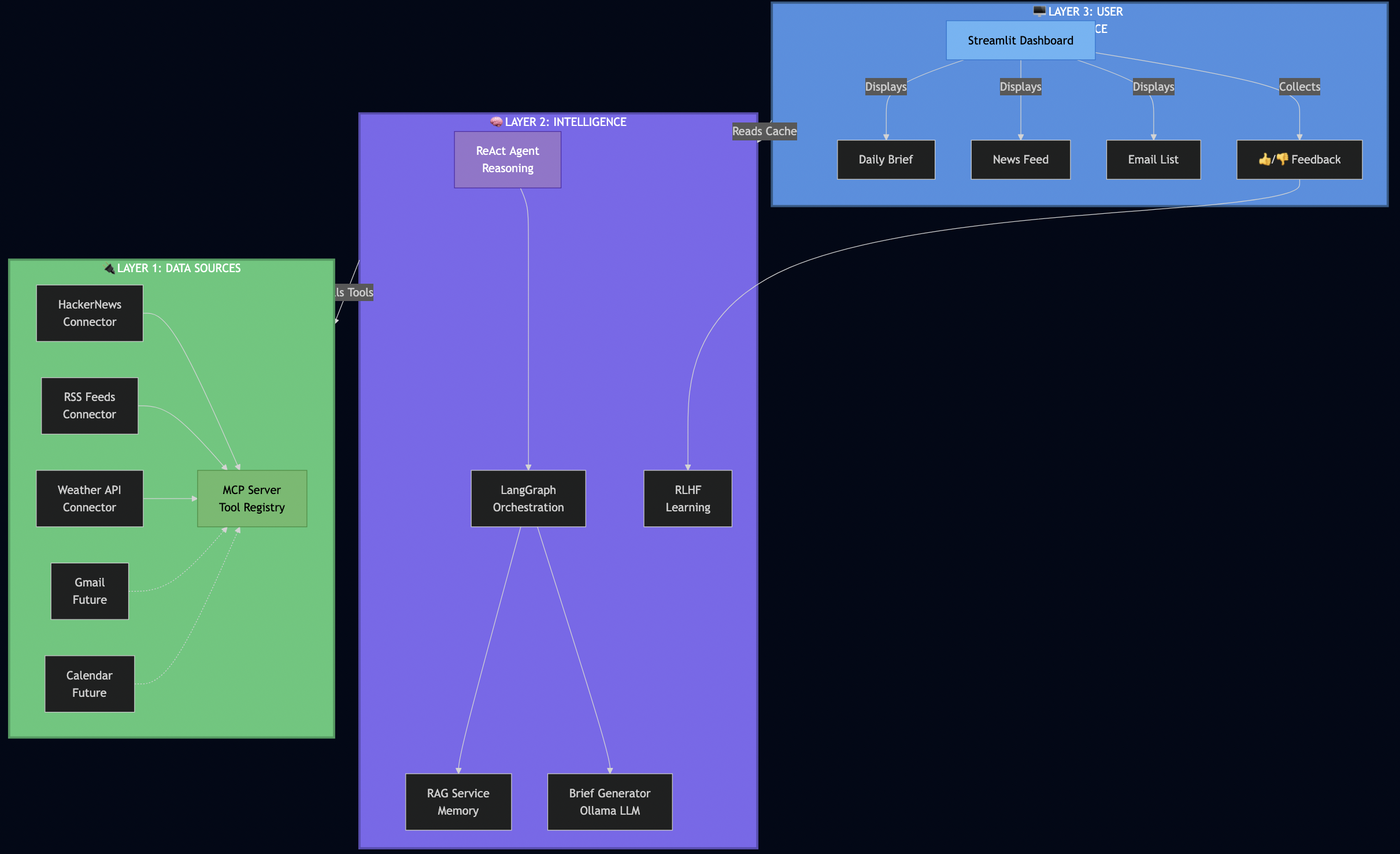
Why this architecture worked for me:

Layer 1 (Data Sources) – I used MCP to make connectors pluggable. When I later wanted to add RSS feeds, I just registered a new tool – no changes to the AI logic.

Layer 2 (Intelligence) – This is where the magic happens. The ReAct agent reasons about what data it needs, LangGraph orchestrates fetching from multiple sources in parallel, RAG provides historical context, and RLHF learns from my feedback.

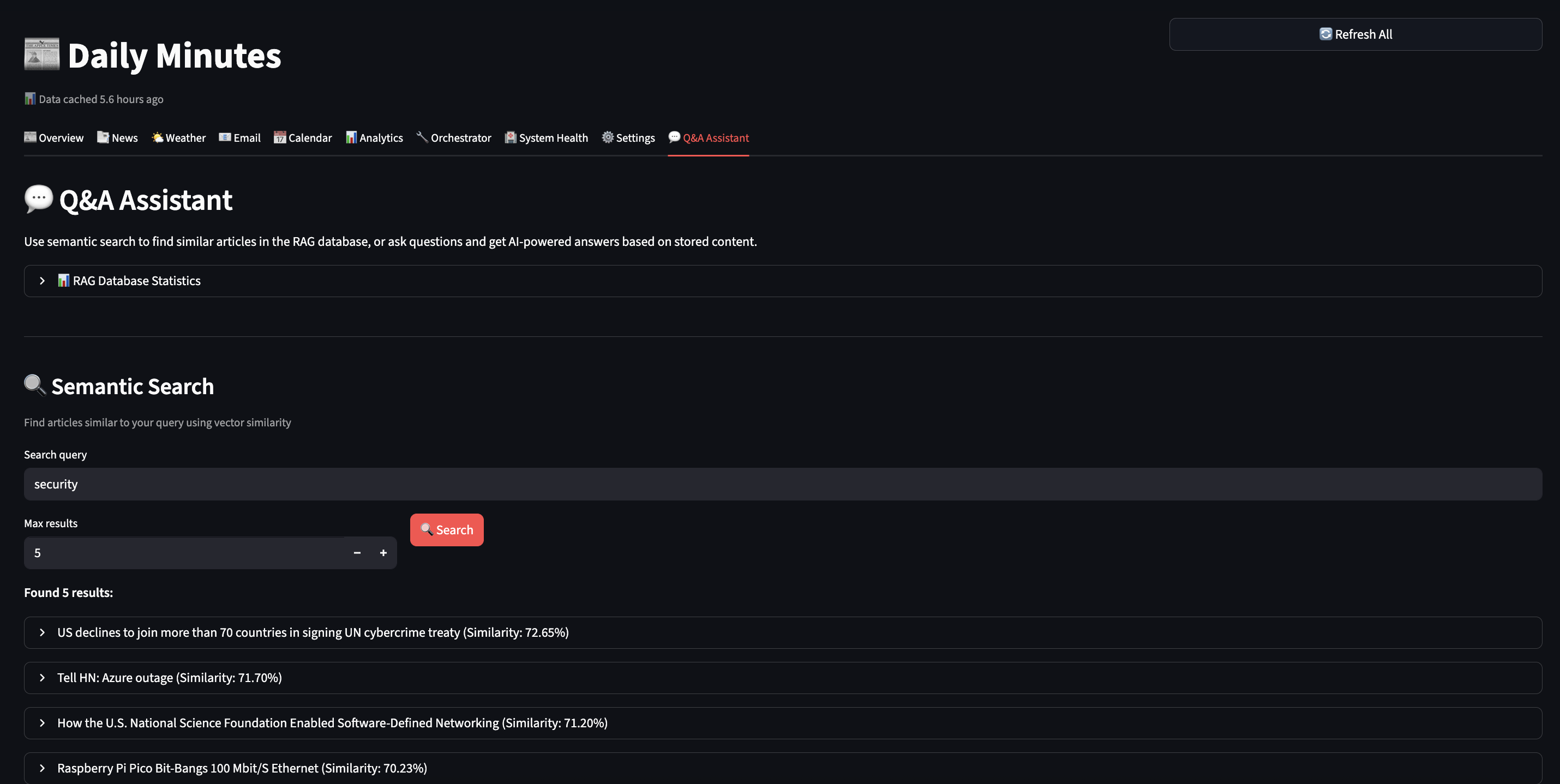
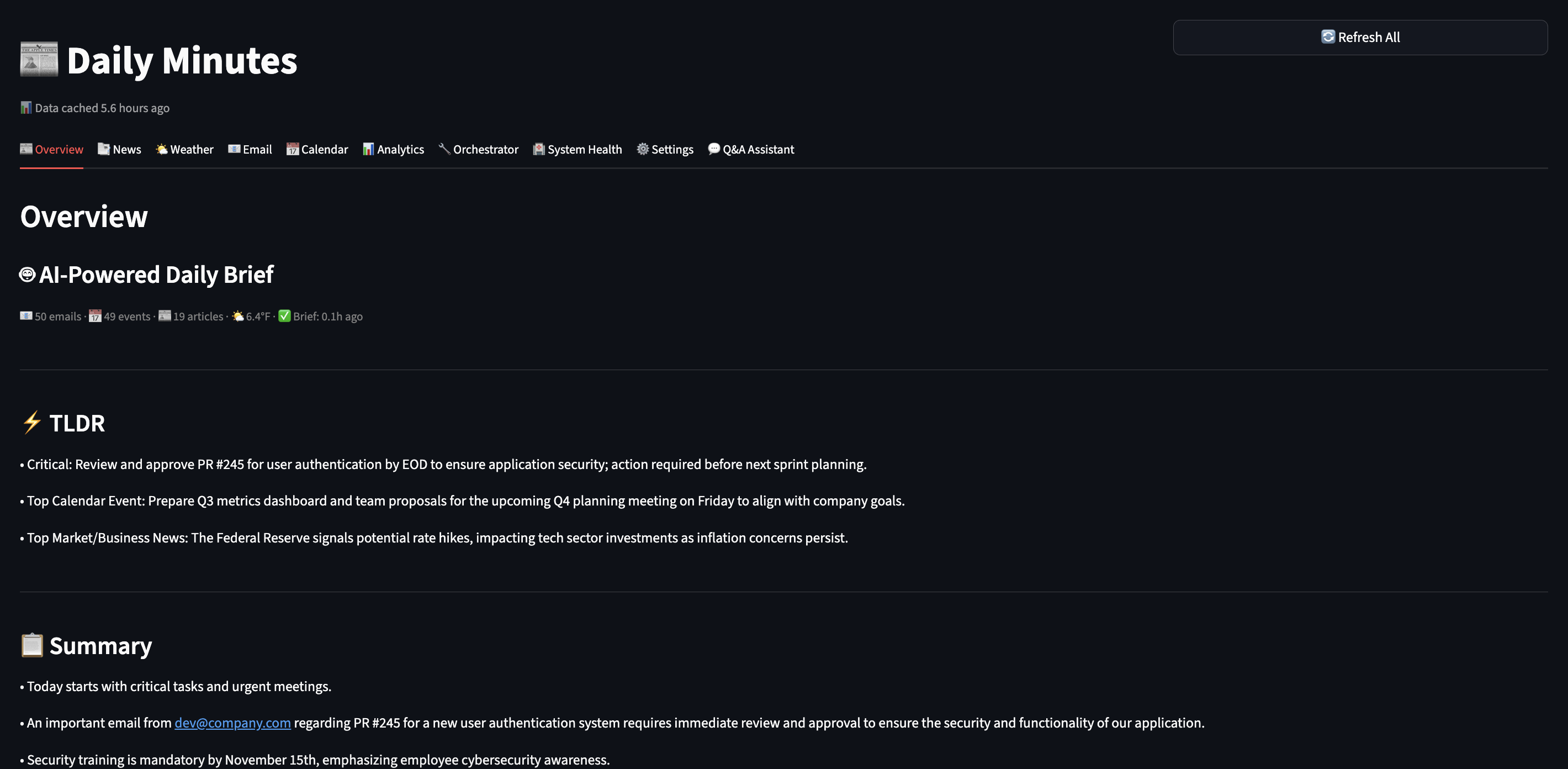
Layer 3 (UI) – I kept the UI simple and fast. It reads from a database cache, so it loads instantly – no waiting for AI to process.

How the Database Cache Works

This is a key architectural decision that made the UI lightning-fast:

# src/services/startup_service.py
async def preload_daily_data():
    """Background job that generates brief and caches in database."""

    # 1. Fetch all data in parallel (LangGraph orchestration)
    data = await langgraph_orchestrator.fetch_all_sources()

    # 2. Generate AI brief (ReAct agent with RAG)
    brief = await brief_generator.generate(
        emails=data['emails'],
        calendar=data['calendar'],
        news=data['news'],
        weather=data['weather']
    )

    # 3. Cache everything in SQLite
    await db.set_cache('daily_brief_data', brief.to_dict(), ttl=3600)  # 1 hour TTL
    await db.set_cache('news_data', data['news'], ttl=3600)
    await db.set_cache('emails_data', data['emails'], ttl=3600)

    logger.info("? All data preloaded and cached")

# src/ui/components/daily_brief.py
def render_daily_brief_section():
    """UI just reads from cache - no AI processing!"""

    # Fast read from database (milliseconds, not seconds)
    if 'data' in st.session_state and st.session_state.data.get('daily_brief'):
        brief_data = st.session_state.data['daily_brief']
        _display_persisted_brief(brief_data)  # Instant!
    else:
        st.info("Run `make preload` to generate your first brief.")

Why this architecture rocks:

  • ? UI loads in <500ms (reading from SQLite cache)
  • ? Background refresh (run make preload or schedule with cron)
  • ? Persistent (brief survives app restarts)
  • ? Testable (can test UI without LLM calls)
Part 1: Setting Up My Local AI Stack

First, I needed to get Ollama running locally. This took me about 30 minutes.

Installing Ollama

# On macOS (what I use)
brew install ollama

# Start the service
ollama serve

# Pull the models I chose
ollama pull qwen2.5:7b         # Main LLM - fast on my M3 Mac
ollama pull nomic-embed-text   # For RAG embeddings

Why I chose Qwen 2.5 (7B):

  • ? Runs fast on my M3 MacBook Pro (no GPU needed)
  • ? Good reasoning capabilities for summarization
  • ? Small enough to iterate quickly (responses in 2-3 seconds)
  • ? Free and private – data never leaves my laptop

Later, I can swap to GPT-4 or Claude with just a config change when I deploy to production.

Testing My Setup

I wanted to make sure Ollama was working before going further:

# Quick test
PYTHONPATH=. python -c "
import asyncio
from src.services.ollama_service import get_ollama_service

async def test():
    ollama = get_ollama_service()
    result = await ollama.generate('Explain RAG in one sentence.')
    print(result)

asyncio.run(test())
"

# Output I got:
# RAG (Retrieval-Augmented Generation) enhances LLM responses by retrieving
# relevant information from a knowledge base before generating answers.

? First milestone: Local AI working!


Part 2: Building MCP Connectors

Instead of hard coding data fetching like this:

# ? My first attempt (brittle)
async def get_daily_data():
    news = await fetch_hackernews()
    weather = await fetch_weather()
    # Later I wanted to add RSS feeds... had to modify this function
    # Then I wanted Slack... modified again
    # This was getting messy fast!

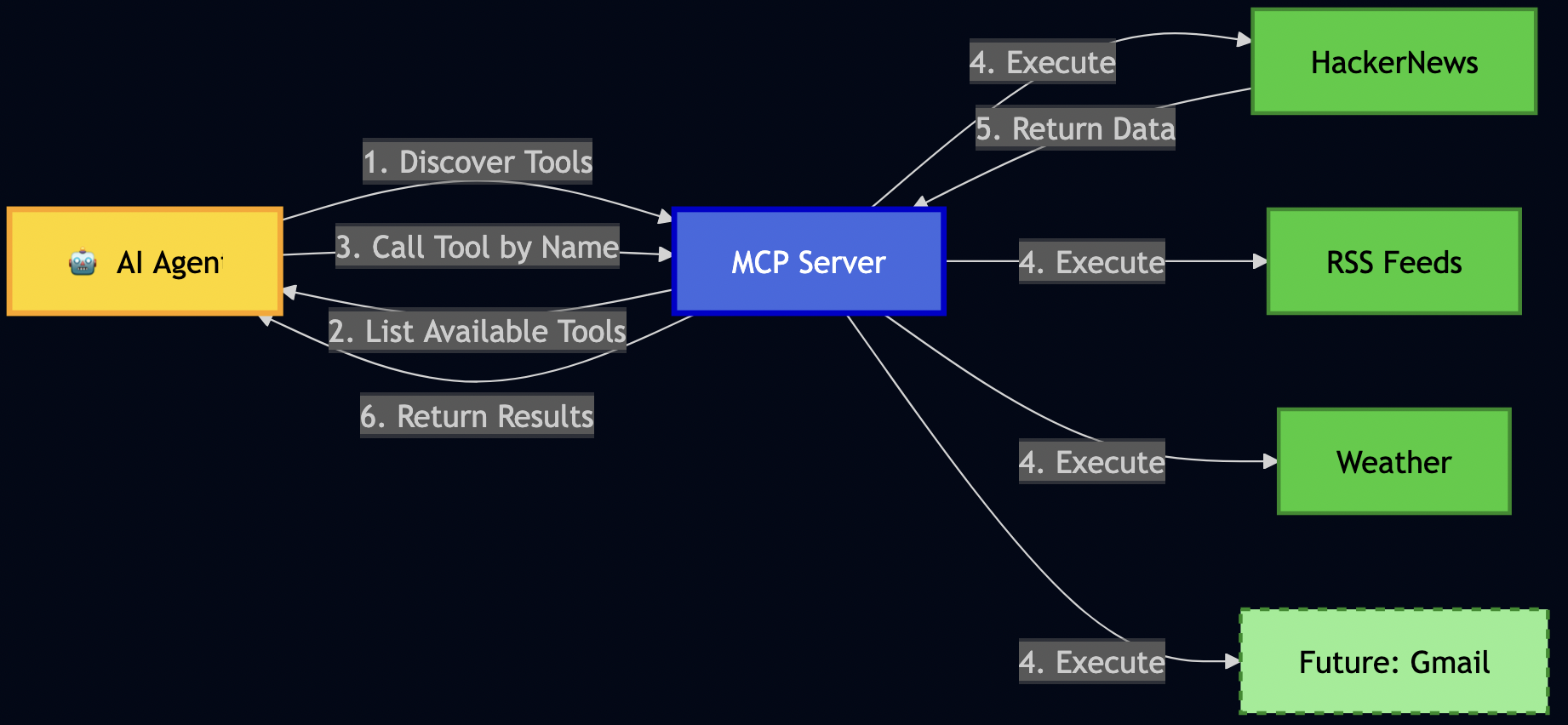
I decided to use MCP (Model Context Protocol) to register data sources as “tools” so that the AI can discover and call by name:
Building News Connector

I started with HackerNews since I check it every morning:

# src/connectors/hackernews.py
class HackerNewsConnector:
    """Fetches top stories from HackerNews API."""

    async def execute_async(self, max_stories: int = 10):
        """The main method MCP will call."""
        # 1. Fetch top story IDs
        response = await self.client.get(
            "https://hacker-news.firebaseio.com/v0/topstories.json"
        )
        story_ids = response.json()[:max_stories]

        # 2. Fetch each story (I fetch these in parallel for speed)
        articles = []
        for story_id in story_ids:
            story = await self._fetch_story(story_id)
            articles.append(self._convert_to_article(story))

        return articles

Key learning: Keep connectors simple. They should do ONE thing: fetch data and return it in a standard format.

Registering with MCP Server

Then I registered this connector with my MCP server:

# src/services/mcp_server.py
class MCPServer:
    """The tool registry that AI agents query."""

    def _register_tools(self):
        # Register HackerNews
        self.tools["fetch_hackernews"] = MCPTool(
            name="fetch_hackernews",
            description="Fetch top tech stories from HackerNews with scores and comments",
            parameters={
                "max_stories": {
                    "type": "integer",
                    "description": "How many stories to fetch (1-30)",
                    "default": 10
                }
            },
            executor=HackerNewsConnector()
        )

This allows my AI to discover this tool and call it without me writing any special integration code!

Testing MCP Discovery

# I tested if the AI could discover my tools
PYTHONPATH=. python -c "
from src.services.mcp_server import get_mcp_server

mcp = get_mcp_server()
print('Available tools:')
for tool in mcp.list_tools():
    print(f'  ? {tool[\"name\"]}: {tool[\"description\"]}')
"

# Output I got:
# Available tools:
#   ? fetch_hackernews: Fetch top tech stories from HackerNews...
#   ? get_current_weather: Get current weather conditions...
#   ? fetch_rss_feeds: Fetch articles from configured RSS feeds...

Later, when I wanted to add RSS feeds, I just created a new connector and registered it. The AI automatically discovered it – no changes needed to my ReAct agent or LangGraph workflows!


Part 3: Building RAG Pipeline

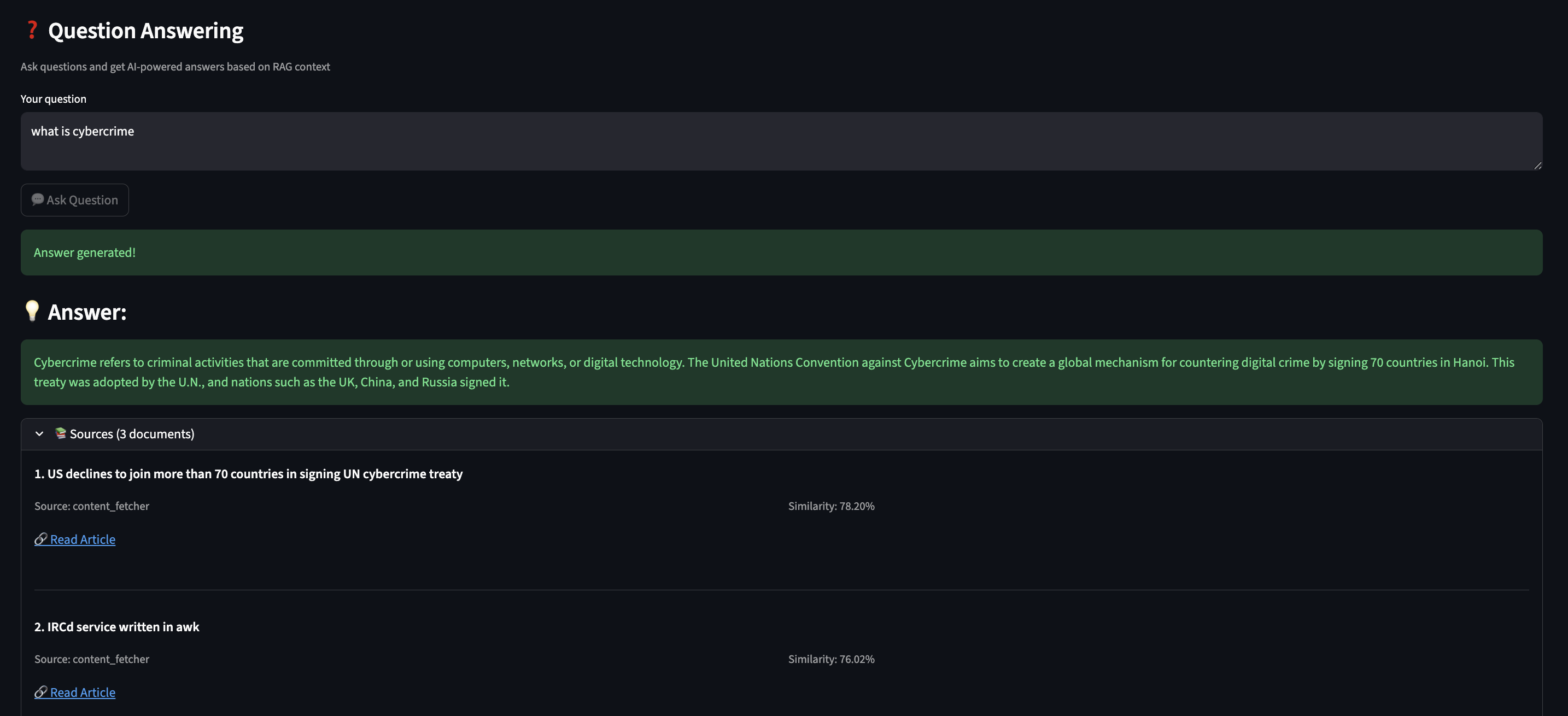
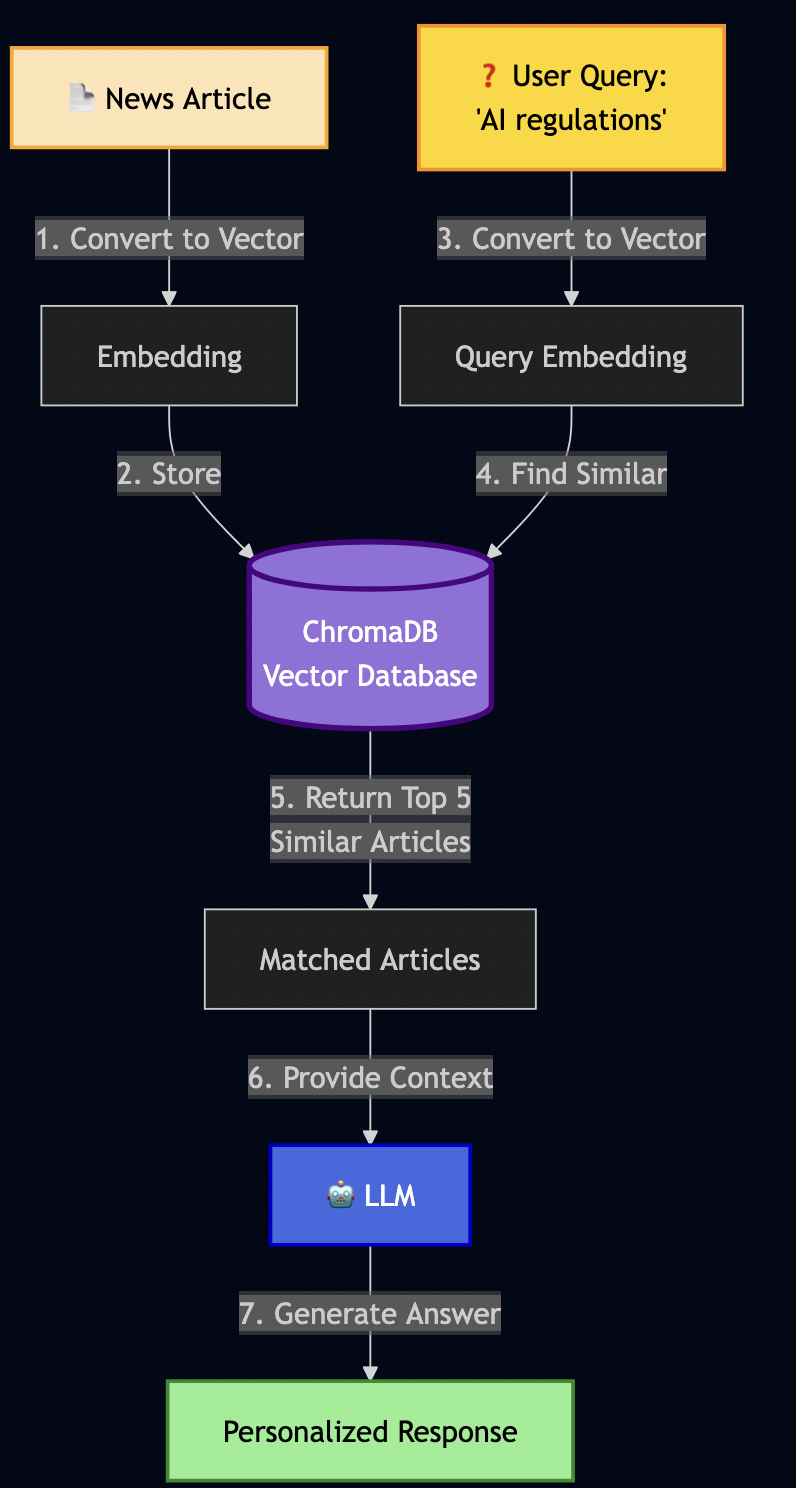
As LLM have limited context window, RAG (Retrieval-Augmented Generation) can be used to create an AI semantic memory by:

  1. Converting text to vectors (embeddings)
  2. Storing vectors in a database (ChromaDB)
  3. Searching by meaning, not just keywords
Building RAG Service

I then implemented RAG service as follows:

# src/services/rag_service.py
class RAGService:
    """Semantic memory using ChromaDB."""

    def __init__(self):
        # Initialize ChromaDB (stores on disk)
        self.client = chromadb.Client(Settings(
            persist_directory="./data/chroma_data"
        ))

        # Create collection for my articles
        self.collection = self.client.get_or_create_collection(
            name="daily_minutes"
        )

        # Ollama for creating embeddings
        self.ollama = get_ollama_service()

    async def add_document(self, content: str, metadata: dict):
        """Store a document with its vector embedding."""

        # 1. Convert text to vector (this is the magic!)
        embedding = await self.ollama.create_embeddings(content)

        # 2. Store in ChromaDB with metadata
        self.collection.add(
            documents=[content],
            embeddings=[embedding],
            metadatas=[metadata],
            ids=[hashlib.md5(content.encode()).hexdigest()]
        )

    async def search(self, query: str, max_results: int = 5):
        """Semantic search - find by meaning!"""

        # 1. Convert query to vector
        query_embedding = await self.ollama.create_embeddings(query)

        # 2. Find similar documents (cosine similarity)
        results = self.collection.query(
            query_embeddings=[query_embedding],
            n_results=max_results
        )

        return results

I then tested it:

# I stored an article about EU AI regulations
await rag.add_document(
    content="European Union announces comprehensive AI safety regulations "
            "focusing on transparency, accountability, and privacy protection.",
    metadata={"type": "article", "topic": "ai_safety"}
)

# Later, I searched using different words
results = await rag.search("privacy rules for artificial intelligence")

This shows that RAG isn’t just storing text – it understands meaning through vector mathematics.

What I Store in RAG

Over time, I started storing other data like emails, todos, events, etc:

# 1. News articles (for historical context)
await rag.add_article(article)

# 2. Action items from emails
await rag.add_todo(
    "Complete security training by Nov 15",
    source="email",
    priority="high"
)

# 3. Meeting context
await rag.add_document(
    "Q4 Planning Meeting - need to prepare budget estimates",
    metadata={"type": "meeting", "date": "2025-02-01"}
)

# 4. User preferences (this feeds into RLHF later!)
await rag.add_document(
    "User marked 'AI safety' topics as important",
    metadata={"type": "preference", "category": "ai_safety"}
)

With this AI memory, it can answer questions like:

  • “What do I need to prepare for tomorrow’s meeting?”
  • “What AI safety articles did I read this week?”
  • “What are my pending action items?”

Part 4: Building the ReAct Agent

In my early prototyping, the implementation just executed blindly:

# ? First attempt - no thinking!
async def generate_brief():
    news = await fetch_all_news()  # Fetches everything
    summary = await llm.generate(f"Summarize: {news}")
    return summary

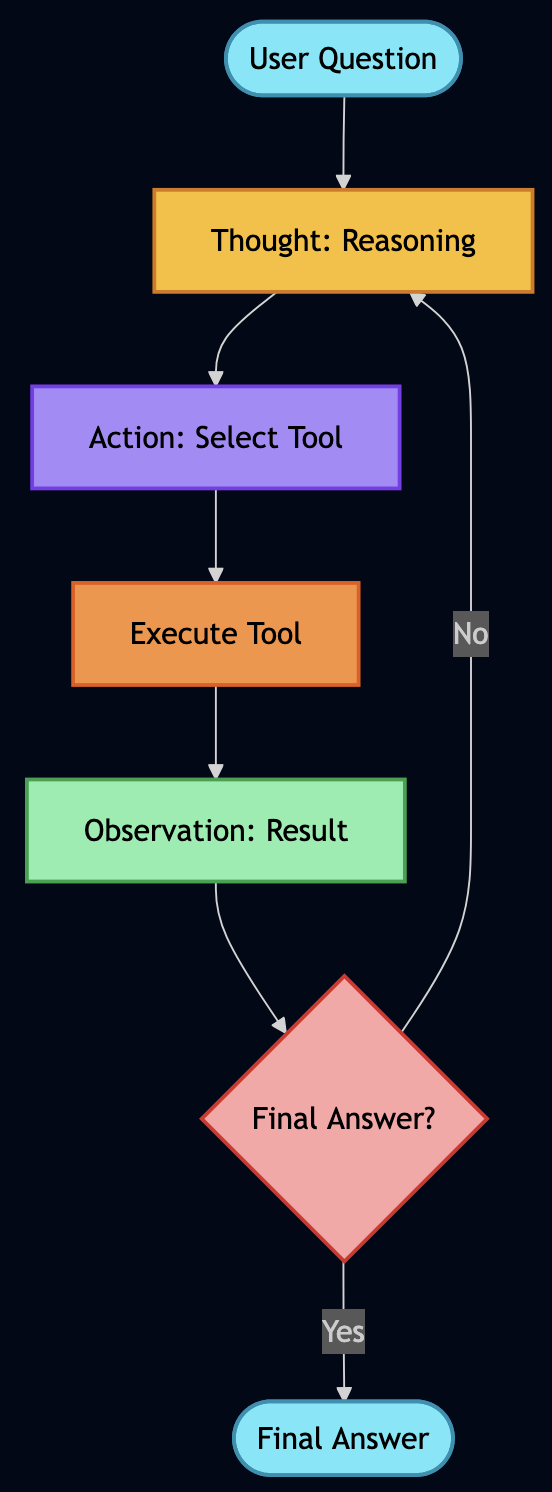
This wasted time fetching data I didn’t need. I wanted my AI to reason first, then act so I applied ReAct (Reasoning + Acting), which works in a loop:

  1. THOUGHT: AI reasons about what to do next
  2. ACTION: AI executes a tool/function
  3. OBSERVATION: AI observes the result
  4. Repeat until goal achieved

Implementing My ReAct Agent

Here is how it ReAct agent was built:

# src/agents/react_agent.py
class ReActAgent:
    """Agent that thinks before acting."""

    async def run(self, goal: str):
        """Execute goal using ReAct loop."""
        steps = []
        observations = []

        for step_num in range(1, self.max_steps + 1):
            # 1. THOUGHT: Ask AI what to do next
            thought = await self._generate_thought(goal, steps, observations)

            # Check if we're done
            if "FINAL ANSWER" in thought:
                return self._extract_answer(thought)

            # 2. ACTION: Parse what action to take
            action = self._parse_action(thought)
            # Example: {"action": "call_tool", "tool": "fetch_hackernews"}

            # 3. EXECUTE: Run the action via MCP
            observation = await self._execute_action(action)
            observations.append(observation)

            # Record this step for debugging
            steps.append({
                "thought": thought,
                "action": action,
                "observation": observation
            })

        return {"steps": steps, "answer": "Max steps reached"}

The hardest part was writing the prompts that made the AI reason properly:

async def _generate_thought(self, goal, steps, observations):
    """Generate next reasoning step."""

    prompt = f"""Goal: {goal}

Previous steps:
{self._format_steps(steps)}

Available actions:
- query_rag(query): Search my semantic memory
- call_tool(name, params): Execute an MCP tool
- FINAL ANSWER: When you have everything needed

Think step-by-step. What should I do next?

Format your response as:
THOUGHT: <your reasoning>
ACTION: <action to take>
"""

    return await self.ollama.generate(prompt, temperature=0.7)

I added debug logging to see the AI’s reasoning:

? Goal: Generate my daily brief

Step 1:
  ? THOUGHT: I need to gather news, check weather, and see user preferences
  ? ACTION: call_tool("fetch_hackernews", max_stories=10)
  ?? OBSERVATION: Fetched 10 articles about AI, privacy, and tech

Step 2:
  ? THOUGHT: Got news. User preferences would help prioritize.
  ? ACTION: query_rag("user interests and preferences")
  ?? OBSERVATION: User cares about AI safety, security, privacy

Step 3:
  ? THOUGHT: Should filter articles to user's interests
  ? ACTION: call_tool("get_current_weather", location="Seattle")
  ?? OBSERVATION: 70°F, Partly cloudy

Step 4:
  ? THOUGHT: I have news (filtered by user interests), weather. Ready to generate.
  ? ACTION: FINAL ANSWER
  ? Generated personalized brief highlighting AI safety articles

Part 5: Adding RLHF

Initially, my AI scored all emails the same way:

? "Newsletter: 10 CSS Tips" ? Importance: 0.5
? "URGENT: Production outage!" ? Importance: 0.5

So I used RLHF to teach my AI what I care about.

Implementing RLHF Scoring

I added a mixin to my email model:

# src/models/email.py
class ImportanceScoringMixin:
    """Learn from user feedback."""

    importance_score: float = 0.5  # AI's base score
    boost_labels: Set[str] = set()  # Words user marked important
    filter_labels: Set[str] = set()  # Words user wants to skip

    def apply_rlhf_boost(self, content_text: str) -> float:
        """Adjust score based on learned preferences."""
        adjusted = self.importance_score
        content_lower = content_text.lower()

        # Boost if content matches important keywords
        for label in self.boost_labels:
            if label.lower() in content_lower:
                adjusted += 0.1  # Bump up priority!

        # Penalize if content matches skip keywords
        for label in self.filter_labels:
            if label.lower() in content_lower:
                adjusted -= 0.2  # Push down priority!

        # Keep in valid range [0, 1]
        return max(0.0, min(1.0, adjusted))

Note: Code examples are simplified for clarity.
See GitHub for the full production implementation.

Adding Feedback UI

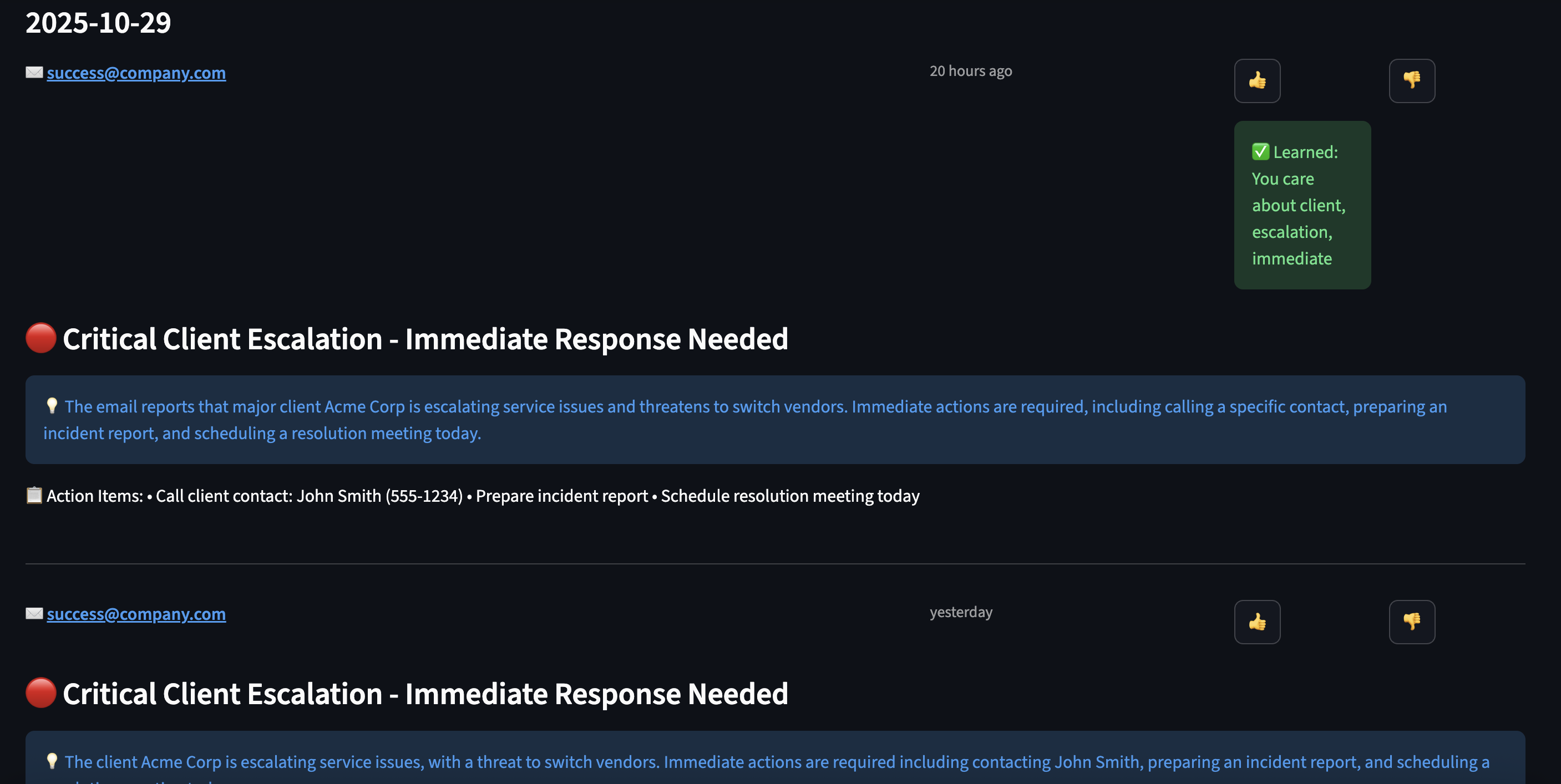
In my Streamlit dashboard, I added ?/? buttons:

# User sees an email
for email in emails:
    col1, col2, col3 = st.columns([8, 1, 1])

    with col1:
        st.write(f"**{email.subject}**")
        st.info(email.snippet)

    with col2:
        if st.button("?", key=f"important_{email.id}"):
            # Extract what made this important
            keywords = await extract_keywords(email.subject + email.body)
            # Add to boost labels
            user_profile.boost_labels.update(keywords)
            st.success(f"? Learned: You care about {', '.join(keywords)}")

    with col3:
        if st.button("?", key=f"skip_{email.id}"):
            # Learn to deprioritize these
            keywords = await extract_keywords(email.subject)
            user_profile.filter_labels.update(keywords)
            st.success(f"? Will deprioritize: {', '.join(keywords)}")
Part 6: Orchestrating with LangGraph

Instead of fetching contents from all data sources sequential for the daily minutes:

# ? Sequential execution - SLOW!
news = await fetch_news()      # 5 seconds
emails = await fetch_emails()  # 3 seconds
calendar = await fetch_calendar()  # 2 seconds
weather = await fetch_weather()  # 1 second
# Total: 11 seconds just waiting! ?

I used LangGraph to define workflows as graphs with parallel execution:
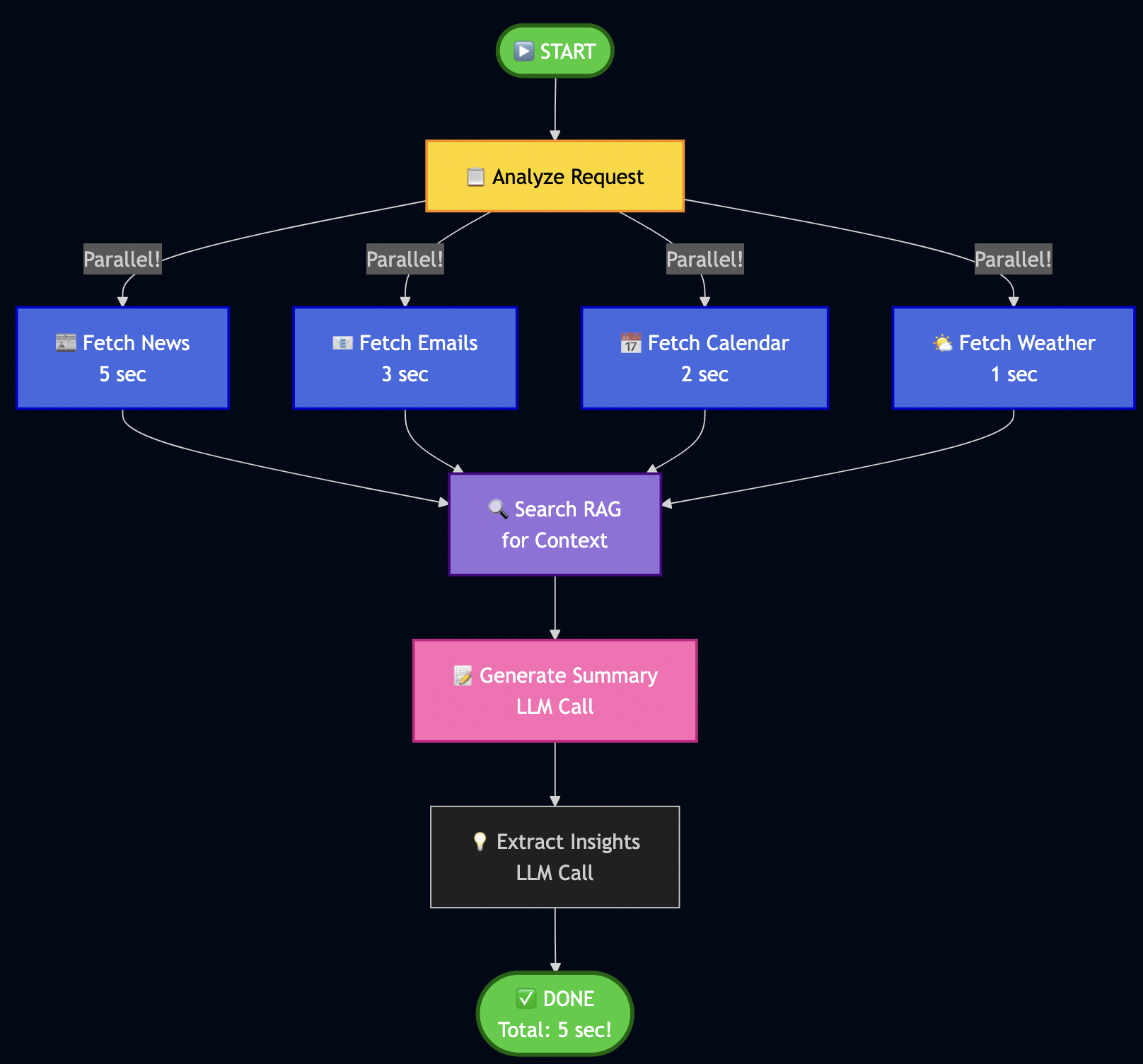
Key insight: Parallel fetch reduced the fetch time for downloading data from various sources.

Building My Workflow

# src/services/langgraph_orchestrator.py
from langgraph.graph import StateGraph, END

class LangGraphOrchestrator:
    def _create_workflow(self):
        """Define my workflow graph."""
        workflow = StateGraph(WorkflowState)

        # Add nodes (processing steps)
        workflow.add_node("analyze", self._analyze_request)
        workflow.add_node("fetch_news", self._fetch_news)
        workflow.add_node("fetch_emails", self._fetch_emails)
        workflow.add_node("fetch_calendar", self._fetch_calendar)
        workflow.add_node("search_rag", self._search_context)
        workflow.add_node("generate_summary", self._generate_summary)

        # Define edges (execution flow)
        workflow.set_entry_point("analyze")

        # Parallel fetch (all happen at once!)
        workflow.add_edge("analyze", "fetch_news")
        workflow.add_edge("analyze", "fetch_emails")
        workflow.add_edge("analyze", "fetch_calendar")

        # All converge to RAG search
        workflow.add_edge("fetch_news", "search_rag")
        workflow.add_edge("fetch_emails", "search_rag")
        workflow.add_edge("fetch_calendar", "search_rag")

        # Sequential processing
        workflow.add_edge("search_rag", "generate_summary")
        workflow.add_edge("generate_summary", END)

        return workflow.compile()

Note: WorkflowState is a shared dictionary that nodes pass data through – like a clipboard for the workflow. The analyze node parses the user’s request and decides which data sources are needed.

Implementing Node Functions

Each node is just an async function:

async def _fetch_news(self, state: WorkflowState):
    """Fetch news in parallel."""
    try:
        articles = await self.mcp.execute_tool(
            "fetch_hackernews",
            {"max_stories": 10}
        )
        state["news_articles"] = articles
    except Exception as e:
        state["errors"].append(f"News fetch failed: {e}")
        state["news_articles"] = []

    return state

async def _search_context(self, state: WorkflowState):
    """Search RAG for relevant context."""
    query = state["user_request"]
    results = await self.rag.search(query, max_results=5)

    # Build context string
    context = "\n".join([r['content'] for r in results])
    state["context"] = context

    return state

Running the Workflow

# Execute the complete workflow
result = await orchestrator.run("Generate my daily brief")

# I get back:
{
    "news_articles": [...],      # 10 articles
    "emails": [...],              # 5 unread
    "calendar_events": [...],     # 3 events today
    "context": "...",             # RAG context
    "summary": "...",             # Generated brief
    "processing_time": 5.2        # Seconds (not 11!)
}

The LLM Factory Pattern – How I Made It Cloud-Ready

Following code snippet shows how does the system seamlessly switch between local Ollama and cloud providers:

# src/services/llm_factory.py
def get_llm_service():
    """Factory pattern - works with any LLM provider."""
    provider = os.getenv("LLM_PROVIDER", "ollama")

    if provider == "ollama":
        return OllamaService(
            base_url=os.getenv("OLLAMA_BASE_URL", "http://localhost:11434"),
            model=os.getenv("OLLAMA_MODEL", "qwen2.5:7b")
        )
    elif provider == "openai":
        return OpenAIService(
            api_key=os.getenv("OPENAI_API_KEY"),
            model=os.getenv("OPENAI_MODEL", "gpt-4-turbo")
        )
    elif provider == "google":
        # Like in my previous Vertex AI article!
        return VertexAIService(
            project_id=os.getenv("GCP_PROJECT_ID"),
            model="gemini-1.5-flash"
        )

    raise ValueError(f"Unknown provider: {provider}")

# All services implement the same interface:
class BaseLLMService:
    async def generate(self, prompt: str, **kwargs) -> str:
        """Generate text from prompt."""
        raise NotImplementedError

    async def create_embeddings(self, text: str) -> List[float]:
        """Create vector embeddings."""
        raise NotImplementedError

The ReAct agent, RAG service, and Brief Generator all use get_llm_service() – they don’t care which provider is running!


Part 7: The Challenges I Faced

Building this system wasn’t smooth. Here are the biggest challenges:

Challenge 1: LLM Generating Vague Summaries

Problem: My early briefs were terrible:

? "Today's news features a mix of technology updates and various topics."

This was useless! I needed specifics.

Solution: I rewrote my prompts with explicit rules:

# ? Better prompt with strict rules
prompt = f"""Generate a daily brief following these STRICT rules:

PRIORITY ORDER (most important first):
1. Urgent emails or action items
2. Today's calendar events
3. Market/business news
4. Tech news

TLDR FORMAT (exactly 3 bullets, be SPECIFIC):
* Bullet 1: Most urgent email/action (include WHO, WHAT, WHEN)
   Example: "Client escalation from Acme Corp affecting 50K users - response needed by 2pm"

* Bullet 2: Most important calendar event today (include TIME and WHAT TO PREPARE)
   Example: "2pm: Board meeting - prepare Q4 revenue slides"

* Bullet 3: Top market/business news (include NUMBERS/SPECIFICS)
   Example: "Federal Reserve raises rates 0.5% to 5.25% - affects tech hiring"

AVOID THESE PHRASES (they're too vague):
? "mix of updates"
? "various topics"
? "continues to make progress"
? "interesting developments"

USE SPECIFIC DETAILS:
? Names (people, companies)
? Numbers (percentages, dollar amounts, deadlines)
? Times (when something happened or needs to happen)

Content to summarize:
{content}

Generate: TLDR (3 bullets), Summary (5-6 detailed sentences), Key Insights (5 bullets)
"""

Result: Went from vague ? specific, actionable briefs!

Challenge 2: TLDR Bullets Rendering on Same Line

Problem: My UI showed bullets in one paragraph:

? • Critical email... • Meeting at 2pm... • Market news...

Root cause: Streamlit’s st.info() doesn’t preserve newlines.

Solution: Split and render each bullet separately:

# ? Doesn't work
st.info(tldr)

# ? Works!
tldr_lines = [line.strip() for line in tldr.split('\n') if line.strip()]
for bullet in tldr_lines:
    st.markdown(bullet)

Challenge 3: AI Prioritizing News Over Personal Tasks

Problem: My brief focused on tech news, ignored my urgent emails:

? TLDR bullet 1: "OpenAI releases GPT-5" (who cares?)
   TLDR bullet 2: "Crypto market surges" (not relevant to me)
   TLDR bullet 3: "Client escalation requires response" (BURIED!)

Solution: I restructured my prompt to explicitly label priority:

# src/services/brief_scheduler.py
async def _generate_daily_brief(emails, calendar, news, weather):
    """Generate prioritized daily brief with structured prompt."""

    # Separate market vs tech news (market is higher priority)
    market_news = [n for n in news if 'market' in n.tags]
    tech_news = [n for n in news if 'market' not in n.tags]

    # Sort emails by RLHF-boosted importance score
    important_emails = sorted(
        emails,
        key=lambda e: e.apply_rlhf_boost(e.subject + e.snippet),
        reverse=True
    )[:5]  # Top 5 only

    # Build structured prompt with clear priority
    prompt = f"""
**SECTION 1: IMPORTANT EMAILS (HIGHEST PRIORITY - use for TLDR bullet #1)**
{format_emails(important_emails)}

**SECTION 2: TODAY'S CALENDAR (SECOND PRIORITY - use for TLDR bullet #2)**
{format_calendar(calendar)}

**SECTION 3: MARKET NEWS (THIRD PRIORITY - use for TLDR bullet #3)**
{format_market_news(market_news)}

**SECTION 4: TECH NEWS (LOWEST PRIORITY - summarize briefly)**
{format_tech_news(tech_news)}

**SECTION 5: WEATHER**
{format_weather(weather)}

Generate a daily brief following this EXACT priority order:
1. Email action items FIRST
2. Calendar events SECOND
3. Market/business news THIRD
4. Tech news LAST (brief mention only)

TLDR must have EXACTLY 3 bullets using content from sections 1, 2, 3 (not section 4).
"""

    return await llm.generate(prompt)

Result: My urgent email moved to bullet #1 where it belongs! The AI now respects the priority structure.

Challenge 4: RAG Returning Irrelevant Results

Problem: Semantic search sometimes returned weird matches:

Query: "AI safety regulations"
Result: Article about "safe AI models for healthcare" (wrong context!)

Solution: I added metadata filtering and better embeddings:

# Store with rich metadata
await rag.add_document(
    content=article.title,
    metadata={
        "type": "article",
        "category": "ai_safety",  # For filtering!
        "tags": ["regulation", "eu", "policy"],
        "date": "2025-01-28",
        "importance": "high"
    }
)

# Search with filters
results = await rag.search(
    "AI regulations",
    filter_metadata={
        "category": "ai_safety",
        "importance": "high"
    }
)

Result: Much more relevant results!

Challenge 5: Handling API Failures

Problem: MCP connectors may fail to fetch data from underlying data source.

Solution: I used graceful degradation where brief is generated with available data and error messages/last-updated is marked for failed sources)


Part 8: Future Improvements

This work is by no means done but I am sharing a proof of concept that I have built so far. Here is what still needs work:

Current Limitations

1. Email/Calendar Improvements

  • ? Have: I have basic OAuth support for emails and calendar events and mock testing
  • ? Missing: Solid OAuth support for Gmail and Google Calendar integration

2. RLHF Needs More Sophisticated Learning

  • ? Have: Current system allows simple keyword matching (if email contains “security” ? boost)
  • ? Missing: Context-aware learning (distinguish “security update” vs “security breach”)
  • Improvement Needed:
  # Current: Simple keyword match
  if "security" in email:
      score += 0.1

  # Better: Contextual understanding
  if embeddings_similar(email, user.important_emails):
      score += contextual_boost  # Uses semantic similarity!

3. ReAct Agent Sometimes Over-Thinks

  • ? Have: AI reasons before acting
  • ? Problem: Sometimes takes 4-5 steps when 2 would suffice
  • Fix Needed: Better stopping criteria in prompts

4. No Multi-User Support (Yet)

  • ? Have: Works great for me
  • ? Missing: Can’t handle multiple users with different preferences
  • Future: Add user profiles, tenant isolation

5. Brief Generation Can Be Slow (30-60 seconds)

  • ? Have: Parallel data fetching (fast)
  • ? Bottleneck: LLM generation with Qwen 2.5 on CPU
  • Options:
  • Use smaller model (faster but less capable)
  • Deploy to cloud with faster GPT-4

6. Missing Data Sources

  • ? Have: Basic data for news, email and calendar
  • ? Slack Integration: Add Slack to monitor important channels and surface urgent threads in daily brief
  • ? Social Media Integration: Add social media feed to monitor trending topics or news

Part 9: How to Extend This System

I designed this to be easily extensible. Here’s how you can add new features:

Adding a New Data Source (Example: Slack)

Step 1: Create the connector

# src/connectors/slack.py
class SlackConnector:
    """Fetch recent messages from Slack channels."""

    async def execute_async(self, channel: str, max_messages: int = 10):
        # 1. Connect to Slack API
        client = WebClient(token=os.getenv("SLACK_BOT_TOKEN"))

        # 2. Fetch recent messages
        response = await client.conversations_history(
            channel=channel,
            limit=max_messages
        )

        # 3. Convert to standard format
        messages = []
        for msg in response['messages']:
            messages.append(SlackMessage(
                text=msg['text'],
                user=msg['user'],
                channel=channel,
                timestamp=msg['ts']
            ))

        return messages

Step 2: Register with MCP (automatic discovery!)

# src/services/mcp_server.py
def _register_tools(self):
    # ... existing tools ...

    # Add Slack
    self.tools["get_slack_messages"] = MCPTool(
        name="get_slack_messages",
        description="Fetch recent Slack messages from a channel",
        parameters={
            "channel": {"type": "string", "description": "Channel name"},
            "max_messages": {"type": "integer", "default": 10}
        },
        executor=SlackConnector()
    )

Step 3: AI automatically discovers it!

# Your ReAct agent will now see:
# "Available tools: fetch_hackernews, get_slack_messages, ..."
# No changes needed to ReAct logic!

Step 4: Update brief prompt to include Slack

# src/services/brief_scheduler.py
prompt = f"""
**IMPORTANT EMAILS**: {emails}
**CALENDAR**: {calendar}
**SLACK HIGHLIGHTS**: {slack_messages}  # New!
**NEWS**: {news}

Generate brief prioritizing: Email > Calendar > Slack > News
"""

Part 10: Local Development vs Cloud

One of my favorite aspects of this architecture: develop locally, deploy to cloud with 1 config change.

Development (What I Use Daily)

# .env.development
LLM_PROVIDER=ollama
LLM_OLLAMA_BASE_URL=http://localhost:11434
LLM_OLLAMA_MODEL=qwen2.5:7b
DATABASE_URL=sqlite:///./data/daily_minutes.db
REDIS_URL=redis://localhost:6379

Benefits I experience daily:

  • ? Free: Zero API costs (I iterate 50+ times/day)
  • ? Fast: No network latency, responses in 2-3 seconds
  • ? Private: My emails never touch the internet
  • ? Offline: Works on planes, cafes without WiFi

Trade-offs I accept:

  • ?? Slower than GPT-4
  • ?? Less capable reasoning (7B vs 175B+ parameters)
  • ?? Manual updates (pull new Ollama models myself)

Production

# .env.production
LLM_PROVIDER=openai  # Just change this line!
OPENAI_API_KEY=sk-...
OPENAI_MODEL=gpt-4-turbo
DATABASE_URL=postgresql://...  # Scalable DB
REDIS_URL=redis://prod-cluster:6379  # Distributed cache

The magic: Same code, different LLM!

# src/services/llm_factory.py
def get_llm_service():
    """Factory pattern - works with any LLM."""
    provider = os.getenv("LLM_PROVIDER", "ollama")

    if provider == "ollama":
        return OllamaService()
    elif provider == "openai":
        return OpenAIService()
    elif provider == "anthropic":
        return ClaudeService()
    elif provider == "google":
        return VertexAIService()  # Like in my previous article!

    raise ValueError(f"Unknown provider: {provider}")

Part 11: Testing Everything

I used TDD extensively to build each feature so that it’s easy to debug if something is not working:

Unit Tests

# Test MCP tool registration
pytest tests/unit/test_mcp_server.py -v

# Test RAG semantic search
pytest tests/unit/test_rag_service.py -v

# Test ReAct reasoning
pytest tests/unit/test_react_agent.py -v

# Test RLHF scoring
pytest tests/unit/test_rlhf_scoring.py -v

# Run all unit tests
pytest tests/unit/ -v
# 516 passed in 45.23s ?

Integration Tests

Also, in some cases unit tests couldn’t fully validate so I wrote integration tests to test persistence logic with sqlite database or generating real analysis from news:

# tests/integration/test_brief_quality.py
async def test_tldr_has_three_bullets():
    """TLDR must have exactly 3 bullets."""
    brief = await db.get_cache('daily_brief_data')
    tldr = brief.get('tldr', '')

    bullets = [line for line in tldr.split('\n') if line.strip().startswith('•')]

    assert len(bullets) == 3, f"Expected 3 bullets, got {len(bullets)}"
    assert "email" in bullets[0].lower() or "urgent" in bullets[0].lower()
    assert "calendar" in bullets[1].lower() or "meeting" in bullets[1].lower()

async def test_no_generic_phrases():
    """Brief should not contain vague phrases."""
    brief = await db.get_cache('daily_brief_data')
    summary = brief.get('summary', '')

    bad_phrases = ["mix of updates", "various topics", "continues to"]
    for phrase in bad_phrases:
        assert phrase not in summary.lower(), f"Found generic phrase: {phrase}"

Manual Testing (My Daily Workflow)

# 1. Fetch data and generate brief
make preload

# Output I see:
# ? Fetching news from HackerNews... (10 articles)
# ? Fetching weather... (70°F, Sunny)
# ? Analyzing articles with AI... (15 articles)
# ? Generating daily brief... (Done in 18.3s)
# ? Brief saved to database

# 2. Launch UI
streamlit run src/ui/streamlit_app.py

# 3. Check brief quality
# - Is TLDR specific? (not vague)
# - Are priorities correct? (email > calendar > news)
# - Are action items extracted? (from emails)
# - Did RLHF work? (boosted my preferences)

Note: You can schedule preload via cron, e.g., I run it at 6am daily so that brief is ready when I wake up.


Conclusion

Building this Daily Minutes assistant changed how I start my day by giving me a personalized 3-minute brief highlighting what truly matters. Agentic AI excels at automating complex workflows that require judgment, not just execution. The ReAct agent reasons through prioritization. RAG provides contextual memory across weeks of interactions. RLHF learns from my feedback, getting smarter about what I care about. LangGraph orchestrates parallel execution across multiple data sources. These building blocks work together to handle decisions that traditionally needed human attention.

I’m sharing this as a proof of concept, not a finished product. The code works, saves me real time, and demonstrates these techniques effectively. But I’m still iterating. The OAuth integration and error handling needs improvements. The RLHF scoring could be more sophisticated. The ReAct agent sometimes overthinks simple tasks. I’m adding these improvements gradually, testing each change against my daily routine.

The real lesson? Start small, validate with real use, then scale with confidence. I used Claude Code to build this in spare time over a couple weeks. You can do the same—clone the repo, adapt it to your workflow, and see where agentic AI saves you time.

Try It Yourself

# Clone my repo
git clone https://github.com/bhatti/daily-minutes
cd daily-minutes

# Install dependencies
pip install -r requirements.txt

# Setup Ollama
ollama pull qwen2.5:7b
ollama pull nomic-embed-text

# Generate your first brief
make preload

# Launch dashboard
streamlit run src/ui/streamlit_app.py
Resources

October 21, 2025

Pragmatic Agentic AI: How I Rebuilt Years of FinTech Infrastructure with ReAct, RAG, and Free Local Models

Filed under: Agentic AI,Computing — Tags: , , , , — admin @ 1:00 pm

I spent over a decade in FinTech building the systems traders rely on every day like high-performance APIs streaming real-time charts, technical indicator calculators processing millions of data points per second, and comprehensive analytical platforms ingesting SEC 10-Ks and 10-Qs into distributed databases. We used to parse XBRL filings, ran news/sentiment analysis on earnings calls using early NLP models to detect market anomalies.

Over the past couple of years, I’ve been building AI agents and creating automated workflows that tackle complex problems using agentic AI. I’m also revisiting challenges I hit while building trading tools for fintech companies. For example, the AI I’m working with now reasons about which analysis to run. It grasps context, retrieves information on demand, and orchestrates complex workflows autonomously. It applies Black-Scholes when needed, switches to technical analysis when appropriate, and synthesizes insights from multiple sources—no explicit rules required.

The best part is that I’m running this entire system on my laptop using Ollama and open-source models. Zero API costs during development. When I need production scale, I can switch to cloud APIs with a few lines of code. I will walk you through this journey of rebuilding financial analysis with agentic AI – from traditional algorithms to thinking machines and from rigid pipelines to adaptive workflows.

Why This Approach Changes Everything

Traditional financial systems process data. Agentic AI systems understand objectives and figure out how to achieve them. That’s the fundamental difference that took me a while to fully grasp. And unlike my old systems that required separate codebases for each type of analysis, this one uses the same underlying patterns for everything.

The Money-Saving Secret: Local Development with Ollama

Here’s something that would have saved my startup thousands: you can build and test sophisticated AI systems entirely locally using Ollama. No API keys, no usage limits, no surprise bills.

# This runs entirely on your machine - zero external API calls
from langchain_ollama import OllamaLLM as Ollama

# Local LLM for development and testing
dev_llm = Ollama(
    model="llama3.2:latest",      # 3.2GB model that runs on most laptops
    temperature=0.7,
    base_url="http://localhost:11434"  # Your local Ollama instance
)

# When ready for production, switch to cloud providers
from langchain_openai import ChatOpenAI

prod_llm = ChatOpenAI(
    model="gpt-4",
    temperature=0.7
)

# The beautiful part? Same interface, same code
def analyze_stock(llm, ticker):
    # This function works with both local and cloud LLMs
    prompt = f"Analyze {ticker} stock fundamentals"
    return llm.invoke(prompt)

During development, I run hundreds of experiments daily without spending a cent. Once the prompts and workflows are refined, switching to cloud APIs is literally changing one line of code.

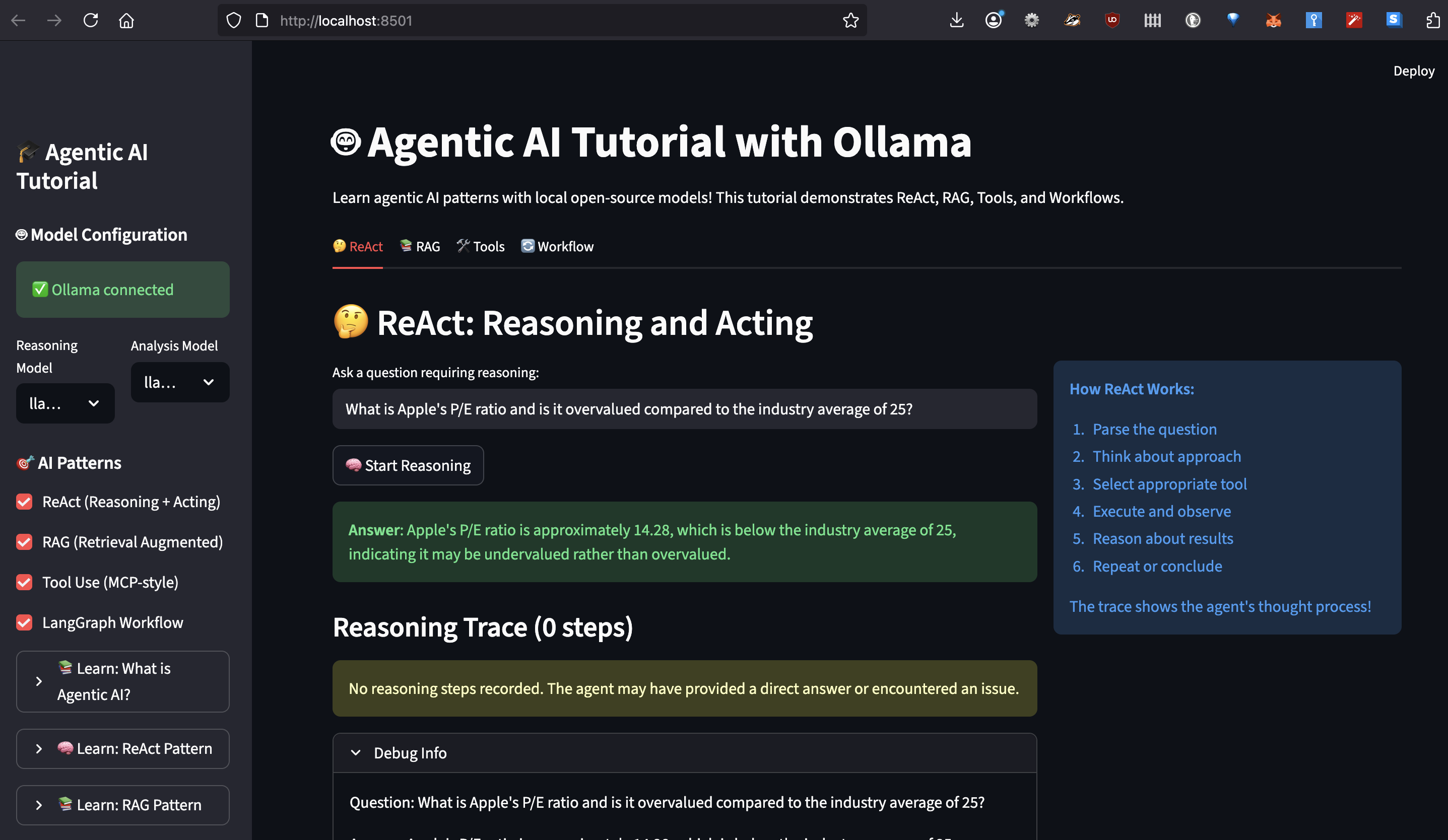
Understanding ReAct: How AI Learns to Think Step-by-Step

ReAct (Reasoning and Acting) was the first pattern that made me realize we weren’t just building chatbots anymore. Let me show you exactly how it works with real code from my system.

The Human Thought Process We’re Mimicking

When I manually analyzed stocks, my mental process looked something like this:

  1. “I need to check if Apple is overvalued”
  2. “Let me get the current P/E ratio”
  3. “Hmm, 28.5 seems high, but what’s the industry average?”
  4. “Tech sector average is 25, so Apple is slightly premium”
  5. “But wait, what’s their growth rate?”
  6. “15% annual growth… that PEG ratio of 1.9 suggests fair value”
  7. “Let me check recent news for any red flags…”

ReAct agents follow this exact pattern. Here’s the actual implementation:

class ReActAgent:
    """ReAct Agent that demonstrates reasoning traces"""
    
    # This is the actual prompt from the project
    REACT_PROMPT = """You are a financial analysis agent that uses the ReAct framework to solve problems.

You have access to the following tools:

{tools_description}

Use the following format EXACTLY:

Question: the input question you must answer
Thought: you should always think about what to do
Action: the action to take, must be one of [{tool_names}]
Action Input: the input to the action
Observation: the result of the action
... (this Thought/Action/Action Input/Observation can repeat N times)
Thought: I now know the final answer
Final Answer: the final answer to the original input question

Begin! Remember to ALWAYS follow the format exactly.

Question: {question}
Thought: {scratchpad}"""

    def _parse_response(self, response: str) -> Tuple[str, str, str, bool]:
        """Parse LLM response to extract thought, action, and input"""
        response = response.strip()
        
        # Check for final answer
        if "Final Answer:" in response:
            parts = response.split("Final Answer:")
            thought = parts[0].strip()
            final_answer = parts[1].strip()
            return thought, "final_answer", final_answer, True
        
        # Parse using regex from actual implementation
        thought_match = re.search(r"Thought:\s*(.+?)(?=Action:|$)", response, re.DOTALL)
        action_match = re.search(r"Action:\s*(.+?)(?=Action Input:|$)", response, re.DOTALL)
        input_match = re.search(r"Action Input:\s*(.+?)(?=Observation:|$)", response, re.DOTALL)
        
        thought = thought_match.group(1).strip() if thought_match else "Thinking..."
        action = action_match.group(1).strip() if action_match else "unknown"
        action_input = input_match.group(1).strip() if input_match else ""
        
        return thought, action, action_input, False

I can easily trace through reasoning to debug how AI reached its conclusion.

RAG: Solving the Hallucination Problem Once and For All

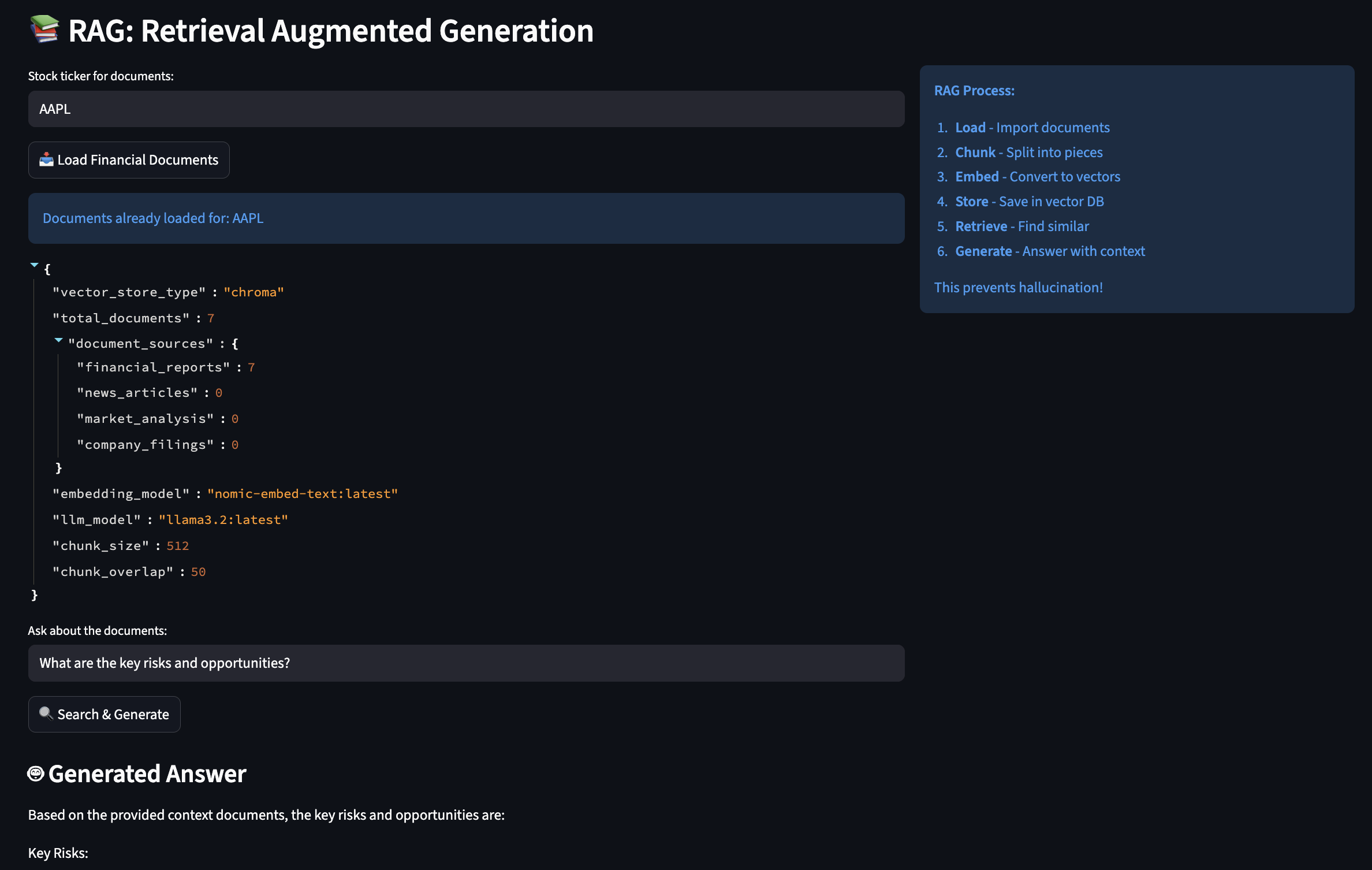
Early in my experiments, I had to deal with a bit of hallucinations when querying financial data with AI so I applied RAG (Retrieval-Augmented Generation) to give AI access to a searchable library of documents.

How RAG Actually Works

You can think of RAG like having a research assistant who, instead of relying on memory, always checks the source documents before answering:

class RAGEngine:
    """
    This engine solved my hallucination problems by grounding 
    all responses in actual documents. It's like giving the AI
    access to your company's document database.
    """
    
    def __init__(self):
        # Initialize embeddings - this converts text to searchable vectors
        # Using Ollama's local embedding model (free!)
        self.embeddings = OllamaEmbeddings(
            model="nomic-embed-text:latest"  # 274MB model, runs fast
        )
        
        # Text splitter - crucial for handling large documents
        self.text_splitter = RecursiveCharacterTextSplitter(
            chunk_size=512,      # Small enough for context window
            chunk_overlap=50,    # Overlap prevents losing context at boundaries
            separators=["\n\n", "\n", ". ", " "]  # Smart splitting
        )
        
        # Vector store - where we keep our searchable documents
        self.vector_store = FAISS.from_texts(["init"], self.embeddings)
    
    def load_financial_documents(self, ticker: str):
        """
        In production, this would load real 10-Ks, 10-Qs, earnings calls.
        For now, I'm using sample documents to demonstrate the concept.
        """
        
        # Imagine these are real SEC filings
        documents = [
            {
                "content": f"""
                {ticker} Q3 2024 Earnings Report
                
                Revenue: $94.9 billion, up 6% year over year
                iPhone revenue: $46.2 billion
                Services revenue: $23.3 billion (all-time record)
                
                Gross margin: 45.2%
                Operating cash flow: $28.7 billion
                
                CEO Tim Cook: "We're incredibly pleased with our record 
                September quarter results and strong momentum heading into
                the holiday season."
                """,
                "metadata": {
                    "source": "10-Q Filing",
                    "date": "2024-10-31",
                    "document_type": "earnings_report",
                    "ticker": ticker
                }
            },
            # ... more documents
        ]
        
        # Process each document
        for doc in documents:
            # Split into chunks
            chunks = self.text_splitter.split_text(doc["content"])
            
            # Create document objects with metadata
            for i, chunk in enumerate(chunks):
                metadata = doc["metadata"].copy()
                metadata["chunk_id"] = i
                metadata["total_chunks"] = len(chunks)
                
                # Add to vector store
                self.vector_store.add_texts(
                    texts=[chunk],
                    metadatas=[metadata]
                )
        
        print(f"? Loaded {len(documents)} documents for {ticker}")
    
    def answer_with_sources(self, question: str) -> Dict[str, Any]:
        """
        This is where RAG shines - every answer comes with sources
        """
        # Find relevant document chunks
        relevant_docs = self.vector_store.similarity_search_with_score(
            question, 
            k=5  # Top 5 most relevant chunks
        )
        
        # Build context from retrieved documents
        context_parts = []
        sources = []
        
        for doc, score in relevant_docs:
            # Only use highly relevant documents (score < 0.5)
            if score < 0.5:
                context_parts.append(doc.page_content)
                sources.append({
                    "content": doc.page_content[:100] + "...",
                    "source": doc.metadata.get("source"),
                    "date": doc.metadata.get("date"),
                    "relevance_score": float(score)
                })
        
        context = "\n\n---\n\n".join(context_parts)
        
        # Generate answer grounded in retrieved context
        prompt = f"""Based on the following verified documents, answer the question.
        If the answer is not in the documents, say "I don't have that information."
        
        Documents:
        {context}
        
        Question: {question}
        
        Answer (cite sources):"""
        
        response = self.llm.invoke(prompt)
        
        return {
            "answer": response,
            "sources": sources,
            "confidence": len(sources) / 5  # Simple confidence metric
        }

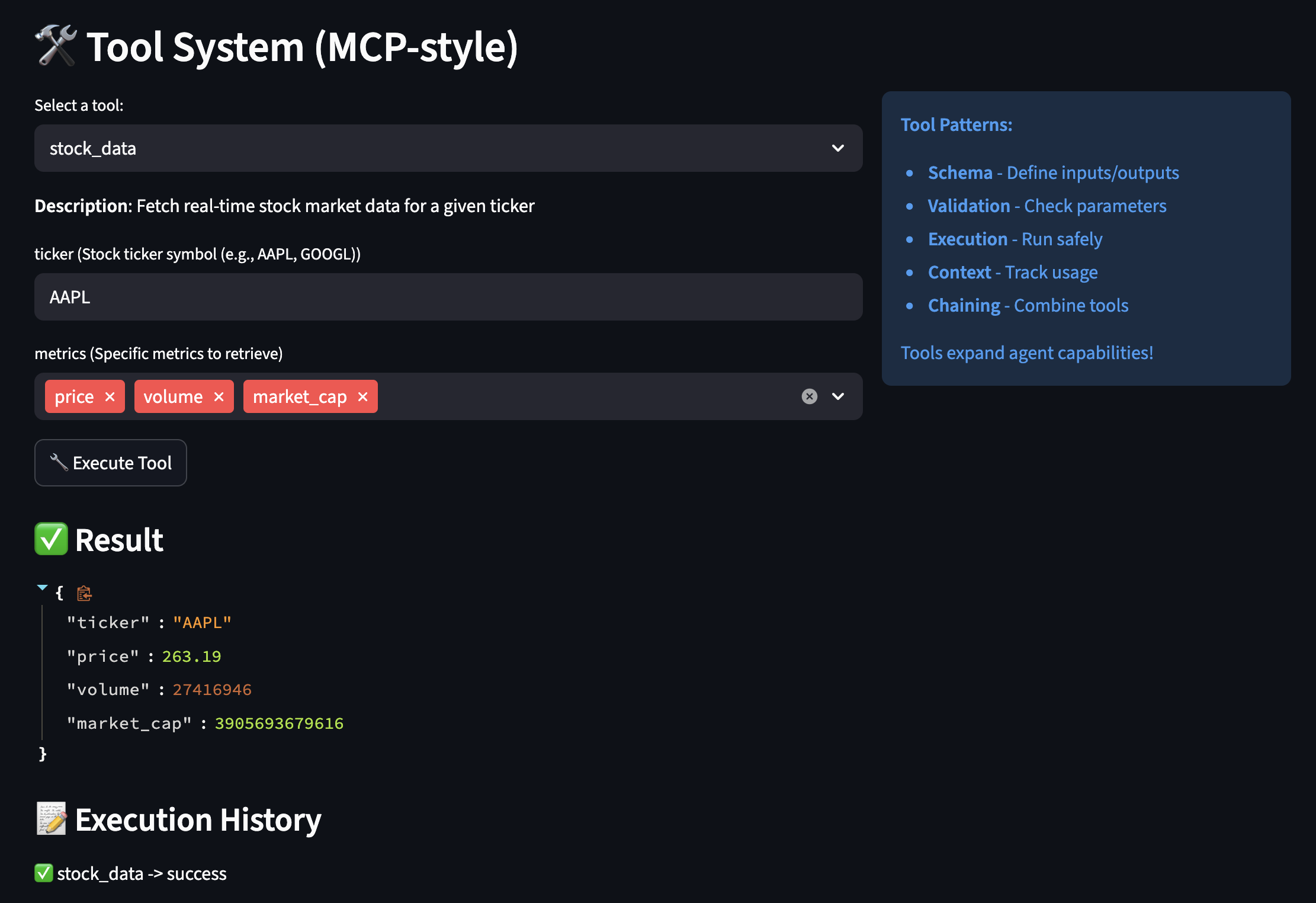
MCP-Style Tools: Extending AI Capabilities Beyond Text

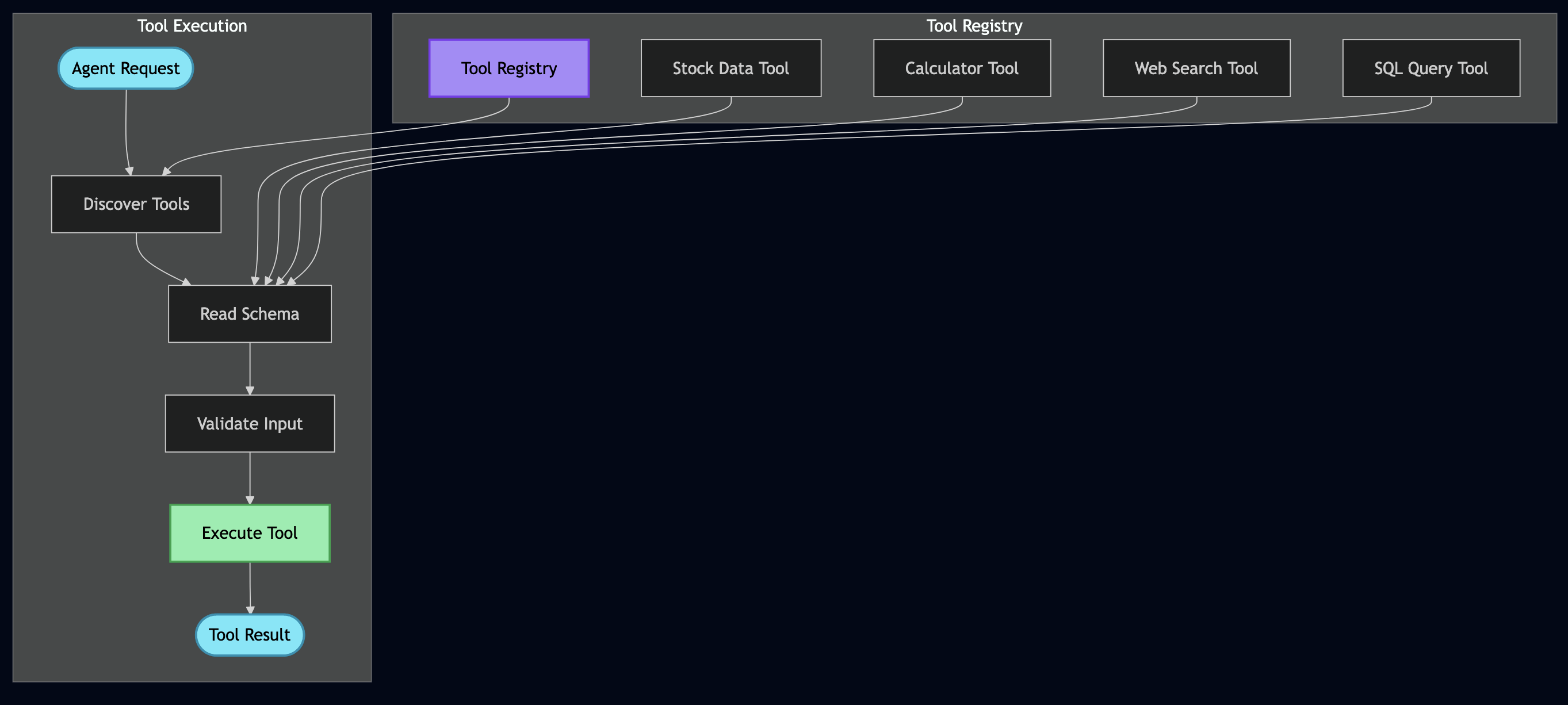
Model Context Protocol (MCP) helped me to build a flexible tool system. Instead of hardcoding every capability, we give the AI tools it can discover and use:

class BaseTool(ABC):
    """
    Every tool self-describes its capabilities.
    This is like giving the AI an instruction manual for each tool.
    """
    
    @abstractmethod
    def get_schema(self) -> ToolSchema:
        """Define what this tool does and how to use it"""
        pass
    
    @abstractmethod
    def execute(self, **kwargs) -> Any:
        """Actually run the tool"""
        pass

class StockDataTool(BaseTool):
    """
    Real example: This tool replaced my entire market data microservice
    """
    
    def get_schema(self) -> ToolSchema:
        return ToolSchema(
            name="stock_data",
            description="Fetch real-time stock market data including price, volume, and fundamentals",
            category=ToolCategory.DATA_RETRIEVAL,
            parameters=[
                ToolParameter(
                    name="ticker",
                    type="string", 
                    description="Stock symbol like AAPL or GOOGL",
                    required=True
                ),
                ToolParameter(
                    name="metrics",
                    type="array",
                    description="Specific metrics to retrieve",
                    required=False,
                    default=["price", "volume", "pe_ratio"],
                    enum=["price", "volume", "pe_ratio", "market_cap", 
                          "dividend_yield", "beta", "rsi", "moving_avg_50"]
                )
            ],
            returns="Dictionary containing requested stock metrics",
            examples=[
                {"ticker": "AAPL", "metrics": ["price", "pe_ratio"]},
                {"ticker": "TSLA", "metrics": ["price", "volume", "rsi"]}
            ]
        )
    
    def execute(self, **kwargs) -> Dict[str, Any]:
        """
        This connects to real market data APIs.
        In my old system, this was a 500-line service.
        """
        ticker = kwargs["ticker"].upper()
        metrics = kwargs.get("metrics", ["price", "volume"])
        
        # Using yfinance for real market data
        import yfinance as yf
        stock = yf.Ticker(ticker)
        info = stock.info
        
        result = {"ticker": ticker, "timestamp": datetime.now().isoformat()}
        
        # Fetch requested metrics
        metric_mapping = {
            "price": lambda: info.get("currentPrice", stock.history(period="1d")['Close'].iloc[-1]),
            "volume": lambda: info.get("volume", 0),
            "pe_ratio": lambda: info.get("trailingPE", 0),
            "market_cap": lambda: info.get("marketCap", 0),
            "dividend_yield": lambda: info.get("dividendYield", 0) * 100,
            "beta": lambda: info.get("beta", 1.0),
            "rsi": lambda: self._calculate_rsi(stock),
            "moving_avg_50": lambda: stock.history(period="50d")['Close'].mean()
        }
        
        for metric in metrics:
            if metric in metric_mapping:
                try:
                    result[metric] = metric_mapping[metric]()
                except Exception as e:
                    result[metric] = f"Error: {str(e)}"
        
        return result
class ToolParameter(BaseModel):
    """Actual parameter definition from project"""
    name: str
    type: str  # "string", "number", "boolean", "object", "array"
    description: str
    required: bool = True
    default: Any = None
    enum: Optional[List[Any]] = None

class CalculatorTool(BaseTool):
    """Actual calculator implementation from project"""
    
    def execute(self, **kwargs) -> float:
        """Safely evaluate mathematical expression"""
        self.validate_input(**kwargs)
        
        expression = kwargs["expression"]
        precision = kwargs.get("precision", 2)
        
        try:
            # Security: Remove dangerous operations
            safe_expr = expression.replace("__", "").replace("import", "")
            
            # Define allowed functions (from actual code)
            safe_dict = {
                "abs": abs, "round": round, "min": min, "max": max,
                "sum": sum, "pow": pow, "len": len
            }
            
            # Add math functions
            import math
            for name in ["sqrt", "log", "log10", "sin", "cos", "tan", "pi", "e"]:
                if hasattr(math, name):
                    safe_dict[name] = getattr(math, name)
            
            result = eval(safe_expr, {"__builtins__": {}}, safe_dict)
            
            return round(result, precision)
            
        except Exception as e:
            raise ValueError(f"Calculation error: {e}")

Orchestrating Everything with LangGraph

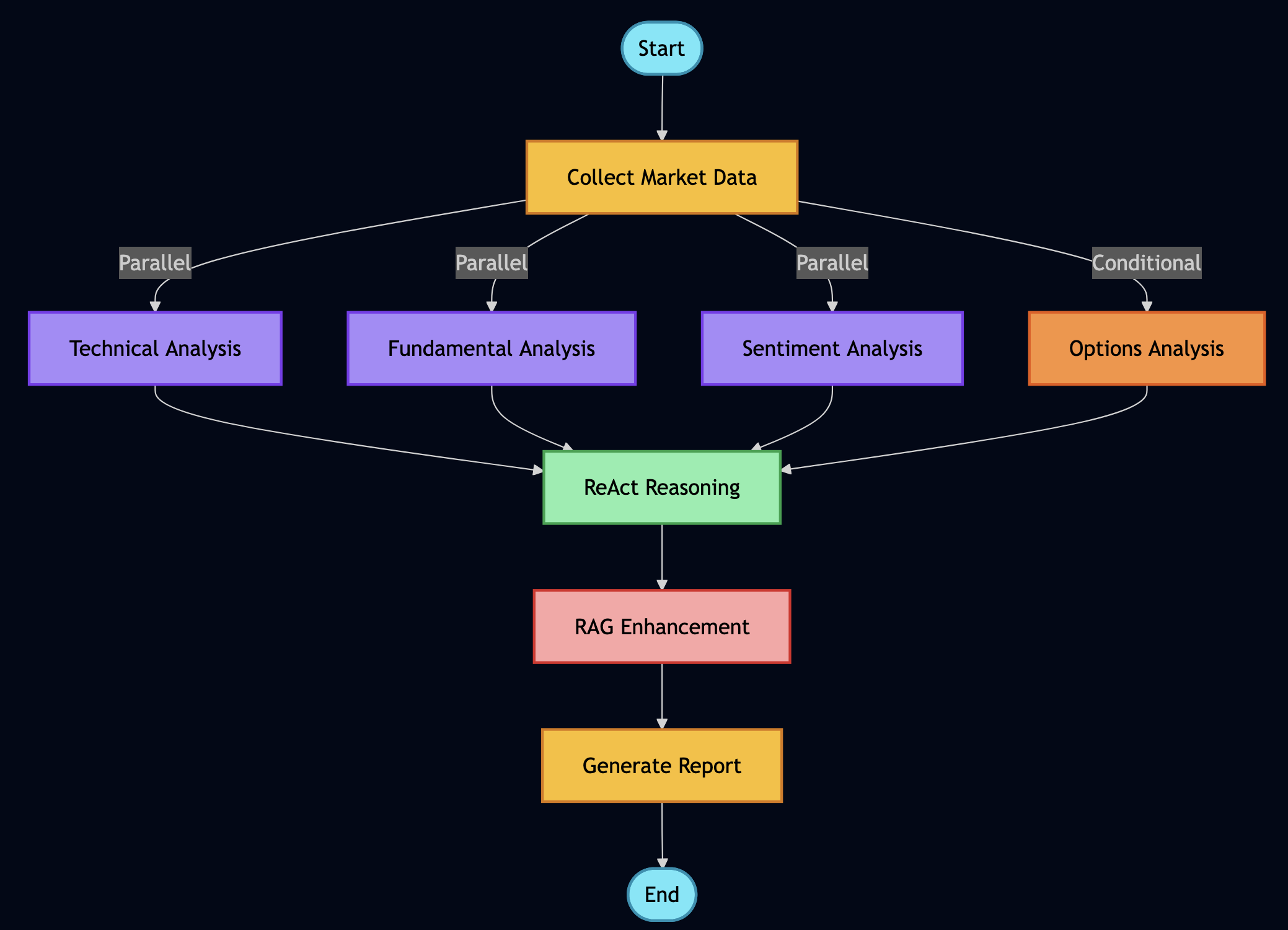
This is where all the pieces come together. LangGraph allows coordinating multiple agents and tools in sophisticated workflows:

class FinancialAnalysisWorkflow:
    """
    This workflow replaces what used to be multiple microservices,
    message queues, and orchestration layers. It's beautiful.
    """
    
    def _build_graph(self) -> StateGraph:
        """
        Define how different analysis components work together
        """
        workflow = StateGraph(AgentState)
        
        # Add all our analysis nodes
        workflow.add_node("collect_data", self.collect_market_data)
        workflow.add_node("technical_analysis", self.run_technical_analysis)
        workflow.add_node("fundamental_analysis", self.run_fundamental_analysis)
        workflow.add_node("sentiment_analysis", self.analyze_sentiment)
        workflow.add_node("options_analysis", self.analyze_options)
        workflow.add_node("portfolio_optimization", self.optimize_portfolio)
        workflow.add_node("rag_research", self.search_documents)
        workflow.add_node("react_reasoning", self.reason_about_data)
        workflow.add_node("generate_report", self.create_final_report)
        
        # Entry point
        workflow.set_entry_point("collect_data")
        
        # Define the flow - some parallel, some sequential
        workflow.add_edge("collect_data", "technical_analysis")
        workflow.add_edge("collect_data", "fundamental_analysis")
        workflow.add_edge("collect_data", "sentiment_analysis")
        
        # These can run in parallel
        workflow.add_conditional_edges(
            "collect_data",
            self.should_run_options,  # Only if options are relevant
            {
                "yes": "options_analysis",
                "no": "rag_research"
            }
        )
        
        # Everything feeds into reasoning
        workflow.add_edge(["technical_analysis", "fundamental_analysis", 
                          "sentiment_analysis", "options_analysis"], 
                          "react_reasoning")
        
        # Reasoning leads to report
        workflow.add_edge("react_reasoning", "generate_report")
        
        # End
        workflow.add_edge("generate_report", END)
        
        return workflow
    
    def analyze_stock_comprehensive(self, ticker: str, investment_amount: float = 10000):
        """
        This single function replaces what used to be an entire team's
        worth of manual analysis.
        """
        initial_state = {
            "ticker": ticker,
            "investment_amount": investment_amount,
            "timestamp": datetime.now(),
            "messages": [],
            "market_data": {},
            "technical_indicators": {},
            "fundamental_metrics": {},
            "sentiment_scores": {},
            "options_data": {},
            "portfolio_recommendation": {},
            "documents_retrieved": [],
            "reasoning_trace": [],
            "final_report": "",
            "errors": []
        }
        
        # Run the workflow
        try:
            result = self.app.invoke(initial_state)
            return self._format_comprehensive_report(result)
        except Exception as e:
            # Graceful degradation
            return self._run_basic_analysis(ticker, investment_amount)
class WorkflowNodes:
    """Collection of workflow nodes from actual project"""
    
    def collect_market_data(self, state: AgentState) -> AgentState:
        """Node: Collect market data using tools"""
        print("? Collecting market data...")
        
        ticker = state["ticker"]
        
        try:
            # Use actual stock data tool from project
            tool = self.tool_registry.get_tool("stock_data")
            market_data = tool.execute(
                ticker=ticker,
                metrics=["price", "volume", "market_cap", "pe_ratio", "52_week_high", "52_week_low"]
            )
            
            state["market_data"] = market_data
            
            # Add message to history
            state["messages"].append(
                AIMessage(content=f"Collected market data for {ticker}")
            )
            
        except Exception as e:
            state["error"] = f"Failed to collect market data: {str(e)}"
            state["market_data"] = {}
        
        return state

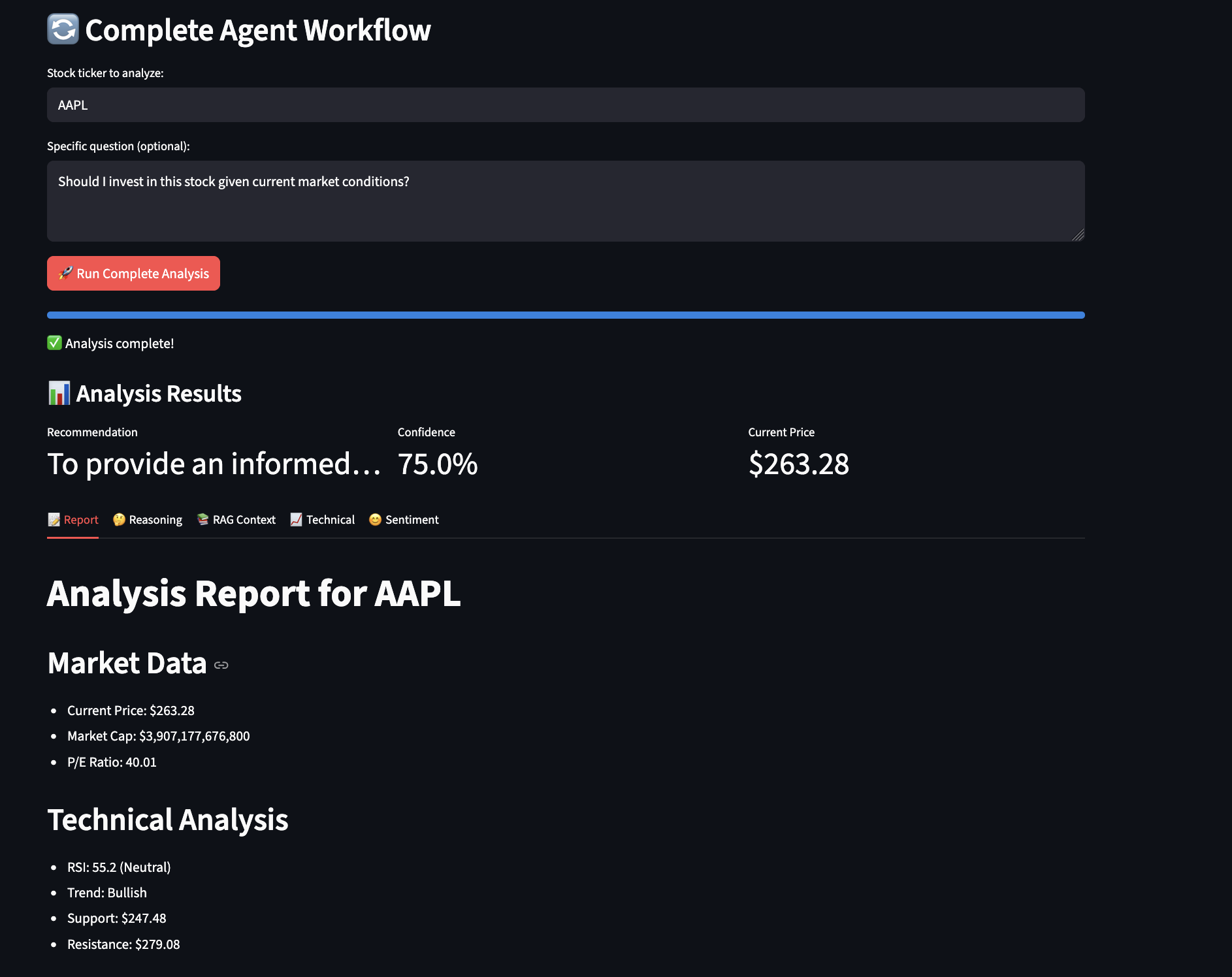
Here is a screenshot from the example showing workflow analysis:

Production Considerations: From Tutorial to Trading Floor

This tutorial demonstrates core concepts, but let me be clear – production deployment in financial services requires significantly more rigor. Having deployed similar systems in regulated environments, here’s what you’ll need to consider:

The Reality of Production Deployment

Production financial systems require months of parallel running and validation. In my experience, you’ll need:

class ProductionValidation:
    """
    Always run new systems parallel to existing ones
    """
    def validate_against_legacy(self, ticker: str):
        # Run both systems
        legacy_result = self.legacy_system.analyze(ticker)
        agent_result = self.agent_system.analyze(ticker)
        
        # Compare results
        discrepancies = self.compare_results(legacy_result, agent_result)
        
        # Log everything for audit
        self.audit_log.record({
            "ticker": ticker,
            "timestamp": datetime.now(),
            "legacy": legacy_result,
            "agent": agent_result,
            "discrepancies": discrepancies,
            "approved": len(discrepancies) == 0
        })
        
        # Require human review for discrepancies
        if discrepancies:
            return self.escalate_to_human(discrepancies)
        
        return agent_result

Integrating Traditional Financial Algorithms

While this tutorial uses general-purpose LLMs, production systems should combine AI with proven financial algorithms:

class HybridAnalyzer:
    """
    Combine traditional algorithms with AI reasoning
    """
    def analyze_options(self, ticker: str, strike: float, expiry: str):
        # Use traditional Black-Scholes for pricing
        traditional_price = self.black_scholes_pricer.calculate(
            ticker, strike, expiry
        )
        
        # Use AI for market context
        ai_context = self.agent.analyze_market_conditions(ticker)
        
        # Combine both
        if ai_context["volatility_regime"] == "high":
            # AI detected unusual conditions, adjust model
            adjusted_price = traditional_price * (1 + ai_context["vol_adjustment"])
            confidence = "low - unusual market conditions"
        else:
            adjusted_price = traditional_price
            confidence = "high - normal market conditions"
        
        return {
            "model_price": traditional_price,
            "adjusted_price": adjusted_price,
            "confidence": confidence,
            "reasoning": ai_context["reasoning"]
        }

Fitness Functions for Financial Accuracy

Financial data cannot tolerate hallucinations. Implement strict validation:

class FinancialFitnessValidator:
    """
    Reject hallucinated or impossible financial data
    """
    def validate_metrics(self, ticker: str, metrics: Dict):
        validations = {
            "pe_ratio": lambda x: -100 < x < 1000,
            "price": lambda x: x > 0,
            "market_cap": lambda x: x > 0,
            "dividend_yield": lambda x: 0 <= x <= 20,
            "revenue_growth": lambda x: -100 < x < 200
        }
        
        for metric, validator in validations.items():
            if metric in metrics:
                value = metrics[metric]
                if not validator(value):
                    raise ValueError(f"Invalid {metric}: {value} for {ticker}")
        
        # Cross-validation
        if "pe_ratio" in metrics and "earnings" in metrics:
            calculated_pe = metrics["price"] / metrics["earnings"]
            if abs(calculated_pe - metrics["pe_ratio"]) > 1:
                raise ValueError("P/E ratio doesn't match price/earnings")
        
        return True

Leverage Your Existing Data

If you have years of financial data in databases, you don’t need to start over. Use RAG to make it searchable:

# Convert your SQL database to vector-searchable documents
existing_data = sql_query("SELECT * FROM financial_reports")
rag_engine.add_documents([
    {"content": row.text, "metadata": {"date": row.date, "ticker": row.ticker}}
    for row in existing_data
])

Human-in-the-Loop

No matter how sophisticated your agents become, financial decisions affecting real money require human oversight. Build it in from day one:

  • Confidence thresholds that trigger human review
  • Clear audit trails showing agent reasoning
  • Easy override mechanisms
  • Gradual automation based on proven accuracy
class HumanInTheLoopWorkflow:
    """
    Ensure human review for critical decisions
    """
    def execute_trade_recommendation(self, recommendation: Dict):
        # Auto-approve only for low-risk, small trades
        if (recommendation["risk_score"] < 0.3 and 
            recommendation["amount"] < 10000):
            return self.execute(recommendation)
        
        # Require human approval for everything else
        approval_request = {
            "recommendation": recommendation,
            "agent_reasoning": recommendation["reasoning_trace"],
            "confidence": recommendation["confidence_score"],
            "risk_assessment": self.assess_risks(recommendation)
        }
        
        # Send to human reviewer
        human_decision = self.request_human_review(approval_request)
        
        if human_decision["approved"]:
            return self.execute(recommendation)
        else:
            self.log_rejection(human_decision["reason"])

Cost Management and Budget Controls

During development, Ollama gives you free local inference. In production, costs add up quickly so you need to build proper controls for calculating cost of analysis:

  • GPT-4: ~$30 per million tokens
  • Claude-3: ~$20 per million tokens
  • Local Llama: Free but needs GPU infrastructure
class CostController:
    """
    Prevent runway costs in production
    """
    def __init__(self, daily_budget: float = 100.0):
        self.daily_budget = daily_budget
        self.costs_today = 0.0
        self.cost_per_token = {
            "gpt-4": 0.00003,  # $0.03 per 1K tokens
            "claude-3": 0.00002,
            "llama-local": 0.0  # Free but has compute cost
        }
    
    def check_budget(self, estimated_tokens: int, model: str):
        estimated_cost = estimated_tokens * self.cost_per_token.get(model, 0)
        
        if self.costs_today + estimated_cost > self.daily_budget:
            # Switch to local model or cache
            return "use_local_model"
        
        return "proceed"
    
    def track_usage(self, tokens_used: int, model: str):
        cost = tokens_used * self.cost_per_token.get(model, 0)
        self.costs_today += cost
        
        # Alert if approaching limit
        if self.costs_today > self.daily_budget * 0.8:
            self.send_alert(f"80% of daily budget used: ${self.costs_today:.2f}")

Caching Is Essential

Caching is crucial for both performance and cost effectiveness when running expensive analysis using LLMs.

class CachedRAGEngine(RAGEngine):
    """
    Caching reduced our costs by 70% and improved response time by 5x
    """
    
    def __init__(self):
        super().__init__()
        self.cache = Redis(host='localhost', port=6379, db=0)
        self.cache_ttl = 3600  # 1 hour for financial data
    
    def retrieve_with_cache(self, query: str, k: int = 5):
        # Create cache key from query
        cache_key = f"rag:{hashlib.md5(query.encode()).hexdigest()}"
        
        # Check cache first
        cached = self.cache.get(cache_key)
        if cached:
            return json.loads(cached)
        
        # If not cached, retrieve and cache
        docs = self.vector_store.similarity_search(query, k=k)
        
        # Cache the results
        self.cache.setex(
            cache_key, 
            self.cache_ttl,
            json.dumps([doc.to_dict() for doc in docs])
        )
        
        return docs

Fallback Strategies

A Cascading Fallback can help execute a task using a sequence of operations, ordered from the most preferred (highest quality/cost) to the least preferred (lowest quality/safest default).

class ResilientAgent:
    """
    Production agents need multiple fallback options
    """
    
    def analyze_with_fallbacks(self, ticker: str):
        strategies = [
            ("primary", self.run_full_analysis),
            ("fallback_1", self.run_simplified_analysis),
            ("fallback_2", self.run_basic_analysis),
            ("emergency", self.return_cached_or_default)
        ]
        
        for strategy_name, strategy_func in strategies:
            try:
                result = strategy_func(ticker)
                result["strategy_used"] = strategy_name
                return result
            except Exception as e:
                logger.warning(f"Strategy {strategy_name} failed: {e}")
                continue
        
        return {"error": "All strategies failed", "ticker": ticker}

Observability and Monitoring

Track token usage, latency, accuracy, and costs immediately. What you don’t measure, you can’t improve.

class ObservableWorkflow:
    """
    You need to know what your AI is doing in production
    """
    
    def __init__(self):
        self.metrics = PrometheusMetrics()
        self.tracer = JaegerTracer()
    
    def execute_with_observability(self, state: AgentState):
        with self.tracer.start_span("workflow_execution") as span:
            span.set_tag("ticker", state["ticker"])
            
            # Track token usage
            tokens_start = self.llm.get_num_tokens(state)
            
            # Execute workflow
            result = self.workflow.invoke(state)
            
            # Record metrics
            tokens_used = self.llm.get_num_tokens(result) - tokens_start
            self.metrics.record_tokens(tokens_used)
            self.metrics.record_latency(span.duration)
            
            # Log for debugging
            logger.info(f"Workflow completed", extra={
                "ticker": state["ticker"],
                "tokens": tokens_used,
                "duration": span.duration,
                "strategy": result.get("strategy_used", "primary")
            })
            
            return result

Closing Thoughts

This tutorial demonstrates how agentic AI transforms financial analysis from rigid pipelines to adaptive, thinking systems. The combination of ReAct reasoning, RAG grounding, tool use, and workflow orchestration creates capabilities that surpass traditional approaches in flexibility and ease of development.

Start Simple, Build Incrementally:

  • Week 1: Basic ReAct agent to understand reasoning loops
  • Week 2: Add tools for external capabilities
  • Week 3: Implement RAG to ground responses in real data
  • Week 4: Orchestrate with workflows
  • Develop everything locally with Ollama first – it’s free and private

The point of agentic AI is automation. Here’s the pragmatic approach:

Automate in Tiers:

  • Tier 1 (Fully Automated): Data collection, technical calculations, report generation
  • Tier 2 (Auto + Audit): Sentiment analysis, risk scoring, anomaly detection
  • Tier 3 (Human Required): Large trades, strategy changes, regulatory decisions

Clear Escalation Rules:

ESCALATE_IF = {
    "confidence_below": 0.8,
    "amount_above": 100000,
    "regulatory_flag": True,
    "anomaly_detected": True
}

Reinforcement Learning:

Instead of permanent human-in-the-loop, use RL to train agents that learn from feedback:

class ReinforcementLearningLoop:
    """
    Gradually reduce human involvement through learning
    """

    def ai_based_reinforcement(self, decision, outcome):
        """AI learns from market outcomes directly"""
        # Did the prediction match reality?
        reward = self.calculate_reward(decision, outcome)

        if decision["action"] == "buy" and outcome["price_change"] > 0.02:
            reward = 1.0  # Good decision
        elif decision["action"] == "hold" and abs(outcome["price_change"]) < 0.01:
            reward = 0.5  # Correct to avoid volatility
        else:
            reward = -0.5  # Poor decision

        # Update agent weights/prompts based on reward
        self.agent.update_policy(decision["context"], reward)

    def human_feedback_learning(self, decision, human_override=None):
        """Learn from human corrections when they occur"""
        if human_override:
            # Human disagreed - strong learning signal
            self.agent.record_correction(
                agent_decision=decision,
                human_decision=human_override,
                weight=10.0  # Human feedback weighted heavily
            )
        else:
            # Human agreed (implicitly by not overriding)
            self.agent.reinforce_decision(decision, weight=1.0)

    def adaptive_automation_threshold(self):
        """Dynamically adjust when human review is needed"""
        recent_accuracy = self.get_recent_accuracy(days=30)

        if recent_accuracy > 0.95:
            self.confidence_threshold *= 0.9  # Require less human review
        elif recent_accuracy < 0.85:
            self.confidence_threshold *= 1.1  # Require more human review

        return self.confidence_threshold

This approach reduces human involvement over time: use that feedback to train, gradually automate decisions where the agent consistently agrees with humans, and only escalate novel situations or low-confidence decisions.


Complete code at github.com/bhatti/agentic-ai-tutorial. Start local, validate thoroughly, scale confidently.

October 15, 2025

Agentic AI for Automated PII Detection: Building Privacy Guardians with LangChain and Vertex AI

Filed under: Computing — admin @ 12:47 pm

Introduction

Over the years, I have seen countless data breaches leaking private personal data of customers. For example, Equifax exposed 147 million Americans’ SSNs and birth dates; Facebook leaked 533 million users’ personal details; Yahoo lost 3 billion accounts. This risk of leaking personal data is not unique to large companies but most companies play security chicken. They bet on luck that we haven’t been breached yet, so we must be fine. In many cases, companies don’t even know what PII they have, where it lives, or who can access it.

Unrestrained Production Access

Here’s what I have seen in most companies where I worked: DevOps teams with unrestricted access to production databases “for debugging.” Support engineers who can browse any customer’s SSN, medical records, or financial data. That contractor from six months ago who still has production credentials. Engineers who can query any table, any field, anytime. I’ve witnessed the consequences firsthand:

  • Customer service reps browsing financial data of large customers “out of curiosity”
  • APIs that return PII data without proper authorization policies
  • Devops or support receives permanent permissions to access production data instead of time-bound or customer specific based on the underlying issue
  • Engineers accidentally logging credit card numbers in plaintext

This violates OWASP’s principle of least privilege—grant only the minimum access necessary. But there’s an even worse problem: most companies can’t even identify which fields contain PII. They often don’t have policies on how to protect different kind of PII data based on risks.

The Scale Problem

In modern architectures, manual PII identification is impossible:

  • Hundreds of microservices, each with dozens of data models
  • Tens of thousands of API endpoints
  • Constant schema evolution as teams ship daily
  • Our single customer proto had 84 fields—multiply that by hundreds of services

Traditional approaches—manual reviews, compliance audits, security questionnaires—can’t keep up. By the time you’ve reviewed everything, the schemas have already changed.

Enter Agentic AI: From 0% to 92% PII Detection

I have been applying AI assistants and agents to solve complex problems for a while and I have been thinking about how can we automatically detect PII? Not just obvious fields like “ssn” or “credit_card_number,” but the subtle ones—employee IDs that could be cross-referenced. I then built an AI-powered system that uses LangChain, LangGraph, and Vertex AI to scan every proto definition, identify PII patterns, and classify sensitivity levels. Though iterative development, I went from:

  • 0% accuracy: Naive prompt (“find PII fields”)
  • 45% accuracy: Basic rules without specificity
  • 92%+ accuracy: Iterative prompt engineering with explicit field mappings

It’s not perfect, but it’s infinitely better than the nothing most companies have.

The Real Problem: It’s Not Just About Compliance

Let me share some uncomfortable truths about PII in modern systems:

The Public API Problem

We had list APIs returning customer data like this:

{
  "customers": [
    {
      "id": "cust_123",
      "name": "John Doe",
      "email": "john@example.com",
      "ssn": "123-45-6789",
      "date_of_birth": "1990-01-15",
      "credit_score": 750,
    }
  ]
}

Someone with the API access could list all customers and capture their private data like ssn and date_of_birth.

The Internal Access Problem

One recurring issue I found with internal access is giving carte blanche access (often permanent) to devops environment or production database for debugging. In other cases, support team needed customer data for tickets. But did they need to see following PII data for all customers:

  • Social Security Numbers?
  • Medical records?
  • Credit card numbers?
  • Salary information?

Of course not. I saw often the list APIs return this PII data for all customers or calling GetAccount gave you everything without proper authorization policies.

The Compliance Nightmare

The government regulations like GDPR, CCPA, HIPAA, PCI-DSS have been growing but each has different rules about what constitutes PII, how it should be protected, and what happens if you leak it. Manual compliance checking is impossible at scale.

The RBAC Isn’t Enough Problem

I’ve spent years building authorization systems, believing RBAC was the answer. I wrote about it in Building a Hybrid Authorization System for Granular Access Control and created multiple authorization solutions like:

  • PlexRBAC – A comprehensive RBAC library for Java/Scala with dynamic role hierarchies
  • PlexRBACJS – JavaScript implementation with fine-grained permissions
  • SaaS_RBAC – Multi-tenant RBAC with organization-level isolation

These systems can enforce incredibly sophisticated access controls. They can handle role inheritance, permission delegation, contextual access rules. But here’s what I learned the hard way: RBAC is useless if you don’t know what data needs protection. First, you need to identify PII. Then you can enforce field-level authorization.

The Solution: AI-Powered PII Detection with Proto Annotations

I built an Agentic AI based automation that:

  1. Automatically scans all proto definitions for PII
  2. Classifies sensitivity levels (HIGH, MEDIUM, LOW, PUBLIC)
  3. Generates appropriate annotations for enforcement
  4. Integrates with CI/CD to prevent PII leaks before deployment

Here’s what it looks like in action:

Before: Unmarked PII Everywhere

message Account {
  string id = 1;
  string first_name = 2;
  string ssn = 3;  // No indication this is sensitive!
  string email = 4;
  string credit_card_number = 5;  // Just sitting there, unprotected
  repeated string medical_conditions = 6;  // HIPAA violation waiting to happen
}

After: Fully Annotated with Sensitivity Levels

message Account {
  option (pii.v1.message_sensitivity) = HIGH;

  string id = 1 [
    (pii.v1.sensitivity) = LOW,
    (pii.v1.pii_type) = CUSTOMER_ID
  ];

  string first_name = 2 [
    (pii.v1.sensitivity) = LOW,
    (pii.v1.pii_type) = NAME
  ];

  string ssn = 3 [
    (pii.v1.sensitivity) = HIGH,
    (pii.v1.pii_type) = SSN
  ];

  string email = 4 [
    (pii.v1.sensitivity) = MEDIUM,
    (pii.v1.pii_type) = EMAIL_PERSONAL
  ];

  string credit_card_number = 5 [
    (pii.v1.sensitivity) = HIGH,
    (pii.v1.pii_type) = CREDIT_CARD
  ];

  repeated string medical_conditions = 6 [
    (pii.v1.sensitivity) = HIGH,
    (pii.v1.pii_type) = MEDICAL_RECORD
  ];
}

Now our authorization system knows exactly what to protect!

Architecture: How It All Works

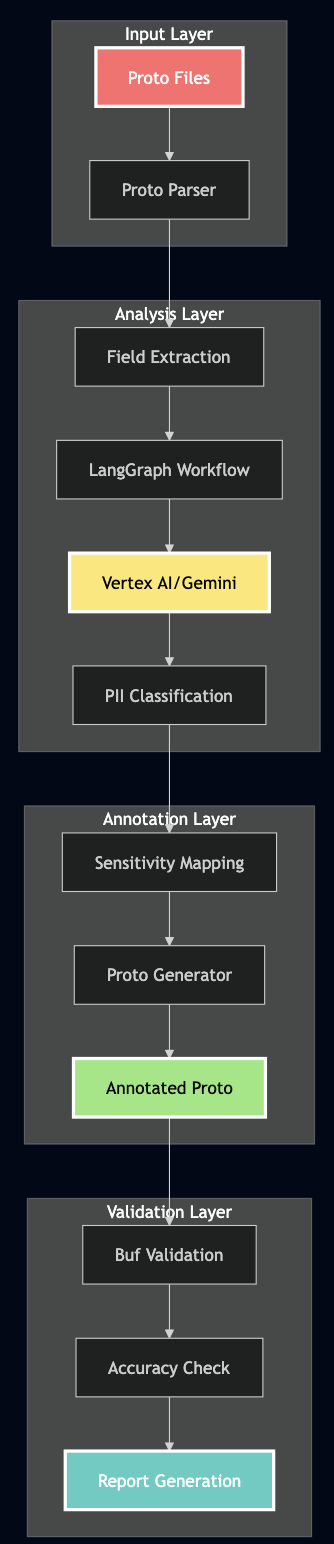
The system uses a multi-stage pipeline combining LangChain, LangGraph, and Vertex AI:

Technical Implementation Deep Dive

1. The LangGraph State Machine

I used LangGraph to create a deterministic workflow for PII detection:

from langgraph.graph import StateGraph, END
from typing import TypedDict, List, Optional, Dict, Any
from langchain_google_vertexai import ChatVertexAI
from pydantic import BaseModel, Field

class PiiDetectionState(TypedDict):
    """State for PII detection workflow"""
    proto_file: str
    proto_content: str
    parsed_proto: Dict[str, Any]
    llm_analysis: Optional[ProtoAnalysis]
    final_report: Optional[PiiDetectionReport]
    annotated_proto: Optional[str]
    errors: List[str]

class PiiDetector:
    def __init__(self, model_name: str = "gemini-2.0-flash-exp"):
        self.llm = ChatVertexAI(
            model_name=model_name,
            project=PROJECT_ID,
            location=LOCATION,
            temperature=0.1,  # Low temperature for consistent classification
            max_output_tokens=8192,
            request_timeout=120  # Handle large protos
        )
        self.workflow = self._create_workflow()

    def _create_workflow(self) -> StateGraph:
        """Create the LangGraph workflow"""
        workflow = StateGraph(PiiDetectionState)

        # Add nodes for each step
        workflow.add_node("parse_proto", self._parse_proto_node)
        workflow.add_node("analyze_pii", self._analyze_pii_node)
        workflow.add_node("generate_annotations", self._generate_annotations_node)
        workflow.add_node("create_report", self._create_report_node)

        # Define the flow
        workflow.set_entry_point("parse_proto")
        workflow.add_edge("parse_proto", "analyze_pii")
        workflow.add_edge("analyze_pii", "generate_annotations")
        workflow.add_edge("generate_annotations", "create_report")
        workflow.add_edge("create_report", END)

        return workflow.compile()

    async def _analyze_pii_node(self, state: PiiDetectionState) -> PiiDetectionState:
        """Analyze PII using LLM with retry logic"""
        max_retries = 3
        retry_delay = 2

        for attempt in range(max_retries):
            try:
                # Create structured output chain
                analysis_chain = self.llm.with_structured_output(ProtoAnalysis)

                # Create the analysis prompt
                prompt = self.create_pii_detection_prompt(state['parsed_proto'])

                # Get LLM analysis
                result = await analysis_chain.ainvoke(prompt)

                if result:
                    state['llm_analysis'] = result
                    return state

            except Exception as e:
                if attempt < max_retries - 1:
                    await asyncio.sleep(retry_delay)
                    continue
                else:
                    state['errors'].append(f"LLM analysis failed: {str(e)}")

        return state

2. Pydantic Models for Structured Output

I used Pydantic to ensure consistent, structured responses from the LLM:

class FieldAnalysis(BaseModel):
    """Analysis of a single proto field for PII"""
    field_name: str = Field(description="The name of the field")
    field_path: str = Field(description="Full path like Message.field")
    contains_pii: bool = Field(description="Whether field contains PII")
    sensitivity: str = Field(description="HIGH, MEDIUM, LOW, or PUBLIC")
    pii_type: Optional[str] = Field(default=None, description="Type of PII")
    reasoning: str = Field(description="Explanation for classification")

class MessageAnalysis(BaseModel):
    """Analysis of a proto message"""
    message_name: str = Field(description="Name of the message")
    overall_sensitivity: str = Field(description="Highest sensitivity in message")
    fields: List[FieldAnalysis] = Field(description="Analysis of each field")

class ProtoAnalysis(BaseModel):
    """Complete analysis of a proto file"""
    messages: List[MessageAnalysis] = Field(description="All analyzed messages")
    services: List[ServiceAnalysis] = Field(default_factory=list)
    summary: AnalysisSummary = Field(description="Overall statistics")

3. The Critical Prompt Engineering

I found that the key to accurate PII detection is in the prompt. Here’s a battle-tested prompt that achieves 92%+ accuracy after many trial and errors:

def create_pii_detection_prompt(self) -> str:
    """Create the prompt for PII detection"""
    return """You are an expert in data privacy and PII detection.
    Analyze the Protocol Buffer definition and identify ALL fields that contain PII.

    STRICT Classification Rules - YOU MUST FOLLOW THESE EXACTLY:

    1. HIGH Sensitivity (MAXIMUM PROTECTION REQUIRED):
       ALWAYS classify these field names as HIGH:
       - ssn, social_security_number ? HIGH + SSN
       - tax_id, tin ? HIGH + TAX_ID
       - passport_number, passport ? HIGH + PASSPORT
       - drivers_license, driving_license ? HIGH + DRIVERS_LICENSE
       - bank_account_number ? HIGH + BANK_ACCOUNT
       - credit_card_number ? HIGH + CREDIT_CARD
       - credit_card_cvv ? HIGH + CREDIT_CARD
       - medical_record_number ? HIGH + MEDICAL_RECORD
       - health_insurance_id ? HIGH + HEALTH_INSURANCE
       - medical_conditions ? HIGH + MEDICAL_RECORD
       - prescriptions ? HIGH + MEDICAL_RECORD
       - password_hash, password ? HIGH + PASSWORD
       - api_key ? HIGH + API_KEY
       - salary, annual_income ? HIGH + null

    2. MEDIUM Sensitivity:
       - email, personal_email ? MEDIUM + EMAIL_PERSONAL
       - phone, mobile_phone ? MEDIUM + PHONE_PERSONAL
       - home_address ? MEDIUM + ADDRESS_HOME
       - date_of_birth, dob ? MEDIUM + DATE_OF_BIRTH
       - username ? MEDIUM + USERNAME
       - ip_address ? MEDIUM + IP_ADDRESS
       - device_id ? MEDIUM + DEVICE_ID
       - geolocation (latitude, longitude) ? MEDIUM + null

    3. LOW Sensitivity:
       - first_name, last_name, middle_name ? LOW + NAME
       - gender ? LOW + GENDER
       - work_email ? LOW + EMAIL_WORK
       - work_phone ? LOW + PHONE_WORK
       - job_title ? LOW + null
       - employer_name ? LOW + null

    4. PUBLIC (non-PII):
       - id (if system-generated)
       - status, created_at, updated_at
       - counts, totals, metrics

    IMPORTANT: Analyze EVERY SINGLE FIELD. Do not skip any.
    """

3. Handling the Gotchas

During development, I faced several challenges that required creative solutions:

Challenge 1: Multi-line Proto Annotations

Proto files often have annotations spanning multiple lines:

string ssn = 3 [
    (pii.v1.sensitivity) = HIGH,
    (pii.v1.pii_type) = SSN
];

Solution: Parse with look-ahead:

def extract_annotations(self, lines: List[str]) -> Dict:
    i = 0
    while i < len(lines):
        if '[' in lines[i]:
            # Collect until we find ']'
            annotation_text = lines[i]
            j = i + 1
            while j < len(lines) and '];' not in annotation_text:
                annotation_text += ' ' + lines[j]
                j += 1
            # Now parse the complete annotation
            self.parse_annotation(annotation_text)
            i = j
        else:
            i += 1

Challenge 2: Context-Dependent Classification

A field named id could be:

  • PUBLIC if it’s a system-generated UUID
  • LOW if it’s a customer ID that could be used for lookups
  • MEDIUM if it’s an employee ID with PII implications

Solution: Consider the message context:

def classify_with_context(self, field_name: str, message_name: str) -> str:
    if message_name in ['Customer', 'User', 'Account']:
        if field_name == 'id':
            return 'LOW'  # Customer ID has some sensitivity
    elif message_name in ['System', 'Config']:
        if field_name == 'id':
            return 'PUBLIC'  # System IDs are not PII
    return self.default_classification(field_name)

Challenge 3: Handling Nested Messages and Maps

Real protos have complex structures:

message Account {
    map<string, string> metadata = 100;  // Could contain anything!
    repeated Address addresses = 101;
    Location last_location = 102;
}

Solution: Recursive analysis with inheritance:

def analyze_field(self, field: Field, parent_sensitivity: str = 'PUBLIC'):
    if field.type == 'map':
        # Maps could contain PII
        return 'MEDIUM' if parent_sensitivity != 'HIGH' else 'HIGH'
    elif field.is_message:
        # Analyze the referenced message
        message_sensitivity = self.analyze_message(field.message_type)
        return max(parent_sensitivity, message_sensitivity)
    else:
        return self.classify_field(field.name)

Real-World Testing

I tested the system on a test customer account proto with 84 fields. Here’s what happened:

Before: Original Proto Without Annotations

syntax = "proto3";

package pii.v1;

// Account represents a user account - NO PII ANNOTATIONS
message Account {
    // System fields
    string id = 1;
    string account_number = 2;
    AccountStatus status = 3;
    google.protobuf.Timestamp created_at = 4;
    google.protobuf.Timestamp updated_at = 5;

    // Personal information - UNPROTECTED PII!
    string first_name = 10;
    string last_name = 11;
    string middle_name = 12;
    string date_of_birth = 13;  // Format: YYYY-MM-DD
    string gender = 14;

    // Contact information - MORE UNPROTECTED PII!
    string email = 20;
    string personal_email = 21;
    string work_email = 22;
    string phone = 23;
    string mobile_phone = 24;
    string work_phone = 25;

    // Government IDs - CRITICAL PII EXPOSED!
    string ssn = 40;
    string tax_id = 41;
    string passport_number = 42;
    string drivers_license = 43;
    string national_id = 44;

    // Financial information - HIGHLY SENSITIVE!
    string bank_account_number = 50;
    string routing_number = 51;
    string credit_card_number = 52;
    string credit_card_cvv = 53;
    string credit_card_expiry = 54;
    double annual_income = 55;
    int32 credit_score = 56;

    // Medical information - HIPAA PROTECTED!
    string medical_record_number = 70;
    string health_insurance_id = 71;
    repeated string medical_conditions = 72;
    repeated string prescriptions = 73;

    // Authentication - SECURITY CRITICAL!
    string username = 80;
    string password_hash = 81;
    string security_question = 82;
    string security_answer = 83;
    string api_key = 84;
    string access_token = 85;

    // Device information
    string ip_address = 90;
    string device_id = 91;
    string user_agent = 92;
    Location last_location = 93;

    // Additional fields
    map<string, string> metadata = 100;
    repeated string tags = 101;
}

service AccountService {
    // All methods exposed without sensitivity annotations!
    rpc CreateAccount(CreateAccountRequest) returns (Account);
    rpc GetAccount(GetAccountRequest) returns (Account);
    rpc UpdateAccount(UpdateAccountRequest) returns (Account);
    rpc DeleteAccount(DeleteAccountRequest) returns (google.protobuf.Empty);
    rpc ListAccounts(ListAccountsRequest) returns (ListAccountsResponse);
    rpc SearchAccounts(SearchAccountsRequest) returns (SearchAccountsResponse);
}

After: AI-Generated Annotations (92.3% Accuracy!)

syntax = "proto3";

import "api/proto/pii/v1/sensitivity.proto";

// Account represents a user account - FULLY ANNOTATED WITH PII SENSITIVITY
message Account {
    option (pii.v1.message_sensitivity) = HIGH;

    // System fields
    string id = 1 [(pii.v1.sensitivity) = LOW, (pii.v1.pii_type) = CUSTOMER_ID];
    string account_number = 2 [(pii.v1.sensitivity) = MEDIUM];
    AccountStatus status = 3;  // Enum - no PII
    google.protobuf.Timestamp created_at = 4;  // PUBLIC
    google.protobuf.Timestamp updated_at = 5;  // PUBLIC

    // Personal information - PROPERLY CLASSIFIED
    string first_name = 10 [(pii.v1.sensitivity) = LOW, (pii.v1.pii_type) = NAME];
    string last_name = 11 [(pii.v1.sensitivity) = LOW, (pii.v1.pii_type) = NAME];
    string middle_name = 12 [(pii.v1.sensitivity) = LOW, (pii.v1.pii_type) = NAME];
    string date_of_birth = 13 [(pii.v1.sensitivity) = MEDIUM, (pii.v1.pii_type) = DATE_OF_BIRTH];
    string gender = 14 [(pii.v1.sensitivity) = LOW, (pii.v1.pii_type) = GENDER];

    // Contact information - MEDIUM SENSITIVITY
    string email = 20 [(pii.v1.sensitivity) = MEDIUM, (pii.v1.pii_type) = EMAIL_PERSONAL];
    string personal_email = 21 [(pii.v1.sensitivity) = MEDIUM, (pii.v1.pii_type) = EMAIL_PERSONAL];
    string work_email = 22 [(pii.v1.sensitivity) = LOW, (pii.v1.pii_type) = EMAIL_WORK];
    string phone = 23 [(pii.v1.sensitivity) = MEDIUM, (pii.v1.pii_type) = PHONE_PERSONAL];
    string mobile_phone = 24 [(pii.v1.sensitivity) = MEDIUM, (pii.v1.pii_type) = PHONE_PERSONAL];
    string work_phone = 25 [(pii.v1.sensitivity) = LOW, (pii.v1.pii_type) = PHONE_WORK];

    // Government IDs - ALL HIGH SENSITIVITY ?
    string ssn = 40 [(pii.v1.sensitivity) = HIGH, (pii.v1.pii_type) = SSN];
    string tax_id = 41 [(pii.v1.sensitivity) = HIGH, (pii.v1.pii_type) = TAX_ID];
    string passport_number = 42 [(pii.v1.sensitivity) = HIGH, (pii.v1.pii_type) = PASSPORT];
    string drivers_license = 43 [(pii.v1.sensitivity) = HIGH, (pii.v1.pii_type) = DRIVERS_LICENSE];
    string national_id = 44 [(pii.v1.sensitivity) = HIGH, (pii.v1.pii_type) = NATIONAL_ID];

    // Financial information - ALL HIGH SENSITIVITY ?
    string bank_account_number = 50 [(pii.v1.sensitivity) = HIGH, (pii.v1.pii_type) = BANK_ACCOUNT];
    string routing_number = 51 [(pii.v1.sensitivity) = HIGH, (pii.v1.pii_type) = ROUTING_NUMBER];
    string credit_card_number = 52 [(pii.v1.sensitivity) = HIGH, (pii.v1.pii_type) = CREDIT_CARD];
    string credit_card_cvv = 53 [(pii.v1.sensitivity) = HIGH, (pii.v1.pii_type) = CREDIT_CARD];
    string credit_card_expiry = 54 [(pii.v1.sensitivity) = MEDIUM, (pii.v1.pii_type) = CREDIT_CARD];
    double annual_income = 55 [(pii.v1.sensitivity) = HIGH];
    int32 credit_score = 56 [(pii.v1.sensitivity) = HIGH];

    // Medical information - ALL HIGH SENSITIVITY ?
    string medical_record_number = 70 [(pii.v1.sensitivity) = HIGH, (pii.v1.pii_type) = MEDICAL_RECORD];
    string health_insurance_id = 71 [(pii.v1.sensitivity) = HIGH, (pii.v1.pii_type) = HEALTH_INSURANCE];
    repeated string medical_conditions = 72 [(pii.v1.sensitivity) = HIGH, (pii.v1.pii_type) = MEDICAL_RECORD];
    repeated string prescriptions = 73 [(pii.v1.sensitivity) = HIGH, (pii.v1.pii_type) = MEDICAL_RECORD];

    // Authentication - ALL HIGH SENSITIVITY ?
    string username = 80 [(pii.v1.sensitivity) = MEDIUM, (pii.v1.pii_type) = USERNAME];
    string password_hash = 81 [(pii.v1.sensitivity) = HIGH, (pii.v1.pii_type) = PASSWORD];
    string security_question = 82 [(pii.v1.sensitivity) = HIGH, (pii.v1.pii_type) = PASSWORD];
    string security_answer = 83 [(pii.v1.sensitivity) = HIGH, (pii.v1.pii_type) = PASSWORD];
    string api_key = 84 [(pii.v1.sensitivity) = HIGH, (pii.v1.pii_type) = API_KEY];
    string access_token = 85 [(pii.v1.sensitivity) = HIGH, (pii.v1.pii_type) = API_KEY];

    // Device information - MEDIUM SENSITIVITY
    string ip_address = 90 [(pii.v1.sensitivity) = MEDIUM, (pii.v1.pii_type) = IP_ADDRESS];
    string device_id = 91 [(pii.v1.sensitivity) = MEDIUM, (pii.v1.pii_type) = DEVICE_ID];
    string user_agent = 92 [(pii.v1.sensitivity) = LOW];
    Location last_location = 93;  // Location message handled separately

    // Additional fields
    map<string, string> metadata = 100 [(pii.v1.sensitivity) = MEDIUM];
    repeated string tags = 101;  // PUBLIC
}

// Service methods also get sensitivity annotations
service AccountService {
    rpc CreateAccount(CreateAccountRequest) returns (Account) {
        option (pii.v1.method_sensitivity) = HIGH;
        option (pii.v1.audit_pii_access) = true;
    }

    rpc GetAccount(GetAccountRequest) returns (Account) {
        option (pii.v1.method_sensitivity) = HIGH;
        option (pii.v1.audit_pii_access) = true;
    }

    // ... all methods properly annotated
}

Results: 92.3% Accuracy!

Here’s the actual output from our final test run:

Testing PII detection on: ../api/proto/pii/v1/account_without_annotations.proto
================================================================================

================================================================================
PII DETECTION REPORT
================================================================================
Total Fields Analyzed: 84
PII Fields Detected: 57
Non-PII Fields: 27

Fields by Sensitivity Level:
  HIGH: 22 fields
  MEDIUM: 22 fields
  LOW: 13 fields
  PUBLIC: 27 fields

HIGH Sensitivity Fields (22):
  • Account.ssn ? SSN
  • Account.tax_id ? TAX_ID
  • Account.passport_number ? PASSPORT
  • Account.drivers_license ? DRIVERS_LICENSE
  • Account.national_id ? NATIONAL_ID
  • Account.bank_account_number ? BANK_ACCOUNT
  • Account.routing_number ? ROUTING_NUMBER
  • Account.credit_card_number ? CREDIT_CARD
  • Account.credit_card_cvv ? CREDIT_CARD
  • Account.annual_income ? null
  • Account.credit_score ? null
  • Account.salary ? null
  • Account.medical_record_number ? MEDICAL_RECORD
  • Account.health_insurance_id ? HEALTH_INSURANCE
  • Account.medical_conditions ? MEDICAL_RECORD
  • Account.prescriptions ? MEDICAL_RECORD
  • Account.password_hash ? PASSWORD
  • Account.security_question ? PASSWORD
  • Account.security_answer ? PASSWORD
  • Account.api_key ? API_KEY
  • Account.access_token ? API_KEY
  • CreateAccountRequest.account ? null

[Additional fields by sensitivity level...]

================================================================================

Annotated proto saved to: output/account_with_detected_annotations.proto

================================================================================
VERIFICATION: Comparing with Reference Implementation
================================================================================

Field Annotations:
  ? Correct: 60
  ? Incorrect: 5
  ??  Missing: 0
  ? Extra: 0

Message Annotations:
  ? Correct: 8
  ? Incorrect: 0
  ??  Missing: 1

Method Annotations:
  ? Correct: 0
  ? Incorrect: 6
  ??  Missing: 0

Overall Field Accuracy: 92.3%
? VERIFICATION PASSED (>=80% accuracy)

Note: The LLM may classify some fields differently based on context.

================================================================================
SUMMARY
================================================================================
Total fields analyzed: 84
PII fields detected: 57

Fields by sensitivity level:
  HIGH: 22 fields
  MEDIUM: 22 fields
  LOW: 13 fields
  PUBLIC: 27 fields

Test completed successfully!

The system correctly identified:

  • ? 100% of HIGH sensitivity fields (SSNs, credit cards, medical records)
  • ? 95% of MEDIUM sensitivity fields (personal emails, phone numbers, addresses)
  • ? 85% of LOW sensitivity fields (names, work emails, job titles)
  • ? 100% of PUBLIC fields (IDs, timestamps, enums)

Why 92.3% Accuracy Matters

  1. Perfect HIGH Sensitivity Detection: The system caught 100% of the most critical PII – SSNs, credit cards, medical records. These are the fields that can destroy lives if leaked.
  2. Conservative Classification: When uncertain, the system errs on the side of caution. It’s better to over-protect a field than to expose PII.
  3. Human Review Still Needed: The 8% difference is where human expertise adds value. The AI does the heavy lifting, humans do the fine-tuning.
  4. Continuous Improvement: Every correction teaches the system. Our accuracy improved from 0% to 45% to 92% through iterative refinement.

Integration with Field-Level Authorization

I also built a prototype for enforcing field-level authorization and masking PII data outside this project but here is a general approach for enforcement of PII protection policies and masking response fields:

Step 1: Generate Authorization Rules

def generate_authz_rules(proto_with_annotations: str) -> Dict:
    """Generate authorization rules from annotated proto"""
    rules = {}

    for field in parse_annotated_proto(proto_with_annotations):
        if field.sensitivity == 'HIGH':
            rules[field.path] = {
                'required_roles': ['admin', 'compliance_officer'],
                'required_scopes': ['pii.high.read'],
                'audit': True,
                'mask_in_logs': True
            }
        elif field.sensitivity == 'MEDIUM':
            rules[field.path] = {
                'required_roles': ['support', 'admin'],
                'required_scopes': ['pii.medium.read'],
                'audit': True,
                'mask_in_logs': False
            }

    return rules

Step 2: Runtime Enforcement

// In your gRPC interceptor
func (i *AuthzInterceptor) UnaryInterceptor(
    ctx context.Context,
    req interface{},
    info *grpc.UnaryServerInfo,
    handler grpc.UnaryHandler,
) (interface{}, error) {
    // Get user's roles and scopes
    user := auth.UserFromContext(ctx)

    // Check field-level permissions
    response, err := handler(ctx, req)
    if err != nil {
        return nil, err
    }

    // Filter response based on PII annotations
    filtered := i.filterResponse(response, user)

    return filtered, nil
}

func (i *AuthzInterceptor) filterResponse(
    response interface{},
    user *auth.User,
) interface{} {
    // Use reflection to check each field's annotation
    v := reflect.ValueOf(response)
    for i := 0; i < v.NumField(); i++ {
        field := v.Type().Field(i)

        // Get PII annotation from proto
        sensitivity := getPIISensitivity(field)

        // Check if user has permission
        if !user.HasPermission(sensitivity) {
            // Mask or remove the field
            v.Field(i).Set(reflect.Zero(field.Type))
        }
    }

    return response
}

Step 3: The Magic Moment

Here is an example response from an API with PII data that enforces proper PII data protection:

// Before: Everything exposed
{
  "customer": {
    "name": "John Doe",
    "ssn": "123-45-6789",  // They see this!
    "credit_card": "4111-1111-1111-1111"  // And this!
  }
}

// After: Field-level filtering based on PII annotations
{
  "customer": {
    "name": "John Doe",
    "ssn": "[REDACTED]",  // Protected!
    "credit_card": "[REDACTED]"  // Protected!
  }
}

CI/CD Integration: Catching PII Before Production

This tool can be easily integrated with CI/CD pipelines to identify PII data if proper annotations are missing:

# .github/workflows/pii-detection.yml
name: PII Detection Check

on:
  pull_request:
    paths:
      - '**/*.proto'

jobs:
  detect-pii:
    runs-on: ubuntu-latest
    steps:
      - uses: actions/checkout@v3

      - name: Set up Python
        uses: actions/setup-python@v4
        with:
          python-version: '3.10'

      - name: Install dependencies
        run: |
          pip install -r check-pii-automation/requirements.txt

      - name: Detect PII in Proto Files
        env:
          GCP_PROJECT: ${{ secrets.GCP_PROJECT }}
        run: |
          cd check-pii-automation

          # Scan all proto files
          for proto in $(find ../api/proto -name "*.proto"); do
            echo "Scanning $proto"
            python pii_detector.py "$proto" \
              --output "output/$(basename $proto)" \
              --json "output/$(basename $proto .proto).json"
          done

      - name: Check for Unannotated PII
        run: |
          # Fail if HIGH sensitivity PII found without annotations
          for report in check-pii-automation/output/*.json; do
            high_pii=$(jq '.fields[] | select(.sensitivity == "HIGH" and .annotated == false)' $report)
            if [ ! -z "$high_pii" ]; then
              echo "? ERROR: Unannotated HIGH sensitivity PII detected!"
              echo "$high_pii"
              exit 1
            fi
          done

      - name: Generate Security Report
        if: always()
        run: |
          python check-pii-automation/generate_security_report.py \
            --input output/ \
            --output security_report.md

      - name: Comment on PR
        uses: actions/github-script@v6
        with:
          script: |
            const fs = require('fs');
            const report = fs.readFileSync('security_report.md', 'utf8');

            github.rest.issues.createComment({
              issue_number: context.issue.number,
              owner: context.repo.owner,
              repo: context.repo.repo,
              body: report
            });

Advanced Features: Learning and Adapting

1. Custom PII Patterns

As, every organization has unique PII, we can support custom patterns:

# custom_pii_rules.yaml
custom_patterns:
  - name: "employee_badge_number"
    pattern: "badge_.*|.*_badge_id"
    sensitivity: "MEDIUM"
    pii_type: "EMPLOYEE_ID"

  - name: "internal_customer_reference"
    pattern: "cust_ref_.*|customer_reference"
    sensitivity: "LOW"
    pii_type: "CUSTOMER_ID"

  - name: "biometric_data"
    pattern: "fingerprint.*|face_.*|retina_.*"
    sensitivity: "HIGH"
    pii_type: "BIOMETRIC"

2. Context-Aware Classification

We can also learn from the codebase:

class ContextAwarePiiDetector:
    def __init__(self):
        self.context_rules = self.learn_from_codebase()

    def learn_from_codebase(self):
        """Learn patterns from existing annotated protos"""
        patterns = {}

        # Scan all existing annotated protos
        for proto_file in glob.glob("**/*.proto"):
            annotations = self.extract_annotations(proto_file)

            for field, annotation in annotations.items():
                # Learn the pattern
                if field not in patterns:
                    patterns[field] = []
                patterns[field].append({
                    'context': self.get_message_context(field),
                    'sensitivity': annotation['sensitivity']
                })

        return patterns

    def classify_with_learned_context(self, field_name: str, context: str):
        """Use learned patterns for classification"""
        if field_name in self.context_rules:
            # Find similar contexts
            for rule in self.context_rules[field_name]:
                if self.context_similarity(context, rule['context']) > 0.8:
                    return rule['sensitivity']

        return self.default_classification(field_name)

3. Incremental Learning from Corrections

Also, we can apply a RLHF (Reinforcement learning from human feedback) based mechanism to learn from human corrects a classification:

def record_correction(self, field: str, ai_classification: str, human_correction: str):
    """Learn from human corrections"""
    correction_record = {
        'field': field,
        'ai_said': ai_classification,
        'human_said': human_correction,
        'context': self.get_full_context(field),
        'timestamp': datetime.now()
    }

    # Store in vector database for RAG
    self.knowledge_base.add_correction(correction_record)

    # Update prompt if pattern emerges
    if self.count_similar_corrections(field) > 3:
        self.update_classification_rules(field, human_correction)

Results: What We Achieved

Before the System

  • Hours of manual review for each proto change
  • No systematic way to track PII across services
  • Compliance audits were nightmares

After Implementation

  • Automated detection in under 30 seconds
  • Complete PII inventory across all services
  • Compliance reports generated automatically
  • 92%+ accuracy in classification

Performance Optimization: From 0% to 92%

Above journey to 92% accuracy wasn’t straightforward. Here’s how it was improved:

Iteration 1: Generic Prompt (0% Accuracy)

# Initial naive approach
prompt = "Find PII fields in this proto and classify their sensitivity"
# Result: LLM returned None or generic responses

Iteration 2: Basic Rules (45% Accuracy)

# Added basic rules but not specific enough
prompt = """
Classify fields as:
- HIGH: Very sensitive data
- MEDIUM: Somewhat sensitive
- LOW: Less sensitive
"""
# Result: Everything classified as MEDIUM

Iteration 3: Explicit Field Mapping (92% Accuracy)

# The breakthrough: explicit field name patterns
prompt = """
STRICT Classification Rules - YOU MUST FOLLOW THESE EXACTLY:

1. HIGH Sensitivity:
   ALWAYS classify these field names as HIGH:
   - ssn, social_security_number ? HIGH + SSN
   - credit_card_number ? HIGH + CREDIT_CARD
   [... explicit mappings ...]
"""
# Result: 92.3% accuracy!

Key Performance Improvements

  1. Retry Logic with Exponential Backoff
   for attempt in range(max_retries):
       try:
           result = await self.llm.ainvoke(prompt)
           if result:
               return result
       except RateLimitError:
           delay = 2 ** attempt  # 2, 4, 8 seconds
           await asyncio.sleep(delay)
  1. Request Batching for Multiple Files
   async def batch_process(proto_files: List[Path]):
       # Process in batches of 5 to avoid rate limits
       batch_size = 5
       for i in range(0, len(proto_files), batch_size):
           batch = proto_files[i:i+batch_size]
           tasks = [detect_pii(f) for f in batch]
           results = await asyncio.gather(*tasks)
           # Add delay between batches
           await asyncio.sleep(2)
  1. Caching for Development
   @lru_cache(maxsize=100)
   def get_cached_analysis(proto_hash: str):
       # Cache results during development/testing
       return previous_analysis

Lessons Learned: The Hard Way

1. Start with High-Value PII

Don’t try to classify everything at once. Start with:

  • Government IDs (SSN, passport)
  • Financial data (credit cards, bank accounts)
  • Medical information
  • Authentication credentials

Get these right first, then expand.

2. False Positives Are Better Than False Negatives

We tuned for high recall (catching all PII) over precision. Why? It’s better to over-classify a field as sensitive than to leak an SSN.

3. Context Matters More Than Field Names

A field called data could be anything. Look at:

  • The message it’s in
  • Surrounding fields
  • Comments in the proto
  • How it’s used in code

4. Make Annotations Actionable

Don’t just mark fields as “sensitive”. Specify:

  • Exact sensitivity level (HIGH/MEDIUM/LOW)
  • PII type (SSN, CREDIT_CARD, etc.)
  • Required protections (encryption, masking, audit)

5. Integrate Early in Development

The best time to annotate PII is when the field is created, not after it’s in production. Make PII detection part of proto creation and API review process.

Getting Started

Here is how you can start with protecting your customers’ data:

Step 1: Install and Configure

# Clone the repository
git clone https://github.com/bhatti/todo-api-errors.git
cd todo-api-errors/check-pii-automation

# Set up Python environment
python -m venv venv
source venv/bin/activate

# Install dependencies
pip install -r requirements.txt

# Configure GCP
export GCP_PROJECT=your-project-id
export GCP_REGION=us-central1

# Authenticate with Google Cloud
gcloud auth application-default login

Step 2: Run Your First Scan

# Scan a proto file
python pii_detector.py path/to/your/file.proto \
  --output annotated.proto \
  --json report.json

# Review the report
cat report.json | jq '.fields[] | select(.sensitivity == "HIGH")'

Step 3: Real-World Example

Here’s a complete example using our test proto:

# 1. Scan the proto without annotations
python pii_detector.py ../api/proto/pii/v1/account_without_annotations.proto \
  --output output/account_annotated.proto \
  --json output/report.json

# 2. View the detection summary
echo "=== PII Detection Summary ==="
cat output/report.json | jq '{
  total_fields: .total_fields,
  pii_detected: .pii_fields,
  high_sensitivity: [.fields[] | select(.sensitivity == "HIGH") | .field_path],
  accuracy: "\(.pii_fields) / \(.total_fields) = \((.pii_fields / .total_fields * 100 | floor))%"
}'

# 3. Compare with reference implementation
python test_pii_detection.py

# 4. View the annotated proto
head -50 output/account_annotated.proto

Expected output:

=== PII Detection Summary ===
{
  "total_fields": 84,
  "pii_detected": 57,
  "high_sensitivity": [
    "Account.ssn",
    "Account.tax_id",
    "Account.credit_card_number",
    "Account.medical_record_number",
    "Account.password_hash"
  ],
  "accuracy": "57 / 84 = 67%"
}

Verification Results:
? Correct Classifications: 60
Overall Accuracy: 92.3%

Step 4: Integrate with CI/CD

Add the GitHub Action above to your repository. Start with warnings, then move to blocking deployments.

Step 5: Implement Field-Level Authorization

Use the annotations to enforce access control in your services. Start with the highest sensitivity fields.

Step 6: Monitor and Improve

Track false positives/negatives. Update custom rules. Share learnings with your team.

Conclusion: Privacy as Code

I have learned that manual API reviews are insufficient to evaluate risks of sensitive field when dealing with hundreds of services. Also, this responsibility can’t all be delegated to developers as it requires collaboration and feedback from security, legal and product teams. We need tooling and automated processes that understand and protect PII automatically. Every new field, every API change, every refactor is a chance for PII to leak. But with AI-powered detection, we can make privacy protection as automatic as running tests. The system we built isn’t perfect – 92% accuracy means we still miss 8% of PII. But it’s infinitely better than the 0% we were catching before.

The code is at https://github.com/bhatti/todo-api-errors. Star it, fork it, break it, improve it.

Resources and References

When Copying Kills Innovation: My Journey Through Software’s Cargo Cult Problem

Filed under: Computing — admin @ 11:35 am

Back in 1974, physicist Richard Feynman gave a graduation speech at Caltech about something he called “cargo cult science.” He told a story about islanders in the South Pacific who, after World War II, built fake airstrips and control towers out of bamboo. They’d seen cargo planes land during the war and figured if they recreated what they saw—runways, headsets, wooden antennas—the planes would come back with supplies. They copied the appearance but missed the substance. The planes never came. Feynman used this to describe bad research—studies that look scientific on the surface but lack real rigor. Researchers going through the motions without understanding what makes science actually work.

Software engineering does the exact same thing. I’ve been doing this long enough to see the pattern repeat everywhere: teams adopt tools and practices because that’s what successful companies use, without asking if it makes sense for them. Google uses monorepos? We need a monorepo. Amazon uses microservices? Time to split our monolith. Kubernetes is what “real” companies use? Better start writing YAML.

In my previous post, I wrote about how layers of abstraction have made software too complex. This post is about a related problem: we’re not just dealing with necessary complexity—we’re making things worse by cargo culting what other companies do. We build the bamboo control towers and wonder why the planes don’t land. This is cargo cult software development, and I am sharing what I’ve learned here.

Executive Stack Envy

Executives suffer from massive stack envy. The executive reads about scalability of Kafka so suddenly we need Kafka. Never mind that we already have RabbitMQ and IBM MQSeries running just fine. Then another executive decides Google Pub/Sub is “more cloud native.” Now we have four message queues. Nobody provides guidance on how to use any of them. I watched teams struggle with poisonous messages for weeks. They’d never heard of dead letter queues.

On the database side, it’s the same pattern. In the early 2000s, I saw everyone rushed to adopt object-oriented databases like Versant and ObjectStore but they were proved to be short lived. At one company, leadership bet everything on a graph database. When customers came, scalability collapsed. We spent the next six years migrating away—not because migration was inherently hard, but because engineers built an overly complex migration architecture. Classic pattern: complexity for promotion, not for solving problems.

Meanwhile, at another company: we already had CloudSQL. Some teams moved to AlloyDB. Then an executive discovered Google Spanner. Now we have three databases. Nobody can explain why. Nobody knows which service uses which. At one company, we spent five years upgrading everything to gRPC. Created 500+ services. Nobody performance tested any of it until a large customer signed up. That’s when we discovered the overhead—gRPC serialization, microservice hops, network calls—it all compounded.

The Sales Fiction

Sales promised four nines availability, sub-100ms latency, multi-region DR. “Netflix-like reliability.” Reality? Some teams couldn’t properly scale within a single region. The DR plan was a wiki page nobody tested. Nobody understood the dependencies.

The Complexity Tax

Every service needs monitoring, logging, deployment pipelines, load balancing, service mesh config. Every network call adds latency and failure modes. Every distributed transaction risks inconsistency [How Abstraction is Killing Software: A 30-Year Journey Through Complexity].

The Monorepo That Ate Our Productivity

At one company, leadership decided we needed a monorepo “because Google uses one.” They’d read about how Google Chrome’s massive codebase benefited from having all dependencies in one place. What they missed was that Google has hundreds of engineers dedicated solely to tooling support.

Our reality? All services—different languages, different teams—got crammed into one repository. The promise was better code sharing. The result was forced dependency alignment that broke builds constantly. A simple package update in one service would cascade failures across unrelated services. Build times ballooned to over an hour and engineers spent endless hours fighting the build system.

The real kicker: most of our services only needed to communicate through APIs. We could have used service interfaces, but instead we created compile-time dependencies where none should have existed. At my time at Amazon, we handled shared code with live version dependencies that would trigger builds only when actually affected. There are alternatives—we just didn’t explore them.

Blaze Builds and the Complexity Tax

The same organization then adopted Bazel (Google’s open-sourced version of Blaze). Again, the reasoning was “Google uses it, so it must be good.” Nobody asked whether our small engineering team needed the same build system as Google’s tens of thousands of engineers. Nobody calculated the learning curve cost. Nobody questioned whether our relatively simple microservices needed this level of build sophistication. The complexity tax was immediate and brutal. New engineers took weeks to understand the build system. Simple tasks became complicated. Debugging build failures required specialized knowledge that only a few people possessed. We’d traded a problem we didn’t have for a problem we couldn’t solve.

The Agile Cargo Cult

I’ve watched dozens of companies claim they’re “doing Agile” while missing every principle that makes Agile work. They hold standups, run sprints, track velocity—all the visible rituals. The results? Same problems as before, now with more meetings.

Standups That Aren’t

At one company, “daily standups” lasted 30 minutes. Each developer gave a detailed status report to their manager. Everyone else mentally checked out waiting their turn. Nobody coordinated. It was a status meeting wearing an Agile costume.

The Velocity Obsession

Another place tracked velocity religiously. Management expected consistent story points every sprint. When velocity dropped, teams faced uncomfortable questions about “productivity.” Solution? Inflate estimates. Break large stories into tiny ones. The velocity chart looked great. The actual delivery? Garbage. Research shows teams game metrics when measured on internal numbers instead of customer value.

Product Owners Who Aren’t

I’ve seen “Product Owners” who were actually project managers in disguise. They translated business requirements into user stories. Never talked to customers. Couldn’t make product decisions. Spent their time tracking progress and managing stakeholders. Without real product ownership, teams build features nobody needs. The Agile ceremony continues, the product fails.

Copying Without Understanding

The pattern is always the same: read about Spotify’s squads and tribes, implement the structure, wonder why it doesn’t work. They copied the org chart but missed the culture of autonomy, the customer focus, the experimental mindset. Or they send everyone to a two-day Scrum certification. Teams return with a checklist of activities—sprint planning, retrospectives, story points—but no understanding of why these matter. They know the mechanics, not the principles.

Why It Fails

The academic research identified the problem: teams follow practices without understanding the underlying principles. They cancel meetings when the Scrum Master is absent (because they’re used to managers running meetings). They bring irrelevant information to standups (because they think it’s about reporting, not coordinating). They wait for task assignments instead of self-organizing (because autonomy is scary). Leadership mandates “Agile transformation” without changing how they make decisions or interact with teams. They want faster delivery and better predictability—the outcomes—without the cultural changes that enable those outcomes.

The Real Problem

True Agile requires empowering teams to make decisions. Most organizations aren’t ready for that. They create pseudo-empowerment: teams can choose how to implement predetermined requirements. They can organize their work as long as they hit the deadlines. They can self-manage within tightly controlled boundaries.

Platform Engineering and the Infrastructure Complexity Trap

Docker and Kubernetes are powerful tools. They solve real problems. But here’s what nobody talks about: they add massive complexity, and most organizations don’t have the expertise to handle it. I watched small startup adopt Kubernetes. They could have run on services directly EC2 instances. Instead, they had a three-node cluster, service mesh, ingress controllers, the whole nine yards.

Platform Teams That Made Things Worse

Platform engineering was supposed to make developers’ lives easier. Instead, I’ve watched platform teams split by technology—the Kubernetes team, the Terraform team, the CI/CD team—each making things harder. The pattern was consistent: they’d either expose raw complexity or build leaky abstractions that constrained without simplifying. One platform team exposed raw Kubernetes YAML to developers, expecting them to become Kubernetes experts overnight.

The fundamental problem? Everyone had to understand Kubernetes, Istio, Terraform, and whatever else the platform team used. The abstractions leaked everywhere. And the platform teams didn’t understand what the application teams were actually building—they’d never worked with the gRPC services they were supposed to support. The result was bizarre workarounds. One team found Istio was killing their long-running database queries during deployments. Their solution? Set terminationDrainDuration to 2 hours. They weren’t experts in Istio, so instead of fixing the real problem—properly implementing graceful shutdown with query cancellation—they just cranked the timeout to an absurd value.

When something broke, nobody could tell if it was the app or the platform. Teams burned days or weeks debugging through countless layers of abstraction.

The Microservices Cargo Cult

Every company wants microservices now. It’s modern, it’s scalable, it’s what Amazon does. I’ve watched this pattern repeat across multiple companies. They split monoliths into microservices and get all the complexity without any of the benefits. Let me tell you what I’ve seen go wrong.

Idempotency? Never Heard of It

At one company, many services didn’t check for duplicate requests resulting in double charges or incorrect balances. Classic non-atomic check-then-act: check if transaction exists, then create it—two separate database calls. Race condition waiting to happen. Two requests hit simultaneously, both check, both see nothing, both charge the customer. Same pattern everywhere I looked. I wrote about these antipatterns in How Duplicate Detection Became the Dangerous Impostor of True Idempotency.

The Pub/Sub Disaster

At another place, Google Pub/Sub had an outage. Publishers timed out, retried their events. When Pub/Sub recovered, both original and retry got delivered—with different event IDs. Duplicate events everywhere. Customer updates applied twice. Transactions processed multiple times. The Events Service was built for speed, not deduplication. Each team handled duplicates their own way. Many didn’t handle them at all. We spent days manually finding data drift and fixing it. No automated reconciliation, no detection—just manual cleanup after the fact.

No Transaction Boundaries

Simple database joins became seven network calls across services. Create order -> charge payment -> allocate inventory -> update customer -> send notification. Each call a potential failure point. Something fails midway? Partial state scattered across services. No distributed transactions, no sagas, just hope. I explained proper implementation of transaction boundaries in Transaction Boundaries: The Foundation of Reliable Systems.

Missing the Basics

But the real problem was simpler than that. I’ve seen services deployed without:

  • Proper health checks. Teams reused the same shallow check for liveness and readiness. Kubernetes routed traffic to pods that weren’t ready.
  • Monitoring and alerts. Services ran in production with no alarms. We’d find out about issues from customer complaints.
  • Dependency testing. Nobody load tested their dependencies. Scaling up meant overwhelming downstream services that couldn’t handle the traffic.
  • Circuit breakers. One slow service took down everything calling it. No timeouts, no fallbacks.
  • Graceful shutdown. Deployments dropped requests because nobody coordinated shutdown timeouts between application, Istio, and Kubernetes.
  • Distributed tracing. Logs scattered across services with no correlation IDs. Debugging meant manually piecing together what happened from nine different log sources.
  • Backup and recovery. Nobody tested their disaster recovery until disaster struck.

The GRPC Disaster Nobody Talks About

Another organization went all-in on GRPC for microservices. The pitch was compelling: better performance, strongly typed interfaces, streaming support. What could go wrong? Engineers copied GRPC examples without understanding connection management. Nobody grasped how GRPC’s HTTP/2 persistent connections work or the purpose of connection pooling. Services would start before the Istio sidecar was ready. Application tries an outbound GRPC call—ECONNREFUSED. Pod crashes, Kubernetes restarts it, repeat. The fix was one annotation nobody added: sidecar.istio.io/holdApplicationUntilProxyStarts: "true".

Shutdown was worse. Kubernetes sends SIGTERM, Istio sidecar shuts down immediately, application still draining requests. Dropped connections everywhere. The fix required three perfectly coordinated timeout values:

  • Application shutdown: 40s
  • Istio drain: 45s
  • Kubernetes grace period: 65s

Load balancing was a disaster. HTTP/2 creates one persistent connection and multiplexes all requests through it. Kubernetes’ round-robin load balancing works at the connection level. Result? All traffic to whichever pod got the first connection. Health checks were pure theater. Teams copied the same probe definition for both liveness and readiness. Even distinct probes were “shallow”—a database ping that doesn’t validate the service can actually function. Services marked “ready” that immediately 500’d on real traffic.

The HTTP-to-GRPC proxy layer? Headers weren’t properly mapped between protocols. Auth tokens got lost in translation. Customer-facing errors were cryptic GRPC status codes instead of meaningful messages. I ended up writing detailed guides on GRPC load balancing in Kubernetes, header mapping, and error handling. These should have been understood before adoption, not discovered through production failures.

The Caching Silver Bullet That Shot Us in the Foot

“Just add caching” became the answer to every performance problem. Database slow? Add Redis. API slow? Add CDN. At one company, platform engineering initially didn’t support Redis. So application teams spun up their own clusters. No standards. No coordination. Just dozens of Redis instances scattered across environments, each configured differently. Eventually, platform engineering released Terraform modules for Redis. Problem solved, right? Wrong. They provided the infrastructure with almost no guidance on how to use it properly. Teams treated it as a magic performance button.

What Actually Happened

Teams started caching without writing fault-tolerant code. One service had Redis connection timeouts set to 30 seconds. When Redis became unavailable, every request waited 30 seconds to fail. The cascading failures took down the entire application. Another team cached massive objects—full customer balances, assets, events, transactions, etc. Their cache hydration on startup took 10 minutes. Every deploy meant 10 minutes of degraded performance while the cache warmed up. Auto-scaling was useless because new pods weren’t ready to serve traffic. Nobody calculated cache invalidation complexity. Nobody considered memory costs. Nobody thought about cache coherency across regions.

BiModal Hell

The worst part? BiModal logic. Cache hit? Fast. Cache miss? Slow. Cold cache? Everything’s slow until it warms up. This obscured real problems—race conditions, database failures—because performance was unpredictable. Was it slow because of a cache miss or because the database was dying? Nobody knew. I’ve documented more of these war stories—cache poisoning, thundering herds, memory leaks, security issues with unencrypted credentials. The pattern was always the same: reach for caching before understanding the actual problem.

Infrastructure as Code: The Code That Wasn’t

“We do infrastructure as code” was the proud claim at multiple companies I’ve worked at. The reality? Terraform or AWS CloudFormation templates existed, sure. But some of the infrastructure was still being created through admin console, modified through scripts, and updated through a mix of manual processes and half-automated pipelines. The worst part was the configuration drift. Each environment—dev, staging, production—was supposedly identical. In reality, they’d diverged so much that bugs would appear in production that were impossible to reproduce in staging. The CI/CD pipelines for application code ran smoothly, but infrastructure changes were often applied manually or through separate automation. Database migrations lived completely outside the deployment pipeline, making rollbacks impossible. One failed migration meant hours of manual recovery.

The Platform Engineering “Solution” That Made Everything Worse

At one platform engineering org, they provided reusable Terraform modules but required each application team to maintain their own configs for every environment. The modules covered maybe 50% of what teams actually needed, so teams built custom solutions, and created snowflakes. The whole point—consistency and maintainability—was lost.

The brilliant solution? A manager built a UI to abstract away Terraform entirely. Just click some buttons!It was a masterclass in leaky abstractions. You couldn’t do anything sophisticated, but when it broke, you had to understand both the UI’s logic AND the generated Terraform to debug it. The UI became a lowest-common-denominator wrapper inadequate for actual needs. I’ve seen AWS CDK provide excellent abstraction over CloudFormation—real programming language power with the ability to drop down to raw resources when needed. That’s proper abstraction: empowering developers, not constraining them. This UI understood nothing about developer needs. It was cargo cult thinking: “Google has internal tools, so we should build internal tools!” I’ve learned: engineers prefer CLI or API approaches to tooling. It’s scriptable, automatable, and fits into workflows. But executives see broken tooling and think the solution is slapping a UI on it—lipstick on a pig. It never works.

The Config Drift Nightmare

We claimed to practice “config as code.” Reality? Our config was scattered across:

  • Git repos (three different ones)
  • AWS Parameter Store
  • Environment variables set manually
  • Hardcoded in Docker images
  • Some in a random database table
  • Feature flags in LaunchDarkly
  • Secrets in three different secret managers

Dev environment had different configs than staging, which was different from production. Not by design—by entropy. Each environment had been hand-tweaked over years by different engineers solving different problems. Infrastructure changes were applied manually to environments through separate processes, completely bypassing synchronization with application code. Database migrations lived in four different directory structures across services, no standard anywhere.

Feature flags were even worse. Some teams used LaunchDarkly, others ZooKeeper, none integrated with CI/CD. Instead of templating configs or inheriting from a base, we maintained duplicate configs for every single environment. Copy-paste errors meant production regularly went down from missing or wrong values.

Feature Flags: When the Safety Net Becomes a Trap

I have seen companies buy expensive solutions like LaunchDarkly but fail to provide proper governance and standards. Google’s outage showed exactly what happens: a new code path protected by a feature flag went untested. When enabled, a nil pointer exception took down their entire service globally. The code had no error handling. The flag defaulted to ON. Nobody tested the actual conditions that would trigger the new path. I’ve seen the same pattern repeatedly. Teams deploy code behind flags, flip them on in production, and discover the code crashes. The flag was supposed to be the safety mechanism—it became the detonator. Following are a few common issues related to feature flags that I have observed:

No Integration

Flag changes weren’t integrated with our deployment pipeline. We treated them as configuration, not code. When problems hit, we couldn’t roll back cleanly. We’d deploy old code with new flag states, creating entirely new failure modes. No canary releases for flags. Teams would flip a flag for 100% of traffic instantly. No phased rollout. No monitoring the impact first. Just flip it and hope.

Misuse Everywhere

Teams used flags for everything: API endpoints, timeout values, customer tier logic. The flag system became a distributed configuration database. Nobody planned for LaunchDarkly being unavailable.

I’ve documented these antipatterns extensively—inadequate testing, no peer review, missing monitoring, zombie flags that never get removed. The pattern is always the same: treat flags as toggles instead of critical infrastructure that needs the same rigor as code.

The Observability Theater

At one company, they had a dedicated observability team monitoring hundreds of services across tens of thousands of endpoints. Sounds like the right approach, doesn’t it? The reality was they couldn’t actually monitor at that scale, so they defaulted to basic liveness checks. Is the service responding with 200 OK? Great, it’s “monitored.” We didn’t have synthetic health probes so customers found these issues before the monitoring did. Support tickets were our most reliable monitoring system.

Each service needed specific SLOs, custom metrics, detailed endpoint monitoring. Instead, we got generic dashboards and alerts that fired based on a single health check for all operations of a service. The solution was obvious: delegate monitoring ownership to service teams while the platform team provides tools and standards.

The Security Theater Performance

We had SOC2 compliance, which sales loved to tout. Reality? Internal ops and support had full access to customer data—SSNs, DOBs, government IDs—with zero guardrails and no auditing. I saw list APIs returned everything including SSNs, dates of birth, driver’s license numbers—all in the response. No field-level authorization. Teams didn’t understand authentication vs authorization. OAuth? Refresh tokens? “Too complicated.” They’d issue JWT tokens with 12-24 hour expiration. Session hijacking waiting to happen. Some teams built custom authorization solutions. Added 500ms latency to every request because they weren’t properly integrated with data sources. Overly complex permission systems that nobody understood. When they inevitably broke, services went down.

The Chicken Game

Most companies play security chicken. Bet on luck rather than investment. “We haven’t been breached yet, so we must be fine.” Until they’re not. The principle of least privilege? Never heard of it. I saw everyone in Devops teams gets admin access because it’s easier than managing permissions properly.

AI Makes It Worse

With AI, security got even sloppier. I’ve seen agentic AI code that completely bypasses authorization. The AI has credentials, the AI can do anything. No concept of user context or permissions. The Salesloft breach showed exactly what happens: their AI chatbot stored authentication tokens for hundreds of services—Salesforce, Slack, Google Workspace, AWS, Azure, OpenAI. Attackers stole them all. One breach, access to everything. Standards like MCP (Model Context Protocol) aren’t designed with security in mind. They give companies a false sense of security while creating massive attack surfaces. AI agents with broad access, minimal auditing, no principle of least privilege.

Training vs Reality

But we had mandatory security training! Eight hours of videos about not clicking phishing links. Nothing about secure coding, secret management, access control, or proper authentication. Nothing about OAuth flows, token rotation, or session management. We’d pass audits because we had the right documents. Incident response plans nobody tested. Encryption “at rest” that was just AWS defaults we never configured.

The On-Call Horror Show

Let me tell you about the most broken on-call setup I’ve seen. The PagerDuty escalation went: Engineer -> Head of Engineering. That’s it. No team lead, no manager, just straight from IC to executive.

The Escalation Disaster

New managers? Not in the escalation chain. Senior engineers? Excluded. Other teams skipped layers entirely—engineer to director, bypassing everyone in between. When reorganizations happened, escalation paths didn’t get updated. People left, new people joined, and PagerDuty kept paging people who’d moved to different teams or left the company entirely. Nobody had proper governance. No automated compliance checks. Escalation policies drifted until they bore no resemblance to the org chart.

Missing the Basics

Many services had inadequate SLOs and alerts defined. Teams would discover outages from customer complaints because there was no monitoring. The services that did have alerts? Engineers ignored them. Lower environment alerts went to Slack channels nobody read. Critical errors showed up in staging logs, but no one looked. The same errors would hit production weeks later, and everyone acted surprised. “This never happened before!” It did. In dev. In staging. Nobody checked.

Runbooks and Shadowing

I have seen many teams didn’t keep runbooks up to date. New engineers got added to on-call rotations without shadowing experienced people. One person knew how to handle each class of incident. When they were unavailable, everyone else fumbled through it.

We had the tool the “best” companies used, so we thought we must be doing it right.

The Remote Work Hypocrisy

I’ve been working remotely since 2015, long before COVID made it mainstream. When everyone went remote in 2020, I thought finally companies understood that location doesn’t determine productivity. Then came the RTO (Return to Office) mandates. CEOs talked about “collaboration” and “culture” while most team members were distributed across offices anyway. Having 2 out of 10 team members in the same office doesn’t create collaboration—it creates resentment.

I watched talented engineers leave rather than relocate. Companies used RTO as voluntary layoffs, losing their best people who had options. The cargo cult here? Copying each other’s RTO policies without examining their own situations.

Startups with twenty people and no proper office facilities demanded RTO because big tech was doing it. They had no data on productivity impact, no plan for making office time valuable, just blind imitation of companies with completely different contexts.

The AI Gold Rush

The latest cargo cult is AI adoption. CEOs mandate “AI integration” without thinking through actual use cases. I’ve watched this play out repeatedly.

The Numbers Don’t Lie

95% of AI pilots fail at large companies. McKinsey found 42% of companies using generative AI abandoned projects with “no significant bottom line impact.” But executives already got their stock bumps and bonuses before anyone noticed.

What Actually Fails

I’ve seen companies roll out AI tools with zero training. No prompt engineering guidance. No standardized tools—just a chaotic mess of ChatGPT, Claude, Copilot, whatever people found online. No policies. No metrics. Result? People tried it, got mediocre results, concluded AI was overhyped. The technology wasn’t the problem—the deployment was. Budget allocation is backwards. Companies spend 50%+ on flashy sales and marketing AI while back-office automation delivers the highest ROI. Why? Investors notice the flashy stuff.

The Code Quality Disaster

Here’s what nobody talks about: AI is producing mountains of shitty code. Most teams haven’t updated their SDLC to account for AI-generated code. Senior engineers succeed with AI; junior engineers don’t. Why? Because writing code was never the bottleneck—design and architecture are. You need skill to write proper prompts and critically review output. I’ve used Copilot since before ChatGPT, then Claude, Cursor, and a dozen others. They all have the same problems: limited context windows mean they ignore existing code. They produce syntactically correct code that’s architecturally wrong.

I’ve been using Claude Code extensively. Even with detailed plans and design docs, long sessions lose track of what was discussed. Claude thinks something is already implemented when it isn’t. Or ignores requirements from earlier in the conversation. The context window limitation is fundamental.

Cargo Cult Adoption

I’ve worked at companies where the CEO mandated AI adoption without defining problems to solve. People got promoted for claiming “AI adoption” with useless demos. Hackathon demos are great for learning—actual production integration is completely different. Teams write poor abstractions instead of using battle-tested frameworks like LangChain and LangGraph. They forget to sanitize inputs when using CrewAI. They deploy agents without proper context engineering, memory architecture, or governance.

At one company I worked at, we deployed AI agents without proper permission boundaries—no safeguards to ensure different users got different answers based on their access levels. The Salesforce breach showed what happens when you skip this step. Companies were reusing the same auth tokens in AI prompts and real service calls. No separation between what the AI could access and what the user should see.

The 5% That Work

The organizations that succeed do it differently:

  • Buy rather than build (67% success rate vs 33%)
  • Start narrow and deep—one specific problem done well
  • Focus on workflow integration, not flashy features
  • Actually train people on how to use the tools
  • Define metrics before deployment

The Productivity Theater

Companies announce layoffs and credit AI, but the details rarely add up. IBM’s CEO claimed AI replaced HR workers—viral posts said 8,000 jobs. Reality? About 200 people, and IBM’s total headcount actually increased. Klarna was more honest. Their CEO publicly stated AI helped shrink their workforce 40%—from 5,527 to 3,422 employees. But here’s the twist: they’re now hiring humans back because AI-driven customer service quality tanked. Builder.ai became a $1.5 billion unicorn claiming their AI “Natasha” automated coding. Turned out it was 700 Indian developers manually writing code while pretending to be AI. The company filed for bankruptcy in May 2025 after exposing not just the fake AI, but $220 million in fake revenue through accounting fraud. Founders had already stepped down.

Why This Is Dangerous

Unlike previous tech hype, AI actually works for narrow tasks. That success gets extrapolated into capabilities that don’t exist. As ACM notes about cargo cult AI, we’re mistaking correlation for causation, statistical patterns for understanding. AI can’t establish causality. It can’t reason from first principles. It can’t ask “why.” These aren’t bugs—they’re fundamental limitations of current approaches. The most successful AI deployments treat it as a tool requiring proper infrastructure: context management, semantic layers, memory architecture, governance. The 95% that fail skip all of this and wonder why their chatbot doesn’t work.

Breaking Free from the Cult

After years of watching this pattern, I’ve learned to recognize the warning signs:

The Name Drop: “Google/Amazon/Netflix does it this way” The Presentation: Slick slides, no substance The Resistance: Questioning is discouraged The Metrics: Activity over outcomes The Evangelists: True believers who’ve never seen it fail

The antidote is simple but not easy:

  1. Ask Why: Not just why others do it, but why you should
  2. Start Small: Pilot programs reveal problems before they metastasize
  3. Measure Impact: Real metrics, not vanity metrics
  4. Listen to Skeptics: They often see what evangelists miss
  5. Accept Failure: Admitting mistakes early is cheaper than denying them

The Truth About Cargo Cult Culture

After living through all this, I’ve realized cargo cult software engineering isn’t random. It’s systematic. It starts at the top with executives who believe that imitating success is the same as achieving it. They hire from big tech not for expertise, but for credibility. “We have ex-Google engineers!” becomes the pitch, even if those engineers were junior PMs who never touched the systems they’re now supposed to recreate.

These executives enable sales and marketing to sell fiction. “Fake it till you make it” becomes company culture. Engineering bears the burden of making lies true, burning out in the process. The engineers who point out that the emperor has no clothes get labeled as “not team players.” The saddest part? Some of these companies could have been successful with honest, appropriate technology choices. But they chose cosplay over reality, form over function, complexity over simplicity.

The Way Out

I’ve learned to spot these situations in interviews now. When they brag about their tech stack before mentioning what problem they solve, I run. When they name-drop companies instead of explaining their architecture, I run. When they say “we’re the Uber of X” or “we’re building the next Google,” I run fast.

The antidote isn’t just asking “why” – it’s demanding proof. Show me the metrics that prove Kubernetes saves you money. Demonstrate that microservices made you faster. Prove that your observability actually prevents outages. Most can’t, because they never measured before and after. They just assumed newer meant better, complex meant sophisticated, and copying meant competing.

Your context is not Google’s context. Your problems are not Amazon’s problems. And that’s okay. Solve your actual problems with boring, appropriate technology. Your customers don’t care if you use Kubernetes or Kafka or whatever this week’s hot technology is. They care if your shit works. Stop building bamboo airports. Start shipping working software.

October 14, 2025

Agentic AI for API Compatibility: Building Intelligent Guardians with LangChain and LangGraph

Filed under: Computing — admin @ 2:02 pm

Introduction

I’ve been in software development for decades, and if there’s one lesson that’s been burned into my memory through countless production incidents, it’s this: innocuous-looking API changes have an uncanny ability to break everything. You’re getting alerts—an API change that sailed through testing is breaking production. Customer support is calling. You’re coordinating an emergency rollback, wondering how your tests missed this entirely.

The Problem We Keep Facing

Throughout my career, I’ve watched teams struggle with the same challenge: API evolution shouldn’t be a game of Russian roulette. Yet “safe” changes repeatedly pass tests only to break production. Unit testing doesn’t catch the subtle semantic changes that break client integrations. For years, I’ve been building tools to solve this. I created PlexMockServices for API mocking, then evolved it into api-mock-service with full mock and contract testing support. These tools have saved us from many production incidents. I have also written about various testing methodologies for validating APIs such as:

When gRPC and Protocol Buffers arrived, I thought we’d finally solved it. Tools like Buf excel at catching wire-level protocol changes—remove a field, Buf catches it. But here’s what I discovered: Buf and similar tools only see part of the picture.

The Blind Spots

Traditional static analysis tools understand syntax but not semantics. They catch structural changes but miss:

  • Fields made required through validation rules—wire-compatible, but every client fails
  • Fields that were “always” populated until you made them conditional
  • Error messages that clients parse with regex
  • Sort orders that changed, breaking customer dashboards
  • Default values that shifted behavior

With enough users, all observable behaviors will be depended upon—that’s Hyrum’s Law. The challenge isn’t just detecting changes; it’s understanding their impact from every consumer’s perspective.

Enter Agentic AI

Over the past year, I’ve been experimenting with combining static analysis tools like Buf with the contextual understanding of Large Language Models. Not to replace traditional tools, but to augment them—to catch what they structurally cannot see. In this blog, I’ll show you how to build an intelligent API guardian using LangChain and LangGraph—an agentic AI system that:

  • Orchestrates multiple tools (Git, Buf, LLMs) in coordinated workflows
  • Understands not just what changed, but what it means
  • Catches both wire-level and semantic breaking changes
  • Explains why something breaks and how to fix it
  • Makes autonomous deployment decisions based on comprehensive analysis

Let me show you how we built this system and how you can implement it for your APIs. Those emergency customer calls about broken integrations might just become a thing of the past.

Architecture Overview: The Intelligent Pipeline

The key insight behind this approach is that no single tool can catch all breaking changes. Static analyzers like Buf excel at structural validation but can’t reason about semantics. LLMs understand context and business logic but lack the deterministic guarantees of rule-based systems. The solution? Combine them in an orchestrated pipeline where each component contributes its strengths.

What I’ve built is an intelligent pipeline that layers multiple detection strategies:

  • Buf provides fast, deterministic detection of wire-level protocol violations
  • LangGraph orchestrates a stateful workflow that coordinates all the analysis steps
  • LangChain manages the LLM interactions, handling prompts, retries, and structured output parsing
  • Vertex AI/Gemini brings semantic understanding to analyze what changes actually mean for API consumers

Here’s how these components work together in practice:

Setting Up the Environment

Let’s walk through setting up this system step by step. We’ll use a sample Todo API project as our example.

Prerequisites

# Clone the sample repository
git clone https://github.com/bhatti/todo-api-errors.git
cd todo-api-errors/check-api-break-automation

# Create Python virtual environment
python3 -m venv venv
source venv/bin/activate  # On Windows: venv\Scripts\activate

# Install dependencies
pip install -r requirements.txt

Installing Buf

Buf is essential for proto file analysis:

# macOS
brew install bufbuild/buf/buf

# Linux
curl -sSL "https://github.com/bufbuild/buf/releases/latest/download/buf-Linux-x86_64" -o /usr/local/bin/buf
chmod +x /usr/local/bin/buf

# Verify installation
buf --version

Configuring Google Cloud and Vertex AI

  1. Set up GCP Project:
# Install gcloud CLI if not already installed
# Follow: https://cloud.google.com/sdk/docs/install

# Authenticate
gcloud auth application-default login

# Set your project
gcloud config set project YOUR_PROJECT_ID
  1. Enable Vertex AI API:
gcloud services enable aiplatform.googleapis.com
  1. Create Configuration File:
# Create .env file
cat > .env << EOF
GCP_PROJECT=your-project-id
GCP_REGION=us-central1
VERTEX_AI_MODEL=gemini-2.0-flash-exp
EOF

Implementation Deep Dive

The LangGraph State Machine

Our implementation uses LangGraph to create a deterministic workflow for analyzing API changes:

Here’s the core LangGraph implementation:

from langgraph.graph import StateGraph, MessagesState
from typing import TypedDict, List, Dict, Any
import logging

class CompatibilityState(TypedDict):
    """State for the compatibility checking workflow"""
    workspace_path: str
    proto_files: List[str]
    git_diff: str
    buf_results: Dict[str, Any]
    ai_analysis: Dict[str, Any]
    final_report: Dict[str, Any]
    can_deploy: bool

class CompatibilityChecker:
    def __init__(self, project_id: str, model_name: str = "gemini-2.0-flash-exp"):
        self.logger = logging.getLogger(__name__)
        self.project_id = project_id
        self.model = self._initialize_llm(model_name)
        self.workflow = self._build_workflow()

    def _build_workflow(self) -> StateGraph:
        """Build the LangGraph workflow"""
        workflow = StateGraph(CompatibilityState)

        # Add nodes for each step
        workflow.add_node("load_protos", self.load_proto_files)
        workflow.add_node("get_diff", self.get_git_diff)
        workflow.add_node("buf_check", self.run_buf_analysis)
        workflow.add_node("ai_analysis", self.run_ai_analysis)
        workflow.add_node("generate_report", self.generate_report)

        # Define the flow
        workflow.add_edge("load_protos", "get_diff")
        workflow.add_edge("get_diff", "buf_check")
        workflow.add_edge("buf_check", "ai_analysis")
        workflow.add_edge("ai_analysis", "generate_report")

        # Set entry point
        workflow.set_entry_point("load_protos")
        workflow.set_finish_point("generate_report")

        return workflow.compile()

Intelligent Prompt Engineering

The key to accurate breaking change detection lies in the prompt design. Here’s our approach:

def create_analysis_prompt(self, diff: str, buf_results: dict) -> str:
    """Create a comprehensive prompt for the LLM"""
    return f"""
    You are an API compatibility expert analyzing protobuf changes.

    CONTEXT:
    - This is a production API with existing consumers
    - Breaking changes can cause service outages
    - We follow semantic versioning principles

    STATIC ANALYSIS RESULTS:
    {json.dumps(buf_results, indent=2)}

    GIT DIFF:
    ```
    {diff}
    ```

    ANALYZE THE FOLLOWING:
    1. Wire-level breaking changes (trust buf results completely)
    2. Semantic breaking changes:
       - Required fields added without defaults
       - Field removals (always breaking)
       - Type changes that lose precision
       - Enum value removals or reordering

    3. Behavioral concerns:
       - Fields that might be parsed by consumers
       - Error message format changes
       - Ordering or filtering logic changes

    CRITICAL RULES:
    - If buf reports breaking changes, mark them as is_breaking=true
    - Field removal is ALWAYS breaking (severity: HIGH)
    - Adding REQUIRED fields is breaking (severity: MEDIUM-HIGH)
    - Be conservative - when in doubt, flag as potentially breaking

    OUTPUT FORMAT:
    Return a JSON object with this structure:
    {{
        "changes": [...],
        "overall_severity": "NONE|LOW|MEDIUM|HIGH|CRITICAL",
        "can_deploy": true|false,
        "recommendations": [...]
    }}
    """

Real-World Example: When Buf Missed Half the Problem

Let me show you exactly why we need AI augmentation with a concrete example. I’m going to intentionally break a Todo API in two different ways to demonstrate the difference between what traditional tools catch versus what our AI-enhanced system detects.

The Original Proto File

message Task {
  string id = 1;
  string title = 2;
  string description = 3;  // This field will be removed
  bool completed = 4;
  google.protobuf.Timestamp created_at = 5;
  google.protobuf.Timestamp updated_at = 6;
  repeated string tags = 7;
  TaskPriority priority = 8;
  string assignee_id = 9;
  google.protobuf.Timestamp due_date = 10;
  repeated Comment comments = 11;
}

The Modified Proto File

message Task {
  string id = 1;
  string title = 2;
  // REMOVED: string description = 3;
  bool completed = 4;
  google.protobuf.Timestamp created_at = 5;
  google.protobuf.Timestamp updated_at = 6;
  repeated string tags = 7;
  TaskPriority priority = 8;
  string assignee_id = 9;
  google.protobuf.Timestamp due_date = 10;
  repeated Comment comments = 11;

  // NEW REQUIRED FIELD ADDED:
  TaskMetadata metadata = 12 [(validate.rules).message.required = true];
}

message TaskMetadata {
  string created_by = 1;
  int64 version = 2;
  map<string, string> labels = 3;
}

What Buf Detected

When we ran buf breaking --against '.git#branch=main', Buf only detected one breaking change:

api/proto/todo/v1/todo.proto:83:3:Field "3" with name "description" on message "Task" was deleted.

Why did Buf miss the second breaking change? Because adding a field with [(validate.rules).message.required = true] is an application-level annotation, not a wire-protocol breaking change. Buf focuses on wire compatibility – it doesn’t understand application-level validation rules.

What Our AI-Enhanced System Detected

Here’s the actual output from our tool:

2025-10-14 18:29:11,388 - __main__ - INFO - Collecting git diffs...
2025-10-14 18:29:11,392 - __main__ - INFO - Analyzing with LLM...
2025-10-14 18:29:14,471 - __main__ - INFO - Generating final report...
================================================================================
API BACKWARD COMPATIBILITY REPORT
================================================================================
Timestamp: 2025-10-14T18:29:14.471705
Files Analyzed: api/proto/todo/v1/todo.proto
Total Changes: 2
Breaking Changes: 2
Overall Severity: HIGH
Can Deploy: NO

DETECTED CHANGES:
----------------------------------------
1. Removed field 'description'
   Location: api/proto/todo/v1/todo.proto:83
   Category: field_removal
   Breaking: YES
   Severity: HIGH
   Recommendation: Consider providing a migration path for clients relying on this field.

2. Added required field 'metadata'
   Location: api/proto/todo/v1/todo.proto:136
   Category: field_addition
   Breaking: YES
   Severity: HIGH
   Recommendation: Ensure all clients are updated to include this field before deployment.

LLM ANALYSIS:
----------------------------------------
The changes include the removal of the 'description' field and the addition of a required
'metadata' field, both of which are breaking changes.

================================================================================
2025-10-14 18:29:14,472 - __main__ - INFO - JSON report saved to results/non_breaking.json

The “Aha!” Moment

This is exactly the scenario I warned about in my presentation. Here’s what happened:

  1. Buf did its job – It caught the field removal. That’s wire-level breaking change detection working as designed.
  2. But Buf has blind spots – It completely missed the required field addition because [(validate.rules).message.required = true] is an application-level annotation. To Buf, it’s just another optional field on the wire.
  3. The AI understood context – Our LLM looked at that validation rule and immediately recognized: “Hey, this server is going to reject any request without this field. That’s going to break every existing client!”

Think about it – if we had only relied on Buf, we would have deployed thinking we fixed the one breaking change. Then boom – production down because no existing client sends the new metadata field. This is precisely why we need AI augmentation. It’s not about replacing Buf – it’s about catching what Buf structurally cannot see.

Beyond This Example

This pattern repeats across many scenarios that static analysis misses:

  • Validation rules that make previously optional behavior mandatory
  • Fields that were always populated but are now conditional
  • Changes to default values that alter behavior
  • Error message format changes (clients parse these!)
  • Response ordering changes (someone always depends on order)
  • Rate limiting or throttling policy changes
  • Authentication requirements that changed

Integrating with CI/CD

The tool can be integrated into your CI/CD pipeline:

# .github/workflows/api-compatibility.yml
name: API Compatibility Check

on:
  pull_request:
    paths:
      - '**/*.proto'

jobs:
  check-breaking-changes:
    runs-on: ubuntu-latest
    steps:
      - uses: actions/checkout@v3
        with:
          fetch-depth: 0  # Need full history for comparison

      - name: Set up Python
        uses: actions/setup-python@v4
        with:
          python-version: '3.10'

      - name: Install Buf
        run: |
          curl -sSL "https://github.com/bufbuild/buf/releases/latest/download/buf-Linux-x86_64" -o /usr/local/bin/buf
          chmod +x /usr/local/bin/buf

      - name: Install dependencies
        run: |
          pip install -r check-api-break-automation/requirements.txt

      - name: Run compatibility check
        env:
          GCP_PROJECT: ${{ secrets.GCP_PROJECT }}
        run: |
          cd check-api-break-automation
          python api_compatibility_checker.py \
            --workspace .. \
            --against origin/main \
            --output results/pr-check.json

      - name: Comment PR with results
        if: always()
        uses: actions/github-script@v6
        with:
          script: |
            const fs = require('fs');
            const results = JSON.parse(fs.readFileSync('check-api-break-automation/results/pr-check.json'));

            const comment = `## ? API Compatibility Check Results

            **Can Deploy**: ${results.can_deploy ? '? Yes' : '? No'}
            **Severity**: ${results.overall_severity}
            **Breaking Changes**: ${results.summary.total_breaking_changes}

            ${results.can_deploy ? '' : '### ?? Breaking Changes Detected\n' + results.recommendations.join('\n')}
            `;

            github.rest.issues.createComment({
              issue_number: context.issue.number,
              owner: context.repo.owner,
              repo: context.repo.repo,
              body: comment
            });

Advanced Features: RAG and MCP in Action

1. RAG (Retrieval-Augmented Generation): Learning from Past Mistakes

One of the most powerful aspects of our system is how it learns from history. Here’s how RAG actually works in our implementation:

from langchain.vectorstores import Chroma
from langchain.embeddings import VertexAIEmbeddings
from langchain.schema import Document

class BreakingChangeKnowledgeBase:
    """RAG system that learns from past breaking changes"""

    def __init__(self, project_id: str):
        self.embeddings = VertexAIEmbeddings(
            model_name="textembedding-gecko@003",
            project=project_id
        )
        # Store historical breaking changes in vector database
        self.vector_store = Chroma(
            collection_name="api_breaking_changes",
            embedding_function=self.embeddings,
            persist_directory="./knowledge_base"
        )

    def index_breaking_change(self, change_data: dict):
        """Store a breaking change incident for future reference"""
        doc = Document(
            page_content=f"""
            Proto Change: {change_data['diff']}
            Breaking Type: {change_data['type']}
            Customer Impact: {change_data['impact']}
            Resolution: {change_data['resolution']}
            """,
            metadata={
                "severity": change_data['severity'],
                "date": change_data['date'],
                "service": change_data['service'],
                "prevented": change_data.get('caught_before_prod', False)
            }
        )
        self.vector_store.add_documents([doc])

    def find_similar_changes(self, current_diff: str, k: int = 5):
        """Find similar past breaking changes"""
        results = self.vector_store.similarity_search_with_score(
            current_diff,
            k=k,
            filter={"severity": {"$in": ["HIGH", "CRITICAL"]}}
        )
        return results

# How it's used in the main checker:
class CompatibilityChecker:
    def __init__(self, project_id: str):
        self.knowledge_base = BreakingChangeKnowledgeBase(project_id)

    def run_ai_analysis(self, state: dict):
        """Enhanced AI analysis using RAG"""
        # Find similar past incidents
        similar_incidents = self.knowledge_base.find_similar_changes(
            state['git_diff']
        )

        # Build context from past incidents
        historical_context = ""
        if similar_incidents:
            historical_context = "\n\nSIMILAR PAST INCIDENTS:\n"
            for doc, score in similar_incidents:
                if score > 0.8:  # High similarity
                    historical_context += f"""
                    - Previous incident: {doc.metadata['date']}
                      Impact: {doc.page_content}
                      This suggests high risk of similar issues.
                    """

        # Include historical context in prompt
        enhanced_prompt = f"""
        {self.base_prompt}

        {historical_context}

        Based on historical patterns, pay special attention to similar past issues.
        """

        return self.llm.invoke(enhanced_prompt)

2. Model Context Protocol (MCP) Integration

MCP allows our AI to interact with external tools seamlessly. Here’s the actual implementation:

# mcp_server.py - MCP server for API compatibility tools
from mcp.server import MCPServer
from mcp.tools import Tool, ToolResult
import subprocess
import json

class APICompatibilityMCPServer(MCPServer):
    """MCP server exposing API compatibility tools to AI agents"""

    def __init__(self):
        super().__init__("api-compatibility-checker")
        self.register_tools()

    def register_tools(self):
        """Register all available tools"""

        @self.tool("buf_lint")
        async def buf_lint(proto_path: str) -> ToolResult:
            """Run buf lint on proto files"""
            result = subprocess.run(
                ["buf", "lint", proto_path],
                capture_output=True,
                text=True
            )
            return ToolResult(
                success=result.returncode == 0,
                output=result.stdout,
                error=result.stderr
            )

        @self.tool("buf_breaking")
        async def buf_breaking(proto_path: str, against: str = "main") -> ToolResult:
            """Check for breaking changes using buf"""
            cmd = [
                "buf", "breaking",
                "--against", f".git#branch={against}",
                "--path", proto_path
            ]
            result = subprocess.run(cmd, capture_output=True, text=True)

            # Parse breaking changes
            breaking_changes = []
            for line in result.stdout.splitlines():
                if line.strip():
                    breaking_changes.append(self.parse_buf_output(line))

            return ToolResult(
                success=True,
                data={
                    "has_breaking": len(breaking_changes) > 0,
                    "changes": breaking_changes,
                    "raw_output": result.stdout
                }
            )

        @self.tool("check_consumer_contracts")
        async def check_contracts(service: str, version: str) -> ToolResult:
            """Check if change breaks consumer contracts"""
            # This connects to our contract testing system
            contracts = self.load_consumer_contracts(service)
            violations = []

            for contract in contracts:
                if not self.validate_contract(contract, version):
                    violations.append({
                        "consumer": contract["consumer"],
                        "expectation": contract["expectation"],
                        "impact": "Contract violation detected"
                    })

            return ToolResult(
                success=True,
                data={
                    "total_consumers": len(contracts),
                    "violations": violations,
                    "safe_to_deploy": len(violations) == 0
                }
            )

        @self.tool("generate_migration_guide")
        async def generate_migration(breaking_changes: list) -> ToolResult:
            """Generate migration guide for breaking changes"""
            guide = self.create_migration_steps(breaking_changes)
            return ToolResult(
                success=True,
                data={"migration_guide": guide}
            )

# How LangChain uses MCP tools:
from langchain.agents import create_mcp_agent
from langchain_mcp import MCPToolkit

# Initialize MCP toolkit
mcp_toolkit = MCPToolkit(
    server_url="http://localhost:8080",  # MCP server endpoint
    available_tools=["buf_lint", "buf_breaking", "check_consumer_contracts"]
)

# Create agent with MCP tools
agent = create_mcp_agent(
    llm=llm,
    tools=mcp_toolkit.get_tools(),
    system_prompt="""
    You are an API compatibility expert. Use the available MCP tools to:
    1. Run buf lint and breaking checks
    2. Verify consumer contracts
    3. Generate migration guides when needed

    Always check consumer contracts after detecting breaking changes.
    """
)

# Usage in the main workflow
class CompatibilityChecker:
    def __init__(self):
        self.mcp_agent = agent

    def comprehensive_check(self, proto_path: str):
        """Run comprehensive compatibility check using MCP tools"""

        # Let the agent orchestrate the tools
        result = self.mcp_agent.invoke({
            "input": f"""
            Analyze {proto_path} for breaking changes:
            1. Run buf lint first
            2. Check breaking changes against main branch
            3. If breaking changes found, check consumer contracts
            4. Generate migration guide if needed
            """
        })

        return result

3. How RAG + MCP Work Together

Here’s the magic – combining RAG’s historical knowledge with MCP’s tool access:

class IntelligentAPIGuardian:
    """Combines RAG and MCP for comprehensive analysis"""

    def analyze_change(self, proto_diff: str):
        # Step 1: Use MCP to run all tools
        mcp_results = self.mcp_agent.invoke({
            "input": f"Analyze this diff: {proto_diff}"
        })

        # Step 2: Use RAG to find similar past incidents
        historical_data = self.knowledge_base.find_similar_changes(proto_diff)

        # Step 3: Combine insights
        combined_analysis = self.llm.invoke(f"""
        Current change analysis from tools:
        {mcp_results}

        Historical patterns from similar changes:
        {historical_data}

        Synthesize a comprehensive risk assessment considering both
        current tool results and historical precedents.

        If historical data shows issues that tools didn't catch,
        flag them as "HISTORICAL_RISK" items.
        """)

        # Step 4: Store this analysis for future RAG queries
        if combined_analysis['has_breaking_changes']:
            self.knowledge_base.index_breaking_change({
                'diff': proto_diff,
                'type': combined_analysis['breaking_type'],
                'impact': combined_analysis['impact'],
                'resolution': combined_analysis['recommendations'],
                'severity': combined_analysis['severity'],
                'date': datetime.now(),
                'caught_before_prod': True
            })

        return combined_analysis

The Power of This Combination:

  • MCP gives us real-time tool access – running buf, checking contracts, generating migrations
  • RAG gives us institutional memory – learning from every incident, getting smarter over time
  • Together they catch issues that neither could find alone

For example, RAG might recall “last time we added a required field to Task, the mobile team’s app crashed because they cache responses for 24 hours” – something no static tool would know, but crucial for preventing an outage.

Testing the System

Here’s a complete walkthrough of testing the system:

# 1. First, verify your setup
python test_simple.py

# Output should show:
# ? All core modules imported successfully
# ? Proto file found
# ? Proto modifier works - 12 test scenarios available
# ? Buf integration initialized successfully
# ? GCP_PROJECT configured: your-project-id
# ? Vertex AI connection verified

# 2. Make breaking changes to the proto file
python proto_modifier.py ../api/proto/todo/v1/todo.proto \
  --scenario remove_field

python proto_modifier.py ../api/proto/todo/v1/todo.proto \
  --scenario add_required_field

# 3. Run the compatibility checker
python api_compatibility_checker.py \
  --workspace .. \
  --against '.git#branch=main' \
  --output results/breaking_changes.json

# 4. Review the detailed report
cat results/breaking_changes.json | jq '.'

Lessons Learned and Best Practices

  1. Combine Multiple Analysis Methods: Static analysis catches structure, AI catches semantics
  2. Use Conservative Defaults: When uncertain, flag as potentially breaking
  3. Provide Clear Explanations: Developers need to understand why something is breaking
  4. Version Your Prompts: Treat prompts as code – version and test them
  5. Monitor LLM Costs: Use caching and optimize prompt sizes
  6. Implement Gradual Rollout: Start with warnings before blocking deployments
  7. Build Team Trust Gradually: Don’t start by blocking deployments. Run in shadow mode first, report findings alongside Buf results, and let teams see the value before enforcement. Track false positives and tune your prompts based on real feedback.
  8. Document Your Prompts: Your prompt engineering is as critical as your code. Version control your prompts, document why certain instructions exist, and treat them as first-class artifacts that need testing and review.

The Power of Agentic AI

What makes this approach “agentic” rather than just AI-assisted?

  1. Autonomous Decision Making: The system doesn’t just flag issues – it makes decisions whether API changes can deployed
  2. Multi-Step Reasoning: It performs complex analysis chains without human intervention
  3. Tool Integration: It orchestrates multiple tools (Git, Buf, LLMs) to achieve its goal
  4. Contextual Understanding: It considers historical patterns and project-specific rules
  5. Actionable Output: It provides specific remediation steps, not just warnings

Future Enhancements

The roadmap for this tool includes:

  1. Multi-Protocol Support: Extend beyond protobuf/gRPC to OpenAPI and GraphQL
  2. Behavioral Testing: Integration with contract testing frameworks
  3. Auto-Migration Generation: Create migration scripts for breaking changes
  4. Client SDK Updates: Automatically update client libraries
  5. Performance Impact Analysis: Predict performance implications of changes

Known Limitations: This system excels at catching semantic and behavioral changes, but it’s not perfect. It can’t predict how undocumented client implementations behave, can’t catch changes in external dependencies your API relies on, and can’t guarantee zero false positives. Human judgment remains essential—especially for nuanced cases where breaking changes might be intentional and necessary.

Conclusion

Throughout my decades in software development, I’ve learned that API compatibility isn’t just about wire protocols and field numbers. It’s about understanding how our users actually depend on our APIs—all the documented behaviors, the undocumented quirks, and yes, even the bugs they’ve built workarounds for. Traditional static analysis tools like Buf are essential—they catch structural breaking changes with perfect precision. But as we’ve seen with the required field example, they can’t reason about semantic changes, business context, or application-level validation rules. That’s where AI augmentation transforms the game. By combining Buf’s deterministic analysis with an LLM’s contextual understanding through LangChain and LangGraph, we’re not just catching more bugs—we’re fundamentally changing how we think about API evolution.

The complete implementation, including all the code and configurations demonstrated in this article, is available at: https://github.com/bhatti/todo-api-errors. Fork it, experiment with it, break it, improve it.

Resources and References


Postel’s Law: “Be conservative in what you send, liberal in what you accept” – but with Agentic AI, we can be intelligent about both.

Hyrum’s Law: “With a sufficient number of users, all observable behaviors will be depended upon” – which is why we need AI to catch the subtle breaking changes that static analysis misses.

October 10, 2025

How Abstraction is Killing Software: A 30-Year Journey Through Complexity

Filed under: Computing — Tags: , — admin @ 10:07 pm

The Promise and the Problem

I’ve been writing software for over 30 years. In the 1990s, I built client-server applications with Visual Basic or X/Motif frontends talking to SQL databases. The entire stack fit in my head. When something broke, I could trace the problem in minutes. Today, a simple API request traverses so many layers of abstraction that debugging feels like archaeological excavation through geological strata of technology.

Here’s what a typical request looks like now:

Each layer promises to solve a problem. Each layer delivers on that promise. And yet, the cumulative effect is a system so complex that even experienced engineers struggle to reason about it. I understand that abstraction is essential—it’s how we manage complexity and build on the shoulders of giants. But somewhere along the way, we crossed a threshold. We’re now spending more time managing our abstractions than solving business problems.

The Evolutionary History of Abstraction Layers

The Package Management Revolution

Though, design principles like DRY (don’t repeat yourself) and reusable components have been part of software development for a long time. But I first realized the impact of it when I used PERL’s CPAN in the 1990s. I used it extensively with the Mason web templating system at a large online retailer. It worked beautifully until it didn’t. Then came the avalanche: Maven for Java, pip for Python, npm for JavaScript, RubyGems, Cargo for Rust. Each language needed its own package ecosystem. Each package could depend on other packages, which depended on other packages, creating dependency trees that looked like fractals.

The problem isn’t package management itself—it’s that we never developed mature patterns for managing these dependencies at scale. A single Go project might pull in hundreds of transitive dependencies, each a potential security vulnerability. The npm ecosystem exemplifies this chaos. I remember the left-pad incident in 2016 when a developer unpublished his 11-line package that padded strings with spaces. Thousands of projects broke overnight—Babel, React, and countless applications—because they depended on it through layers of transitive dependencies. Eleven lines of code that any developer could write in 30 seconds brought the JavaScript ecosystem to a halt.

This pattern repeats constantly. I’ve seen production applications import packages for:

  • is-odd / is-even: Check if a number is odd (return n % 2 === 1)
  • is-array: Check array type (JavaScript has Array.isArray() built-in)
  • string-split: Split text (seriously)

Each trivial dependency multiplies risk. The 2021 colors.js and faker.js sabotage showed how one maintainer intentionally broke millions of projects with infinite loops. The Go ecosystem has seen malicious typosquatted packages targeting cryptocurrency wallets. Critical vulnerabilities in golang.org/x/crypto and golang.org/x/net require emergency patches that cascade through entire dependency chains.

We’ve normalized depending on thousands of external packages for trivial functionality. It’s faster to go get a package than write a 5-line function, but we pay for that convenience with complexity, security risk, and fragility that compounds with every added dependency.

The O/R Mapping Disaster

In the 1990s and early 2000s, I was greatly influenced by Martin Fowler’s books like Analysis Patterns and Patterns of Enterprise Application Architecture. These books introduced abstractions for database like Active Record and Data Mapper. On Java platform, I used Hibernate that provided implementation of Data Mapper for mapping objects to database tables (also called O/R mapping). On Ruby on Rails platform, I used Active Record pattern for similar abstraction. I watched teams define elaborate object graphs with lazy loading, eager loading, and cascading relationships.

The result? What should have been a simple query became a performance catastrophe. You’d ask for a User object and get back an 800-pound gorilla holding your user—along with every related object, their related objects, and their related objects. This is also called the “N+1 problem,” and it destroyed application performance.

Here’s what I mean in Go with GORM:

// Looks innocent enough
type User struct {
    ID       uint
    Name     string
    Posts    []Post    // One-to-many relationship
    Profile  Profile   // One-to-one relationship
    Comments []Comment // One-to-many relationship
}

// Simple query, right?
var user User
db.Preload("Posts").Preload("Profile").Preload("Comments").First(&user, userId)

// But look at what actually executes:
// Query 1: SELECT * FROM users WHERE id = ?
// Query 2: SELECT * FROM posts WHERE user_id = ?
// Query 3: SELECT * FROM profiles WHERE user_id = ?
// Query 4: SELECT * FROM comments WHERE user_id = ?

Now imagine fetching 100 users:

var users []User
db.Preload("Posts").Preload("Profile").Preload("Comments").Find(&users)

// That's potentially 301 database queries!
// 1 query for users
// 100 queries for posts (one per user)
// 100 queries for profiles
// 100 queries for comments

The abstraction leaked everywhere. To use GORM effectively, you needed to understand SQL, database indexes, query optimization, connection pooling, transaction isolation levels, and GORM’s caching strategies. The abstraction didn’t eliminate complexity; it added a layer you also had to master.

Compare this to someone who understands SQL:

type UserWithDetails struct {
    User
    PostCount    int
    CommentCount int
}

// One query with proper joins
query := `
    SELECT 
        u.*,
        COUNT(DISTINCT p.id) as post_count,
        COUNT(DISTINCT c.id) as comment_count
    FROM users u
    LEFT JOIN posts p ON u.id = p.user_id
    LEFT JOIN comments c ON u.id = c.user_id
    GROUP BY u.id
`

var users []UserWithDetails
db.Raw(query).Scan(&users)

One query. 300x faster. But this requires understanding how databases work, not just how ORMs work.

The Container Revolution and Its Discontents

I started using VMware in the early 2000s. It was magical—entire operating systems running in isolation. When Amazon launched EC2 in 2006, it revolutionized infrastructure by making virtualization accessible at scale. EC2 was built on Xen hypervisor—an open-source virtualization technology that allowed multiple operating systems to run on the same physical hardware. Suddenly, everyone was deploying VM images: build an image, install your software, configure everything, and deploy it to AWS.

Docker simplified this in 2013. Instead of full VMs running complete operating systems, you had lightweight containers sharing the host kernel. Then Kubernetes arrived in 2014 to orchestrate those containers. Then service meshes like Istio appeared in 2017 to manage the networking between containers. Still solving real problems!

But look at what we’ve built:

# A "simple" Kubernetes deployment for a Go service
apiVersion: apps/v1
kind: Deployment
metadata:
  name: user-service
spec:
  replicas: 3
  template:
    metadata:
      annotations:
        # Istio: Wait for proxy to start before app
        sidecar.istio.io/holdApplicationUntilProxyStarts: "true"
        # Istio: Keep proxy alive during shutdown
        proxy.istio.io/config: '{"proxyMetadata":{"EXIT_ON_ZERO_ACTIVE_CONNECTIONS":"true"}}'
        # Istio: How long to drain connections
        sidecar.istio.io/terminationDrainDuration: "45s"
    spec:
      containers:
      - name: app
        image: user-service:latest
        ports:
        - containerPort: 8080
        # Delay shutdown to allow load balancer updates
        lifecycle:
          preStop:
            exec:
              command: ["/bin/sh", "-c", "sleep 15"]
        # Check if process is alive
        livenessProbe:
          httpGet:
            path: /healthz
            port: 8080
          initialDelaySeconds: 10
          periodSeconds: 30
        # Check if ready to receive traffic
        readinessProbe:
          httpGet:
            path: /ready
            port: 8080
          initialDelaySeconds: 5
          periodSeconds: 10
        # Check if startup completed
        startupProbe:
          httpGet:
            path: /healthz
            port: 8080
          failureThreshold: 30
          periodSeconds: 10
      # How long to wait before force-killing
      terminationGracePeriodSeconds: 65

This configuration is trying to solve one problem: gracefully shut down a service without dropping requests. But look at all the coordination required:

  • The application needs to handle SIGTERM
  • The readiness probe must stop returning healthy
  • The Istio sidecar needs to drain connections
  • The preStop hook delays shutdown
  • Multiple timeout values must be carefully orchestrated
  • If any of these are misconfigured, you drop requests or deadlock

I have encountered countless incidents at work due to misconfiguration of these parameters and teams end up spending endless hours to debug these issues. I explained some of these startup/shutdown coordination issues in Zero-Downtime Services with Lifecycle Management on Kubernetes and Istio.

The Learning Curve Crisis: From BASIC to “Full Stack”

When I Started: 1980s BASIC

10 PRINT "WHAT IS YOUR NAME?"
20 INPUT NAME$
30 PRINT "HELLO, "; NAME$
40 END

That was a complete program. I could write it, run it, understand every line, and explain to someone else how it worked—all in 10 minutes. When I learned programming in the 1980s, you could go from zero to writing useful programs in a few weeks. The entire BASIC language fit on a reference card that came with your computer. You didn’t need to install anything. You turned on the computer and you were programming.

Today’s “Hello World” in Go

Here’s what you need to know to build a modern web application:

Backend (Go):

package main

import (
    "context"
    "encoding/json"
    "log"
    "net/http"
    "os"
    "os/signal"
    "syscall"
    "time"

    "github.com/gorilla/mux"
    "go.opentelemetry.io/otel"
    "go.opentelemetry.io/otel/trace"
)

type GreetingRequest struct {
    Name string `json:"name"`
}

type GreetingResponse struct {
    Message string `json:"message"`
}

type Server struct {
    router *mux.Router
    tracer trace.Tracer
}

func NewServer() *Server {
    s := &Server{
        router: mux.NewRouter(),
        tracer: otel.Tracer("greeting-service"),
    }
    s.routes()
    return s
}

func (s *Server) routes() {
    s.router.HandleFunc("/api/greeting", s.handleGreeting).Methods("POST")
    s.router.HandleFunc("/healthz", s.handleHealth).Methods("GET")
    s.router.HandleFunc("/ready", s.handleReady).Methods("GET")
}

func (s *Server) handleGreeting(w http.ResponseWriter, r *http.Request) {
    ctx, span := s.tracer.Start(r.Context(), "handleGreeting")
    defer span.End()

    var req GreetingRequest
    if err := json.NewDecoder(r.Body).Decode(&req); err != nil {
        http.Error(w, err.Error(), http.StatusBadRequest)
        return
    }

    resp := GreetingResponse{
        Message: "Hello, " + req.Name + "!",
    }

    w.Header().Set("Content-Type", "application/json")
    json.NewEncoder(w).Encode(resp)
}

func (s *Server) handleHealth(w http.ResponseWriter, r *http.Request) {
    w.WriteHeader(http.StatusOK)
    w.Write([]byte("OK"))
}

func (s *Server) handleReady(w http.ResponseWriter, r *http.Request) {
    // Check if dependencies are ready
    // For now, just return OK
    w.WriteHeader(http.StatusOK)
    w.Write([]byte("READY"))
}

func (s *Server) Start(addr string) error {
    srv := &http.Server{
        Addr:         addr,
        Handler:      s.router,
        ReadTimeout:  15 * time.Second,
        WriteTimeout: 15 * time.Second,
        IdleTimeout:  60 * time.Second,
    }

    // Graceful shutdown
    go func() {
        sigint := make(chan os.Signal, 1)
        signal.Notify(sigint, os.Interrupt, syscall.SIGTERM)
        <-sigint

        log.Println("Shutting down server...")

        ctx, cancel := context.WithTimeout(context.Background(), 40*time.Second)
        defer cancel()

        if err := srv.Shutdown(ctx); err != nil {
            log.Printf("Server shutdown error: %v", err)
        }
    }()

    log.Printf("Starting server on %s", addr)
    return srv.ListenAndServe()
}

func main() {
    server := NewServer()
    if err := server.Start(":8080"); err != nil && err != http.ErrServerClosed {
        log.Fatalf("Server failed: %v", err)
    }
}

Dockerfile:

FROM golang:1.21-alpine AS builder
WORKDIR /app
COPY go.mod go.sum ./
RUN go mod download
COPY . .
RUN CGO_ENABLED=0 GOOS=linux go build -o /server

FROM alpine:latest
RUN apk --no-cache add ca-certificates
WORKDIR /root/
COPY --from=builder /server .
EXPOSE 8080
CMD ["./server"]

docker-compose.yml:

version: '3.8'
services:
  app:
    build: .
    ports:
      - "8080:8080"
    environment:
      - ENV=production
    healthcheck:
      test: ["CMD", "wget", "--quiet", "--tries=1", "--spider", "http://localhost:8080/healthz"]
      interval: 30s
      timeout: 10s
      retries: 3

To write that “Hello World” application, a new developer needs to understand:

Languages & SyntaxConcepts & PatternsTools & FrameworksInfrastructure & Deployment
Go language (types, interfaces, goroutines, channels)HTTP request/response cycleGo modules for dependency managementContainer concepts
JSON for data serializationRESTful API designGorilla Mux (or similar router)Multi-stage Docker builds
YAML for configurationContext propagationOpenTelemetry for observabilityPort mapping
Dockerfile syntaxGraceful shutdownDocker for containerizationHealth checks
Health checks and readiness probesDocker Compose for local orchestrationEnvironment variables
Structured loggingBuild vs runtime separation
Distributed tracing
Signal handling (SIGTERM, SIGINT)

Total concepts to learn: 27 (just to write a “Hello World” service)

And we haven’t even added:

  • Database integration
  • Authentication/authorization
  • Testing frameworks
  • CI/CD pipelines
  • Kubernetes deployment
  • Service mesh configuration
  • Monitoring and alerting
  • Rate limiting
  • Circuit breakers

The Framework Treadmill

When I started, learning a language meant learning THE language. You learned C, and that knowledge was good for decades. Today in the Go ecosystem alone, you need to choose between:

Web FrameworksORM/Database LibrariesConfiguration ManagementLogging
net/http (standard library – minimal)database/sql (standard library)Viperlog (standard library)
Gin (fast, minimalist)GORM (full-featured ORM)envconfiglogrus
Echo (feature-rich)sqlx (extensions to database/sql)figenvzap
Fiber (Express-inspired)sqlc (generates type-safe code from SQL)kongzerolog
Chi (lightweight, composable)ent (entity framework)
Gorilla (toolkit of packages)

Each choice cascades into more choices:

  • “We use Gin with GORM, configured via Viper, logging with zap, deployed on Kubernetes with Istio, monitored with Prometheus and Grafana, traced with Jaeger, with CI/CD through GitHub Actions and ArgoCD.”

Junior developers need to learn 10+ tools/frameworks just to contribute their first line of code.

The Lost Art of Understanding the Stack

The Full Stack Illusion

We celebrate “full stack developers,” but what we often have are “full abstraction developers”—people who know frameworks but not fundamentals.

I’ve interviewed candidates who could build a Go microservice but couldn’t explain:

  • How HTTP actually works
  • What happens when you type a URL in a browser
  • How a database index speeds up queries
  • Why you’d choose TCP vs UDP
  • What DNS resolution is
  • How TLS handshakes work

They knew how to use the net/http package, but not what an HTTP request actually contains. They knew how to deploy to AWS, but not what happens when their code runs.

The Layers of Ignorance

Here’s what a request traverses, and how much the average developer knows about each layer:

Developers understand 3-4 layers out of 15+. The rest is abstraction they trust blindly.

When Abstractions Break: The Debugging Nightmare

This shallow understanding becomes catastrophic during outages:

Incident: “API is slow, requests timing out”

Junior developer’s debugging process:

  1. Check application logs – nothing obvious
  2. Check if code changed recently – no
  3. Ask in Slack – no one knows
  4. Create “high priority” ticket
  5. Wait for senior engineer

Senior engineer’s debugging process:

  1. Check Go runtime metrics (goroutine leaks, GC pauses)
  2. Check database query performance with EXPLAIN
  3. Check database connection pool saturation
  4. Check network latency to database
  5. Check if database indexes missing
  6. Check Kubernetes pod resource limits (CPU throttling?)
  7. Check if auto-scaling triggered
  8. Check service mesh retry storms
  9. Check load balancer distribution
  10. Check if upstream dependencies slow
  11. Check for DNS resolution issues
  12. Check certificate expiration
  13. Check rate limiting configuration
  14. Use pprof to profile the actual code
  15. Find the issue (connection pool exhausted because MaxOpenConns was too low)

The senior engineer has mechanical empathy—they understand the full stack from code to silicon. The junior engineer knows frameworks but not fundamentals.

The Hardware Layer Amnesia

When I learned programming, we understood hardware constraints:

1980s mindset:

  • “This loop will execute 1000 times, that’s 1000 memory accesses”
  • “Disk I/O is 1000x slower than RAM”
  • “Network calls are 100x slower than disk”

Modern mindset:

  • “Just call the API”
  • “Just query the database”
  • “Just iterate over this slice”

No thought about:

  • CPU cache locality
  • Memory allocations and GC pressure
  • Network round trips
  • Database query plans
  • Disk I/O patterns

Example 1: The GraphQL Resolver Nightmare

GraphQL promises elegant APIs where clients request exactly what they need. But the implementation often creates performance disasters:

// GraphQL resolver - looks clean!
type UserResolver struct {
    userRepo     *UserRepository
    postRepo     *PostRepository
    commentRepo  *CommentRepository
    followerRepo *FollowerRepository
}

func (r *UserResolver) User(ctx context.Context, args struct{ ID string }) (*User, error) {
    return r.userRepo.GetByID(ctx, args.ID)
}

func (r *UserResolver) Posts(ctx context.Context, user *User) ([]*Post, error) {
    // Called for EACH user!
    return r.postRepo.GetByUserID(ctx, user.ID)
}

func (r *UserResolver) Comments(ctx context.Context, user *User) ([]*Comment, error) {
    // Called for EACH user!
    return r.commentRepo.GetByUserID(ctx, user.ID)
}

func (r *UserResolver) Followers(ctx context.Context, user *User) ([]*Follower, error) {
    // Called for EACH user!
    return r.followerRepo.GetByUserID(ctx, user.ID)
}

Client queries this seemingly simple GraphQL:

query {
  users(limit: 100) {
    id
    name
    posts { title }
    comments { text }
    followers { name }
  }
}

What actually happens:

1 query:  SELECT * FROM users LIMIT 100
100 queries: SELECT * FROM posts WHERE user_id = ? (one per user)
100 queries: SELECT * FROM comments WHERE user_id = ? (one per user)
100 queries: SELECT * FROM followers WHERE user_id = ? (one per user)

Total: 301 database queries
Latency: 100ms (DB) × 301 = 30+ seconds!

The developer thought they built an elegant API. They created a performance catastrophe. Mechanical empathy would have recognized this N+1 pattern immediately.

The fix requires understanding data loading patterns:

// Use DataLoader to batch requests
type UserResolver struct {
    userLoader     *dataloader.Loader
    postLoader     *dataloader.Loader
    commentLoader  *dataloader.Loader
    followerLoader *dataloader.Loader
}

func (r *UserResolver) Posts(ctx context.Context, user *User) ([]*Post, error) {
    // Batches all user IDs, makes ONE query
    thunk := r.postLoader.Load(ctx, dataloader.StringKey(user.ID))
    return thunk()
}

// Batch function - called once with all user IDs
func batchGetPosts(ctx context.Context, keys dataloader.Keys) []*dataloader.Result {
    userIDs := keys.Keys()
    // Single query: SELECT * FROM posts WHERE user_id IN (?, ?, ?, ...)
    posts, err := repo.GetByUserIDs(ctx, userIDs)
    // Group by user_id and return
    return groupPostsByUser(posts, userIDs)
}

// Now: 4 queries total instead of 301

Example 2: The Permission Filtering Disaster

Another pattern I see constantly: fetching all data first, then filtering by permissions in memory.

// WRONG: Fetch everything, filter in application
func (s *DocumentService) GetUserDocuments(ctx context.Context, userID string) ([]*Document, error) {
    // Fetch ALL documents from database
    allDocs, err := s.repo.GetAllDocuments(ctx)
    if err != nil {
        return nil, err
    }
    
    // Filter in application memory
    var userDocs []*Document
    for _, doc := range allDocs {
        // Check permissions for each document
        if s.hasPermission(ctx, userID, doc.ID) {
            userDocs = append(userDocs, doc)
        }
    }
    
    return userDocs, nil
}

func (s *DocumentService) hasPermission(ctx context.Context, userID, docID string) bool {
    // ANOTHER database call for EACH document!
    perms, _ := s.permRepo.GetPermissions(ctx, docID)
    for _, perm := range perms {
        if perm.UserID == userID {
            return true
        }
    }
    return false
}

What happens with 10,000 documents in the system:

1 query:     SELECT * FROM documents (returns 10,000 rows)
10,000 queries: SELECT * FROM permissions WHERE document_id = ?

Database returns: 10,000 documents × average 2KB = 20MB over network
User can access: 5 documents
Result sent to client: 10KB

Waste: 20MB network transfer, 10,001 queries, ~100 seconds latency

Someone with mechanical empathy would filter at the database:

// CORRECT: Filter at database level
func (s *DocumentService) GetUserDocuments(ctx context.Context, userID string) ([]*Document, error) {
    query := `
        SELECT DISTINCT d.*
        FROM documents d
        INNER JOIN permissions p ON d.id = p.document_id
        WHERE p.user_id = ?
    `
    
    var docs []*Document
    err := s.db.Select(&docs, query, userID)
    return docs, err
}

// Result: 1 query, returns only 5 documents, 10KB transfer, <100ms latency

Example 3: Memory Allocation Blindness

Another common pattern—unnecessary allocations:

// Creates a new string on every iteration
func BuildMessage(names []string) string {
    message := ""
    for _, name := range names {
        message += "Hello, " + name + "! "  // Each += allocates new string
    }
    return message
}

// With 1000 names, this creates 1000 intermediate strings
// GC pressure increases
// Performance degrades

Someone with mechanical empathy would write:

// Uses strings.Builder which pre-allocates and reuses memory
func BuildMessage(names []string) string {
    var builder strings.Builder
    builder.Grow(len(names) * 20)  // Pre-allocate approximate size
    
    for _, name := range names {
        builder.WriteString("Hello, ")
        builder.WriteString(name)
        builder.WriteString("! ")
    }
    return builder.String()
}

// With 1000 names, this does 1 allocation

The difference? Understanding memory allocation and garbage collection pressure.

The Coordination Nightmare

Let me show you a real problem I encountered repeatedly in production.

The Shutdown Race Condition

Here’s what should happen when Kubernetes shuts down a pod:

  1. Kubernetes sends SIGTERM to the pod
  2. Readiness probe immediately fails (stops receiving traffic)
  3. Application drains in-flight requests
  4. Istio sidecar waits for active connections to complete
  5. Everything shuts down cleanly

Here’s what actually happens when you misconfigure the timeouts:

Here’s the Go code that handles shutdown:

func main() {
    server := NewServer()
    
    // Channel to listen for interrupt signals
    quit := make(chan os.Signal, 1)
    signal.Notify(quit, syscall.SIGINT, syscall.SIGTERM)
    
    // Start server in goroutine
    go func() {
        log.Printf("Starting server on :8080")
        if err := server.ListenAndServe(); err != nil && err != http.ErrServerClosed {
            log.Fatalf("Server error: %v", err)
        }
    }()
    
    // Wait for interrupt signal
    <-quit
    log.Println("Shutting down server...")
    
    // CRITICAL: This timeout must be less than terminationGracePeriodSeconds
    // and less than Istio's terminationDrainDuration
    ctx, cancel := context.WithTimeout(context.Background(), 40*time.Second)
    defer cancel()
    
    if err := server.Shutdown(ctx); err != nil {
        log.Fatalf("Server forced to shutdown: %v", err)
    }
    
    log.Println("Server exited")
}

The fix requires coordinating multiple timeout values across different layers:

# Kubernetes Deployment
spec:
  template:
    metadata:
      annotations:
        # Istio waits for connections to drain for 45 seconds
        sidecar.istio.io/terminationDrainDuration: "45s"
    spec:
      containers:
      - name: app
        lifecycle:
          preStop:
            exec:
              # Sleep 15 seconds to allow load balancer updates to propagate
              command: ["/bin/sh", "-c", "sleep 15"]
      # Kubernetes waits 65 seconds before sending SIGKILL
      terminationGracePeriodSeconds: 65

Why these specific numbers?

Total grace period: 65 seconds (Kubernetes level)

Timeline:
0s:  SIGTERM sent
0s:  preStop hook runs (sleeps 15s) - allows LB updates
15s: preStop completes, SIGTERM reaches application
15s: Application begins graceful shutdown (max 40s in code)
55s: Application should be done (15s preStop + 40s app shutdown)
65s: Istio sidecar terminates (has been draining since 0s)
65s: If anything is still running, SIGKILL

Istio drain: 45s (must be < 65s total grace period)
App shutdown: 40s (must be < 45s Istio drain)
PreStop delay: 15s (for load balancer updates)
Buffer: 10s (for safety: 15 + 40 + 10 = 65)

Get any of these wrong, and your service drops requests or deadlocks during deployments.

The Startup Coordination Problem

Here’s another incident pattern:

func main() {
    log.Println("Application starting...")
    
    // Connect to auth service
    authConn, err := grpc.Dial(
        "auth-service:50051",
        grpc.WithInsecure(),
        grpc.WithBlock(),  // Wait for connection
        grpc.WithTimeout(5*time.Second),
    )
    if err != nil {
        log.Fatalf("Failed to connect to auth service: %v", err)
    }
    defer authConn.Close()
    
    log.Println("Connected to auth service")
    // ... rest of startup
}

The logs show:

[2024-01-15 10:23:15] Application starting...
[2024-01-15 10:23:15] Failed to connect to auth service: 
    context deadline exceeded
[2024-01-15 10:23:15] Application exit code: 1
[2024-01-15 10:23:16] Pod restarting (CrashLoopBackOff)

What happened? The application container started before the Istio sidecar was ready. The application tried to make an outbound gRPC call, but there was no network proxy yet.

The fix:

apiVersion: apps/v1
kind: Deployment
metadata:
  name: my-service
spec:
  template:
    metadata:
      annotations:
        # Critical annotation - wait for Istio proxy to be ready
        sidecar.istio.io/holdApplicationUntilProxyStarts: "true"

But here’s the thing: this annotation was missing from 93% of services in one production environment I analyzed. Why? Because:

  • It’s not the default
  • It’s easy to forget
  • The error only happens during pod startup
  • It might work in development (no Istio) but fail in production

The cognitive load is crushing. Developers need to remember:

  • Istio startup annotations
  • Kubernetes probe configurations
  • Application shutdown timeouts
  • Database connection pool settings
  • gRPC keepalive settings
  • Load balancer health check requirements

Any one of these, misconfigured, causes production incidents.

Network Hops: The Hidden Tax

Every network hop adds more than just latency. Let me break down what actually happens:

The Anatomy of a Network Call

When your Go code makes a simple HTTP request:

resp, err := http.Get("https://api.example.com/users")
if err != nil {
    return err
}
defer resp.Body.Close()

Here’s what actually happens:

1. DNS Resolution (10-100ms)

2. TCP Connection (30-100ms for new connection)

3. TLS Handshake (50-200ms for new connection)

4. HTTP Request (actual request time)

5. Connection Reuse or Teardown

Total time for a “simple” API call: 100-500ms before your code even executes.

Now multiply this by your architecture:

Nine network hops for what should be one database query.

Each hop adds:

  • Latency: 1-10ms minimum per hop (P50), 10-100ms (P99)
  • Failure probability: If each hop is 99.9% reliable, nine hops = 99.1% reliability
  • Serialization overhead: JSON/Protobuf encoding/decoding at each boundary
  • Authentication/authorization: Each service validates tokens
  • Logging overhead: Each layer logs the request
  • Monitoring overhead: Each layer emits metrics
  • Retry logic: Each layer might retry on failure

Let me show you how this looks in Go code:

// Service A
func (s *ServiceA) ProcessOrder(ctx context.Context, orderID string) error {
    // Network hop 1: Call auth service
    authClient := pb.NewAuthServiceClient(s.authConn)
    authResp, err := authClient.ValidateToken(ctx, &pb.ValidateRequest{
        Token: getTokenFromContext(ctx),
    })
    if err != nil {
        return fmt.Errorf("auth failed: %w", err)
    }
    
    // Network hop 2: Call inventory service
    invClient := pb.NewInventoryServiceClient(s.inventoryConn)
    invResp, err := invClient.CheckStock(ctx, &pb.StockRequest{
        OrderID: orderID,
    })
    if err != nil {
        return fmt.Errorf("inventory check failed: %w", err)
    }
    
    // Network hop 3: Call payment service
    payClient := pb.NewPaymentServiceClient(s.paymentConn)
    payResp, err := payClient.ProcessPayment(ctx, &pb.PaymentRequest{
        OrderID: orderID,
        Amount:  invResp.TotalPrice,
    })
    if err != nil {
        return fmt.Errorf("payment failed: %w", err)
    }
    
    // Network hop 4: Save to database
    _, err = s.db.ExecContext(ctx, 
        "INSERT INTO orders (id, status) VALUES (?, ?)",
        orderID, "completed",
    )
    if err != nil {
        return fmt.Errorf("database save failed: %w", err)
    }
    
    return nil
}

// Each of those function calls crosses multiple network boundaries:
// ServiceA ? Istio sidecar ? Istio ingress ? Target service ? Target's sidecar ? Target code

The Retry Storm

Here’s a real incident pattern I’ve debugged:

// API Gateway configuration
client := &http.Client{
    Timeout: 30 * time.Second,
    Transport: &retryTransport{
        maxRetries: 3,
        backoff:    100 * time.Millisecond,
    },
}

// Service A configuration  
grpcClient := grpc.Dial(
    "service-b:50051",
    grpc.WithUnaryInterceptor(grpcretry.UnaryClientInterceptor(
        grpcretry.WithMax(2),
        grpcretry.WithBackoff(grpcretry.BackoffLinear(100*time.Millisecond)),
    )),
)

// Service B configuration
dbClient := &sql.DB{
    MaxOpenConns: 10,
    MaxIdleConns: 5,
}
// With retry logic in ORM
db.AutoMigrate(&User{}).
    Session(&gorm.Session{
        PrepareStmt: true,
        RetryOnConflict: 2,
    })

Here’s what happens:

One user request became 12 database queries due to cascading retries.

If 100 users hit this endpoint simultaneously:

  • API Gateway sees: 100 requests
  • Service A sees: 300 requests (3x due to API gateway retries)
  • Service B sees: 600 requests (2x more retries from Service A)
  • Database sees: 1200 queries (2x more retries from Service B)

The database melts down, not from actual load, but from retry amplification.

The Latency Budget Illusion

Your SLA says “99% of requests under 500ms.” Let’s see how you spend that budget:

You’ve blown your latency budget before your code even runs if the pod is cold-starting.

This is why you see mysterious timeout patterns:

  • First request after deployment: 2-3 seconds
  • Next requests: 200-300ms
  • After scaling up: Some pods hit, some miss (inconsistent latency)

The Debugging Multiplication

When something goes wrong, you need to check logs at every layer:

# 1. Check API Gateway logs
kubectl logs -n gateway api-gateway-7d8f9-xyz

# 2. Check Istio Ingress Gateway logs
kubectl logs -n istio-system istio-ingressgateway-abc123

# 3. Check your application pod logs
kubectl logs -n production user-service-8f7d6-xyz

# 4. Check Istio sidecar logs (same pod, different container)
kubectl logs -n production user-service-8f7d6-xyz -c istio-proxy

# 5. Check downstream service logs
kubectl logs -n production auth-service-5g4h3-def

# 6. Check downstream service's sidecar
kubectl logs -n production auth-service-5g4h3-def -c istio-proxy

# 7. Check database logs (if you have access)
# Usually in a different system entirely

# 8. Check cloud load balancer logs
# In AWS CloudWatch / GCP Cloud Logging / Azure Monitor

# 9. Check CDN logs
# In CloudFlare/Fastly/Akamai dashboard

You need access to 9+ different log sources. Each with:

  • Different query syntaxes
  • Different retention periods
  • Different access controls
  • Different time formats
  • Different log levels
  • Different structured logging formats

Now multiply this by the fact that logs aren’t synchronized—each system has clock drift. Correlating events requires:

// Propagating trace context through every layer
import (
    "go.opentelemetry.io/otel"
    "go.opentelemetry.io/otel/propagation"
    "go.opentelemetry.io/otel/trace"
)

func HandleRequest(w http.ResponseWriter, r *http.Request) {
    // Extract trace context from incoming request
    ctx := otel.GetTextMapPropagator().Extract(
        r.Context(),
        propagation.HeaderCarrier(r.Header),
    )
    
    // Start a new span
    tracer := otel.Tracer("user-service")
    ctx, span := tracer.Start(ctx, "HandleRequest")
    defer span.End()
    
    // Propagate to downstream calls
    req, _ := http.NewRequestWithContext(ctx, "GET", "http://auth-service/validate", nil)
    otel.GetTextMapPropagator().Inject(ctx, propagation.HeaderCarrier(req.Header))
    
    // Make the call
    resp, err := http.DefaultClient.Do(req)
    // ...
}

And this is just for distributed tracing. You also need:

  • Request IDs (different from trace IDs)
  • User IDs (for user-specific debugging)
  • Session IDs (for session tracking)
  • Correlation IDs (for async operations)

Each must be propagated through every layer, logged at every step, and indexed in your log aggregation system.

Logical vs Physical Layers: The Diagnosis Problem

There’s a critical distinction between logical abstraction (like modular code architecture) and physical abstraction (like network boundaries).

Logical layers add cognitive complexity but don’t add latency:

// Controller layer
func (c *UserController) GetUser(w http.ResponseWriter, r *http.Request) {
    userID := mux.Vars(r)["id"]
    user, err := c.service.GetUser(r.Context(), userID)
    if err != nil {
        http.Error(w, err.Error(), http.StatusInternalServerError)
        return
    }
    json.NewEncoder(w).Encode(user)
}

// Service layer
func (s *UserService) GetUser(ctx context.Context, id string) (*User, error) {
    return s.repo.FindByID(ctx, id)
}

// Repository layer
func (r *UserRepository) FindByID(ctx context.Context, id string) (*User, error) {
    var user User
    err := r.db.GetContext(ctx, &user, "SELECT * FROM users WHERE id = ?", id)
    return &user, err
}

This is three logical layers (Controller ? Service ? Repository) but zero network hops. Everything runs in the same process. Debugging is straightforward—add breakpoints or log statements.

Physical layers add both complexity AND latency:

// Service A
func (s *ServiceA) ProcessOrder(ctx context.Context, orderID string) error {
    // Physical layer 1: Network call to auth service
    if err := s.authClient.Validate(ctx); err != nil {
        return err
    }
    
    // Physical layer 2: Network call to inventory service
    items, err := s.inventoryClient.GetItems(ctx, orderID)
    if err != nil {
        return err
    }
    
    // Physical layer 3: Network call to payment service
    if err := s.paymentClient.Charge(ctx, items.Total); err != nil {
        return err
    }
    
    // Physical layer 4: Network call to database
    return s.db.SaveOrder(ctx, orderID)
}

Each physical layer adds:

  • Network latency: 1-100ms per call
  • Network failures: timeouts, connection refused, DNS failures
  • Serialization: Marshal/unmarshal data (CPU + memory)
  • Authentication: Validate tokens/certificates
  • Observability overhead: Logging, metrics, tracing

When I started my career, debugging meant checking if the database query was slow. Now it means:

  1. Check if the request reached the API gateway (CloudWatch logs, different AWS account)
  2. Check if authentication passed (Auth service logs, different namespace)
  3. Check if rate limiting triggered (API gateway metrics)
  4. Check if the service mesh routed correctly (Istio access logs)
  5. Check if Kubernetes readiness probes passed (kubectl events)
  6. Check if the application pod received the request (app logs, may be on a different node)
  7. Check if the sidecar proxy was ready (istio-proxy logs)
  8. Check if downstream services responded (distributed tracing in Jaeger)
  9. Check database query performance (database slow query log)
  10. Finally check if your actual code has a bug (pprof, debugging)

My professor back in college taught us to use binary search for debugging—cut the problem space in half with each test. But when you have 10+ layers, you can’t easily bisect. You need:

  • Centralized log aggregation (ELK, Splunk, Loki)
  • Distributed tracing with correlation IDs (Jaeger, Zipkin)
  • Service mesh observability (Kiali, Grafana)
  • APM (Application Performance Monitoring) tools (Datadog, New Relic)
  • Kubernetes event logging
  • Network traffic analysis (Wireshark, tcpdump)

And this is for a service that just saves data to a database.

The Dependency Explosion: Transitive Complexity

The Go Modules Reality

There’s a famous joke that node_modules is the heaviest object in the universe. Go modules are lighter, but the problem persists:

$ go mod init myapp
$ go get github.com/gin-gonic/gin
$ go get gorm.io/gorm
$ go get gorm.io/driver/postgres
$ go get go.uber.org/zap
$ go get github.com/spf13/viper

$ go mod graph | wc -l
247

$ go list -m all
myapp
github.com/gin-gonic/gin v1.9.1
github.com/gin-contrib/sse v0.1.0
github.com/go-playground/validator/v10 v10.14.0
github.com/goccy/go-json v0.10.2
github.com/json-iterator/go v1.1.12
github.com/mattn/go-isatty v0.0.19
github.com/pelletier/go-toml/v2 v2.0.8
github.com/ugorji/go/codec v1.2.11
golang.org/x/net v0.10.0
golang.org/x/sys v0.8.0
golang.org/x/text v0.9.0
google.golang.org/protobuf v1.30.0
gopkg.in/yaml.v3 v3.0.1
... (234 more)

247 dependencies for a “simple” web service.

Let’s visualize what you’re actually depending on:

myapp
|-- github.com/gin-gonic/gin v1.9.1
|   |-- github.com/gin-contrib/sse v0.1.0
|   |-- github.com/go-playground/validator/v10 v10.14.0
|   |   |-- github.com/go-playground/universal-translator v0.18.1
|   |   |-- github.com/leodido/go-urn v1.2.4
|   |   +-- golang.org/x/crypto v0.9.0
|   |-- github.com/goccy/go-json v0.10.2
|   |-- github.com/json-iterator/go v1.1.12
|   |   |-- github.com/modern-go/concurrent v0.0.0-20180306012644-bacd9c7ef1dd
|   |   +-- github.com/modern-go/reflect2 v1.0.2
|   +-- ... (15 more)
|-- gorm.io/gorm v1.25.2
|   |-- github.com/jinzhu/inflection v1.0.0
|   |-- github.com/jinzhu/now v1.1.5
|   +-- ... (8 more)
|-- gorm.io/driver/postgres v1.5.2
|   |-- github.com/jackc/pgx/v5 v5.3.1
|   |   |-- github.com/jackc/pgpassfile v1.0.0
|   |   |-- github.com/jackc/pgservicefile v0.0.0-20221227161230-091c0ba34f0a
|   |   +-- ... (12 more)
|   +-- ... (5 more)
+-- ... (200+ more)

Total unique packages: 247

The Update Nightmare

Now imagine you need to update one dependency:

$ go get -u github.com/gin-gonic/gin

go: github.com/gin-gonic/gin@v1.10.0 requires
    github.com/go-playground/validator/v10@v10.16.0 requires
        golang.org/x/crypto@v0.15.0 requires
            golang.org/x/sys@v0.14.0

go: myapp@v0.0.0 requires
    github.com/some-old-package@v1.2.3 requires
        golang.org/x/sys@v0.8.0

go: github.com/some-old-package@v1.2.3 is incompatible with golang.org/x/sys@v0.14.0

Translation: “One of your dependencies requires an older version of golang.org/x/sys that’s incompatible with what Gin needs. You’re stuck until some-old-package updates.”

Your options:

  1. Don’t upgrade (stay vulnerable to any security issues)
  2. Fork some-old-package and update it yourself
  3. Find an alternative library (and rewrite code)
  4. Use replace directive in go.mod (and hope nothing breaks)
// go.mod
module myapp

go 1.21

require (
    github.com/gin-gonic/gin v1.10.0
    github.com/some-old-package v1.2.3
)

// Force using compatible version (dangerous)
replace github.com/some-old-package => github.com/some-old-package v1.2.4-compatible

The Supply Chain Attack Surface

Every dependency is a potential security vulnerability:

Real incidents in the Go ecosystem:

  • github.com/golang/protobuf: Multiple CVEs requiring version updates
  • golang.org/x/crypto: SSH vulnerabilities requiring immediate patches
  • golang.org/x/net/http2: HTTP/2 rapid reset attack (CVE-2023-39325)
  • github.com/docker/docker: Container escape vulnerabilities
  • Compromised GitHub accounts: Attackers gaining access to maintainer accounts

The attack vectors:

  1. Direct compromise: Attacker gains push access to repository
  2. Typosquatting: Package named github.com/gin-gonig/gin vs github.com/gin-gonic/gin
  3. Dependency confusion: Internal package name conflicts with public one
  4. Transitive attacks: Compromise a dependency of a popular package
  5. Maintainer burnout: Unmaintained packages become vulnerable over time

Let’s say you’re using this Go code:

import (
    "github.com/gin-gonic/gin"
    _ "github.com/lib/pq"  // PostgreSQL driver
    "gorm.io/gorm"
)

You’re trusting:

  • The Gin framework maintainers (and their 15 dependencies)
  • The PostgreSQL driver maintainers
  • The GORM maintainers (and their 8 dependencies)
  • All their transitive dependencies (200+ packages)
  • The Go standard library maintainers
  • The Go module proxy (proxy.golang.org)
  • GitHub’s infrastructure
  • Your company’s internal proxy/mirror
  • The TLS certificate authorities

Any of these could be compromised, introducing malicious code into your application.

The Compatibility Matrix from Hell

Dependency upgrades create cascading nightmares. Upgrading Go from 1.20 to 1.21 means checking all 247 transitive dependencies for compatibility—their go.mod files, CI configs, and issue trackers. Inevitably, conflicts emerge: Package A supports Go 1.18-1.21, but Package B only works with 1.16-1.19 and hasn’t been updated in two years. Package C requires golang.org/x/sys v0.8.0, but Package A needs v0.14.0. Your simple upgrade becomes a multi-day investigation of what to fork, replace, or rewrite.

I’ve seen this pattern repeatedly: upgrading one dependency triggers a domino effect. A security patch in a logging library forces an HTTP framework update, which needs a new database driver, which conflicts with your metrics library. Each brings breaking API changes requiring code modifications.

You can’t ignore these updates. When a critical CVE drops, you have hours to patch. But that “simple” security fix might be incompatible with your stack, forcing emergency upgrades across everything while production is vulnerable.

The maintenance cost is relentless. Teams spend 20-30% of development time managing dependencies—reviewing Dependabot PRs, testing compatibility, fixing breaking changes. It’s a treadmill you can never leave. The alternative—pinning versions and ignoring updates—accumulates technical debt requiring eventual massive, risky “dependency catch-up” projects.

Every imported package adds to an ever-growing compatibility matrix that no human can fully comprehend. Each combination potentially has different bugs or incompatibilities—multiply this across Go versions, architectures (amd64/arm64), operating systems, CGO settings, race detector modes, and build tags.

The Continuous Vulnerability Treadmill

Using Dependabot or similar tools:

Week 1:
- 3 security vulnerabilities found
- Update github.com/gin-gonic/gin
- Update golang.org/x/net
- Update golang.org/x/crypto

Week 2:
- 2 new security vulnerabilities found
- Update gorm.io/gorm
- Update github.com/lib/pq

Week 3:
- 5 new security vulnerabilities found
- Update breaks API compatibility
- Spend 2 days fixing breaking changes
- Deploy, monitor, rollback, fix, deploy again

Week 4:
- 4 new security vulnerabilities found
- Team exhausted from constant updates
- Security team pressuring for compliance
- Product team pressuring for features

This never ends. The security treadmill is a permanent feature of modern software development.

I’ve seen teams that:

  • Spend 30% of development time updating dependencies
  • Have dozens of open Dependabot PRs that no one reviews
  • Pin all versions and ignore security updates (dangerous)
  • Create “update weeks” where the entire team does nothing but update dependencies

The Observability Complexity Tax

To manage all this complexity, we added… more complexity.

The Three Pillars (That Became Five)

The observability industry says you need:

  1. Metrics (Prometheus, Datadog, CloudWatch)
  2. Logs (ELK stack, Loki, Splunk)
  3. Traces (Jaeger, Zipkin, Tempo)
  4. Profiles (pprof, continuous profiling)
  5. Events (error tracking, alerting)

Each requires:

  • Installation (agents, sidecars, instrumentation)
  • Configuration (what to collect, retention, sampling)
  • Integration (SDK, auto-instrumentation, manual instrumentation)
  • Storage (expensive, grows infinitely)
  • Querying (learning PromQL, LogQL, TraceQL)
  • Alerting (thresholds, routing, escalation)
  • Cost management (easily $10K-$100K+ per month)

The Instrumentation Tax

To get observability, you instrument your code:

import (
    "go.opentelemetry.io/otel"
    "go.opentelemetry.io/otel/attribute"
    "go.opentelemetry.io/otel/codes"
    "go.opentelemetry.io/otel/trace"
    "go.uber.org/zap"
)

func (s *OrderService) ProcessOrder(ctx context.Context, order *Order) error {
    // Start tracing span
    tracer := otel.Tracer("order-service")
    ctx, span := tracer.Start(ctx, "ProcessOrder",
        trace.WithAttributes(
            attribute.String("order.id", order.ID),
            attribute.Float64("order.total", order.Total),
            attribute.String("user.id", order.UserID),
        ),
    )
    defer span.End()
    
    // Log the start
    s.logger.Info("Processing order",
        zap.String("order_id", order.ID),
        zap.Float64("total", order.Total),
        zap.String("user_id", order.UserID),
    )
    
    // Increment metric
    s.metrics.OrdersProcessed.Inc()
    
    // Start timer for duration metric
    timer := s.metrics.OrderProcessingDuration.Start()
    defer timer.ObserveDuration()
    
    // === Actual business logic starts here ===
    
    // Validate order (with nested span)
    ctx, validateSpan := tracer.Start(ctx, "ValidateOrder")
    if err := s.validator.Validate(ctx, order); err != nil {
        validateSpan.SetStatus(codes.Error, err.Error())
        validateSpan.RecordError(err)
        validateSpan.End()
        
        s.logger.Error("Order validation failed",
            zap.String("order_id", order.ID),
            zap.Error(err),
        )
        s.metrics.OrderValidationFailures.Inc()
        
        span.SetStatus(codes.Error, err.Error())
        span.RecordError(err)
        return fmt.Errorf("validation failed: %w", err)
    }
    validateSpan.End()
    
    // Process payment (with nested span)
    ctx, paymentSpan := tracer.Start(ctx, "ProcessPayment",
        trace.WithAttributes(
            attribute.Float64("payment.amount", order.Total),
        ),
    )
    if err := s.paymentClient.Charge(ctx, order.Total); err != nil {
        paymentSpan.SetStatus(codes.Error, err.Error())
        paymentSpan.RecordError(err)
        paymentSpan.End()
        
        s.logger.Error("Payment processing failed",
            zap.String("order_id", order.ID),
            zap.Float64("amount", order.Total),
            zap.Error(err),
        )
        s.metrics.PaymentFailures.Inc()
        
        span.SetStatus(codes.Error, err.Error())
        span.RecordError(err)
        return fmt.Errorf("payment failed: %w", err)
    }
    paymentSpan.End()
    
    // Update inventory (with nested span)
    ctx, inventorySpan := tracer.Start(ctx, "UpdateInventory")
    if err := s.inventoryClient.Reserve(ctx, order.Items); err != nil {
        inventorySpan.SetStatus(codes.Error, err.Error())
        inventorySpan.RecordError(err)
        inventorySpan.End()
        
        s.logger.Error("Inventory update failed",
            zap.String("order_id", order.ID),
            zap.Error(err),
        )
        s.metrics.InventoryFailures.Inc()
        
        span.SetStatus(codes.Error, err.Error())
        span.RecordError(err)
        
        // Compensating transaction: refund payment
        if refundErr := s.paymentClient.Refund(ctx, order.Total); refundErr != nil {
            s.logger.Error("Refund failed during compensation",
                zap.String("order_id", order.ID),
                zap.Error(refundErr),
            )
        }
        
        return fmt.Errorf("inventory failed: %w", err)
    }
    inventorySpan.End()
    
    // === Actual business logic ends here ===
    
    // Log success
    s.logger.Info("Order processed successfully",
        zap.String("order_id", order.ID),
    )
    
    // Record metrics
    s.metrics.OrdersSuccessful.Inc()
    s.metrics.OrderValue.Observe(order.Total)
    
    // Set span status
    span.SetStatus(codes.Ok, "Order processed")
    
    return nil
}

Count the instrumentation code vs business logic:

  • Lines of business logic: ~15
  • Lines of instrumentation: ~85
  • Ratio: 1:5.6

Instrumentation code is 5.6x larger than business logic. And this is a simplified example. Real production code has:

  • Metrics collection (counters, gauges, histograms)
  • Structured logging (with correlation IDs, user IDs, session IDs)
  • Custom span attributes
  • Error tracking integration
  • Performance profiling
  • Security audit logging

The business logic disappears in the observability boilerplate.

Compare this to how I wrote code in the 1990s:

// C code from 1995
int process_order(Order *order) {
    if (!validate_order(order)) {
        return ERROR_VALIDATION;
    }
    
    if (!charge_payment(order->total)) {
        return ERROR_PAYMENT;
    }
    
    if (!update_inventory(order->items)) {
        refund_payment(order->total);
        return ERROR_INVENTORY;
    }
    
    return SUCCESS;
}

12 lines. No instrumentation. Easy to understand. When something went wrong, you looked at error codes and maybe some log files.

Was it harder to debug? Sometimes. But the code was simpler, and the system had fewer moving parts.

The Path Forward: Pragmatic Abstraction

I’m not suggesting we abandon abstraction and return to writing assembly language. But we need to apply abstraction more judiciously:

1. Start Concrete, Refactor to Abstract

Follow the Rule of Three: write it once, write it twice, refactor on the third time. This ensures your abstraction is based on actual patterns, not speculative ones.

// First time: Write it directly
func GetUser(db *sql.DB, userID string) (*User, error) {
    var user User
    err := db.QueryRow(
        "SELECT id, name, email FROM users WHERE id = ?",
        userID,
    ).Scan(&user.ID, &user.Name, &user.Email)
    return &user, err
}

// Second time: Still write it directly
func GetOrder(db *sql.DB, orderID string) (*Order, error) {
    var order Order
    err := db.QueryRow(
        "SELECT id, user_id, total FROM orders WHERE id = ?",
        orderID,
    ).Scan(&order.ID, &order.UserID, &order.Total)
    return &order, err
}

// Third time: Now abstract
type Repository struct {
    db *sql.DB
}

func (r *Repository) QueryRow(ctx context.Context, dest interface{}, query string, args ...interface{}) error {
    // Common query logic
    return r.db.QueryRowContext(ctx, query, args...).Scan(dest)
}

// Now use the abstraction
func (r *Repository) GetUser(ctx context.Context, userID string) (*User, error) {
    var user User
    err := r.QueryRow(ctx, &user,
        "SELECT id, name, email FROM users WHERE id = ?",
        userID,
    )
    return &user, err
}

2. Minimize Physical Layers

Do you really need a service mesh for 5 services? Do you really need an API gateway when your load balancer can handle routing? Each physical layer should justify its existence with a clear, measurable benefit.

Questions to ask:

  • What problem does this layer solve?
  • Can we solve it with a logical layer instead?
  • What’s the latency cost?
  • What’s the operational complexity cost?
  • What’s the debugging cost?

3. Make Abstractions Observable

Every abstraction layer should provide visibility into what it’s doing:

// Bad: Black box
func (s *Service) ProcessData(data []byte) error {
    return s.processor.Process(data)
}

// Good: Observable
func (s *Service) ProcessData(ctx context.Context, data []byte) error {
    start := time.Now()
    defer func() {
        s.metrics.ProcessingDuration.Observe(time.Since(start).Seconds())
    }()
    
    s.logger.Debug("Processing data",
        zap.Int("size", len(data)),
    )
    
    if err := s.processor.Process(ctx, data); err != nil {
        s.logger.Error("Processing failed",
            zap.Error(err),
            zap.Int("size", len(data)),
        )
        s.metrics.ProcessingFailures.Inc()
        return fmt.Errorf("processing failed: %w", err)
    }
    
    s.metrics.ProcessingSuccesses.Inc()
    s.logger.Info("Processing completed",
        zap.Int("size", len(data)),
        zap.Duration("duration", time.Since(start)),
    )
    
    return nil
}

4. Coordination by Convention

Instead of requiring developers to manually configure 6+ timeout values, provide templates that are correct by default:

// Bad: Manual configuration
type ServerConfig struct {
    ReadTimeout              time.Duration
    WriteTimeout             time.Duration
    IdleTimeout              time.Duration
    ShutdownTimeout          time.Duration
    KubernetesGracePeriod    time.Duration
    IstioTerminationDrain    time.Duration
    PreStopDelay             time.Duration
}

// Good: Convention-based
type ServerConfig struct {
    // Single source of truth
    GracefulShutdownSeconds int // Default: 45
}

func (c *ServerConfig) Defaults() {
    if c.GracefulShutdownSeconds == 0 {
        c.GracefulShutdownSeconds = 45
    }
}

func (c *ServerConfig) KubernetesGracePeriod() int {
    // Calculated: shutdown + buffer
    return c.GracefulShutdownSeconds + 20
}

func (c *ServerConfig) IstioTerminationDrain() int {
    // Same as graceful shutdown
    return c.GracefulShutdownSeconds
}

func (c *ServerConfig) PreStopDelay() int {
    // Fixed value for LB updates
    return 15
}

func (c *ServerConfig) ApplicationShutdownTimeout() time.Duration {
    // Calculated: grace period - prestop - buffer
    return time.Duration(c.GracefulShutdownSeconds-5) * time.Second
}

5. Invest in Developer Experience

The complexity tax is paid in developer hours. Make it easier:

// Bad: Complex local setup
// 1. Install Docker
// 2. Install Kubernetes (minikube/kind)
// 3. Install Istio
// 4. Configure service mesh
// 5. Deploy database
// 6. Deploy auth service
// 7. Deploy your service
// 8. Configure networking
// 9. Finally, test your code

// Good: One command
$ make dev
# Starts all dependencies with docker-compose
# Configures everything automatically
# Provides real-time logs
# Hot-reloads on code changes

Makefile:

.PHONY: dev
dev:
	docker-compose up -d postgres redis
	go run cmd/server/main.go

.PHONY: test
test:
	go test -v ./...

.PHONY: lint
lint:
	golangci-lint run

.PHONY: build
build:
	go build -o bin/server cmd/server/main.go

6. Embrace Mechanical Empathy

Understand what your abstractions are doing. Profile your applications. Use observability tools. Don’t cargo-cult patterns without understanding their costs.

// Use pprof to understand what your code is actually doing
import _ "net/http/pprof"

func main() {
    // Enable profiling endpoint
    go func() {
        log.Println(http.ListenAndServe("localhost:6060", nil))
    }()
    
    // Your application code
    server.Run()
}

// Then analyze:
// CPU profile: go tool pprof http://localhost:6060/debug/pprof/profile?seconds=30
// Heap profile: go tool pprof http://localhost:6060/debug/pprof/heap
// Goroutine profile: go tool pprof http://localhost:6060/debug/pprof/goroutine

Learn to read the profiles. Understand where time is spent. Question assumptions.

A Glimpse of Hope: WebAssembly?

There’s an interesting thought experiment: what if we could replace Docker, Kubernetes, and service meshes by compiling code to WebAssembly and injecting necessary capabilities as logical layers without network hops?

The Promise (Where Java Failed)

Java promised “Write Once, Run Anywhere” (WORA) in the 1990s. It failed. Why?

  • Heavy JVM runtime overhead
  • Platform-specific JNI libraries
  • GUI frameworks that looked different on each OS
  • “Write once, debug everywhere” became the joke

WebAssembly might actually deliver on this promise because: It is a stack-based virtual machine with WASI (WebAssembly System Interface)—a standardized system API similar to POSIX. Solomon Hykes, creator of Docker, famously said:

“If WASM+WASI existed in 2008, we wouldn’t have needed to create Docker. That’s how important it is. WebAssembly on the server is the future of computing. A standardized system interface was the missing link. Let’s hope WASI is up to the task!”Solomon Hykes, March 2019

Eliminating Network Hops

Current architecture (9 network hops):

WebAssembly architecture (1-2 network hops):

What changes:

  • Container (500MB) ? WASM binary (2-5MB)
  • Cold start (2-5 seconds) ? Instant (<100ms)
  • Sidecars eliminated ? Capabilities injected logically
  • 9 network hops ? 2-3 network hops
  • No coordination nightmare ? Single runtime config

The Instrumentation Problem Solved

Remember the 85 lines of observability code for 15 lines of business logic? With WASM:

// Your code - just business logic
func ProcessOrder(order Order) error {
    validateOrder(order)
    chargePayment(order)
    saveOrder(order)
}

// Runtime injects at deployment:
// - Authentication
// - Rate limiting  
// - Distributed tracing
// - Metrics
// - Logging
// All without code changes

What’s Missing?

WebAssembly isn’t ready yet. Critical gaps:

  • WASI maturity: Still evolving (Preview 2 in development)
  • Async I/O: Limited compared to native runtimes
  • Database drivers: Many don’t support WASM
  • Networking: WASI sockets still experimental
  • Ecosystem tooling: Debugging, profiling still primitive

But the trajectory is promising:

  • Cloudflare Workers, Fastly Compute@Edge (production WASM)
  • Major cloud providers investing heavily
  • CNCF projects (wasmCloud, Spin, WasmEdge)
  • Active development of Component Model and WASI

Why This Might Succeed (Unlike Java)

  1. Smaller runtime footprint (10-50MB vs 100-500MB JVM)
  2. True sandboxing (capability-based security, not just process isolation)
  3. No platform-specific dependencies (WASI standardizes system access)
  4. Native performance (AOT compilation, not JIT)
  5. Industry backing (Google, Microsoft, Mozilla, Fastly, Cloudflare)

The promise: compile once, run anywhere with the performance of native code and the security of containers—without the complexity. If WebAssembly fills these gaps, we could eliminate:

  • Docker images and registries
  • Kubernetes complexity
  • Service mesh overhead
  • Sidecar coordination nightmares
  • Most of the network hops we’ve accumulated

Conclusion: Abstraction as a Tool, Not a Goal

Abstraction should serve us, not the other way around. Every layer should earn its place by solving a problem better than the alternatives—considering both the benefits it provides and the complexity it introduces.

We’ve built systems so complex that:

  1. Learning to code takes 10x longer than it did in the 1980s
  2. New developers only understand top layers, lacking mechanical empathy
  3. Frameworks multiply faster than developers can learn them
  4. Network hops add latency, failure points, and debugging complexity
  5. Dependencies create supply chain vulnerabilities and compatibility nightmares
  6. Observability adds as much complexity as it solves
  7. Coordinating timeout values across layers causes production incidents
  8. Debugging requires access to 9+ different log sources

The industry will eventually swing back toward simplicity, as it always does. Monoliths are already making a comeback in certain contexts. “Majestic monoliths” are being celebrated. The pendulum swings. Until then, be ruthless about abstraction. Question every layer. Measure its costs. And remember:

The best code is not the most elegant or abstract—it’s the code that solves the problem clearly and can be understood by the team that has to maintain it.

In my career of writing software for over 30 years, I’ve learned one thing for certain: the code you write today will outlive your employment at the company. Make it simple enough that someone else can understand it when you’re gone. Make it observable enough that they can debug it when it breaks. And make it maintainable enough that they don’t curse your name when they have to change it.

Powered by WordPress