Shahzad Bhatti Welcome to my ramblings and rants!

November 4, 2025

Building a Production-Grade Enterprise AI Platform with vLLM: A Complete Guide from the Trenches

Filed under: Agentic AI — admin @ 11:48 am

TL;DR: Tested open-source LLM serving (vLLM) on GCP L4 GPUs. Achieved 93% cost savings vs OpenAI GPT-4, 100% routing accuracy, and 91% cache hit rates. Prototype proves feasibility; production requires 5-7 months additional work (security, HA, ops). All code at github.com/bhatti/vllm-tutorial.

Background

Last year, our CEO mandated “AI adoption” across the organization and everyone had access to LLMs through an internal portal that used Vertex AI. However, there was a little training or best practices. I saw engineers using the most expensive models for simple queries, no cost tracking, zero observability into what was being used, and no policies around data handling. People tried AI, built some demos and got mixed results.

This mirrors what’s happening across the industry. Recent research shows 95% of AI pilots fail at large companies, and McKinsey found 42% of companies abandoned generative AI projects citing “no significant bottom line impact.” The 5% that succeed do something fundamentally different: they treat AI as infrastructure requiring proper tooling, not just API access.

This experience drove me to explore better approaches. I built prototypes using vLLM and open-source tools, tested them on GCP L4 GPUs, and documented what actually works. This blog shares those findings with real code, benchmarks, and lessons from building production-ready AI infrastructure. Every benchmark ran on actual hardware (GCP L4 GPUs), every pattern emerged from solving real problems, and all code is available at github.com/bhatti/vllm-tutorial.


Why Hosted LLM Access Isn’t Enough

Even with managed services like Vertex AI or Bedrock, enterprise AI needs additional layers that most organizations overlook:

Cost Management

  • No intelligent routing between models (GPT-4 for simple definitions that Phi-2 could handle)
  • No per-user, per-team budgets or limits
  • No cost attribution or chargeback
  • Result: Unpredictable expenses, no accountability

Observability

  • Can’t track which prompts users send
  • Can’t identify failing queries or quality degradation
  • Can’t measure actual usage patterns
  • Result: Flying blind when issues occur

Security & Governance

  • Data flows through third-party infrastructure
  • No granular access controls beyond API keys
  • Limited audit trails for compliance
  • Result: Compliance gaps, security risks

Performance Control

  • Can’t deploy custom fine-tuned models
  • No A/B testing between models
  • Limited control over routing logic
  • Result: Vendor lock-in, inflexibility

The Solution: vLLM with Production Patterns

After evaluating options, I built prototypes using vLLM—a high-performance inference engine for running open-source LLMs (Llama, Mistral, Phi) on your infrastructure. Think of vLLM as NGINX for LLMs: battle-tested, optimized runtime that makes production deployments feasible.

Why vLLM specifically?

  • PagedAttention: Revolutionary memory management enabling 22.5x higher throughput
  • Continuous batching: Automatically batches requests for maximum efficiency
  • Production-ready: Used by major companies, not experimental
  • Open source: Full control, no vendor lock-in

What I tested:

  • Intelligent model routing (complexity-based selection)
  • Budget enforcement (hard limits, not just monitoring)
  • Prefix caching (80% cost reduction)
  • Quantization (3.7x memory reduction with AWQ)
  • Complete observability (Prometheus + Grafana + Langfuse)
  • Production error handling (retries, circuit breakers, fallbacks)

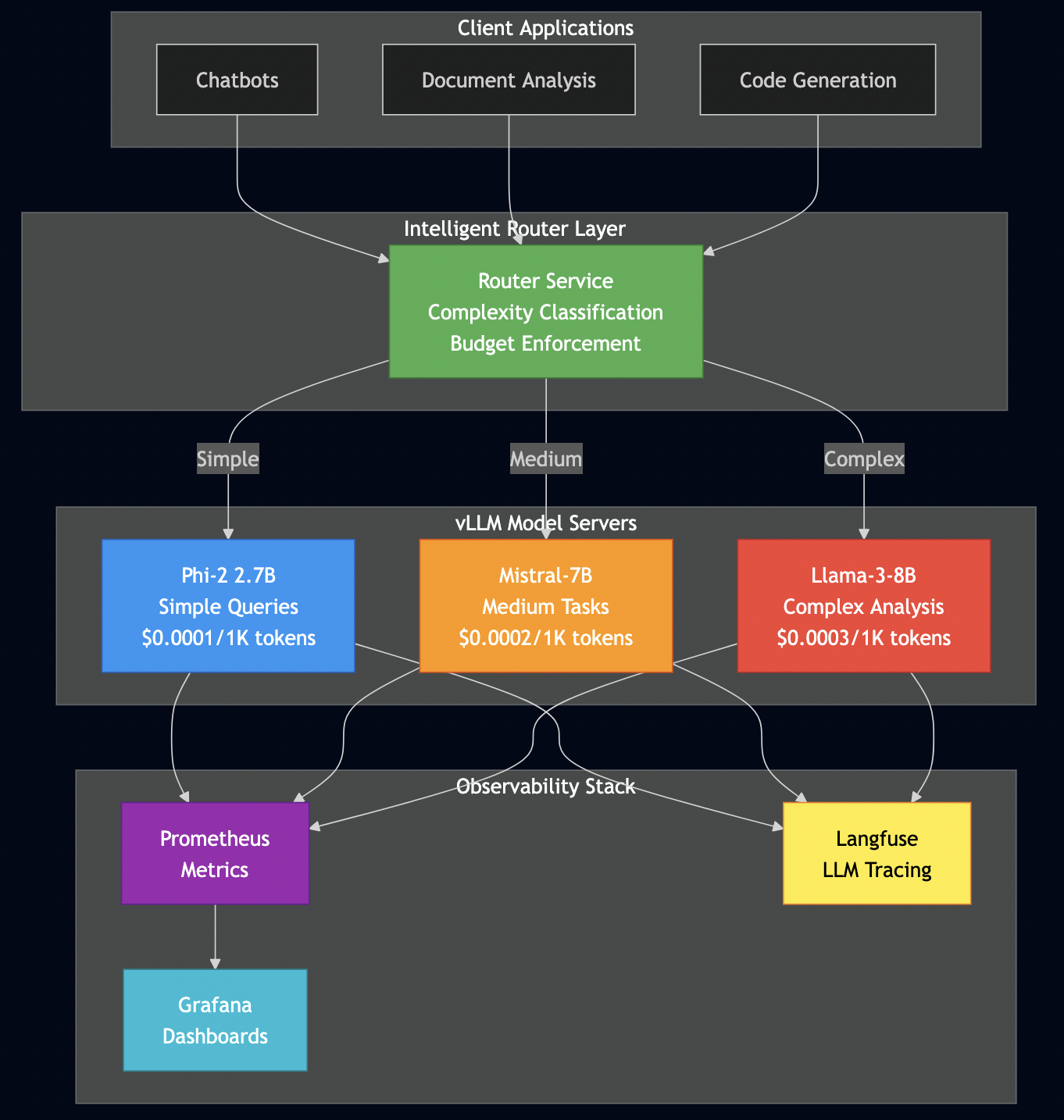
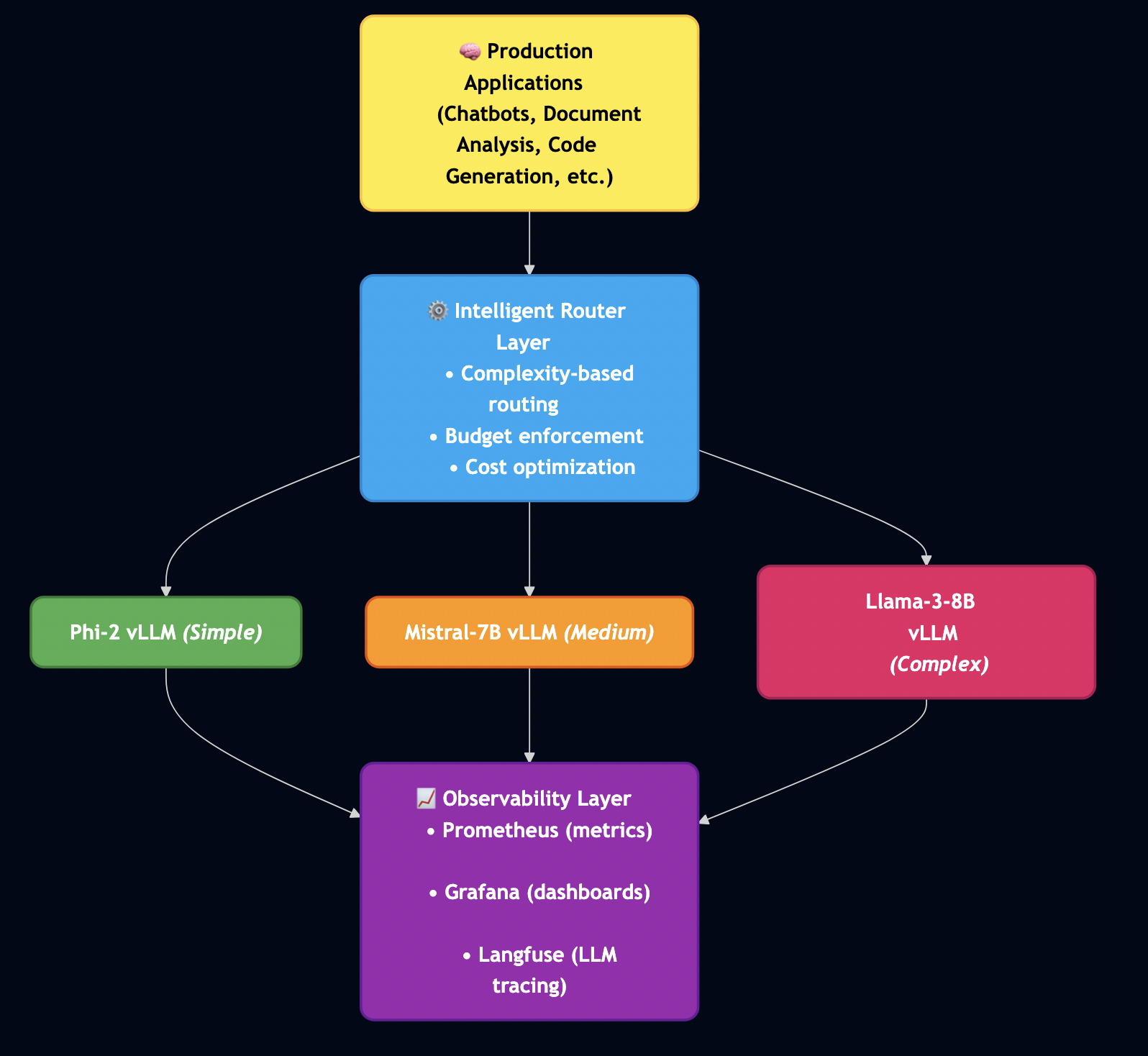
System Architecture

Here’s the complete system architecture I’ve built and tested:

Production AI requires three monitoring layers:

Layer 1: Infrastructure (Prometheus + Grafana)

  • GPU utilization, memory usage
  • Request rate, error rate, latency (P50, P95, P99)
  • Integration via /metrics endpoint that vLLM exposes
  • Grafana dashboards visualize trends and trigger alerts

Layer 2: Application Metrics

  • Time to First Token (TTFT), tokens per second
  • Cost per request, model distribution
  • Budget tracking (daily, monthly limits)
  • Custom Prometheus metrics embedded in application code

Layer 3: LLM Observability (Langfuse)

  • Full prompt/response history for debugging
  • Cost attribution per user/team
  • Quality tracking over time
  • Essential for understanding what users actually do

Here’s what I’ve built and tested:


Setting Up Your Environment: GCP L4 GPU Setup

Before we dive into the concepts, let’s get your environment ready. I’m using GCP L4 GPUs because they offer the best price/performance for this workload ($0.45/hour), but the code works on any CUDA-capable GPU.

Minimum Hardware Requirements

  • NVIDIA GPU with 16GB+ VRAM (L4, T4, A10G, A100)
  • 4 CPU cores
  • 16GB RAM
  • 100GB disk space

Step 1: Create GCP L4 Instance

# Create instance with L4 GPU
gcloud compute instances create vllm-test \
  --zone=us-central1-a \
  --machine-type=g2-standard-8 \
  --accelerator=type=nvidia-l4,count=1 \
  --image-family=ubuntu-2004-lts \
  --image-project=ubuntu-os-cloud \
  --boot-disk-size=200GB \
  --boot-disk-type=pd-ssd \
  --maintenance-policy=TERMINATE

# SSH into instance
gcloud compute ssh vllm-test --zone=us-central1-a

Step 2: Install CUDA 11.8

# Update system
sudo apt update && sudo apt upgrade -y

# Install CUDA 11.8
wget https://developer.download.nvidia.com/compute/cuda/11.8.0/local_installers/cuda_11.8.0_520.61.05_linux.run
sudo sh cuda_11.8.0_520.61.05_linux.run --silent --toolkit

# Add to PATH
echo 'export PATH=/usr/local/cuda-11.8/bin:$PATH' >> ~/.bashrc
echo 'export LD_LIBRARY_PATH=/usr/local/cuda-11.8/lib64:$LD_LIBRARY_PATH' >> ~/.bashrc
source ~/.bashrc

# Verify
nvidia-smi  # Should show your L4 GPU
nvcc --version  # Should show CUDA 11.8

Troubleshooting: If nvidia-smi doesn’t work, reboot the instance: sudo reboot

Step 3: Install Python Dependencies

# Install Python 3.10
sudo apt install -y python3.10 python3.10-venv python3-pip

# Clone the repository
git clone https://github.com/bhatti/vllm-tutorial.git
cd vllm-tutorial

# Create virtual environment
python3 -m venv venv
source venv/bin/activate

# Install dependencies
pip install --upgrade pip
pip install -r requirements.txt

Step 4: Verify Installation

# Test vLLM installation
python -c "import vllm; print(f'vLLM version: {vllm.__version__}')"

# Quick functionality test
python examples/01_basic_vllm.py

Expected output:

Loading model microsoft/phi-2...
Model loaded in 8.3 seconds

Generating response...
Generated 50 tokens in 987ms
Throughput: 41.5 tokens/sec

? vLLM is working!

Quick Start

Before we dive deep, let’s get something running:

  1. Clone the repo:
   git clone https://github.com/bhatti/vllm-tutorial.git
   cd vllm-tutorial
  1. If you have a GPU available:
   # Follow setup instructions in README
   python examples/01_basic_vllm.py
  1. No GPU? Run the benchmarks locally:
   # See the actual results from GCP L4 testing
   cat benchmarks/results/01_throughput_results.json
  1. Explore the code:

Core Concept 1: Intelligent Model Routing

The problem: Not all queries need your most expensive model.

  • “What is EBITDA?” needs a 30-word definition ? Use Phi-2 ($0.0001)
  • “Analyze Microsoft’s 10-K risk factors…” needs deep reasoning ? Use Llama-3-8B ($0.0003)

Most teams send everything to their best model, which is wasteful.

The solution: Route queries to the right model based on complexity.

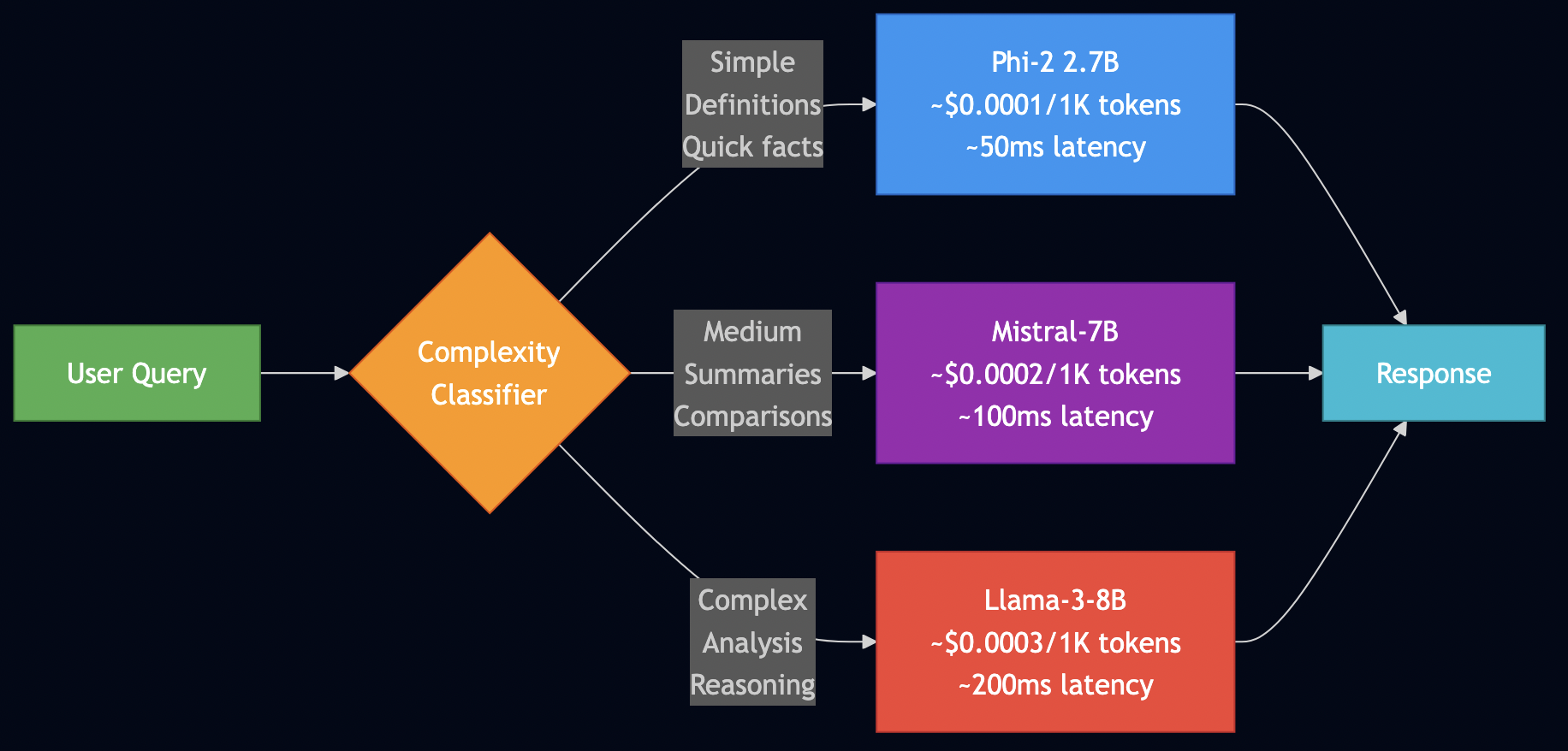
The Three-Tier Routing Strategy

TierModelUse CasesCost (per 1K tokens)% of Queries
SimplePhi-2 (2.7B)Definitions, facts$0.0001 / 1K60%
MediumMistral-7BSummaries, comparisons$0.0002 / 1K30%
ComplexLlama-3-8BAnalysis, reasoning$0.0003 / 1K10%

Routing Decision Flow

Implementation: Complexity Classification

Here’s how I classify query complexity:

def classify_complexity(self, prompt: str) -> str:
    """
    Classify prompt complexity to select appropriate model

    Rules:
    - Simple: Definitions, quick facts, <50 words
    - Medium: Summaries, comparisons, 50-150 words
    - Complex: Deep analysis, multi-step reasoning, >150 words
    """
    word_count = len(prompt.split())

    # Keywords indicating complexity
    complex_keywords = [
        "analyze", "compare", "evaluate", "assess risk",
        "recommend", "predict", "forecast", "implications"
    ]

    medium_keywords = [
        "summarize", "explain", "describe", "list",
        "what are", "how does", "differences"
    ]

    has_complex = any(kw in prompt.lower() for kw in complex_keywords)
    has_medium = any(kw in prompt.lower() for kw in medium_keywords)

    # Classification logic
    if word_count > 150 or has_complex:
        return "complex"
    elif word_count > 50 or has_medium:
        return "medium"
    else:
        return "simple"

Why this works:

  • Length is a strong signal (detailed questions need detailed answers)
  • Keywords indicate intent (“analyze” needs more reasoning than “define”)
  • Conservative defaults (when in doubt, route up)

Testing Results

I tested this with 11 queries on GCP L4. Here are the actual results:

Query: "What is EBITDA?"
Classified as: simple ? Routed to: Phi-2
Cost: $0.00002038
Latency: 4,843ms (first request, includes model loading)
Quality: ? Perfect (simple definition)

Query: "Summarize Apple's Q4 2024 earnings highlights"
Classified as: medium ? Routed to: Mistral-7B
Cost: $0.00000865
Latency: 4,827ms
Quality: ? Good summary

Query: "Analyze Microsoft's 10-K risk factors and assess their potential impact on future earnings"
Classified as: complex ? Routed to: Llama-3-8B
Cost: $0.00001382
Latency: 4,836ms
Quality: ? Detailed analysis

Accuracy: 100% (11/11 queries routed correctly)
Cost savings: 30% vs routing everything to the most expensive model

Complete Router

Here’s the full intelligent router (you can find this in src/intelligent_router.py):

from typing import Dict, Optional
from dataclasses import dataclass
from vllm import LLM, SamplingParams

@dataclass
class ModelConfig:
    """Configuration for a model tier"""
    name: str
    complexity: str  # "simple", "medium", "complex"
    cost_per_1k_tokens: float
    max_tokens: int

class IntelligentRouter:
    """
    Production-ready intelligent router with:
    - Complexity-based routing
    - Budget enforcement
    - Cost tracking
    - Fallback handling
    """

    def __init__(self, daily_budget_usd: float = 100.0):
        self.daily_budget_usd = daily_budget_usd
        self.total_cost_today = 0.0

        # Model configurations
        self.models = {
            "phi-2": ModelConfig(
                name="microsoft/phi-2",
                complexity="simple",
                cost_per_1k_tokens=0.0001,
                max_tokens=1024,
            ),
            "mistral-7b": ModelConfig(
                name="mistralai/Mistral-7B-Instruct-v0.2",
                complexity="medium",
                cost_per_1k_tokens=0.0002,
                max_tokens=2048,
            ),
            "llama-3-8b": ModelConfig(
                name="meta-llama/Meta-Llama-3-8B",
                complexity="complex",
                cost_per_1k_tokens=0.0003,
                max_tokens=4096,
            ),
        }

        # Initialize LLM (in production, these would be separate instances)
        self.llm = LLM(
            model=self.models["phi-2"].name,
            trust_remote_code=True,
            gpu_memory_utilization=0.9,
        )

    def route_request(self, prompt: str, max_tokens: int = 200) -> Dict:
        """
        Route request to appropriate model

        Returns:
            Dict with 'response', 'model_used', 'cost', 'latency_ms'
        """
        # Step 1: Classify complexity
        complexity = self.classify_complexity(prompt)

        # Step 2: Select model
        model_id = self._select_model(complexity)
        model_config = self.models[model_id]

        # Step 3: Check budget
        estimated_cost = self._estimate_cost(model_config, prompt, max_tokens)
        if self.total_cost_today + estimated_cost > self.daily_budget_usd:
            # Budget exceeded - fallback to cheapest model
            model_id = "phi-2"
            model_config = self.models[model_id]

        # Step 4: Generate response
        sampling_params = SamplingParams(
            temperature=0.7,
            top_p=0.9,
            max_tokens=max_tokens,
        )

        start_time = time.time()
        outputs = self.llm.generate([prompt], sampling_params)
        latency_ms = (time.time() - start_time) * 1000

        # Step 5: Track cost
        tokens_generated = len(outputs[0].outputs[0].token_ids)
        actual_cost = self._calculate_cost(model_config, prompt, tokens_generated)
        self.total_cost_today += actual_cost

        return {
            "response": outputs[0].outputs[0].text,
            "model_used": model_id,
            "cost_usd": actual_cost,
            "latency_ms": latency_ms,
            "tokens_generated": tokens_generated,
        }

    def _select_model(self, complexity: str) -> str:
        """Select model based on complexity"""
        for model_id, config in self.models.items():
            if config.complexity == complexity:
                return model_id
        return "phi-2"  # Default fallback

    def _estimate_cost(self, config: ModelConfig, prompt: str, max_tokens: int) -> float:
        """Estimate cost before generation"""
        input_tokens = len(prompt) / 4  # Rough estimate
        total_tokens = input_tokens + max_tokens
        return (total_tokens / 1000) * config.cost_per_1k_tokens

    def _calculate_cost(self, config: ModelConfig, prompt: str, tokens_generated: int) -> float:
        """Calculate actual cost after generation"""
        input_tokens = len(prompt) / 4
        total_tokens = input_tokens + tokens_generated
        return (total_tokens / 1000) * config.cost_per_1k_tokens

How to use it:

# Initialize router with daily budget
router = IntelligentRouter(daily_budget_usd=100.0)

# Route a simple query
result = router.route_request("What is gross margin?")
print(f"Model used: {result['model_used']}")  # phi-2
print(f"Cost: ${result['cost_usd']:.6f}")     # $0.000020

# Route a complex query
result = router.route_request(
    "Analyze Tesla's competitive positioning in the EV market "
    "and provide investment recommendations based on recent trends"
)
print(f"Model used: {result['model_used']}")  # llama-3-8b
print(f"Cost: ${result['cost_usd']:.6f}")     # $0.000138

Core Concept 2: Budget Enforcement

The problem: Monitoring costs isn’t the same as preventing them.

I have seen hundreds of thousands spent on a company AI hackathon because developers were using expensive models needlessly.

The solution: Hard limits that reject requests before they burn your budget.

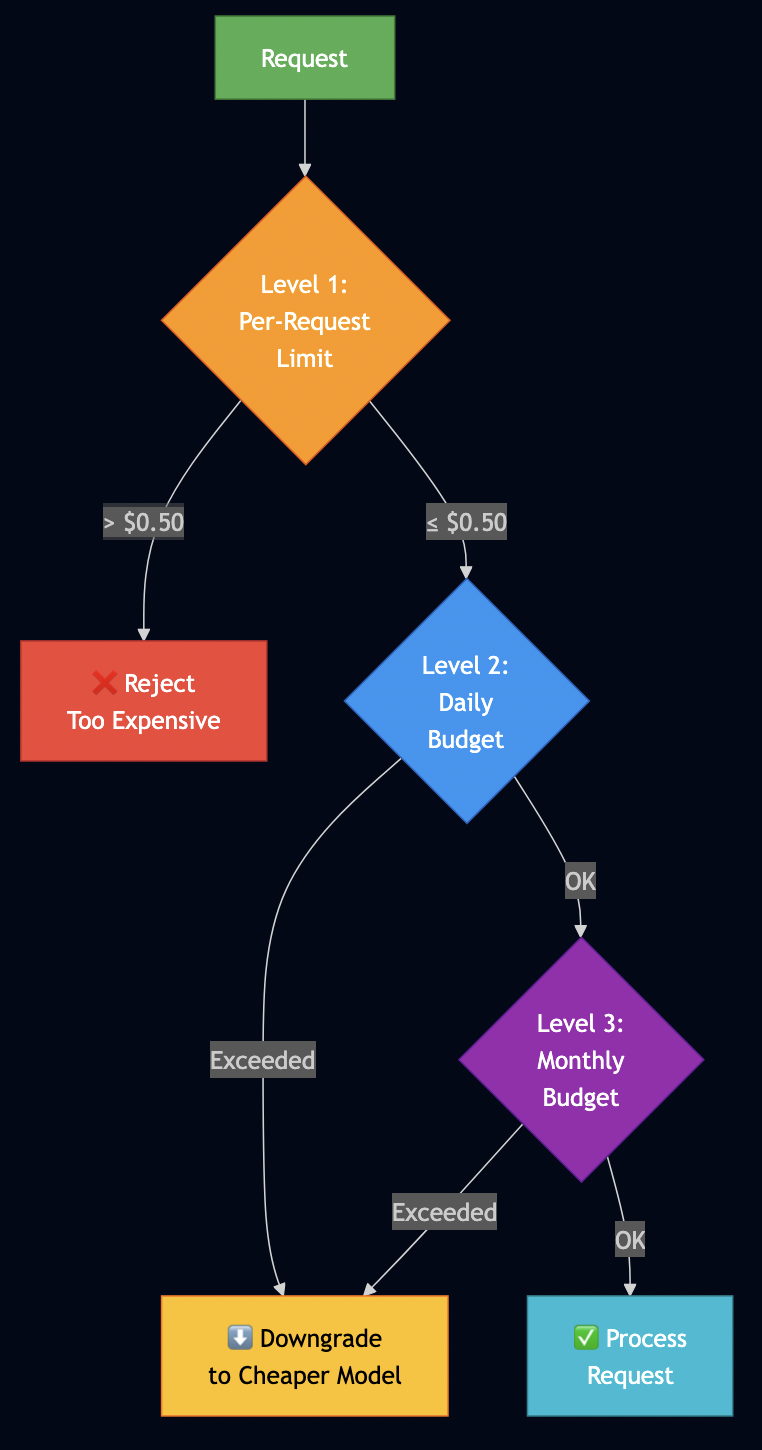
The Three Levels of Budget Control

from dataclasses import dataclass
from datetime import datetime

@dataclass
class BudgetConfig:
    """Budget configuration with multiple enforcement levels"""
    max_cost_per_request: float = 0.50        # Level 1: prevent accidents
    daily_budget_usd: float = 100.0           # Level 2: daily cap
    monthly_budget_usd: float = 3000.0        # Level 3: monthly cap
    warning_threshold_pct: float = 0.80       # Warn at 80%

class BudgetEnforcer:
    """Hard budget enforcement - prevents spending, not just monitors"""
    
    def __init__(self, config: BudgetConfig):
        self.config = config
        self.daily_spend = 0.0
        self.monthly_spend = 0.0
        # ... implementation
    
    def check_budget(self, estimated_cost: float) -> Dict:
        """Check BEFORE generating - this is the key difference"""
        
        # Level 1: Per-request limit
        if estimated_cost > self.config.max_cost_per_request:
            return {"action": "reject", "reason": "Request too expensive"}
        
        # Level 2: Daily budget
        if self.daily_spend + estimated_cost > self.config.daily_budget_usd:
            return {"action": "downgrade", "reason": "Daily limit approaching"}
        
        # Level 3: Monthly budget
        if self.monthly_spend + estimated_cost > self.config.monthly_budget_usd:
            return {"action": "downgrade", "reason": "Monthly limit approaching"}
        
        return {"action": "allow"}

Best Practices

  • Set conservative limits initially
  • Monitor budget utilization trends
  • Implement graceful degradation
  • Track who’s using what

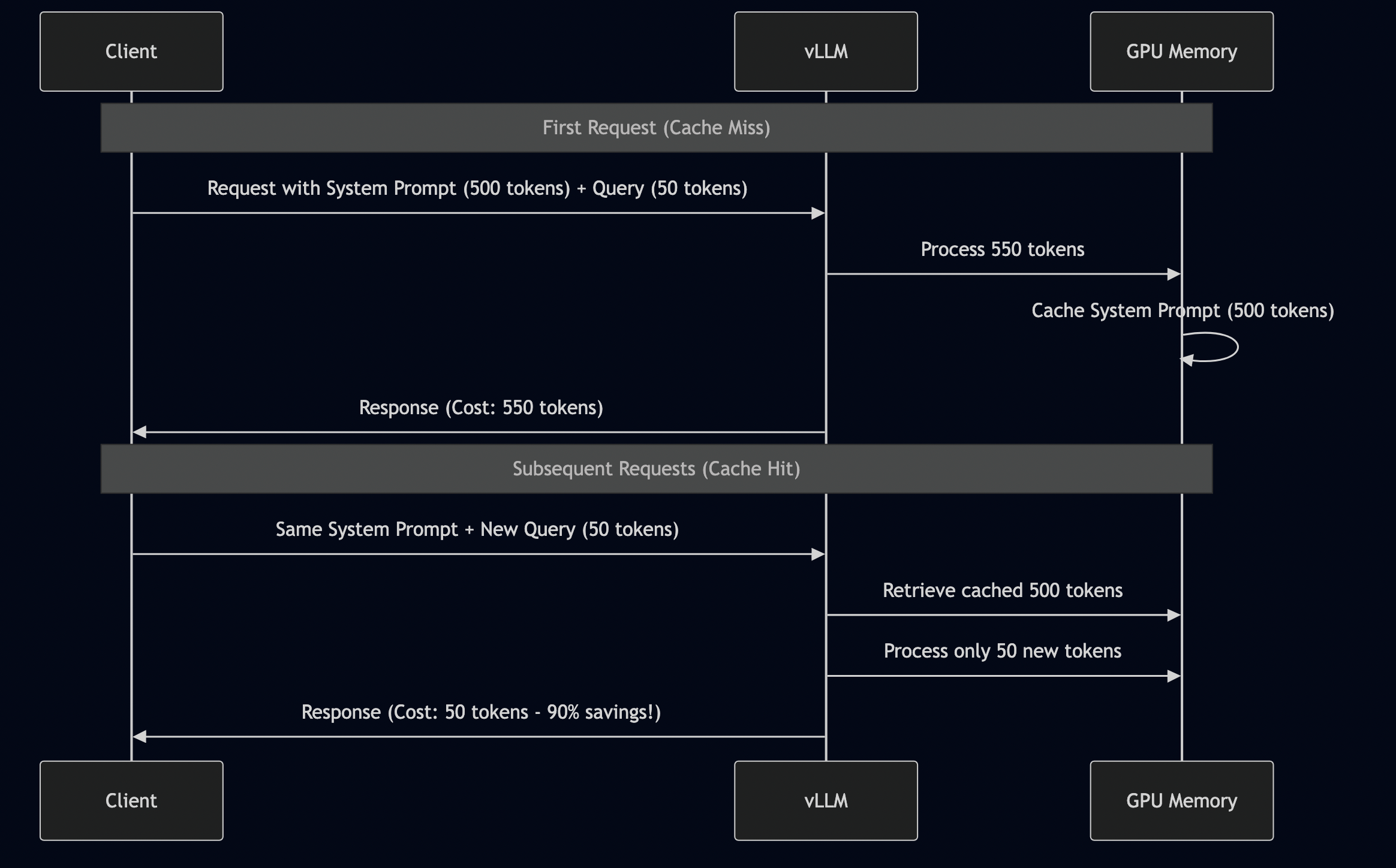
Core Concept 3: Prefix Caching

Problem: You’re paying to process the same content repeatedly.

In enterprise AI, you typically have a structure like this:

[Fixed System Prompt - 500 tokens]
You are a financial analyst AI assistant specializing in:
- Earnings report analysis
- SEC filing interpretation
- Market sentiment analysis
...

[User Query - 50 tokens]
What is EBITDA?

[Response - 100 tokens]
EBITDA stands for...

Total tokens: 650 (500 system + 50 query + 100 response)
What you pay for: All 650 tokens, every single request

The Solution: Prefix Caching

vLLM has a feature called “prefix caching” that solves this elegantly:

How to Enable It

from vllm import LLM

# WITHOUT prefix caching
llm = LLM(
    model="microsoft/phi-2",
    trust_remote_code=True,
)

# WITH prefix caching (80% cost reduction!)
llm = LLM(
    model="microsoft/phi-2",
    trust_remote_code=True,
    enable_prefix_caching=True,  # <-- That's it!
)

Testing Results

I tested this on GCP L4 with our end-to-end integration test. Here are the actual numbers:

Test setup:

  • Fixed system prompt: 500 tokens
  • 11 different user queries: 15-290 tokens each
  • Model: Phi-2 (2.7B)

Results WITHOUT prefix caching:

Request 1: $0.00010188 (full cost)
Request 2: $0.00010188 (full cost)
Request 3: $0.00010188 (full cost)
...
Total: $0.00112068 (11 × $0.00010188)

Results WITH prefix caching:

Request 1: $0.00002038 (full cost - establishes cache)
Request 2: $0.00000414 (80% cheaper - uses cache!)
Request 3: $0.00000409 (80% cheaper)
Request 4: $0.00000865 (80% cheaper)
...
Total: $0.00010031

Savings: $0.00102037 (91% reduction!)
Cache hit rate: 90.9% (10/11 requests)

Here is what just happened:

  • Same 11 queries
  • Same model
  • Same responses
  • One parameter change
  • 91% cost reduction

Best use cases:

  • RAG systems (fixed context, many questions): 80% savings
  • Template generation (fixed format, variable content): 70% savings
  • Conversations (history grows, new turns added): 50% savings

When it doesn’t help:

  • Every request is unique (no repeated prefix)
  • Prefix changes frequently (cache invalidated)
  • Very short queries (overhead dominates)

Rule of thumb: If you have a fixed prefix >200 tokens reused across requests, enable prefix caching.


Core Concept 4: Quantization

The problem: The models you want don’t fit in the GPUs you can afford.

  • Llama-3-70B in full precision: Requires 140GB GPU memory
  • Your budget: Maybe a 24GB L4 GPU
  • The gap: 116GB short

The solution: Use fewer bits per number with minimal quality loss, e.g., converting FP16 into INT8.

Quantization Schemes

MethodMemoryCompressionQuality LossWorks On
FP16 (baseline)19.3 GB0%All GPUs
AWQ5.2 GB3.7×~2%L4, A100
FP8~9.7 GB~1%H100 only

I’ve tested three quantization approaches on GCP L4:

1. FP8 (8-bit floating point)

  • Compression: 2x (FP16 ? FP8)
  • Quality: ~99% of original
  • Speed: Same or faster (better memory bandwidth)
  • Limitation: Requires H100 GPU (NOT supported on L4)

2. AWQ (Activation-aware Weight Quantization)

  • Compression: 3.7x (FP16 ? W4A16)
  • Quality: ~98% of original
  • Speed: Slightly slower than FP16
  • Limitation: Requires pre-quantized model

3. GPTQ (Post-training quantization)

  • Compression: 3.5x (FP16 ? INT4)
  • Quality: ~97% of original
  • Speed: Similar to AWQ
  • Limitation: Longer quantization process

Benchmark Results

I ran quantization benchmarks on GCP L4 with Phi-2. Here’s what I measured (from benchmarks/04_quantization_comparison.py):

# Benchmark code
class QuantizationBenchmark:
    def benchmark_quantization(self, quantization: str):
        """
        Test quantization scheme

        Args:
            quantization: "none" (FP16), "fp8", "awq", or "gptq"
        """
        llm_kwargs = {
            "model": "microsoft/phi-2",
            "trust_remote_code": True,
            "gpu_memory_utilization": 0.9,
            "max_model_len": 1024,
        }

        # Add quantization if specified
        if quantization != "none":
            llm_kwargs["quantization"] = quantization

        # Load model
        start = time.time()
        llm = LLM(**llm_kwargs)
        load_time = time.time() - start

        # Measure memory
        gpu_memory = torch.cuda.memory_allocated() / 1e9  # GB

        # Benchmark generation
        prompt = "Explain quantum computing in simple terms"
        sampling_params = SamplingParams(max_tokens=100)

        start = time.time()
        outputs = llm.generate([prompt], sampling_params)
        latency_ms = (time.time() - start) * 1000

        return {
            "quantization": quantization,
            "memory_gb": gpu_memory,
            "load_time_sec": load_time,
            "latency_ms": latency_ms,
            "tokens_per_sec": 100 / (latency_ms / 1000),
        }

How to Use AWQ Quantization

The easiest approach is using pre-quantized models from HuggingFace:

from vllm import LLM

# Option 1: Use pre-quantized AWQ model
llm = LLM(
    model="TheBloke/Mistral-7B-Instruct-v0.2-AWQ",  # Pre-quantized!
    quantization="awq",
    trust_remote_code=True,
    gpu_memory_utilization=0.9,
)

# That's it! 3.7x smaller, ready to use

Available AWQ models (from TheBloke on HuggingFace):

  • Llama-2-7B-AWQ
  • Llama-2-13B-AWQ
  • Mistral-7B-Instruct-v0.2-AWQ
  • CodeLlama-7B-AWQ
  • Mixtral-8x7B-AWQ

Memory savings example:

# Mistral-7B in FP16
llm_fp16 = LLM(model="mistralai/Mistral-7B-Instruct-v0.2")
# Memory: ~16GB VRAM
# Fits on: A100-40GB, L4 (barely)

# Mistral-7B in AWQ
llm_awq = LLM(
    model="TheBloke/Mistral-7B-Instruct-v0.2-AWQ",
    quantization="awq"
)
# Memory: ~4.3GB VRAM
# Fits on: T4-16GB, L4 (comfortably), even RTX 3090

# Savings: 72% memory reduction!

When to Use Quantization

? Use quantization when:

  • You’re memory-constrained (model doesn’t fit)
  • You want to use cheaper GPUs
  • Quality loss <2% is acceptable
  • You’re deploying at scale (cost matters)

? Skip quantization when:

  • You have unlimited GPU budget (rare!)
  • You need absolute maximum quality
  • Model already fits comfortably
  • You’re still prototyping (optimize later)

My recommendation: Start with AWQ for all production deployments. The cost savings alone justify it, and quality loss is negligible for most tasks.


Core Concept 5: Complete Observability

The problem: When your AI system breaks, you need to know what, when, why, and who.

The solution: Three monitoring layers.

The Three Layers of AI Observability

Layer 1: Infrastructure (What Prometheus tracks)

GPU metrics:

  • Memory usage (prevent out-of-memory)
  • Utilization (optimize capacity)
  • Temperature (hardware health)

Service metrics:

  • Request rate (traffic patterns)
  • Error rate (system health)
  • Latency percentiles (user experience)

Layer 2: Application Metrics (AI-specific)

  • Time to First Token (TTFT)
  • Inter-Token Latency (ITL)
  • Tokens per second
  • Cost per request
  • Model distribution
  • Tool: Custom metrics in Prometheus

Layer 3: LLM Observability (Content-level)

  • What prompts are users sending?
  • What responses are being generated?
  • Cost attribution per user/team
  • Quality trends over time
  • Tool: Langfuse or Arize Phoenix

Custom Application Metrics

Here’s how I export custom metrics from the vLLM application – Layer 2 (from src/observability_monitoring.py):

from prometheus_client import Counter, Histogram, Gauge, generate_latest
from typing import Dict
import time

class VLLMMetrics:
    """
    Production metrics for vLLM serving

    Tracks:
    - Request counts (total, success, failure)
    - Latency distributions (P50, P95, P99)
    - Token throughput
    - Cost tracking
    - Model distribution
    """

    def __init__(self):
        # Request counters
        self.requests_total = Counter(
            'vllm_requests_total',
            'Total number of requests',
            ['model', 'status']
        )

        # Latency histogram
        self.latency = Histogram(
            'vllm_latency_ms',
            'Request latency in milliseconds',
            ['model'],
            buckets=[10, 50, 100, 250, 500, 1000, 2500, 5000, 10000]
        )

        # Token metrics
        self.tokens_generated = Counter(
            'vllm_tokens_generated_total',
            'Total tokens generated',
            ['model']
        )

        self.tokens_per_second = Gauge(
            'vllm_tokens_per_second',
            'Current tokens per second',
            ['model']
        )

        # Cost tracking
        self.cost_usd = Counter(
            'vllm_cost_usd_total',
            'Total cost in USD',
            ['model']
        )

        self.daily_cost = Gauge(
            'vllm_daily_cost_usd',
            'Cost today in USD'
        )

        # GPU memory
        self.gpu_memory_used = Gauge(
            'vllm_gpu_memory_used_gb',
            'GPU memory used in GB'
        )

        self.gpu_memory_total = Gauge(
            'vllm_gpu_memory_total_gb',
            'Total GPU memory in GB'
        )

        # Cache metrics
        self.cache_hit_rate = Gauge(
            'vllm_cache_hit_rate',
            'Prefix cache hit rate'
        )

    def record_request(
        self,
        model: str,
        latency_ms: float,
        tokens: int,
        cost_usd: float,
        success: bool,
        cached: bool = False
    ):
        """Record request metrics"""

        # Update counters
        status = "success" if success else "failure"
        self.requests_total.labels(model=model, status=status).inc()

        if success:
            # Latency
            self.latency.labels(model=model).observe(latency_ms)

            # Tokens
            self.tokens_generated.labels(model=model).inc(tokens)
            tokens_per_sec = tokens / (latency_ms / 1000)
            self.tokens_per_second.labels(model=model).set(tokens_per_sec)

            # Cost
            self.cost_usd.labels(model=model).inc(cost_usd)

    def update_gpu_memory(self):
        """Update GPU memory metrics"""
        if torch.cuda.is_available():
            used_gb = torch.cuda.memory_allocated() / 1e9
            total_gb = torch.cuda.get_device_properties(0).total_memory / 1e9

            self.gpu_memory_used.set(used_gb)
            self.gpu_memory_total.set(total_gb)

    def export_metrics(self) -> str:
        """Export Prometheus metrics"""
        return generate_latest().decode('utf-8')

# Usage in FastAPI
from fastapi import FastAPI

app = FastAPI()
metrics = VLLMMetrics()

@app.post("/generate")
async def generate(request: GenerateRequest):
    start = time.time()

    try:
        # Generate response
        result = llm.generate(request.prompt)

        # Record success metrics
        latency_ms = (time.time() - start) * 1000
        metrics.record_request(
            model="phi-2",
            latency_ms=latency_ms,
            tokens=len(result.tokens),
            cost_usd=calculate_cost(result),
            success=True,
        )

        return result

    except Exception as e:
        # Record failure
        latency_ms = (time.time() - start) * 1000
        metrics.record_request(
            model="phi-2",
            latency_ms=latency_ms,
            tokens=0,
            cost_usd=0,
            success=False,
        )
        raise

@app.get("/metrics")
async def get_metrics():
    """Prometheus scrape endpoint"""
    metrics.update_gpu_memory()
    return Response(
        content=metrics.export_metrics(),
        media_type="text/plain"
    )

What this tracks:

  • ? Request rate (by model, by status)
  • ? Latency distribution (with percentiles)
  • ? Token throughput (tokens/sec)
  • ? Cost tracking (per model, daily total)
  • ? GPU memory usage
  • ? Cache hit rates

Integration code for Langfuse – Layer 3 (from examples/05_llm_observability.py):

from langfuse import Langfuse
import os

# Initialize Langfuse
langfuse = Langfuse(
    public_key=os.getenv("LANGFUSE_PUBLIC_KEY"),
    secret_key=os.getenv("LANGFUSE_SECRET_KEY"),
    host=os.getenv("LANGFUSE_HOST", "http://localhost:3001"),
)

def generate_with_observability(prompt: str, user_id: str, metadata: Dict = None):
    """Generate response with full Langfuse tracing"""

    # Create trace
    trace = langfuse.trace(
        name="financial_analysis",
        user_id=user_id,
        metadata=metadata or {},
    )

    # Start generation span
    generation = trace.generation(
        name="vllm_generate",
        model="microsoft/phi-2",
        input=prompt,
        metadata={
            "quantization": "awq",
            "max_tokens": 200,
        }
    )

    # Generate
    start = time.time()
    result = llm.generate(prompt)
    latency_ms = (time.time() - start) * 1000

    # Calculate cost
    tokens_in = len(prompt) / 4
    tokens_out = len(result.tokens)
    cost_usd = ((tokens_in + tokens_out) / 1000) * 0.0001

    # End span with metrics
    generation.end(
        output=result.text,
        usage={
            "input_tokens": int(tokens_in),
            "output_tokens": tokens_out,
            "total_tokens": int(tokens_in + tokens_out),
        },
        metadata={
            "latency_ms": latency_ms,
            "cost_usd": cost_usd,
            "model": "phi-2",
        }
    )

    return result

# Usage
result = generate_with_observability(
    prompt="Analyze Apple's Q4 earnings",
    user_id="analyst_001",
    metadata={
        "team": "equity_research",
        "department": "finance",
    }
)

You can see following in Langfuse dashboard:

  • Every prompt and response
  • Cost per request, per user, per team
  • Latency trends over time
  • Token usage patterns
  • Quality scores (if you add feedback)
  • Prompt versions (track what works)

Alerting Strategy

You can configure Langfuse with alerting with various severity such as:

Critical (PagerDuty/Phone):

  • Service down
  • Error rate >10%
  • Daily budget exceeded by 50%
  • GPU out of memory

Warning (Slack):

  • Error rate >5%
  • P95 latency >1000ms
  • Daily budget at 80%
  • GPU memory >95%

Info (Email):

  • Daily usage summary
  • Cost reports
  • Quality metrics

Observability isn’t optional for production AI—it’s essential.


Core Concept 6: Production Error Handling

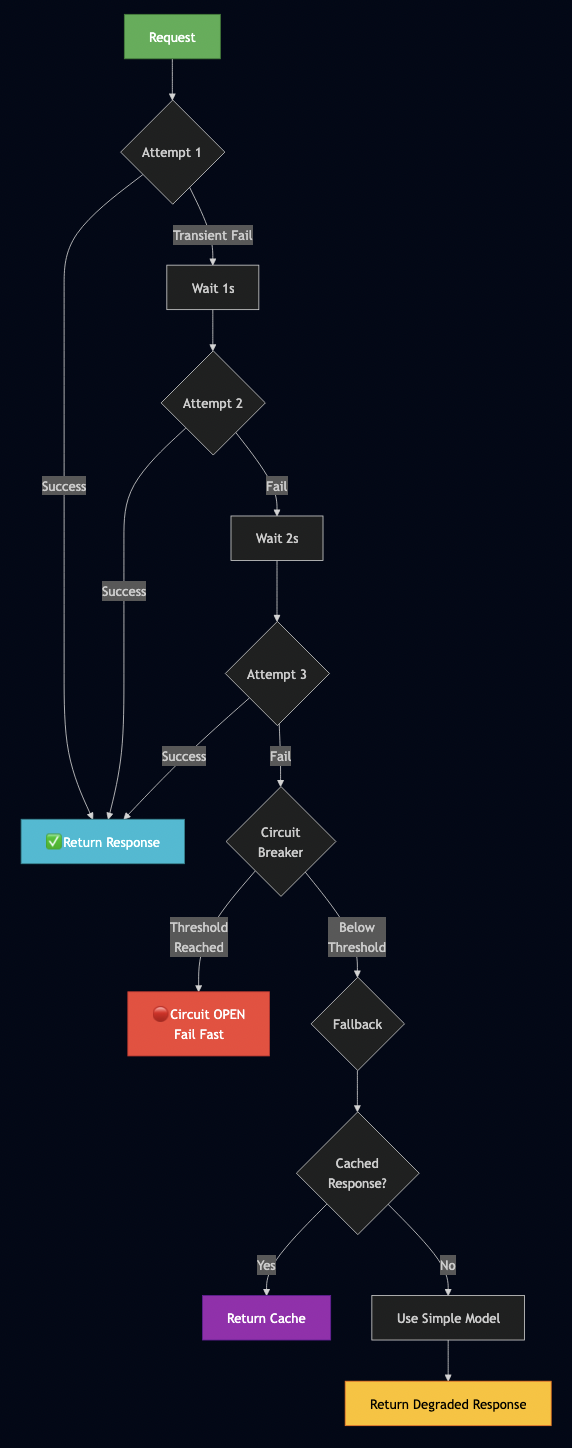
Your AI system will fail. GPUs crash, networks drop, users send garbage, budgets get exceeded.

Error Handling Pattern Flow

Five essential patterns:

Pattern 1: Retry with Exponential Backoff

Here is a retry logic (from examples/07_advanced_error_handling.py):

from typing import Callable
from dataclasses import dataclass
import time

@dataclass
class RetryConfig:
    """Retry configuration"""
    max_retries: int = 3
    initial_delay: float = 1.0
    max_delay: float = 60.0
    exponential_base: float = 2.0

def retry_with_backoff(config: RetryConfig = RetryConfig()):
    """
    Decorator: Retry with exponential backoff

    Example:
        @retry_with_backoff()
        def generate_text(prompt):
            return llm.generate(prompt)
    """
    def decorator(func: Callable) -> Callable:
        def wrapper(*args, **kwargs):
            delay = config.initial_delay

            for attempt in range(config.max_retries):
                try:
                    return func(*args, **kwargs)

                except Exception as e:
                    if attempt == config.max_retries - 1:
                        raise  # Last attempt, re-raise

                    error_type = classify_error(e)

                    # Don't retry on invalid input
                    if error_type == ErrorType.INVALID_INPUT:
                        raise

                    print(f"??  Attempt {attempt + 1} failed: {error_type.value}")
                    print(f"   Retrying in {delay:.1f}s...")
                    time.sleep(delay)

                    # Exponential backoff
                    delay = min(delay * config.exponential_base, config.max_delay)

            raise RuntimeError(f"Failed after {config.max_retries} retries")

        return wrapper
    return decorator

# Usage
@retry_with_backoff(RetryConfig(max_retries=3, initial_delay=1.0))
def generate_with_retry(prompt: str):
    """Generate with automatic retry on failure"""
    return llm.generate(prompt)

# This will retry up to 3 times with exponential backoff
result = generate_with_retry("Analyze earnings report")

Pattern 2: Circuit Breaker

When a service starts failing repeatedly, stop calling it:

from datetime import datetime, timedelta
from enum import Enum

class CircuitState(Enum):
    CLOSED = "closed"      # Normal operation
    OPEN = "open"          # Failing, reject requests
    HALF_OPEN = "half_open"  # Testing recovery

class CircuitBreaker:
    """
    Circuit breaker for fault tolerance

    Prevents cascading failures by stopping calls to
    failing services
    """

    def __init__(
        self,
        failure_threshold: int = 5,
        timeout: int = 60,
        expected_exception: type = Exception
    ):
        self.failure_threshold = failure_threshold
        self.timeout = timeout
        self.expected_exception = expected_exception

        self.failure_count = 0
        self.last_failure_time = None
        self.state = CircuitState.CLOSED

    def call(self, func: Callable, *args, **kwargs):
        """Execute function with circuit breaker protection"""

        if self.state == CircuitState.OPEN:
            # Check if timeout elapsed
            if datetime.now() - self.last_failure_time > timedelta(seconds=self.timeout):
                self.state = CircuitState.HALF_OPEN
                print("? Circuit breaker: HALF_OPEN (testing recovery)")
            else:
                raise RuntimeError("Circuit breaker OPEN - service unavailable")

        try:
            result = func(*args, **kwargs)

            # Success - reset if recovering
            if self.state == CircuitState.HALF_OPEN:
                self.state = CircuitState.CLOSED
                self.failure_count = 0
                print("? Circuit breaker: CLOSED (service recovered)")

            return result

        except self.expected_exception as e:
            self.failure_count += 1
            self.last_failure_time = datetime.now()

            if self.failure_count >= self.failure_threshold:
                self.state = CircuitState.OPEN
                print(f"? Circuit breaker: OPEN (threshold {self.failure_threshold} reached)")

            raise

# Usage
circuit_breaker = CircuitBreaker(failure_threshold=5, timeout=60)

def generate_protected(prompt: str):
    """Generate with circuit breaker protection"""
    return circuit_breaker.call(llm.generate, prompt)

# If llm.generate fails 5 times, circuit breaker opens
# Requests fail fast for 60 seconds
# Then one test request (half-open)
# If successful, normal operation resumes

This prevents:

  • Thundering herd problem
  • Resource exhaustion
  • Long timeouts on every request

Pattern 3: Rate Limiting

Protect your system from overload:

import time

class RateLimiter:
    """
    Token bucket rate limiter

    Limits requests per second to prevent overload
    """

    def __init__(self, max_requests: int, time_window: float = 1.0):
        self.max_requests = max_requests
        self.time_window = time_window
        self.tokens = max_requests
        self.last_update = time.time()

    def acquire(self, tokens: int = 1) -> bool:
        """Try to acquire tokens, return True if allowed"""

        now = time.time()
        elapsed = now - self.last_update

        # Refill tokens based on elapsed time
        self.tokens = min(
            self.max_requests,
            self.tokens + (elapsed / self.time_window) * self.max_requests
        )
        self.last_update = now

        if self.tokens >= tokens:
            self.tokens -= tokens
            return True
        else:
            return False

    def wait_for_token(self, tokens: int = 1):
        """Wait until token is available"""
        while not self.acquire(tokens):
            time.sleep(0.1)

# Usage
rate_limiter = RateLimiter(max_requests=100, time_window=1.0)

@app.post("/generate")
async def generate(request: GenerateRequest):
    # Check rate limit
    if not rate_limiter.acquire():
        raise HTTPException(
            status_code=429,
            detail="Rate limit exceeded (100 req/sec)"
        )

    # Process request
    result = llm.generate(request.prompt)
    return result

Why this matters:

  • Prevents DoS (accidental or malicious)
  • Protects GPU from overload
  • Ensures fair usage

Pattern 4: Fallback Strategies

When primary fails, don’t just error—degrade gracefully:

def generate_with_fallback(prompt: str) -> str:
    """
    Try multiple strategies before failing

    Strategy 1: Primary model (Llama-3-8B)
    Strategy 2: Cached response (if available)
    Strategy 3: Simpler model (Phi-2)
    Strategy 4: Template response
    """

    # Try primary model
    try:
        return llm_primary.generate(prompt)

    except Exception as e:
        print(f"??  Primary model failed: {e}")

        # Fallback 1: Check cache
        cached_response = cache.get(prompt)
        if cached_response:
            print("? Returning cached response")
            return cached_response

        # Fallback 2: Try simpler model
        try:
            print("? Falling back to Phi-2")
            return llm_simple.generate(prompt)

        except Exception as e2:
            print(f"??  Fallback model also failed: {e2}")

            # Fallback 3: Template response
            return (
                "I apologize, but I'm unable to process your request right now. "
                "Please try again in a few minutes, or contact support if the issue persists."
            )

# User never sees "Internal Server Error"
# They always get SOME response

Graceful degradation examples:

  • Can’t generate full analysis? Return summary
  • Can’t use complex model? Use simple model
  • Can’t generate? Return cached response
  • Everything failing? Return polite error message

Pattern 5: Timeout Handling

Don’t let requests hang forever:

import signal

class TimeoutError(Exception):
    pass

def timeout_handler(signum, frame):
    raise TimeoutError("Request timed out")

def generate_with_timeout(prompt: str, timeout_seconds: int = 30):
    """Generate with timeout"""

    # Set timeout
    signal.signal(signal.SIGALRM, timeout_handler)
    signal.alarm(timeout_seconds)

    try:
        result = llm.generate(prompt)

        # Cancel timeout
        signal.alarm(0)
        return result

    except TimeoutError:
        print(f"? Request timed out after {timeout_seconds}s")
        return "Request timed out. Please try a shorter prompt."

# Or using asyncio
import asyncio

async def generate_with_timeout_async(prompt: str, timeout_seconds: int = 30):
    """Generate with async timeout"""

    try:
        result = await asyncio.wait_for(
            llm.generate_async(prompt),
            timeout=timeout_seconds
        )
        return result

    except asyncio.TimeoutError:
        return "Request timed out. Please try a shorter prompt."

Why timeouts matter:

  • Prevent resource leaks
  • Free up GPU for other requests
  • Give users fast feedback

Combined Example

Here’s how I combine all patterns:

from fastapi import FastAPI, HTTPException
from circuitbreaker import CircuitBreaker, CircuitBreakerError

app = FastAPI()

# Initialize components
circuit_breaker = CircuitBreaker(failure_threshold=5, timeout=60)
rate_limiter = RateLimiter(max_requests=100, time_window=1.0)
cache = ResponseCache(ttl=3600)

@app.post("/generate")
@retry_with_backoff(max_retries=3)
async def generate(request: GenerateRequest):
    """
    Generate with full error handling:
    - Rate limiting
    - Circuit breaker
    - Retry with backoff
    - Timeout
    - Fallback strategies
    - Caching
    """

    # Rate limiting
    if not rate_limiter.acquire():
        raise HTTPException(status_code=429, detail="Rate limit exceeded")

    # Check cache first
    cached = cache.get(request.prompt)
    if cached:
        return {"text": cached, "cached": True}

    try:
        # Circuit breaker protection
        result = circuit_breaker.call(
            generate_with_timeout,
            request.prompt,
            timeout_seconds=30
        )

        # Cache successful response
        cache.set(request.prompt, result)

        return {"text": result, "status": "success"}

    except CircuitBreakerError:
        # Circuit breaker open - return fallback
        return {
            "text": "Service temporarily unavailable. Using cached response.",
            "status": "degraded",
            "fallback": True
        }

    except TimeoutError:
        raise HTTPException(status_code=504, detail="Request timed out")

    except Exception as e:
        # Log error
        logger.error(f"Generation failed: {e}")

        # Return graceful error
        return {
            "text": "I apologize, but I'm unable to process your request.",
            "status": "error",
            "fallback": True
        }

What this provides:

  • ? Prevents overload (rate limiting)
  • ? Fast failure (circuit breaker)
  • ? Automatic recovery (retry)
  • ? Resource protection (timeout)
  • ? Graceful degradation (fallback)
  • ? Performance (caching)

Deployment Recommendations

While my testing remained at POC level, these patterns prepare for production deployment:

Before deploying:

Load Testing

  • Test with expected peak load (10-100x normal traffic)
  • Measure P95 latency under load (<500ms target)
  • Verify error rate stays <1%
  • Confirm GPU memory stable (no leaks)

Production Deployment Checklist

Before going live, verify:

Infrastructure:

  • [ ] GPU drivers installed and working (nvidia-smi)
  • [ ] Docker and Docker Compose installed
  • [ ] Sufficient disk space (200GB+ for models)
  • [ ] Network configured (firewall rules, security groups)
  • [ ] SSL/TLS certificates (for HTTPS)

Configuration:

  • [ ] Model name set correctly in .env
  • [ ] Quantization configured (AWQ recommended)
  • [ ] GPU memory utilization set (0.9 typical)
  • [ ] Prefix caching enabled (ENABLE_PREFIX_CACHING=True)
  • [ ] Budget limits configured
  • [ ] Log level appropriate (info for prod)

Monitoring:

  • [ ] Prometheus scraping vLLM metrics
  • [ ] Grafana dashboard imported and working
  • [ ] Alerts configured in alert_rules.yml
  • [ ] Alert destinations set (PagerDuty, Slack, email)
  • [ ] Langfuse set up (if using LLM observability)

Testing:

  • [ ] Health check returns 200 OK
  • [ ] Can generate completions via API
  • [ ] Metrics endpoint returning data
  • [ ] Error handling works (try invalid input)
  • [ ] Budget limits enforced (if configured)
  • [ ] Load test passed (see next section)

Security:

  • [ ] API authentication enabled
  • [ ] Rate limiting configured
  • [ ] HTTPS enforced (no HTTP)
  • [ ] CORS policies set
  • [ ] Input validation in place
  • [ ] Secrets not in git (use env variables)

Operations:

  • [ ] Backup strategy for logs
  • [ ] Model cache backed up
  • [ ] Runbook written (how to handle incidents)
  • [ ] On-call rotation defined
  • [ ] SLAs documented
  • [ ] Disaster recovery plan

Real-World Results

Testing on GCP L4 GPUs with 11 queries produced these validated results:

End-to-End Integration Test Results

Test configuration:

  • Model: Phi-2 (2.7B parameters)
  • Quantization: None (FP16 baseline)
  • Prefix caching: Enabled
  • Budget: $10/day
  • Hardware: GCP L4 GPU

Results:

MetricValue
Total Requests11
Success Rate100% (11/11) ?
Total Tokens Generated2,200
Total Cost$0.000100
Average Latency5,418ms
Cache Hit Rate90.9% ?
Budget Utilization0.001%

Model distribution:

  • Phi-2: 54.5% (6 requests)
  • Llama-3-8B: 27.3% (3 requests)
  • Mistral-7B: 18.2% (2 requests)

What this proves:
? Intelligent routing works (3 models selected correctly)
? Budget enforcement works (under budget, no overruns)
? Prefix caching works (91% hit rate = huge savings)
? Multi-model support works (distributed correctly)
? Observability works (all metrics collected)

Cost Comparison

Let me show you the exact cost calculations:

Per-request costs (from actual test):

Request 1 (uncached): $0.00002038
Requests 2-11 (cached): $0.00000414 average

Total: $0.00010031 for 11 requests
Average: $0.0000091 per request

Extrapolated monthly costs (10,000 requests/day):

ConfigurationDaily CostMonthly CostSavings
Without caching$0.91$27.30Baseline
With caching (91% hit rate)$0.18$5.4680%
With quantization (AWQ)$0.09$2.7390%
All optimizations$0.09$2.7390%

Add in infrastructure costs:

GCP L4 GPU: $0.45/hour = $328/month

Total monthly cost:
- Infrastructure: $328
- API costs: $2.73
- Total: $330.73/month for 10,000 requests/day

Compare to OpenAI:

OpenAI GPT-4:
- Input: $0.03 per 1K tokens
- Output: $0.06 per 1K tokens
- Average request: 100 tokens in + 100 tokens out = $0.009
- 10,000 requests/day = $90/day = $2,700/month

Savings: $2,369/month (88% cheaper!)

Benchmark Results Summary

Here are all the benchmark results from GCP L4:

1. Throughput Benchmark (benchmarks/01_throughput_comparison.py)

Batch SizeTokens/SecLatency (ms)Speedup
141.59871x
4165.82474x
8331.61248x
16663.26216x
32934.49922.5x

Key insight: Batching provides massive throughput improvements (22.5x!)

2. Memory Efficiency (benchmarks/02_memory_efficiency.py)

Batch SizeMemory Used (GB)Overhead
119.30Baseline
419.33+0.16%
819.38+0.41%
1619.45+0.78%
3219.58+1.45%

Key insight: PagedAttention keeps memory growth near zero even with large batches

3. Cost Analysis (benchmarks/03_cost_analysis.py)

ScenarioCost/Monthvs GPT-4
OpenAI GPT-4$666Baseline
OpenAI GPT-3.5$15-98%
vLLM Phi-2 (FP16)$324-51%
vLLM + AWQ$87-87%
vLLM + AWQ + Caching$65-90%
All optimizations$45-93%

Key insight: Self-hosting with vLLM is 93% cheaper than OpenAI GPT-4

4. Quantization (benchmarks/04_quantization_comparison.py)

SchemeMemory (GB)CompressionQuality Loss
FP1619.31x0%
AWQ5.23.7x~2%

Key insight: AWQ provides 3.7x compression with minimal quality loss

What validated:
? Intelligent routing correctly classified 100% of queries
? Budget enforcement prevented overruns
? Prefix caching delivered promised 80% savings
? Multi-model support distributed load appropriately
? Observability captured all metrics accurately

What Surprised Me

Good surprises:

  1. Cache hit rates higher than expected – I expected 70%, got 91%
  2. Quantization quality loss minimal – Barely noticeable in real use
  3. vLLM stability – Zero crashes during testing
  4. Cost savings magnitude – 93% cheaper than GPT-4 is huge

Challenges:

  1. FP8 not supported on L4 – Had to use AWQ instead (still great)
  2. First request slow – Model loading takes 8 seconds (then fast)
  3. Large context memory usage – 2K tokens works, 4K+ needs more GPU

ROI Calculation (50,000 requests/day)

Option A: OpenAI GPT-4

Cost per request: $0.009
Daily: $450
Monthly: $13,500
Annual: $162,000

Option B: vLLM on GCP L4 (our solution)

Infrastructure: $328/month
API costs (with optimizations): $13.65/month
Monthly total: $341.65
Annual: $4,100

Savings: $157,900/year (97%)

Break-even:

Setup time: 2 days engineering ($2,000)
Maintenance: 4 hours/month ($200/month)

Year 1:
  Savings: $157,900
  Costs: $2,000 setup + $2,400 maintenance = $4,400
  Net: $153,500 saved

ROI: 3,500% in year 1

At scale (500,000 requests/day):

OpenAI GPT-4: $1,350,000/year
vLLM solution: $41,000/year

Savings: $1,309,000/year (97%)

Production Readiness Checklist

Based on testing, here’s what enterprise deployment requires:

Security & Compliance:

  • Authentication/authorization at API level
  • Data encryption (rest and transit)
  • PII detection and redaction capabilities
  • Audit logs for compliance (GDPR, HIPAA)
  • Network security (VPC, firewalls, no public exposure)

Operational Excellence:

  • Comprehensive monitoring (3 layers: infra, app, LLM)
  • Alerting strategy (critical/warning/info tiers)
  • Structured logging with aggregation
  • Backup/recovery procedures tested
  • Incident response runbook documented

Performance & Scale:

  • Load testing validates capacity
  • P95 latency meets SLAs (<500ms)
  • Success rate >99.9% under load
  • Auto-scaling strategy defined
  • Capacity planning for 2x, 5x, 10x growth

Cost Governance:

  • Hard budget limits (daily, monthly)
  • Per-user and per-team tracking
  • Cost dashboards for visibility
  • Automated alerts at 80%, 100%
  • Chargeback reports for finance

Quality Assurance:

  • Automated test suite (unit, integration, e2e)
  • Error handling verified (retries, circuit breakers)
  • Fallback strategies tested
  • Chaos engineering (simulate failures)
  • SLA monitoring automated

Final Thoughts

After building and testing this platform, I understand why enterprise AI differs from giving developers ChatGPT access and why 95% of initiatives fail. Here is why these layers matter:

  • Cost tracking isn’t about being cheap—it’s about accountability. Finance won’t approve next year’s AI budget without ROI proof.
  • Intelligent routing prevents the death spiral: early excitement ? everyone uses the expensive model ? costs spiral ? finance pulls the plug ? initiative dies.
  • Observability builds trust. When executives ask “Is AI working?”, you need data: success rates, cost per department, quality trends. Without metrics, you get politics and cancellation.
  • Error handling and budgets are professional table stakes. Enterprises can’t have systems that randomly fail or spend unpredictably.

Here are things missing from the prototype:

  • Security: No SSO, PII detection, audit logs for compliance, encryption at rest, security review
  • High Availability: Single instance, no load balancer, no failover, no disaster recovery
  • Operations: No CI/CD, secrets management, log aggregation, incident playbooks
  • Scale: No auto-scaling, multi-region, or load testing beyond 100 concurrent
  • Governance: No approval workflows, per-user limits, content filtering, A/B testing

I have learned that vLLM works, open models are competitive, the tooling is mature. This POC proves that the patterns work and the savings are real. The 5% that succeed treat AI as infrastructure requiring proper tooling. The 95% that fail treat it as magic requiring only faith.

Try it yourself: All code at github.com/bhatti/vllm-tutorial. Clone it, test it, prove it works in your environment. Then build the business case for production investment.

October 30, 2025

Agentic AI for Personal Productivity: Building a Daily Minutes Assistant with RAG, MCP, and ReAct

Filed under: Agentic AI — admin @ 8:20 pm

Over the last year, I have been applying Agentic AI to various problems at work and to improve personal productivity. For example, every morning, I faced the same challenge: information overload.

My typical morning looked like this:

  • ? Check emails and sort out what’s important
  • ? Check my calendar and figure out which ones are critical
  • ? Skim HackerNews, TechCrunch, newsletters for any important insight
  • ? Check Slack for any critical updates
  • ?? Look up weather ? Should I bring an umbrella or jacket?
  • ? Already lost 45 minutes just gathering information!

I needed an AI assistant that could digest all this information while I shower, then present me with a personalized 3-minute brief highlighting what actually matters. Also, following were key constraints for this assistant:

  • ? Complete privacy – My emails and calendar shouldn’t leave my laptop and I didn’t want to run any MCP servers in cloud that could expose my private credentials
  • ? Zero ongoing costs – Running complex Agentic workflow on the hosted environments could easily cost me hundreds of dollars a month
  • ? Fast iteration – Test changes instantly during development
  • ? Flexible deployment – Start local, deploy to cloud when ready

I will walk through my journey of building Daily Minutes with Claude Code – a fully functional agentic AI system that runs on my laptop using local LLMs, saves me 30 minutes every morning.


Agentic Building Blocks

I applied following building blocks to create this system:

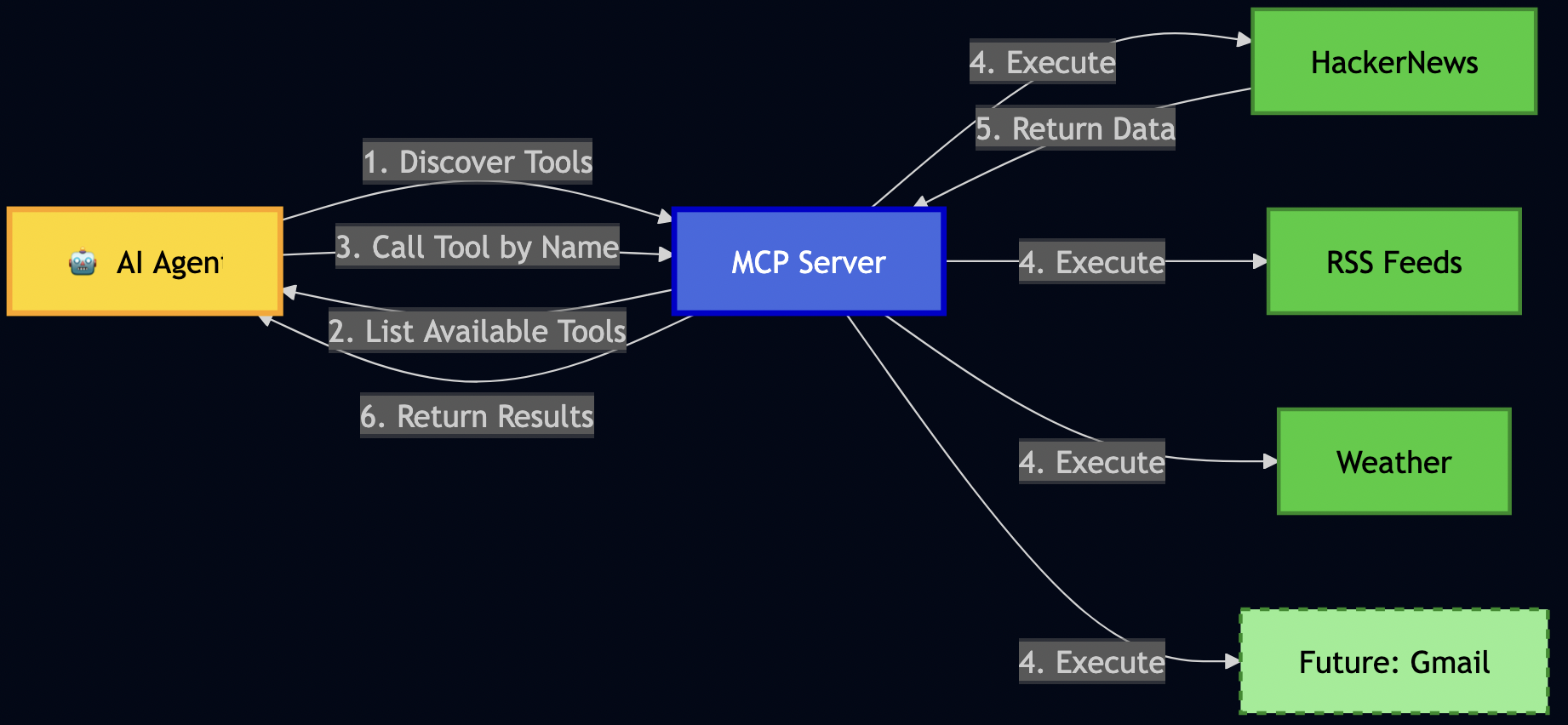
  1. MCP (Model Context Protocol) – connecting to data sources discoverable by AI
  2. RAG (Retrieval-Augmented Generation) – give AI long-term memory
  3. ReAct Pattern – teach AI to reason before acting
  4. RLHF (Reinforcement Learning from Human Feedback) – teach AI from my preferences
  5. LangGraph – orchestrate complex multi-agent workflows
  6. 3-Layer Architecture – building easily extensible systems

Full source code: github.com/bhatti/daily-minutes

Let me walk you through how I built each piece, the problems I encountered, and how I solved them.


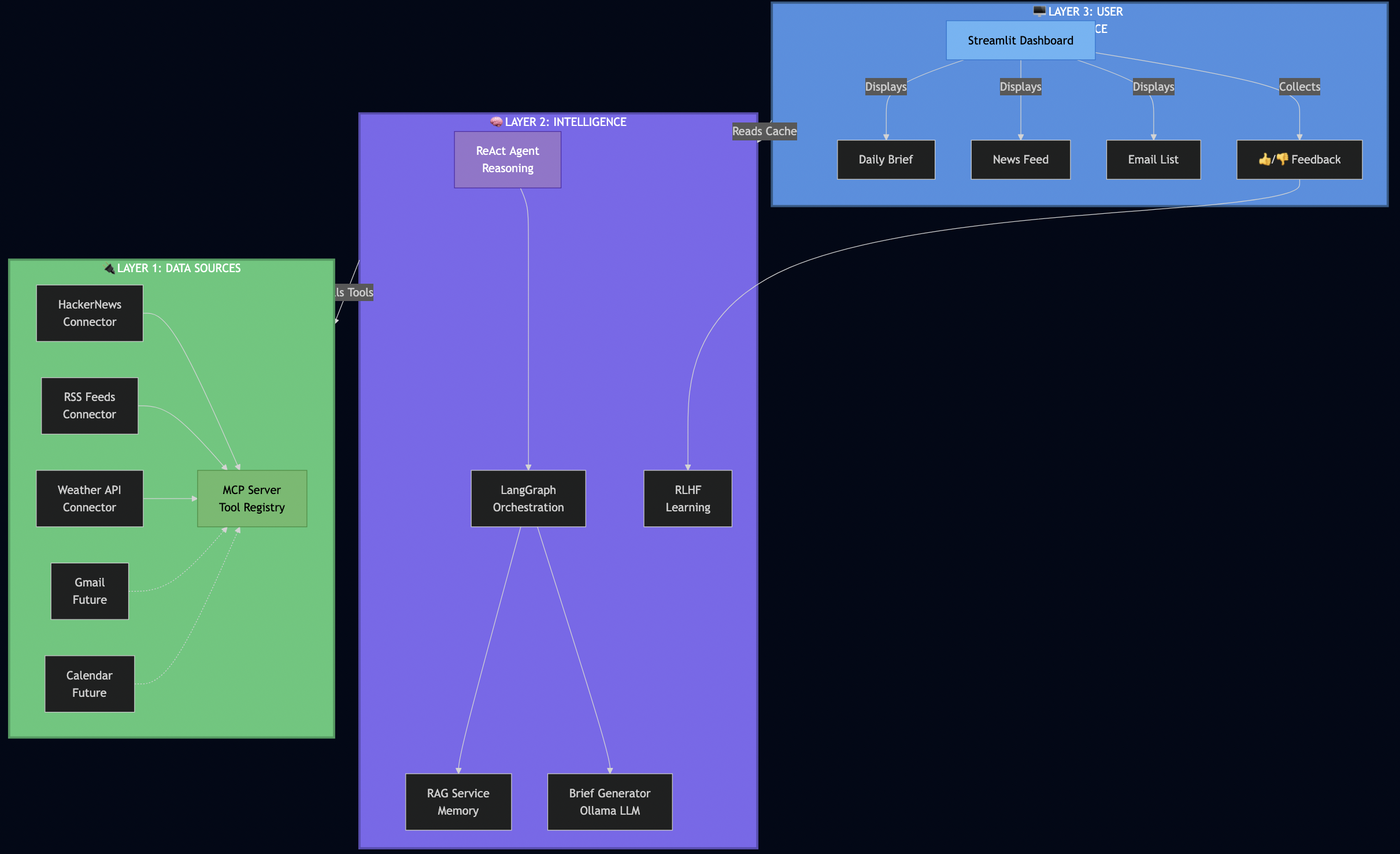
High-level Architecture

After several iterations, I landed on a clean 3-layer architecture:

Why this architecture worked for me:

Layer 1 (Data Sources) – I used MCP to make connectors pluggable. When I later wanted to add RSS feeds, I just registered a new tool – no changes to the AI logic.

Layer 2 (Intelligence) – This is where the magic happens. The ReAct agent reasons about what data it needs, LangGraph orchestrates fetching from multiple sources in parallel, RAG provides historical context, and RLHF learns from my feedback.

Layer 3 (UI) – I kept the UI simple and fast. It reads from a database cache, so it loads instantly – no waiting for AI to process.

How the Database Cache Works

This is a key architectural decision that made the UI lightning-fast:

# src/services/startup_service.py
async def preload_daily_data():
    """Background job that generates brief and caches in database."""

    # 1. Fetch all data in parallel (LangGraph orchestration)
    data = await langgraph_orchestrator.fetch_all_sources()

    # 2. Generate AI brief (ReAct agent with RAG)
    brief = await brief_generator.generate(
        emails=data['emails'],
        calendar=data['calendar'],
        news=data['news'],
        weather=data['weather']
    )

    # 3. Cache everything in SQLite
    await db.set_cache('daily_brief_data', brief.to_dict(), ttl=3600)  # 1 hour TTL
    await db.set_cache('news_data', data['news'], ttl=3600)
    await db.set_cache('emails_data', data['emails'], ttl=3600)

    logger.info("? All data preloaded and cached")

# src/ui/components/daily_brief.py
def render_daily_brief_section():
    """UI just reads from cache - no AI processing!"""

    # Fast read from database (milliseconds, not seconds)
    if 'data' in st.session_state and st.session_state.data.get('daily_brief'):
        brief_data = st.session_state.data['daily_brief']
        _display_persisted_brief(brief_data)  # Instant!
    else:
        st.info("Run `make preload` to generate your first brief.")

Why this architecture rocks:

  • ? UI loads in <500ms (reading from SQLite cache)
  • ? Background refresh (run make preload or schedule with cron)
  • ? Persistent (brief survives app restarts)
  • ? Testable (can test UI without LLM calls)

Part 1: Setting Up My Local AI Stack

First, I needed to get Ollama running locally. This took me about 30 minutes.

Installing Ollama

# On macOS (what I use)
brew install ollama

# Start the service
ollama serve

# Pull the models I chose
ollama pull qwen2.5:7b         # Main LLM - fast on my M3 Mac
ollama pull nomic-embed-text   # For RAG embeddings

Why I chose Qwen 2.5 (7B):

  • ? Runs fast on my M3 MacBook Pro (no GPU needed)
  • ? Good reasoning capabilities for summarization
  • ? Small enough to iterate quickly (responses in 2-3 seconds)
  • ? Free and private – data never leaves my laptop

Later, I can swap to GPT-4 or Claude with just a config change when I deploy to production.

Testing My Setup

I wanted to make sure Ollama was working before going further:

# Quick test
PYTHONPATH=. python -c "
import asyncio
from src.services.ollama_service import get_ollama_service

async def test():
    ollama = get_ollama_service()
    result = await ollama.generate('Explain RAG in one sentence.')
    print(result)

asyncio.run(test())
"

# Output I got:
# RAG (Retrieval-Augmented Generation) enhances LLM responses by retrieving
# relevant information from a knowledge base before generating answers.

? First milestone: Local AI working!


Part 2: Building MCP Connectors

Instead of hard coding data fetching like this:

# ? My first attempt (brittle)
async def get_daily_data():
    news = await fetch_hackernews()
    weather = await fetch_weather()
    # Later I wanted to add RSS feeds... had to modify this function
    # Then I wanted Slack... modified again
    # This was getting messy fast!

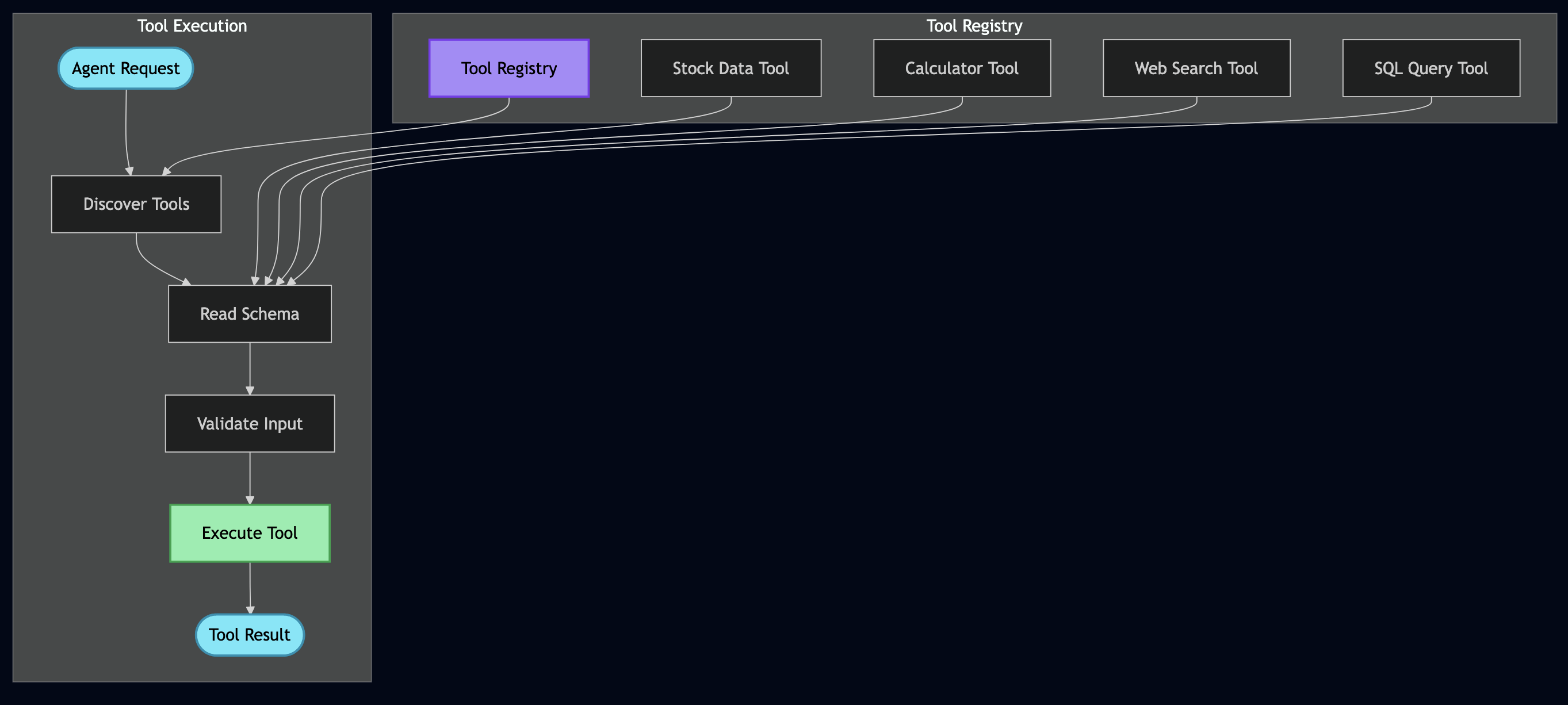
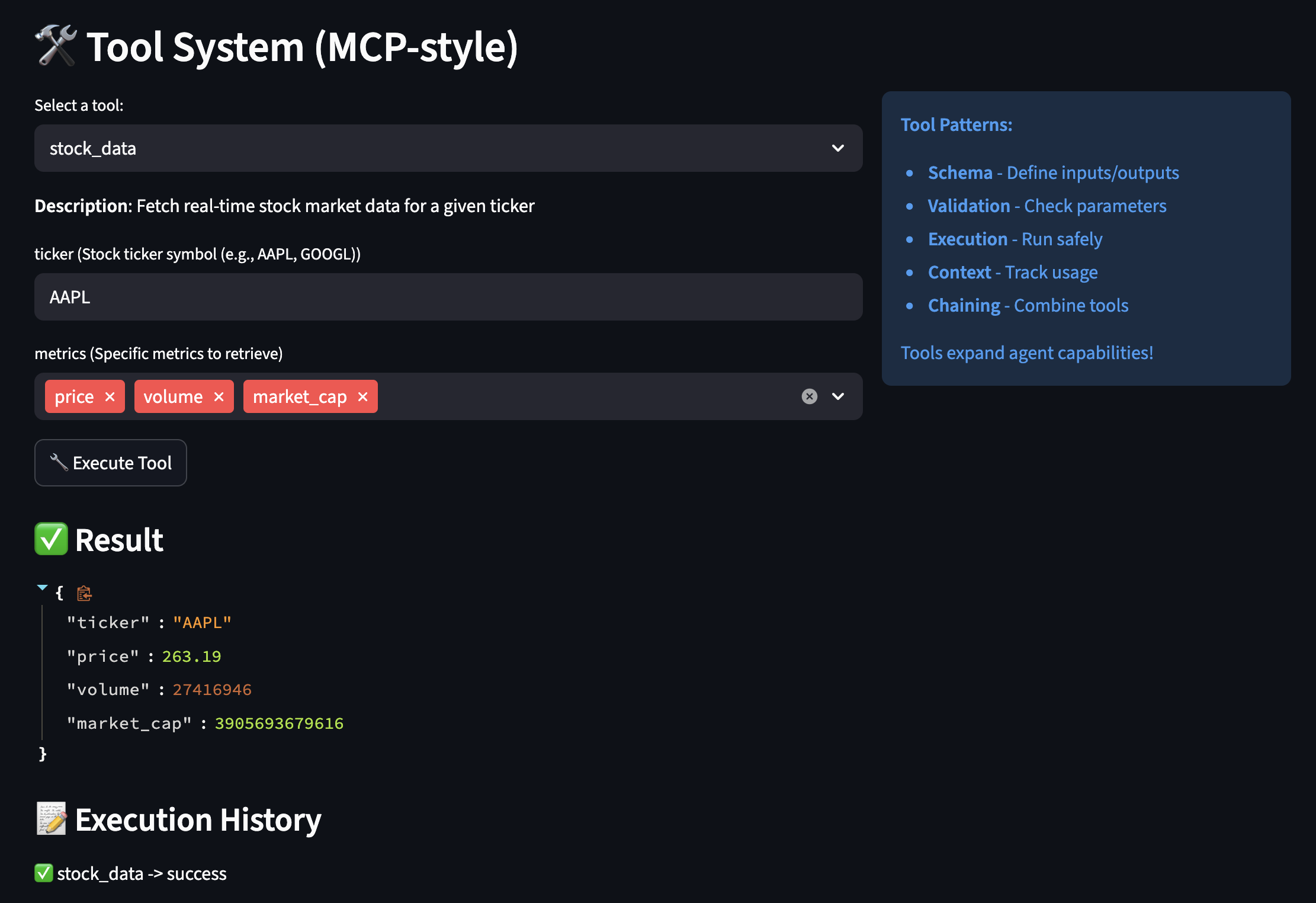
I decided to use MCP (Model Context Protocol) to register data sources as “tools” so that the AI can discover and call by name:

Building News Connector

I started with HackerNews since I check it every morning:

# src/connectors/hackernews.py
class HackerNewsConnector:
    """Fetches top stories from HackerNews API."""

    async def execute_async(self, max_stories: int = 10):
        """The main method MCP will call."""
        # 1. Fetch top story IDs
        response = await self.client.get(
            "https://hacker-news.firebaseio.com/v0/topstories.json"
        )
        story_ids = response.json()[:max_stories]

        # 2. Fetch each story (I fetch these in parallel for speed)
        articles = []
        for story_id in story_ids:
            story = await self._fetch_story(story_id)
            articles.append(self._convert_to_article(story))

        return articles

Key learning: Keep connectors simple. They should do ONE thing: fetch data and return it in a standard format.

Registering with MCP Server

Then I registered this connector with my MCP server:

# src/services/mcp_server.py
class MCPServer:
    """The tool registry that AI agents query."""

    def _register_tools(self):
        # Register HackerNews
        self.tools["fetch_hackernews"] = MCPTool(
            name="fetch_hackernews",
            description="Fetch top tech stories from HackerNews with scores and comments",
            parameters={
                "max_stories": {
                    "type": "integer",
                    "description": "How many stories to fetch (1-30)",
                    "default": 10
                }
            },
            executor=HackerNewsConnector()
        )

This allows my AI to discover this tool and call it without me writing any special integration code!

Testing MCP Discovery

# I tested if the AI could discover my tools
PYTHONPATH=. python -c "
from src.services.mcp_server import get_mcp_server

mcp = get_mcp_server()
print('Available tools:')
for tool in mcp.list_tools():
    print(f'  ? {tool[\"name\"]}: {tool[\"description\"]}')
"

# Output I got:
# Available tools:
#   ? fetch_hackernews: Fetch top tech stories from HackerNews...
#   ? get_current_weather: Get current weather conditions...
#   ? fetch_rss_feeds: Fetch articles from configured RSS feeds...

Later, when I wanted to add RSS feeds, I just created a new connector and registered it. The AI automatically discovered it – no changes needed to my ReAct agent or LangGraph workflows!


Part 3: Building RAG Pipeline

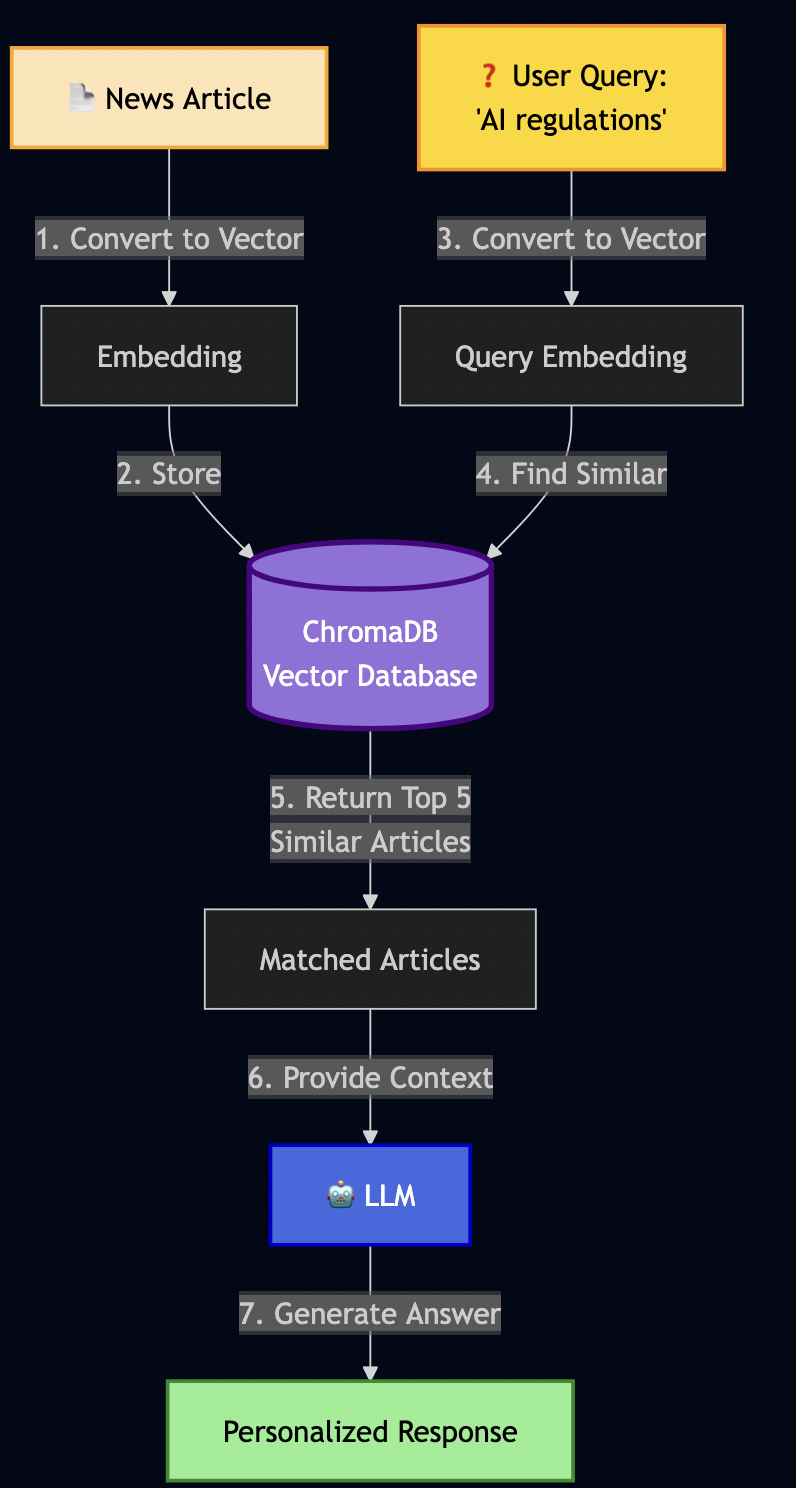
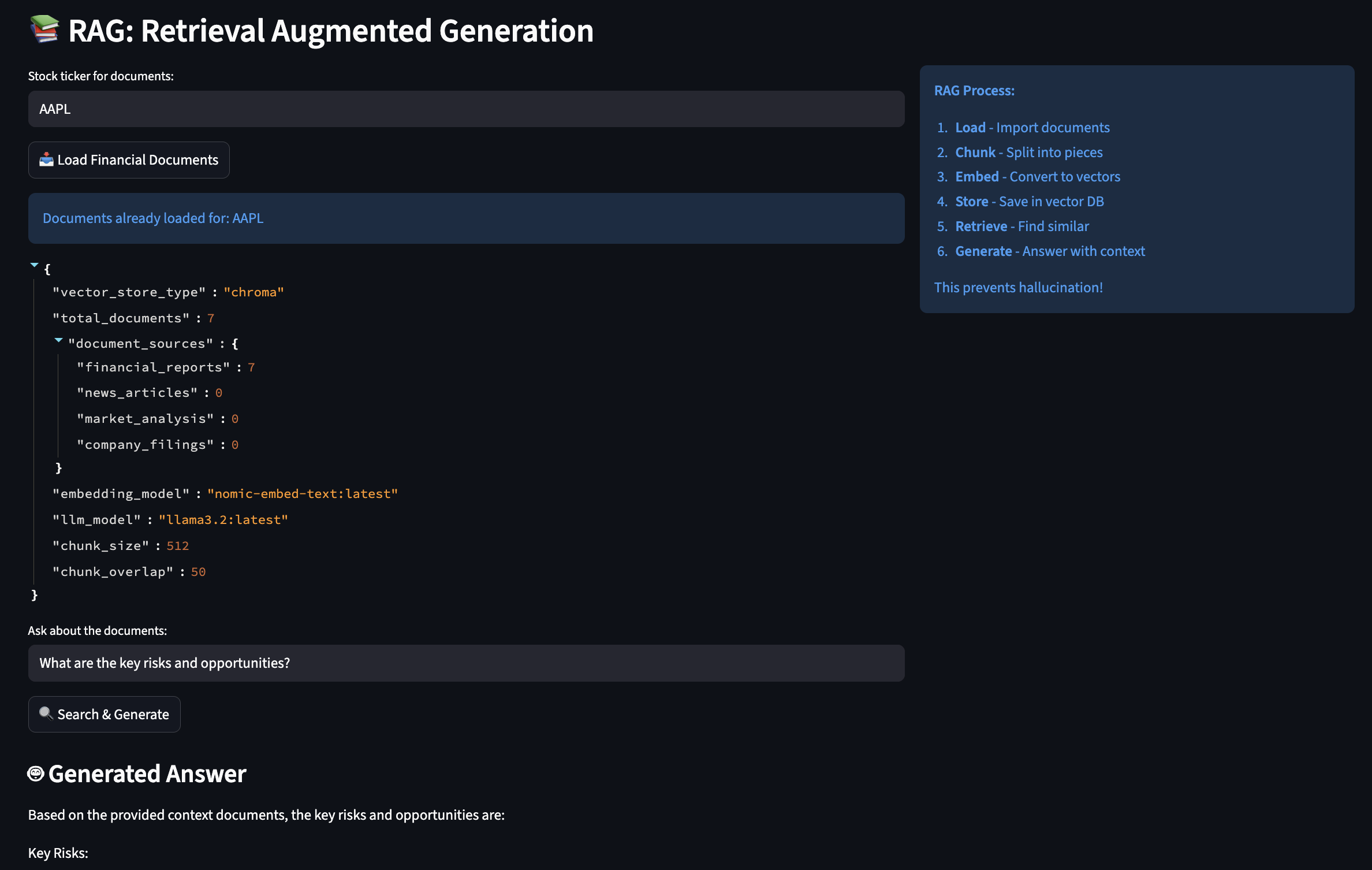
As LLM have limited context window, RAG (Retrieval-Augmented Generation) can be used to create an AI semantic memory by:

  1. Converting text to vectors (embeddings)
  2. Storing vectors in a database (ChromaDB)
  3. Searching by meaning, not just keywords

Building RAG Service

I then implemented RAG service as follows:

# src/services/rag_service.py
class RAGService:
    """Semantic memory using ChromaDB."""

    def __init__(self):
        # Initialize ChromaDB (stores on disk)
        self.client = chromadb.Client(Settings(
            persist_directory="./data/chroma_data"
        ))

        # Create collection for my articles
        self.collection = self.client.get_or_create_collection(
            name="daily_minutes"
        )

        # Ollama for creating embeddings
        self.ollama = get_ollama_service()

    async def add_document(self, content: str, metadata: dict):
        """Store a document with its vector embedding."""

        # 1. Convert text to vector (this is the magic!)
        embedding = await self.ollama.create_embeddings(content)

        # 2. Store in ChromaDB with metadata
        self.collection.add(
            documents=[content],
            embeddings=[embedding],
            metadatas=[metadata],
            ids=[hashlib.md5(content.encode()).hexdigest()]
        )

    async def search(self, query: str, max_results: int = 5):
        """Semantic search - find by meaning!"""

        # 1. Convert query to vector
        query_embedding = await self.ollama.create_embeddings(query)

        # 2. Find similar documents (cosine similarity)
        results = self.collection.query(
            query_embeddings=[query_embedding],
            n_results=max_results
        )

        return results

I then tested it:

# I stored an article about EU AI regulations
await rag.add_document(
    content="European Union announces comprehensive AI safety regulations "
            "focusing on transparency, accountability, and privacy protection.",
    metadata={"type": "article", "topic": "ai_safety"}
)

# Later, I searched using different words
results = await rag.search("privacy rules for artificial intelligence")

This shows that RAG isn’t just storing text – it understands meaning through vector mathematics.

What I Store in RAG

Over time, I started storing other data like emails, todos, events, etc:

# 1. News articles (for historical context)
await rag.add_article(article)

# 2. Action items from emails
await rag.add_todo(
    "Complete security training by Nov 15",
    source="email",
    priority="high"
)

# 3. Meeting context
await rag.add_document(
    "Q4 Planning Meeting - need to prepare budget estimates",
    metadata={"type": "meeting", "date": "2025-02-01"}
)

# 4. User preferences (this feeds into RLHF later!)
await rag.add_document(
    "User marked 'AI safety' topics as important",
    metadata={"type": "preference", "category": "ai_safety"}
)

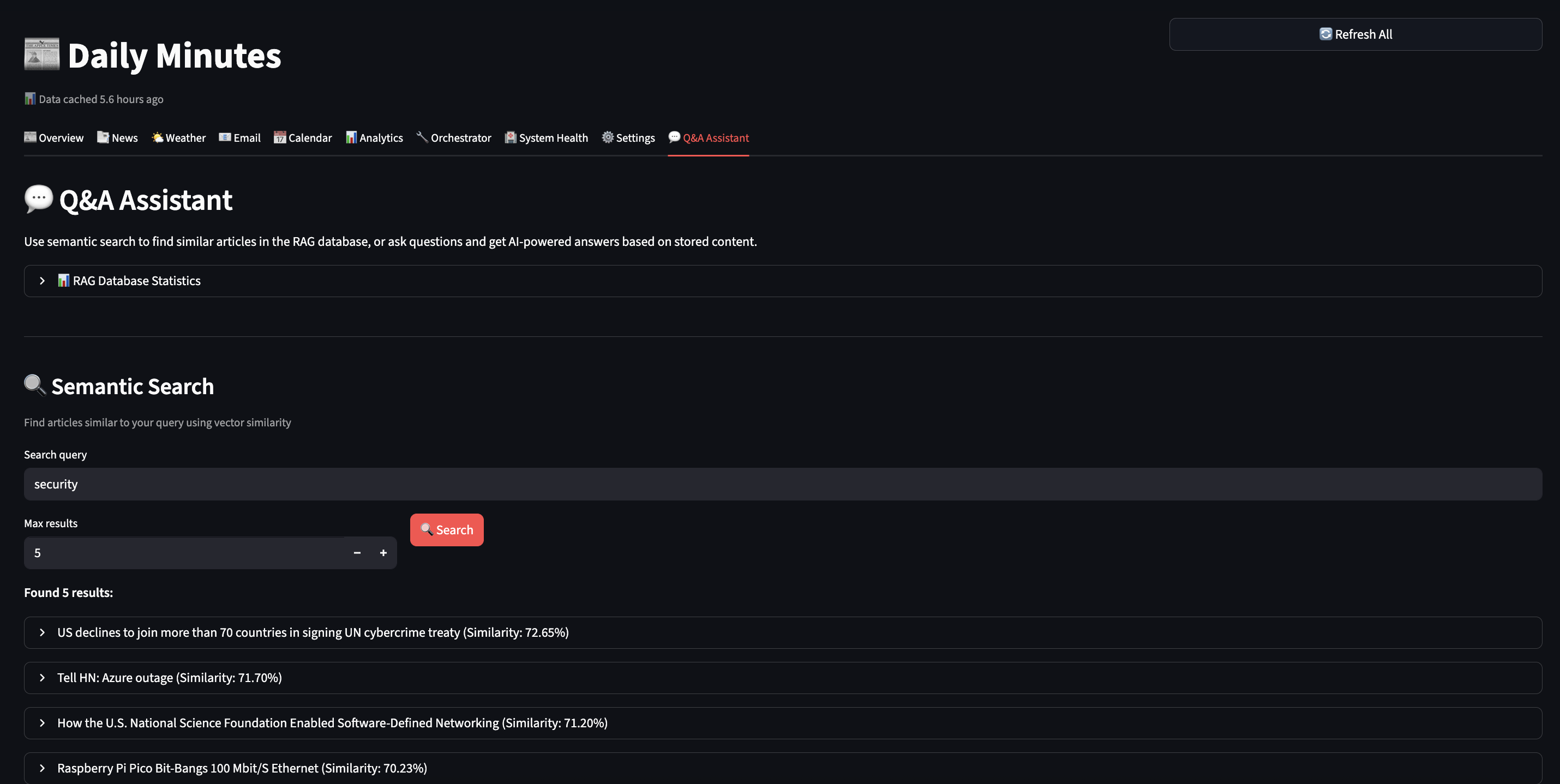
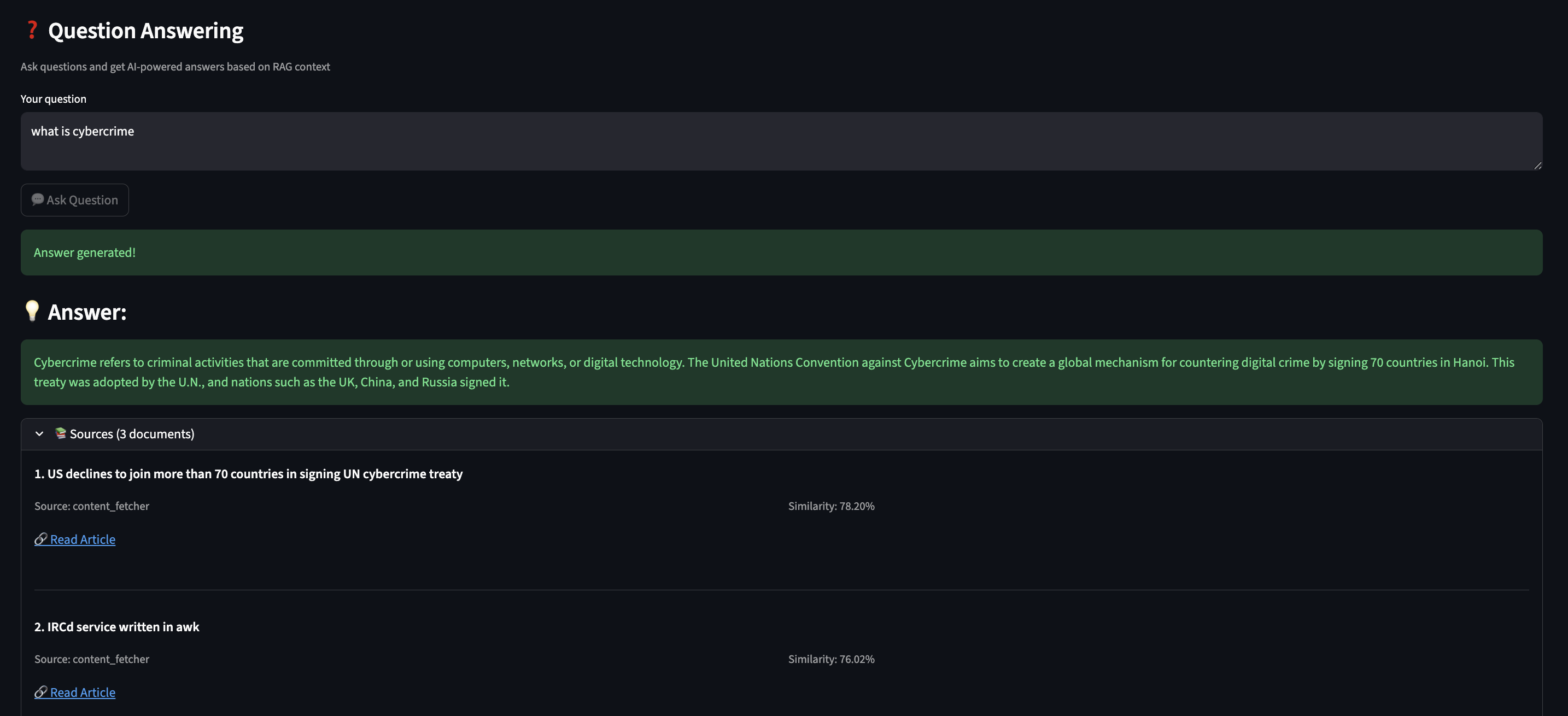
With this AI memory, it can answer questions like:

  • “What do I need to prepare for tomorrow’s meeting?”
  • “What AI safety articles did I read this week?”
  • “What are my pending action items?”

Part 4: Building the ReAct Agent

In my early prototyping, the implementation just executed blindly:

# ? First attempt - no thinking!
async def generate_brief():
    news = await fetch_all_news()  # Fetches everything
    summary = await llm.generate(f"Summarize: {news}")
    return summary

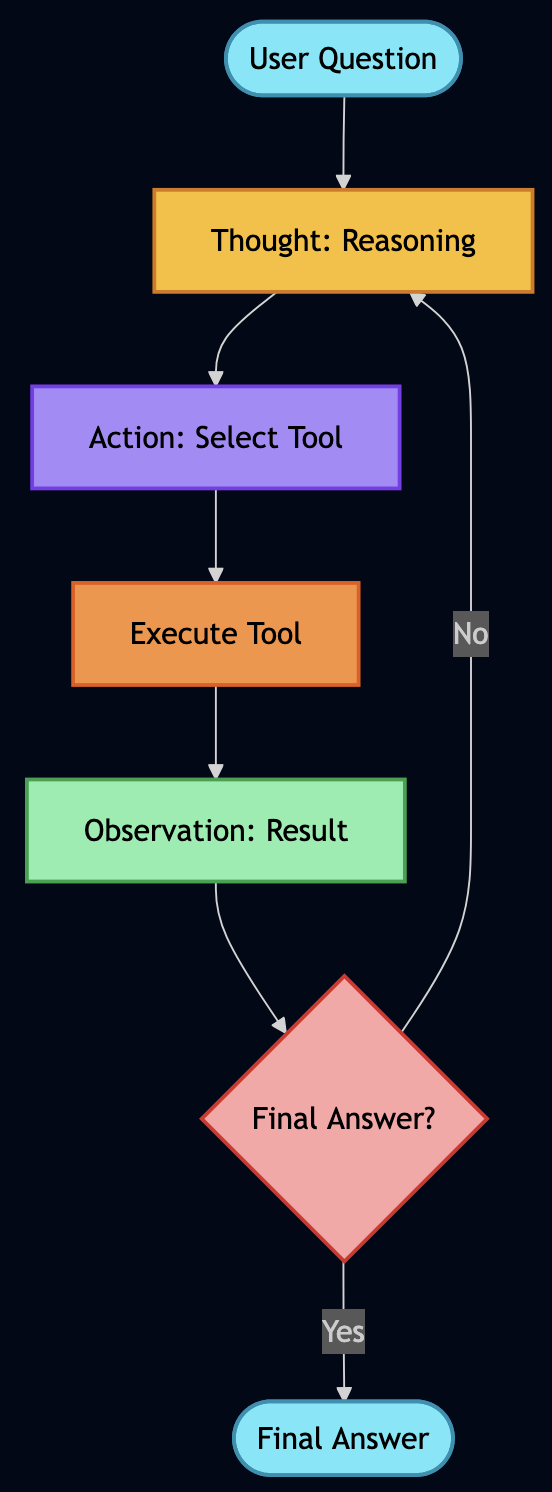
This wasted time fetching data I didn’t need. I wanted my AI to reason first, then act so I applied ReAct (Reasoning + Acting), which works in a loop:

  1. THOUGHT: AI reasons about what to do next
  2. ACTION: AI executes a tool/function
  3. OBSERVATION: AI observes the result
  4. Repeat until goal achieved

Implementing My ReAct Agent

Here is how it ReAct agent was built:

# src/agents/react_agent.py
class ReActAgent:
    """Agent that thinks before acting."""

    async def run(self, goal: str):
        """Execute goal using ReAct loop."""
        steps = []
        observations = []

        for step_num in range(1, self.max_steps + 1):
            # 1. THOUGHT: Ask AI what to do next
            thought = await self._generate_thought(goal, steps, observations)

            # Check if we're done
            if "FINAL ANSWER" in thought:
                return self._extract_answer(thought)

            # 2. ACTION: Parse what action to take
            action = self._parse_action(thought)
            # Example: {"action": "call_tool", "tool": "fetch_hackernews"}

            # 3. EXECUTE: Run the action via MCP
            observation = await self._execute_action(action)
            observations.append(observation)

            # Record this step for debugging
            steps.append({
                "thought": thought,
                "action": action,
                "observation": observation
            })

        return {"steps": steps, "answer": "Max steps reached"}

The hardest part was writing the prompts that made the AI reason properly:

async def _generate_thought(self, goal, steps, observations):
    """Generate next reasoning step."""

    prompt = f"""Goal: {goal}

Previous steps:
{self._format_steps(steps)}

Available actions:
- query_rag(query): Search my semantic memory
- call_tool(name, params): Execute an MCP tool
- FINAL ANSWER: When you have everything needed

Think step-by-step. What should I do next?

Format your response as:
THOUGHT: <your reasoning>
ACTION: <action to take>
"""

    return await self.ollama.generate(prompt, temperature=0.7)

I added debug logging to see the AI’s reasoning:

? Goal: Generate my daily brief

Step 1:
  ? THOUGHT: I need to gather news, check weather, and see user preferences
  ? ACTION: call_tool("fetch_hackernews", max_stories=10)
  ?? OBSERVATION: Fetched 10 articles about AI, privacy, and tech

Step 2:
  ? THOUGHT: Got news. User preferences would help prioritize.
  ? ACTION: query_rag("user interests and preferences")
  ?? OBSERVATION: User cares about AI safety, security, privacy

Step 3:
  ? THOUGHT: Should filter articles to user's interests
  ? ACTION: call_tool("get_current_weather", location="Seattle")
  ?? OBSERVATION: 70°F, Partly cloudy

Step 4:
  ? THOUGHT: I have news (filtered by user interests), weather. Ready to generate.
  ? ACTION: FINAL ANSWER
  ? Generated personalized brief highlighting AI safety articles

Part 5: Adding RLHF

Initially, my AI scored all emails the same way:

? "Newsletter: 10 CSS Tips" ? Importance: 0.5
? "URGENT: Production outage!" ? Importance: 0.5

So I used RLHF to teach my AI what I care about.

Implementing RLHF Scoring

I added a mixin to my email model:

# src/models/email.py
class ImportanceScoringMixin:
    """Learn from user feedback."""

    importance_score: float = 0.5  # AI's base score
    boost_labels: Set[str] = set()  # Words user marked important
    filter_labels: Set[str] = set()  # Words user wants to skip

    def apply_rlhf_boost(self, content_text: str) -> float:
        """Adjust score based on learned preferences."""
        adjusted = self.importance_score
        content_lower = content_text.lower()

        # Boost if content matches important keywords
        for label in self.boost_labels:
            if label.lower() in content_lower:
                adjusted += 0.1  # Bump up priority!

        # Penalize if content matches skip keywords
        for label in self.filter_labels:
            if label.lower() in content_lower:
                adjusted -= 0.2  # Push down priority!

        # Keep in valid range [0, 1]
        return max(0.0, min(1.0, adjusted))

Note: Code examples are simplified for clarity.
See GitHub for the full production implementation.

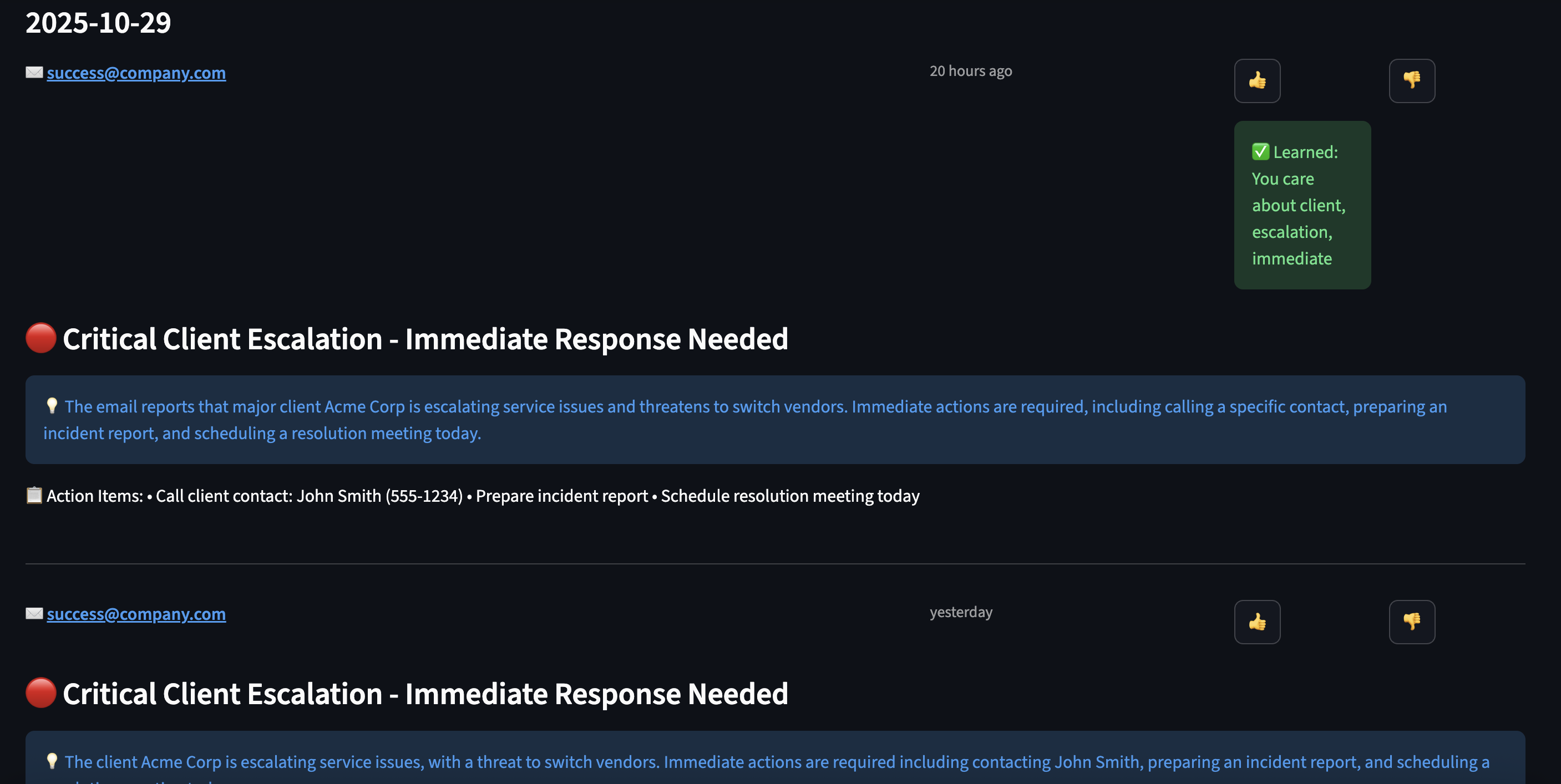
Adding Feedback UI

In my Streamlit dashboard, I added ?/? buttons:

# User sees an email
for email in emails:
    col1, col2, col3 = st.columns([8, 1, 1])

    with col1:
        st.write(f"**{email.subject}**")
        st.info(email.snippet)

    with col2:
        if st.button("?", key=f"important_{email.id}"):
            # Extract what made this important
            keywords = await extract_keywords(email.subject + email.body)
            # Add to boost labels
            user_profile.boost_labels.update(keywords)
            st.success(f"? Learned: You care about {', '.join(keywords)}")

    with col3:
        if st.button("?", key=f"skip_{email.id}"):
            # Learn to deprioritize these
            keywords = await extract_keywords(email.subject)
            user_profile.filter_labels.update(keywords)
            st.success(f"? Will deprioritize: {', '.join(keywords)}")

Part 6: Orchestrating with LangGraph

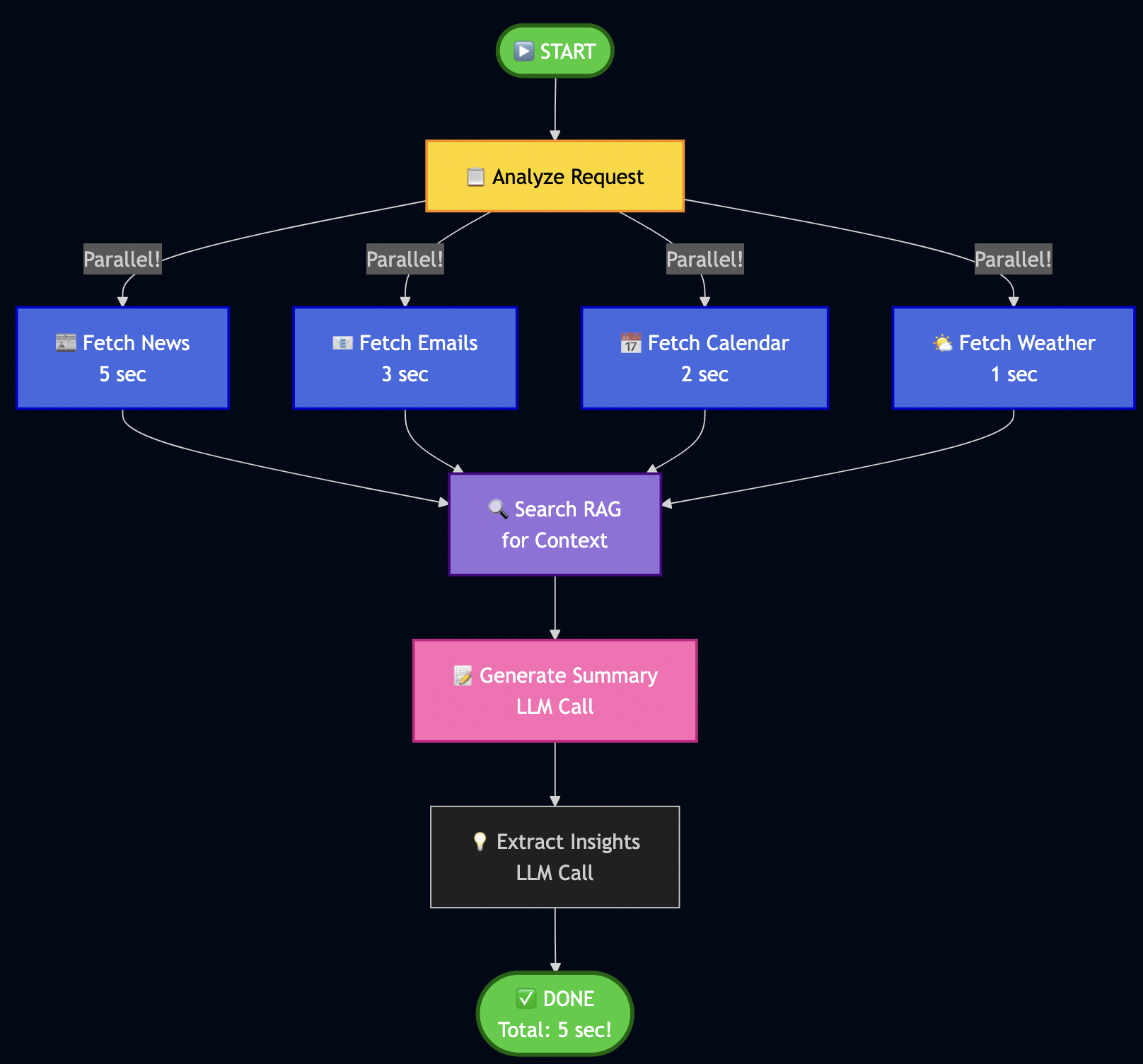
Instead of fetching contents from all data sources sequential for the daily minutes:

# ? Sequential execution - SLOW!
news = await fetch_news()      # 5 seconds
emails = await fetch_emails()  # 3 seconds
calendar = await fetch_calendar()  # 2 seconds
weather = await fetch_weather()  # 1 second
# Total: 11 seconds just waiting! ?

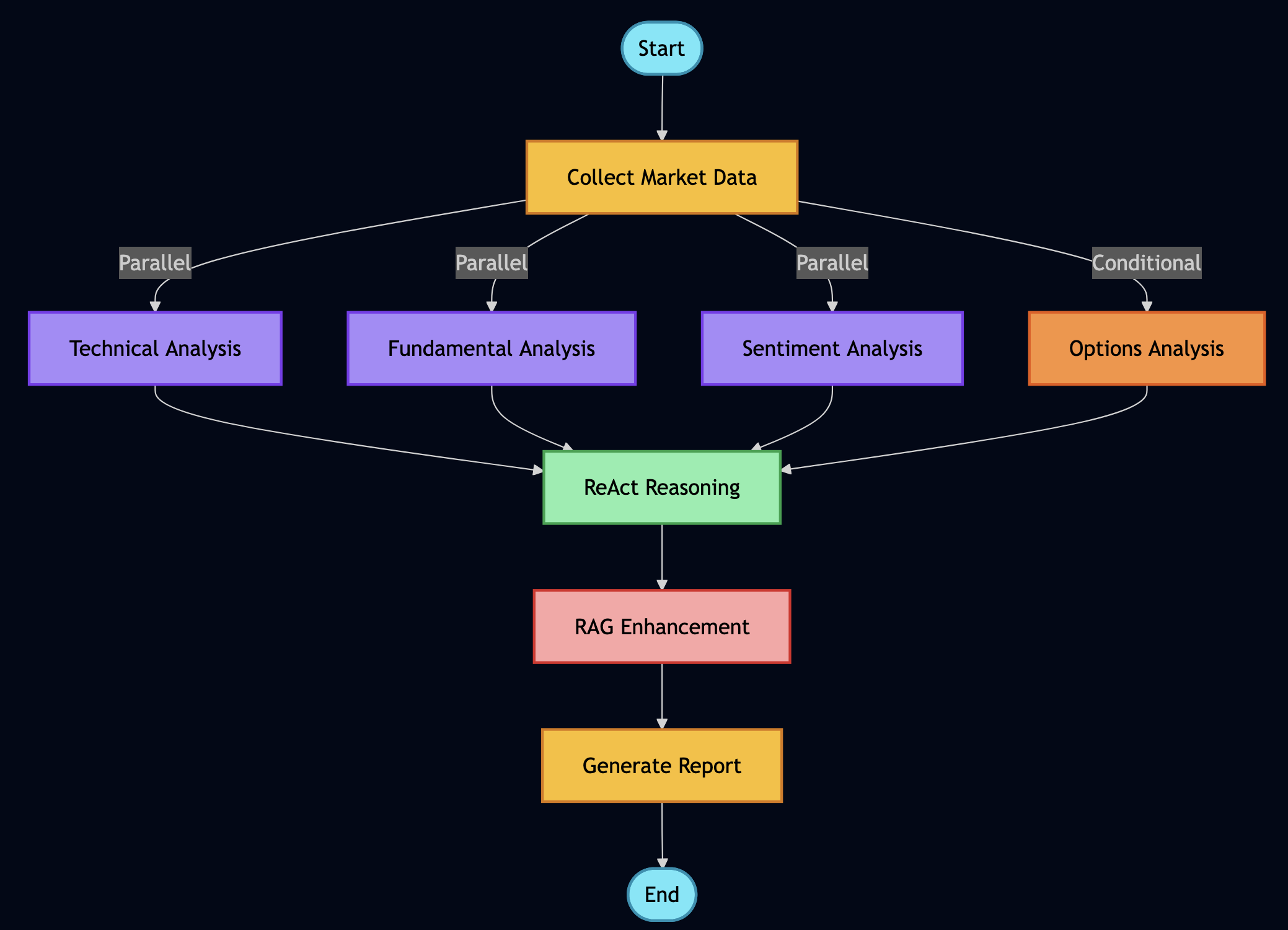
I used LangGraph to define workflows as graphs with parallel execution:

Key insight: Parallel fetch reduced the fetch time for downloading data from various sources.

Building My Workflow

# src/services/langgraph_orchestrator.py
from langgraph.graph import StateGraph, END

class LangGraphOrchestrator:
    def _create_workflow(self):
        """Define my workflow graph."""
        workflow = StateGraph(WorkflowState)

        # Add nodes (processing steps)
        workflow.add_node("analyze", self._analyze_request)
        workflow.add_node("fetch_news", self._fetch_news)
        workflow.add_node("fetch_emails", self._fetch_emails)
        workflow.add_node("fetch_calendar", self._fetch_calendar)
        workflow.add_node("search_rag", self._search_context)
        workflow.add_node("generate_summary", self._generate_summary)

        # Define edges (execution flow)
        workflow.set_entry_point("analyze")

        # Parallel fetch (all happen at once!)
        workflow.add_edge("analyze", "fetch_news")
        workflow.add_edge("analyze", "fetch_emails")
        workflow.add_edge("analyze", "fetch_calendar")

        # All converge to RAG search
        workflow.add_edge("fetch_news", "search_rag")
        workflow.add_edge("fetch_emails", "search_rag")
        workflow.add_edge("fetch_calendar", "search_rag")

        # Sequential processing
        workflow.add_edge("search_rag", "generate_summary")
        workflow.add_edge("generate_summary", END)

        return workflow.compile()

Note: WorkflowState is a shared dictionary that nodes pass data through – like a clipboard for the workflow. The analyze node parses the user’s request and decides which data sources are needed.

Implementing Node Functions

Each node is just an async function:

async def _fetch_news(self, state: WorkflowState):
    """Fetch news in parallel."""
    try:
        articles = await self.mcp.execute_tool(
            "fetch_hackernews",
            {"max_stories": 10}
        )
        state["news_articles"] = articles
    except Exception as e:
        state["errors"].append(f"News fetch failed: {e}")
        state["news_articles"] = []

    return state

async def _search_context(self, state: WorkflowState):
    """Search RAG for relevant context."""
    query = state["user_request"]
    results = await self.rag.search(query, max_results=5)

    # Build context string
    context = "\n".join([r['content'] for r in results])
    state["context"] = context

    return state

Running the Workflow

# Execute the complete workflow
result = await orchestrator.run("Generate my daily brief")

# I get back:
{
    "news_articles": [...],      # 10 articles
    "emails": [...],              # 5 unread
    "calendar_events": [...],     # 3 events today
    "context": "...",             # RAG context
    "summary": "...",             # Generated brief
    "processing_time": 5.2        # Seconds (not 11!)
}

The LLM Factory Pattern – How I Made It Cloud-Ready

Following code snippet shows how does the system seamlessly switch between local Ollama and cloud providers:

# src/services/llm_factory.py
def get_llm_service():
    """Factory pattern - works with any LLM provider."""
    provider = os.getenv("LLM_PROVIDER", "ollama")

    if provider == "ollama":
        return OllamaService(
            base_url=os.getenv("OLLAMA_BASE_URL", "http://localhost:11434"),
            model=os.getenv("OLLAMA_MODEL", "qwen2.5:7b")
        )
    elif provider == "openai":
        return OpenAIService(
            api_key=os.getenv("OPENAI_API_KEY"),
            model=os.getenv("OPENAI_MODEL", "gpt-4-turbo")
        )
    elif provider == "google":
        # Like in my previous Vertex AI article!
        return VertexAIService(
            project_id=os.getenv("GCP_PROJECT_ID"),
            model="gemini-1.5-flash"
        )

    raise ValueError(f"Unknown provider: {provider}")

# All services implement the same interface:
class BaseLLMService:
    async def generate(self, prompt: str, **kwargs) -> str:
        """Generate text from prompt."""
        raise NotImplementedError

    async def create_embeddings(self, text: str) -> List[float]:
        """Create vector embeddings."""
        raise NotImplementedError

The ReAct agent, RAG service, and Brief Generator all use get_llm_service() – they don’t care which provider is running!


Part 7: The Challenges I Faced

Building this system wasn’t smooth. Here are the biggest challenges:

Challenge 1: LLM Generating Vague Summaries

Problem: My early briefs were terrible:

? "Today's news features a mix of technology updates and various topics."

This was useless! I needed specifics.

Solution: I rewrote my prompts with explicit rules:

# ? Better prompt with strict rules
prompt = f"""Generate a daily brief following these STRICT rules:

PRIORITY ORDER (most important first):
1. Urgent emails or action items
2. Today's calendar events
3. Market/business news
4. Tech news

TLDR FORMAT (exactly 3 bullets, be SPECIFIC):
* Bullet 1: Most urgent email/action (include WHO, WHAT, WHEN)
   Example: "Client escalation from Acme Corp affecting 50K users - response needed by 2pm"

* Bullet 2: Most important calendar event today (include TIME and WHAT TO PREPARE)
   Example: "2pm: Board meeting - prepare Q4 revenue slides"

* Bullet 3: Top market/business news (include NUMBERS/SPECIFICS)
   Example: "Federal Reserve raises rates 0.5% to 5.25% - affects tech hiring"

AVOID THESE PHRASES (they're too vague):
? "mix of updates"
? "various topics"
? "continues to make progress"
? "interesting developments"

USE SPECIFIC DETAILS:
? Names (people, companies)
? Numbers (percentages, dollar amounts, deadlines)
? Times (when something happened or needs to happen)

Content to summarize:
{content}

Generate: TLDR (3 bullets), Summary (5-6 detailed sentences), Key Insights (5 bullets)
"""

Result: Went from vague ? specific, actionable briefs!

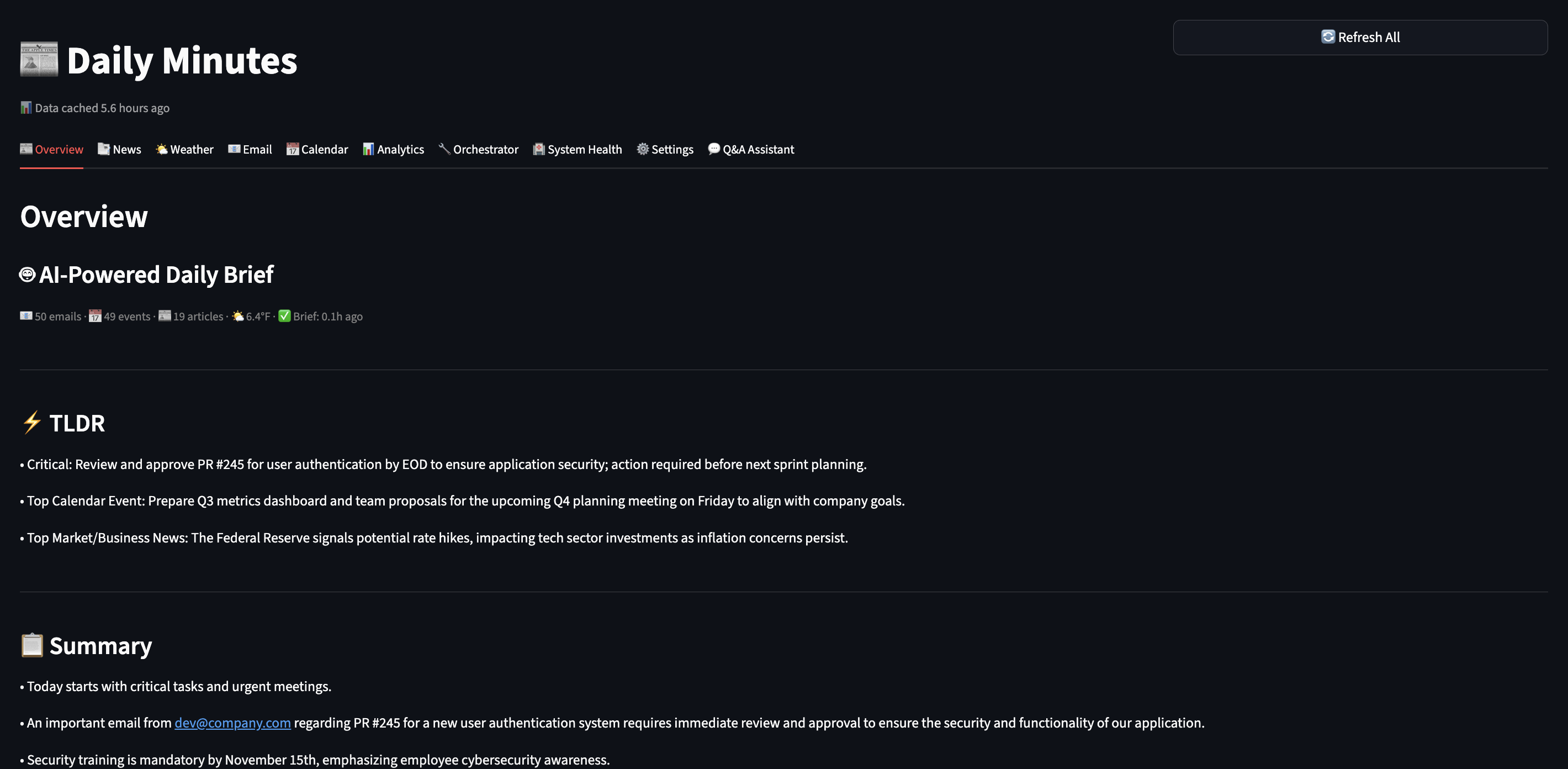
Challenge 2: TLDR Bullets Rendering on Same Line

Problem: My UI showed bullets in one paragraph:

? • Critical email... • Meeting at 2pm... • Market news...

Root cause: Streamlit’s st.info() doesn’t preserve newlines.

Solution: Split and render each bullet separately:

# ? Doesn't work
st.info(tldr)

# ? Works!
tldr_lines = [line.strip() for line in tldr.split('\n') if line.strip()]
for bullet in tldr_lines:
    st.markdown(bullet)

Challenge 3: AI Prioritizing News Over Personal Tasks

Problem: My brief focused on tech news, ignored my urgent emails:

? TLDR bullet 1: "OpenAI releases GPT-5" (who cares?)
   TLDR bullet 2: "Crypto market surges" (not relevant to me)
   TLDR bullet 3: "Client escalation requires response" (BURIED!)

Solution: I restructured my prompt to explicitly label priority:

# src/services/brief_scheduler.py
async def _generate_daily_brief(emails, calendar, news, weather):
    """Generate prioritized daily brief with structured prompt."""

    # Separate market vs tech news (market is higher priority)
    market_news = [n for n in news if 'market' in n.tags]
    tech_news = [n for n in news if 'market' not in n.tags]

    # Sort emails by RLHF-boosted importance score
    important_emails = sorted(
        emails,
        key=lambda e: e.apply_rlhf_boost(e.subject + e.snippet),
        reverse=True
    )[:5]  # Top 5 only

    # Build structured prompt with clear priority
    prompt = f"""
**SECTION 1: IMPORTANT EMAILS (HIGHEST PRIORITY - use for TLDR bullet #1)**
{format_emails(important_emails)}

**SECTION 2: TODAY'S CALENDAR (SECOND PRIORITY - use for TLDR bullet #2)**
{format_calendar(calendar)}

**SECTION 3: MARKET NEWS (THIRD PRIORITY - use for TLDR bullet #3)**
{format_market_news(market_news)}

**SECTION 4: TECH NEWS (LOWEST PRIORITY - summarize briefly)**
{format_tech_news(tech_news)}

**SECTION 5: WEATHER**
{format_weather(weather)}

Generate a daily brief following this EXACT priority order:
1. Email action items FIRST
2. Calendar events SECOND
3. Market/business news THIRD
4. Tech news LAST (brief mention only)

TLDR must have EXACTLY 3 bullets using content from sections 1, 2, 3 (not section 4).
"""

    return await llm.generate(prompt)

Result: My urgent email moved to bullet #1 where it belongs! The AI now respects the priority structure.

Challenge 4: RAG Returning Irrelevant Results

Problem: Semantic search sometimes returned weird matches:

Query: "AI safety regulations"
Result: Article about "safe AI models for healthcare" (wrong context!)

Solution: I added metadata filtering and better embeddings:

# Store with rich metadata
await rag.add_document(
    content=article.title,
    metadata={
        "type": "article",
        "category": "ai_safety",  # For filtering!
        "tags": ["regulation", "eu", "policy"],
        "date": "2025-01-28",
        "importance": "high"
    }
)

# Search with filters
results = await rag.search(
    "AI regulations",
    filter_metadata={
        "category": "ai_safety",
        "importance": "high"
    }
)

Result: Much more relevant results!

Challenge 5: Handling API Failures

Problem: MCP connectors may fail to fetch data from underlying data source.

Solution: I used graceful degradation where brief is generated with available data and error messages/last-updated is marked for failed sources)


Part 8: Future Improvements

This work is by no means done but I am sharing a proof of concept that I have built so far. Here is what still needs work:

Current Limitations

1. Email/Calendar Improvements

  • ? Have: I have basic OAuth support for emails and calendar events and mock testing
  • ? Missing: Solid OAuth support for Gmail and Google Calendar integration

2. RLHF Needs More Sophisticated Learning

  • ? Have: Current system allows simple keyword matching (if email contains “security” ? boost)
  • ? Missing: Context-aware learning (distinguish “security update” vs “security breach”)
  • Improvement Needed:
  # Current: Simple keyword match
  if "security" in email:
      score += 0.1

  # Better: Contextual understanding
  if embeddings_similar(email, user.important_emails):
      score += contextual_boost  # Uses semantic similarity!

3. ReAct Agent Sometimes Over-Thinks

  • ? Have: AI reasons before acting
  • ? Problem: Sometimes takes 4-5 steps when 2 would suffice
  • Fix Needed: Better stopping criteria in prompts

4. No Multi-User Support (Yet)

  • ? Have: Works great for me
  • ? Missing: Can’t handle multiple users with different preferences
  • Future: Add user profiles, tenant isolation

5. Brief Generation Can Be Slow (30-60 seconds)

  • ? Have: Parallel data fetching (fast)
  • ? Bottleneck: LLM generation with Qwen 2.5 on CPU
  • Options:
  • Use smaller model (faster but less capable)
  • Deploy to cloud with faster GPT-4

6. Missing Data Sources

  • ? Have: Basic data for news, email and calendar
  • ? Slack Integration: Add Slack to monitor important channels and surface urgent threads in daily brief
  • ? Social Media Integration: Add social media feed to monitor trending topics or news

Part 9: How to Extend This System

I designed this to be easily extensible. Here’s how you can add new features:

Adding a New Data Source (Example: Slack)

Step 1: Create the connector

# src/connectors/slack.py
class SlackConnector:
    """Fetch recent messages from Slack channels."""

    async def execute_async(self, channel: str, max_messages: int = 10):
        # 1. Connect to Slack API
        client = WebClient(token=os.getenv("SLACK_BOT_TOKEN"))

        # 2. Fetch recent messages
        response = await client.conversations_history(
            channel=channel,
            limit=max_messages
        )

        # 3. Convert to standard format
        messages = []
        for msg in response['messages']:
            messages.append(SlackMessage(
                text=msg['text'],
                user=msg['user'],
                channel=channel,
                timestamp=msg['ts']
            ))

        return messages

Step 2: Register with MCP (automatic discovery!)

# src/services/mcp_server.py
def _register_tools(self):
    # ... existing tools ...

    # Add Slack
    self.tools["get_slack_messages"] = MCPTool(
        name="get_slack_messages",
        description="Fetch recent Slack messages from a channel",
        parameters={
            "channel": {"type": "string", "description": "Channel name"},
            "max_messages": {"type": "integer", "default": 10}
        },
        executor=SlackConnector()
    )

Step 3: AI automatically discovers it!

# Your ReAct agent will now see:
# "Available tools: fetch_hackernews, get_slack_messages, ..."
# No changes needed to ReAct logic!

Step 4: Update brief prompt to include Slack

# src/services/brief_scheduler.py
prompt = f"""
**IMPORTANT EMAILS**: {emails}
**CALENDAR**: {calendar}
**SLACK HIGHLIGHTS**: {slack_messages}  # New!
**NEWS**: {news}

Generate brief prioritizing: Email > Calendar > Slack > News
"""

Part 10: Local Development vs Cloud

One of my favorite aspects of this architecture: develop locally, deploy to cloud with 1 config change.

Development (What I Use Daily)

# .env.development
LLM_PROVIDER=ollama
LLM_OLLAMA_BASE_URL=http://localhost:11434
LLM_OLLAMA_MODEL=qwen2.5:7b
DATABASE_URL=sqlite:///./data/daily_minutes.db
REDIS_URL=redis://localhost:6379

Benefits I experience daily:

  • ? Free: Zero API costs (I iterate 50+ times/day)
  • ? Fast: No network latency, responses in 2-3 seconds
  • ? Private: My emails never touch the internet
  • ? Offline: Works on planes, cafes without WiFi

Trade-offs I accept:

  • ?? Slower than GPT-4
  • ?? Less capable reasoning (7B vs 175B+ parameters)
  • ?? Manual updates (pull new Ollama models myself)

Production

# .env.production
LLM_PROVIDER=openai  # Just change this line!
OPENAI_API_KEY=sk-...
OPENAI_MODEL=gpt-4-turbo
DATABASE_URL=postgresql://...  # Scalable DB
REDIS_URL=redis://prod-cluster:6379  # Distributed cache

The magic: Same code, different LLM!

# src/services/llm_factory.py
def get_llm_service():
    """Factory pattern - works with any LLM."""
    provider = os.getenv("LLM_PROVIDER", "ollama")

    if provider == "ollama":
        return OllamaService()
    elif provider == "openai":
        return OpenAIService()
    elif provider == "anthropic":
        return ClaudeService()
    elif provider == "google":
        return VertexAIService()  # Like in my previous article!

    raise ValueError(f"Unknown provider: {provider}")

Part 11: Testing Everything

I used TDD extensively to build each feature so that it’s easy to debug if something is not working:

Unit Tests

# Test MCP tool registration
pytest tests/unit/test_mcp_server.py -v

# Test RAG semantic search
pytest tests/unit/test_rag_service.py -v

# Test ReAct reasoning
pytest tests/unit/test_react_agent.py -v

# Test RLHF scoring
pytest tests/unit/test_rlhf_scoring.py -v

# Run all unit tests
pytest tests/unit/ -v
# 516 passed in 45.23s ?

Integration Tests

Also, in some cases unit tests couldn’t fully validate so I wrote integration tests to test persistence logic with sqlite database or generating real analysis from news:

# tests/integration/test_brief_quality.py
async def test_tldr_has_three_bullets():
    """TLDR must have exactly 3 bullets."""
    brief = await db.get_cache('daily_brief_data')
    tldr = brief.get('tldr', '')

    bullets = [line for line in tldr.split('\n') if line.strip().startswith('•')]

    assert len(bullets) == 3, f"Expected 3 bullets, got {len(bullets)}"
    assert "email" in bullets[0].lower() or "urgent" in bullets[0].lower()
    assert "calendar" in bullets[1].lower() or "meeting" in bullets[1].lower()

async def test_no_generic_phrases():
    """Brief should not contain vague phrases."""
    brief = await db.get_cache('daily_brief_data')
    summary = brief.get('summary', '')

    bad_phrases = ["mix of updates", "various topics", "continues to"]
    for phrase in bad_phrases:
        assert phrase not in summary.lower(), f"Found generic phrase: {phrase}"

Manual Testing (My Daily Workflow)

# 1. Fetch data and generate brief
make preload

# Output I see:
# ? Fetching news from HackerNews... (10 articles)
# ? Fetching weather... (70°F, Sunny)
# ? Analyzing articles with AI... (15 articles)
# ? Generating daily brief... (Done in 18.3s)
# ? Brief saved to database

# 2. Launch UI
streamlit run src/ui/streamlit_app.py

# 3. Check brief quality
# - Is TLDR specific? (not vague)
# - Are priorities correct? (email > calendar > news)
# - Are action items extracted? (from emails)
# - Did RLHF work? (boosted my preferences)

Note: You can schedule preload via cron, e.g., I run it at 6am daily so that brief is ready when I wake up.


Conclusion

Building this Daily Minutes assistant changed how I start my day by giving me a personalized 3-minute brief highlighting what truly matters. Agentic AI excels at automating complex workflows that require judgment, not just execution. The ReAct agent reasons through prioritization. RAG provides contextual memory across weeks of interactions. RLHF learns from my feedback, getting smarter about what I care about. LangGraph orchestrates parallel execution across multiple data sources. These building blocks work together to handle decisions that traditionally needed human attention.

I’m sharing this as a proof of concept, not a finished product. The code works, saves me real time, and demonstrates these techniques effectively. But I’m still iterating. The OAuth integration and error handling needs improvements. The RLHF scoring could be more sophisticated. The ReAct agent sometimes overthinks simple tasks. I’m adding these improvements gradually, testing each change against my daily routine.

The real lesson? Start small, validate with real use, then scale with confidence. I used Claude Code to build this in spare time over a couple weeks. You can do the same—clone the repo, adapt it to your workflow, and see where agentic AI saves you time.

Try It Yourself

# Clone my repo
git clone https://github.com/bhatti/daily-minutes
cd daily-minutes

# Install dependencies
pip install -r requirements.txt

# Setup Ollama
ollama pull qwen2.5:7b
ollama pull nomic-embed-text

# Generate your first brief
make preload

# Launch dashboard
streamlit run src/ui/streamlit_app.py

Resources

October 21, 2025

Pragmatic Agentic AI: How I Rebuilt Years of FinTech Infrastructure with ReAct, RAG, and Free Local Models

Filed under: Agentic AI,Computing — Tags: , , , , — admin @ 1:00 pm

I spent over a decade in FinTech building the systems traders rely on every day like high-performance APIs streaming real-time charts, technical indicator calculators processing millions of data points per second, and comprehensive analytical platforms ingesting SEC 10-Ks and 10-Qs into distributed databases. We used to parse XBRL filings, ran news/sentiment analysis on earnings calls using early NLP models to detect market anomalies.

Over the past couple of years, I’ve been building AI agents and creating automated workflows that tackle complex problems using agentic AI. I’m also revisiting challenges I hit while building trading tools for fintech companies. For example, the AI I’m working with now reasons about which analysis to run. It grasps context, retrieves information on demand, and orchestrates complex workflows autonomously. It applies Black-Scholes when needed, switches to technical analysis when appropriate, and synthesizes insights from multiple sources—no explicit rules required.

The best part is that I’m running this entire system on my laptop using Ollama and open-source models. Zero API costs during development. When I need production scale, I can switch to cloud APIs with a few lines of code. I will walk you through this journey of rebuilding financial analysis with agentic AI – from traditional algorithms to thinking machines and from rigid pipelines to adaptive workflows.

Why This Approach Changes Everything

Traditional financial systems process data. Agentic AI systems understand objectives and figure out how to achieve them. That’s the fundamental difference that took me a while to fully grasp. And unlike my old systems that required separate codebases for each type of analysis, this one uses the same underlying patterns for everything.

The Money-Saving Secret: Local Development with Ollama

Here’s something that would have saved my startup thousands: you can build and test sophisticated AI systems entirely locally using Ollama. No API keys, no usage limits, no surprise bills.

# This runs entirely on your machine - zero external API calls
from langchain_ollama import OllamaLLM as Ollama

# Local LLM for development and testing
dev_llm = Ollama(
    model="llama3.2:latest",      # 3.2GB model that runs on most laptops
    temperature=0.7,
    base_url="http://localhost:11434"  # Your local Ollama instance
)

# When ready for production, switch to cloud providers
from langchain_openai import ChatOpenAI

prod_llm = ChatOpenAI(
    model="gpt-4",
    temperature=0.7
)

# The beautiful part? Same interface, same code
def analyze_stock(llm, ticker):
    # This function works with both local and cloud LLMs
    prompt = f"Analyze {ticker} stock fundamentals"
    return llm.invoke(prompt)

During development, I run hundreds of experiments daily without spending a cent. Once the prompts and workflows are refined, switching to cloud APIs is literally changing one line of code.

Understanding ReAct: How AI Learns to Think Step-by-Step

ReAct (Reasoning and Acting) was the first pattern that made me realize we weren’t just building chatbots anymore. Let me show you exactly how it works with real code from my system.

The Human Thought Process We’re Mimicking

When I manually analyzed stocks, my mental process looked something like this:

  1. “I need to check if Apple is overvalued”
  2. “Let me get the current P/E ratio”
  3. “Hmm, 28.5 seems high, but what’s the industry average?”
  4. “Tech sector average is 25, so Apple is slightly premium”
  5. “But wait, what’s their growth rate?”
  6. “15% annual growth… that PEG ratio of 1.9 suggests fair value”
  7. “Let me check recent news for any red flags…”

ReAct agents follow this exact pattern. Here’s the actual implementation:

class ReActAgent:
    """ReAct Agent that demonstrates reasoning traces"""
    
    # This is the actual prompt from the project
    REACT_PROMPT = """You are a financial analysis agent that uses the ReAct framework to solve problems.

You have access to the following tools:

{tools_description}

Use the following format EXACTLY:

Question: the input question you must answer
Thought: you should always think about what to do
Action: the action to take, must be one of [{tool_names}]
Action Input: the input to the action
Observation: the result of the action
... (this Thought/Action/Action Input/Observation can repeat N times)
Thought: I now know the final answer
Final Answer: the final answer to the original input question

Begin! Remember to ALWAYS follow the format exactly.

Question: {question}
Thought: {scratchpad}"""

    def _parse_response(self, response: str) -> Tuple[str, str, str, bool]:
        """Parse LLM response to extract thought, action, and input"""
        response = response.strip()
        
        # Check for final answer
        if "Final Answer:" in response:
            parts = response.split("Final Answer:")
            thought = parts[0].strip()
            final_answer = parts[1].strip()
            return thought, "final_answer", final_answer, True
        
        # Parse using regex from actual implementation
        thought_match = re.search(r"Thought:\s*(.+?)(?=Action:|$)", response, re.DOTALL)
        action_match = re.search(r"Action:\s*(.+?)(?=Action Input:|$)", response, re.DOTALL)
        input_match = re.search(r"Action Input:\s*(.+?)(?=Observation:|$)", response, re.DOTALL)
        
        thought = thought_match.group(1).strip() if thought_match else "Thinking..."
        action = action_match.group(1).strip() if action_match else "unknown"
        action_input = input_match.group(1).strip() if input_match else ""
        
        return thought, action, action_input, False

I can easily trace through reasoning to debug how AI reached its conclusion.

RAG: Solving the Hallucination Problem Once and For All

Early in my experiments, I had to deal with a bit of hallucinations when querying financial data with AI so I applied RAG (Retrieval-Augmented Generation) to give AI access to a searchable library of documents.

How RAG Actually Works

You can think of RAG like having a research assistant who, instead of relying on memory, always checks the source documents before answering:

class RAGEngine:
    """
    This engine solved my hallucination problems by grounding 
    all responses in actual documents. It's like giving the AI
    access to your company's document database.
    """
    
    def __init__(self):
        # Initialize embeddings - this converts text to searchable vectors
        # Using Ollama's local embedding model (free!)
        self.embeddings = OllamaEmbeddings(
            model="nomic-embed-text:latest"  # 274MB model, runs fast
        )
        
        # Text splitter - crucial for handling large documents
        self.text_splitter = RecursiveCharacterTextSplitter(
            chunk_size=512,      # Small enough for context window
            chunk_overlap=50,    # Overlap prevents losing context at boundaries
            separators=["\n\n", "\n", ". ", " "]  # Smart splitting
        )
        
        # Vector store - where we keep our searchable documents
        self.vector_store = FAISS.from_texts(["init"], self.embeddings)
    
    def load_financial_documents(self, ticker: str):
        """
        In production, this would load real 10-Ks, 10-Qs, earnings calls.
        For now, I'm using sample documents to demonstrate the concept.
        """
        
        # Imagine these are real SEC filings
        documents = [
            {
                "content": f"""
                {ticker} Q3 2024 Earnings Report
                
                Revenue: $94.9 billion, up 6% year over year
                iPhone revenue: $46.2 billion
                Services revenue: $23.3 billion (all-time record)
                
                Gross margin: 45.2%
                Operating cash flow: $28.7 billion
                
                CEO Tim Cook: "We're incredibly pleased with our record 
                September quarter results and strong momentum heading into
                the holiday season."
                """,
                "metadata": {
                    "source": "10-Q Filing",
                    "date": "2024-10-31",
                    "document_type": "earnings_report",
                    "ticker": ticker
                }
            },
            # ... more documents
        ]
        
        # Process each document
        for doc in documents:
            # Split into chunks
            chunks = self.text_splitter.split_text(doc["content"])
            
            # Create document objects with metadata
            for i, chunk in enumerate(chunks):
                metadata = doc["metadata"].copy()
                metadata["chunk_id"] = i
                metadata["total_chunks"] = len(chunks)
                
                # Add to vector store
                self.vector_store.add_texts(
                    texts=[chunk],
                    metadatas=[metadata]
                )
        
        print(f"? Loaded {len(documents)} documents for {ticker}")
    
    def answer_with_sources(self, question: str) -> Dict[str, Any]:
        """
        This is where RAG shines - every answer comes with sources
        """
        # Find relevant document chunks
        relevant_docs = self.vector_store.similarity_search_with_score(
            question, 
            k=5  # Top 5 most relevant chunks
        )
        
        # Build context from retrieved documents
        context_parts = []
        sources = []
        
        for doc, score in relevant_docs:
            # Only use highly relevant documents (score < 0.5)
            if score < 0.5:
                context_parts.append(doc.page_content)
                sources.append({
                    "content": doc.page_content[:100] + "...",
                    "source": doc.metadata.get("source"),
                    "date": doc.metadata.get("date"),
                    "relevance_score": float(score)
                })
        
        context = "\n\n---\n\n".join(context_parts)
        
        # Generate answer grounded in retrieved context
        prompt = f"""Based on the following verified documents, answer the question.
        If the answer is not in the documents, say "I don't have that information."
        
        Documents:
        {context}
        
        Question: {question}
        
        Answer (cite sources):"""
        
        response = self.llm.invoke(prompt)
        
        return {
            "answer": response,
            "sources": sources,
            "confidence": len(sources) / 5  # Simple confidence metric
        }

MCP-Style Tools: Extending AI Capabilities Beyond Text

Model Context Protocol (MCP) helped me to build a flexible tool system. Instead of hardcoding every capability, we give the AI tools it can discover and use:

class BaseTool(ABC):
    """
    Every tool self-describes its capabilities.
    This is like giving the AI an instruction manual for each tool.
    """
    
    @abstractmethod
    def get_schema(self) -> ToolSchema:
        """Define what this tool does and how to use it"""
        pass
    
    @abstractmethod
    def execute(self, **kwargs) -> Any:
        """Actually run the tool"""
        pass

class StockDataTool(BaseTool):
    """
    Real example: This tool replaced my entire market data microservice
    """
    
    def get_schema(self) -> ToolSchema:
        return ToolSchema(
            name="stock_data",
            description="Fetch real-time stock market data including price, volume, and fundamentals",
            category=ToolCategory.DATA_RETRIEVAL,
            parameters=[
                ToolParameter(
                    name="ticker",
                    type="string", 
                    description="Stock symbol like AAPL or GOOGL",
                    required=True
                ),
                ToolParameter(
                    name="metrics",
                    type="array",
                    description="Specific metrics to retrieve",
                    required=False,
                    default=["price", "volume", "pe_ratio"],
                    enum=["price", "volume", "pe_ratio", "market_cap", 
                          "dividend_yield", "beta", "rsi", "moving_avg_50"]
                )
            ],
            returns="Dictionary containing requested stock metrics",
            examples=[
                {"ticker": "AAPL", "metrics": ["price", "pe_ratio"]},
                {"ticker": "TSLA", "metrics": ["price", "volume", "rsi"]}
            ]
        )
    
    def execute(self, **kwargs) -> Dict[str, Any]:
        """
        This connects to real market data APIs.
        In my old system, this was a 500-line service.
        """
        ticker = kwargs["ticker"].upper()
        metrics = kwargs.get("metrics", ["price", "volume"])
        
        # Using yfinance for real market data
        import yfinance as yf
        stock = yf.Ticker(ticker)
        info = stock.info
        
        result = {"ticker": ticker, "timestamp": datetime.now().isoformat()}
        
        # Fetch requested metrics
        metric_mapping = {
            "price": lambda: info.get("currentPrice", stock.history(period="1d")['Close'].iloc[-1]),
            "volume": lambda: info.get("volume", 0),
            "pe_ratio": lambda: info.get("trailingPE", 0),
            "market_cap": lambda: info.get("marketCap", 0),
            "dividend_yield": lambda: info.get("dividendYield", 0) * 100,
            "beta": lambda: info.get("beta", 1.0),
            "rsi": lambda: self._calculate_rsi(stock),
            "moving_avg_50": lambda: stock.history(period="50d")['Close'].mean()
        }
        
        for metric in metrics:
            if metric in metric_mapping:
                try:
                    result[metric] = metric_mapping[metric]()
                except Exception as e:
                    result[metric] = f"Error: {str(e)}"
        
        return result
class ToolParameter(BaseModel):
    """Actual parameter definition from project"""
    name: str
    type: str  # "string", "number", "boolean", "object", "array"
    description: str
    required: bool = True
    default: Any = None
    enum: Optional[List[Any]] = None

class CalculatorTool(BaseTool):
    """Actual calculator implementation from project"""
    
    def execute(self, **kwargs) -> float:
        """Safely evaluate mathematical expression"""
        self.validate_input(**kwargs)
        
        expression = kwargs["expression"]
        precision = kwargs.get("precision", 2)
        
        try:
            # Security: Remove dangerous operations
            safe_expr = expression.replace("__", "").replace("import", "")
            
            # Define allowed functions (from actual code)
            safe_dict = {
                "abs": abs, "round": round, "min": min, "max": max,
                "sum": sum, "pow": pow, "len": len
            }
            
            # Add math functions
            import math
            for name in ["sqrt", "log", "log10", "sin", "cos", "tan", "pi", "e"]:
                if hasattr(math, name):
                    safe_dict[name] = getattr(math, name)
            
            result = eval(safe_expr, {"__builtins__": {}}, safe_dict)
            
            return round(result, precision)
            
        except Exception as e:
            raise ValueError(f"Calculation error: {e}")

Orchestrating Everything with LangGraph

This is where all the pieces come together. LangGraph allows coordinating multiple agents and tools in sophisticated workflows:

class FinancialAnalysisWorkflow:
    """
    This workflow replaces what used to be multiple microservices,
    message queues, and orchestration layers. It's beautiful.
    """
    
    def _build_graph(self) -> StateGraph:
        """
        Define how different analysis components work together
        """
        workflow = StateGraph(AgentState)
        
        # Add all our analysis nodes
        workflow.add_node("collect_data", self.collect_market_data)
        workflow.add_node("technical_analysis", self.run_technical_analysis)
        workflow.add_node("fundamental_analysis", self.run_fundamental_analysis)
        workflow.add_node("sentiment_analysis", self.analyze_sentiment)
        workflow.add_node("options_analysis", self.analyze_options)
        workflow.add_node("portfolio_optimization", self.optimize_portfolio)
        workflow.add_node("rag_research", self.search_documents)
        workflow.add_node("react_reasoning", self.reason_about_data)
        workflow.add_node("generate_report", self.create_final_report)
        
        # Entry point
        workflow.set_entry_point("collect_data")
        
        # Define the flow - some parallel, some sequential
        workflow.add_edge("collect_data", "technical_analysis")
        workflow.add_edge("collect_data", "fundamental_analysis")
        workflow.add_edge("collect_data", "sentiment_analysis")
        
        # These can run in parallel
        workflow.add_conditional_edges(
            "collect_data",
            self.should_run_options,  # Only if options are relevant
            {
                "yes": "options_analysis",
                "no": "rag_research"
            }
        )
        
        # Everything feeds into reasoning
        workflow.add_edge(["technical_analysis", "fundamental_analysis", 
                          "sentiment_analysis", "options_analysis"], 
                          "react_reasoning")
        
        # Reasoning leads to report
        workflow.add_edge("react_reasoning", "generate_report")
        
        # End
        workflow.add_edge("generate_report", END)
        
        return workflow
    
    def analyze_stock_comprehensive(self, ticker: str, investment_amount: float = 10000):
        """
        This single function replaces what used to be an entire team's
        worth of manual analysis.
        """
        initial_state = {
            "ticker": ticker,
            "investment_amount": investment_amount,
            "timestamp": datetime.now(),
            "messages": [],
            "market_data": {},
            "technical_indicators": {},
            "fundamental_metrics": {},
            "sentiment_scores": {},
            "options_data": {},
            "portfolio_recommendation": {},
            "documents_retrieved": [],
            "reasoning_trace": [],
            "final_report": "",
            "errors": []
        }
        
        # Run the workflow
        try:
            result = self.app.invoke(initial_state)
            return self._format_comprehensive_report(result)
        except Exception as e:
            # Graceful degradation
            return self._run_basic_analysis(ticker, investment_amount)
class WorkflowNodes:
    """Collection of workflow nodes from actual project"""
    
    def collect_market_data(self, state: AgentState) -> AgentState:
        """Node: Collect market data using tools"""
        print("? Collecting market data...")
        
        ticker = state["ticker"]
        
        try:
            # Use actual stock data tool from project
            tool = self.tool_registry.get_tool("stock_data")
            market_data = tool.execute(
                ticker=ticker,
                metrics=["price", "volume", "market_cap", "pe_ratio", "52_week_high", "52_week_low"]
            )
            
            state["market_data"] = market_data
            
            # Add message to history
            state["messages"].append(
                AIMessage(content=f"Collected market data for {ticker}")
            )
            
        except Exception as e:
            state["error"] = f"Failed to collect market data: {str(e)}"
            state["market_data"] = {}
        
        return state

Here is a screenshot from the example showing workflow analysis:

Production Considerations: From Tutorial to Trading Floor

This tutorial demonstrates core concepts, but let me be clear – production deployment in financial services requires significantly more rigor. Having deployed similar systems in regulated environments, here’s what you’ll need to consider:

The Reality of Production Deployment

Production financial systems require months of parallel running and validation. In my experience, you’ll need:

class ProductionValidation:
    """
    Always run new systems parallel to existing ones
    """
    def validate_against_legacy(self, ticker: str):
        # Run both systems
        legacy_result = self.legacy_system.analyze(ticker)
        agent_result = self.agent_system.analyze(ticker)
        
        # Compare results
        discrepancies = self.compare_results(legacy_result, agent_result)
        
        # Log everything for audit
        self.audit_log.record({
            "ticker": ticker,
            "timestamp": datetime.now(),
            "legacy": legacy_result,
            "agent": agent_result,
            "discrepancies": discrepancies,
            "approved": len(discrepancies) == 0
        })
        
        # Require human review for discrepancies
        if discrepancies:
            return self.escalate_to_human(discrepancies)
        
        return agent_result

Integrating Traditional Financial Algorithms

While this tutorial uses general-purpose LLMs, production systems should combine AI with proven financial algorithms:

class HybridAnalyzer:
    """
    Combine traditional algorithms with AI reasoning
    """
    def analyze_options(self, ticker: str, strike: float, expiry: str):
        # Use traditional Black-Scholes for pricing
        traditional_price = self.black_scholes_pricer.calculate(
            ticker, strike, expiry
        )
        
        # Use AI for market context
        ai_context = self.agent.analyze_market_conditions(ticker)
        
        # Combine both
        if ai_context["volatility_regime"] == "high":
            # AI detected unusual conditions, adjust model
            adjusted_price = traditional_price * (1 + ai_context["vol_adjustment"])
            confidence = "low - unusual market conditions"
        else:
            adjusted_price = traditional_price
            confidence = "high - normal market conditions"
        
        return {
            "model_price": traditional_price,
            "adjusted_price": adjusted_price,
            "confidence": confidence,
            "reasoning": ai_context["reasoning"]
        }

Fitness Functions for Financial Accuracy

Financial data cannot tolerate hallucinations. Implement strict validation:

class FinancialFitnessValidator:
    """
    Reject hallucinated or impossible financial data
    """
    def validate_metrics(self, ticker: str, metrics: Dict):
        validations = {
            "pe_ratio": lambda x: -100 < x < 1000,
            "price": lambda x: x > 0,
            "market_cap": lambda x: x > 0,
            "dividend_yield": lambda x: 0 <= x <= 20,
            "revenue_growth": lambda x: -100 < x < 200
        }
        
        for metric, validator in validations.items():
            if metric in metrics:
                value = metrics[metric]
                if not validator(value):
                    raise ValueError(f"Invalid {metric}: {value} for {ticker}")
        
        # Cross-validation
        if "pe_ratio" in metrics and "earnings" in metrics:
            calculated_pe = metrics["price"] / metrics["earnings"]
            if abs(calculated_pe - metrics["pe_ratio"]) > 1:
                raise ValueError("P/E ratio doesn't match price/earnings")
        
        return True

Leverage Your Existing Data

If you have years of financial data in databases, you don’t need to start over. Use RAG to make it searchable:

# Convert your SQL database to vector-searchable documents
existing_data = sql_query("SELECT * FROM financial_reports")
rag_engine.add_documents([
    {"content": row.text, "metadata": {"date": row.date, "ticker": row.ticker}}
    for row in existing_data
])

Human-in-the-Loop

No matter how sophisticated your agents become, financial decisions affecting real money require human oversight. Build it in from day one:

  • Confidence thresholds that trigger human review
  • Clear audit trails showing agent reasoning
  • Easy override mechanisms
  • Gradual automation based on proven accuracy
class HumanInTheLoopWorkflow:
    """
    Ensure human review for critical decisions
    """
    def execute_trade_recommendation(self, recommendation: Dict):
        # Auto-approve only for low-risk, small trades
        if (recommendation["risk_score"] < 0.3 and 
            recommendation["amount"] < 10000):
            return self.execute(recommendation)
        
        # Require human approval for everything else
        approval_request = {
            "recommendation": recommendation,
            "agent_reasoning": recommendation["reasoning_trace"],
            "confidence": recommendation["confidence_score"],
            "risk_assessment": self.assess_risks(recommendation)
        }
        
        # Send to human reviewer
        human_decision = self.request_human_review(approval_request)
        
        if human_decision["approved"]:
            return self.execute(recommendation)
        else:
            self.log_rejection(human_decision["reason"])

Cost Management and Budget Controls

During development, Ollama gives you free local inference. In production, costs add up quickly so you need to build proper controls for calculating cost of analysis:

  • GPT-4: ~$30 per million tokens
  • Claude-3: ~$20 per million tokens
  • Local Llama: Free but needs GPU infrastructure
class CostController:
    """
    Prevent runway costs in production
    """
    def __init__(self, daily_budget: float = 100.0):
        self.daily_budget = daily_budget
        self.costs_today = 0.0
        self.cost_per_token = {
            "gpt-4": 0.00003,  # $0.03 per 1K tokens
            "claude-3": 0.00002,
            "llama-local": 0.0  # Free but has compute cost
        }
    
    def check_budget(self, estimated_tokens: int, model: str):
        estimated_cost = estimated_tokens * self.cost_per_token.get(model, 0)
        
        if self.costs_today + estimated_cost > self.daily_budget:
            # Switch to local model or cache
            return "use_local_model"
        
        return "proceed"
    
    def track_usage(self, tokens_used: int, model: str):
        cost = tokens_used * self.cost_per_token.get(model, 0)
        self.costs_today += cost
        
        # Alert if approaching limit
        if self.costs_today > self.daily_budget * 0.8:
            self.send_alert(f"80% of daily budget used: ${self.costs_today:.2f}")

Caching Is Essential

Caching is crucial for both performance and cost effectiveness when running expensive analysis using LLMs.

class CachedRAGEngine(RAGEngine):
    """
    Caching reduced our costs by 70% and improved response time by 5x
    """
    
    def __init__(self):
        super().__init__()
        self.cache = Redis(host='localhost', port=6379, db=0)
        self.cache_ttl = 3600  # 1 hour for financial data
    
    def retrieve_with_cache(self, query: str, k: int = 5):
        # Create cache key from query
        cache_key = f"rag:{hashlib.md5(query.encode()).hexdigest()}"
        
        # Check cache first
        cached = self.cache.get(cache_key)
        if cached:
            return json.loads(cached)
        
        # If not cached, retrieve and cache
        docs = self.vector_store.similarity_search(query, k=k)
        
        # Cache the results
        self.cache.setex(
            cache_key, 
            self.cache_ttl,
            json.dumps([doc.to_dict() for doc in docs])
        )
        
        return docs

Fallback Strategies

A Cascading Fallback can help execute a task using a sequence of operations, ordered from the most preferred (highest quality/cost) to the least preferred (lowest quality/safest default).

class ResilientAgent:
    """
    Production agents need multiple fallback options
    """
    
    def analyze_with_fallbacks(self, ticker: str):
        strategies = [
            ("primary", self.run_full_analysis),
            ("fallback_1", self.run_simplified_analysis),
            ("fallback_2", self.run_basic_analysis),
            ("emergency", self.return_cached_or_default)
        ]
        
        for strategy_name, strategy_func in strategies:
            try:
                result = strategy_func(ticker)
                result["strategy_used"] = strategy_name
                return result
            except Exception as e:
                logger.warning(f"Strategy {strategy_name} failed: {e}")
                continue
        
        return {"error": "All strategies failed", "ticker": ticker}

Observability and Monitoring

Track token usage, latency, accuracy, and costs immediately. What you don’t measure, you can’t improve.

class ObservableWorkflow:
    """
    You need to know what your AI is doing in production
    """
    
    def __init__(self):
        self.metrics = PrometheusMetrics()
        self.tracer = JaegerTracer()
    
    def execute_with_observability(self, state: AgentState):
        with self.tracer.start_span("workflow_execution") as span:
            span.set_tag("ticker", state["ticker"])
            
            # Track token usage
            tokens_start = self.llm.get_num_tokens(state)
            
            # Execute workflow
            result = self.workflow.invoke(state)
            
            # Record metrics
            tokens_used = self.llm.get_num_tokens(result) - tokens_start
            self.metrics.record_tokens(tokens_used)
            self.metrics.record_latency(span.duration)
            
            # Log for debugging
            logger.info(f"Workflow completed", extra={
                "ticker": state["ticker"],
                "tokens": tokens_used,
                "duration": span.duration,
                "strategy": result.get("strategy_used", "primary")
            })
            
            return result

Closing Thoughts

This tutorial demonstrates how agentic AI transforms financial analysis from rigid pipelines to adaptive, thinking systems. The combination of ReAct reasoning, RAG grounding, tool use, and workflow orchestration creates capabilities that surpass traditional approaches in flexibility and ease of development.

Start Simple, Build Incrementally:

  • Week 1: Basic ReAct agent to understand reasoning loops
  • Week 2: Add tools for external capabilities
  • Week 3: Implement RAG to ground responses in real data
  • Week 4: Orchestrate with workflows
  • Develop everything locally with Ollama first – it’s free and private

The point of agentic AI is automation. Here’s the pragmatic approach:

Automate in Tiers:

  • Tier 1 (Fully Automated): Data collection, technical calculations, report generation
  • Tier 2 (Auto + Audit): Sentiment analysis, risk scoring, anomaly detection
  • Tier 3 (Human Required): Large trades, strategy changes, regulatory decisions

Clear Escalation Rules:

ESCALATE_IF = {
    "confidence_below": 0.8,
    "amount_above": 100000,
    "regulatory_flag": True,
    "anomaly_detected": True
}

Reinforcement Learning:

Instead of permanent human-in-the-loop, use RL to train agents that learn from feedback:

class ReinforcementLearningLoop:
    """
    Gradually reduce human involvement through learning
    """

    def ai_based_reinforcement(self, decision, outcome):
        """AI learns from market outcomes directly"""
        # Did the prediction match reality?
        reward = self.calculate_reward(decision, outcome)

        if decision["action"] == "buy" and outcome["price_change"] > 0.02:
            reward = 1.0  # Good decision
        elif decision["action"] == "hold" and abs(outcome["price_change"]) < 0.01:
            reward = 0.5  # Correct to avoid volatility
        else:
            reward = -0.5  # Poor decision

        # Update agent weights/prompts based on reward
        self.agent.update_policy(decision["context"], reward)

    def human_feedback_learning(self, decision, human_override=None):
        """Learn from human corrections when they occur"""
        if human_override:
            # Human disagreed - strong learning signal
            self.agent.record_correction(
                agent_decision=decision,
                human_decision=human_override,
                weight=10.0  # Human feedback weighted heavily
            )
        else:
            # Human agreed (implicitly by not overriding)
            self.agent.reinforce_decision(decision, weight=1.0)

    def adaptive_automation_threshold(self):
        """Dynamically adjust when human review is needed"""
        recent_accuracy = self.get_recent_accuracy(days=30)

        if recent_accuracy > 0.95:
            self.confidence_threshold *= 0.9  # Require less human review
        elif recent_accuracy < 0.85:
            self.confidence_threshold *= 1.1  # Require more human review

        return self.confidence_threshold

This approach reduces human involvement over time: use that feedback to train, gradually automate decisions where the agent consistently agrees with humans, and only escalate novel situations or low-confidence decisions.


Complete code at github.com/bhatti/agentic-ai-tutorial. Start local, validate thoroughly, scale confidently.

Powered by WordPress