I spent over a decade in FinTech building the systems traders rely on every day like high-performance APIs streaming real-time charts, technical indicator calculators processing millions of data points per second, and comprehensive analytical platforms ingesting SEC 10-Ks and 10-Qs into distributed databases. We used to parse XBRL filings, ran news/sentiment analysis on earnings calls using early NLP models to detect market anomalies.
Over the past couple of years, I’ve been building AI agents and creating automated workflows that tackle complex problems using agentic AI. I’m also revisiting challenges I hit while building trading tools for fintech companies. For example, the AI I’m working with now reasons about which analysis to run. It grasps context, retrieves information on demand, and orchestrates complex workflows autonomously. It applies Black-Scholes when needed, switches to technical analysis when appropriate, and synthesizes insights from multiple sources—no explicit rules required.
The best part is that I’m running this entire system on my laptop using Ollama and open-source models. Zero API costs during development. When I need production scale, I can switch to cloud APIs with a few lines of code. I will walk you through this journey of rebuilding financial analysis with agentic AI – from traditional algorithms to thinking machines and from rigid pipelines to adaptive workflows.
Why This Approach Changes Everything
Traditional financial systems process data. Agentic AI systems understand objectives and figure out how to achieve them. That’s the fundamental difference that took me a while to fully grasp. And unlike my old systems that required separate codebases for each type of analysis, this one uses the same underlying patterns for everything.
The Money-Saving Secret: Local Development with Ollama
Here’s something that would have saved my startup thousands: you can build and test sophisticated AI systems entirely locally using Ollama. No API keys, no usage limits, no surprise bills.
# This runs entirely on your machine - zero external API calls
from langchain_ollama import OllamaLLM as Ollama

# Local LLM for development and testing
dev_llm = Ollama(
    model="llama3.2:latest",      # 3.2GB model that runs on most laptops
    temperature=0.7,
    base_url="http://localhost:11434"  # Your local Ollama instance
)

# When ready for production, switch to cloud providers
from langchain_openai import ChatOpenAI

prod_llm = ChatOpenAI(
    model="gpt-4",
    temperature=0.7
)

# The beautiful part? Same interface, same code
def analyze_stock(llm, ticker):
    # This function works with both local and cloud LLMs
    prompt = f"Analyze {ticker} stock fundamentals"
    return llm.invoke(prompt)
During development, I run hundreds of experiments daily without spending a cent. Once the prompts and workflows are refined, switching to cloud APIs is literally changing one line of code.
Understanding ReAct: How AI Learns to Think Step-by-Step
ReAct (Reasoning and Acting) was the first pattern that made me realize we weren’t just building chatbots anymore. Let me show you exactly how it works with real code from my system.
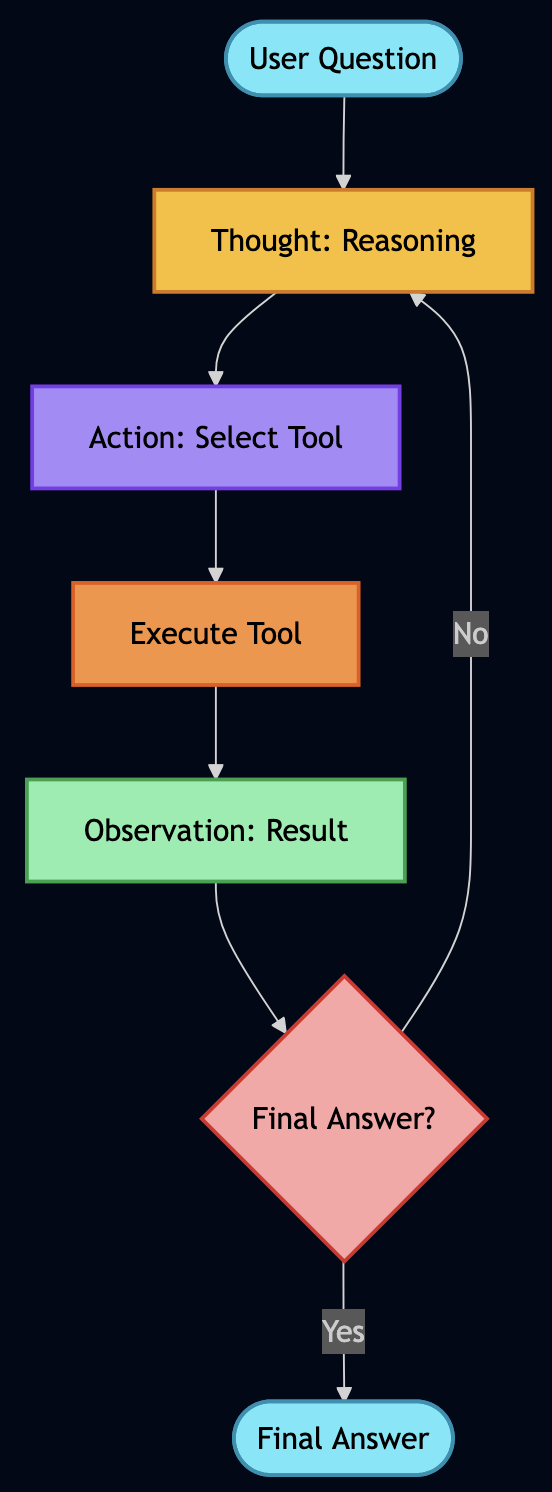
The Human Thought Process We’re Mimicking
When I manually analyzed stocks, my mental process looked something like this:
- “I need to check if Apple is overvalued”
- “Let me get the current P/E ratio”
- “Hmm, 28.5 seems high, but what’s the industry average?”
- “Tech sector average is 25, so Apple is slightly premium”
- “But wait, what’s their growth rate?”
- “15% annual growth… that PEG ratio of 1.9 suggests fair value”
- “Let me check recent news for any red flags…”
ReAct agents follow this exact pattern. Here’s the actual implementation:
class ReActAgent:
    """ReAct Agent that demonstrates reasoning traces"""

    # This is the actual prompt from the project
    REACT_PROMPT = """You are a financial analysis agent that uses the ReAct framework to solve problems.

You have access to the following tools:

{tools_description}

Use the following format EXACTLY:

Question: the input question you must answer
Thought: you should always think about what to do
Action: the action to take, must be one of [{tool_names}]
Action Input: the input to the action
Observation: the result of the action
... (this Thought/Action/Action Input/Observation can repeat N times)
Thought: I now know the final answer
Final Answer: the final answer to the original input question

Begin! Remember to ALWAYS follow the format exactly.

Question: {question}
Thought: {scratchpad}"""

    def _parse_response(self, response: str) -> Tuple[str, str, str, bool]:
        """Parse LLM response to extract thought, action, and input"""
        response = response.strip()

        # Check for final answer
        if "Final Answer:" in response:
            parts = response.split("Final Answer:")
            thought = parts[0].strip()
            final_answer = parts[1].strip()
            return thought, "final_answer", final_answer, True

        # Parse using regex from actual implementation
        thought_match = re.search(r"Thought:\s*(.+?)(?=Action:|$)", response, re.DOTALL)
        action_match = re.search(r"Action:\s*(.+?)(?=Action Input:|$)", response, re.DOTALL)
        input_match = re.search(r"Action Input:\s*(.+?)(?=Observation:|$)", response, re.DOTALL)

        thought = thought_match.group(1).strip() if thought_match else "Thinking..."
        action = action_match.group(1).strip() if action_match else "unknown"
        action_input = input_match.group(1).strip() if input_match else ""

        return thought, action, action_input, False
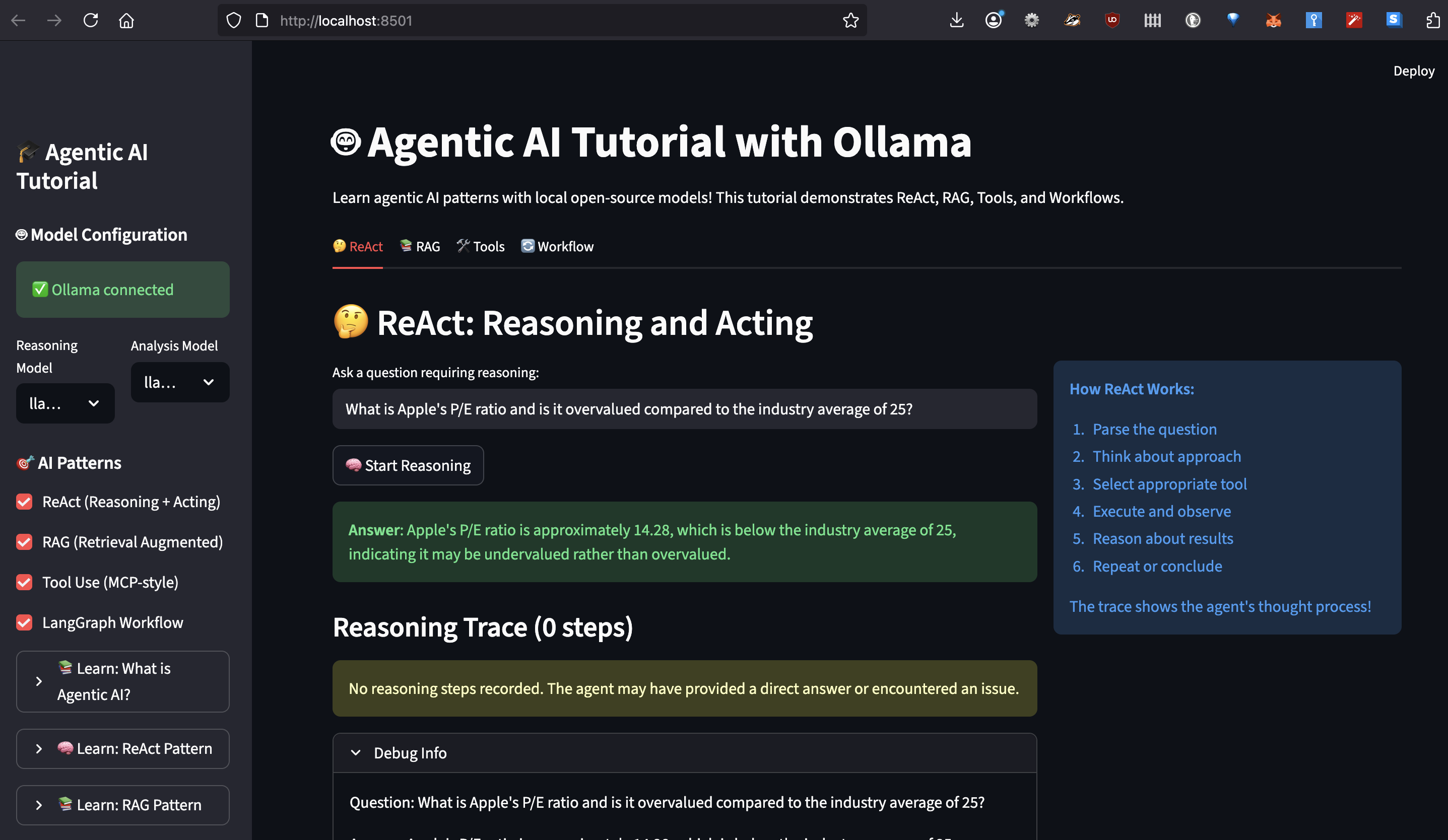
I can easily trace through reasoning to debug how AI reached its conclusion.
RAG: Solving the Hallucination Problem Once and For All
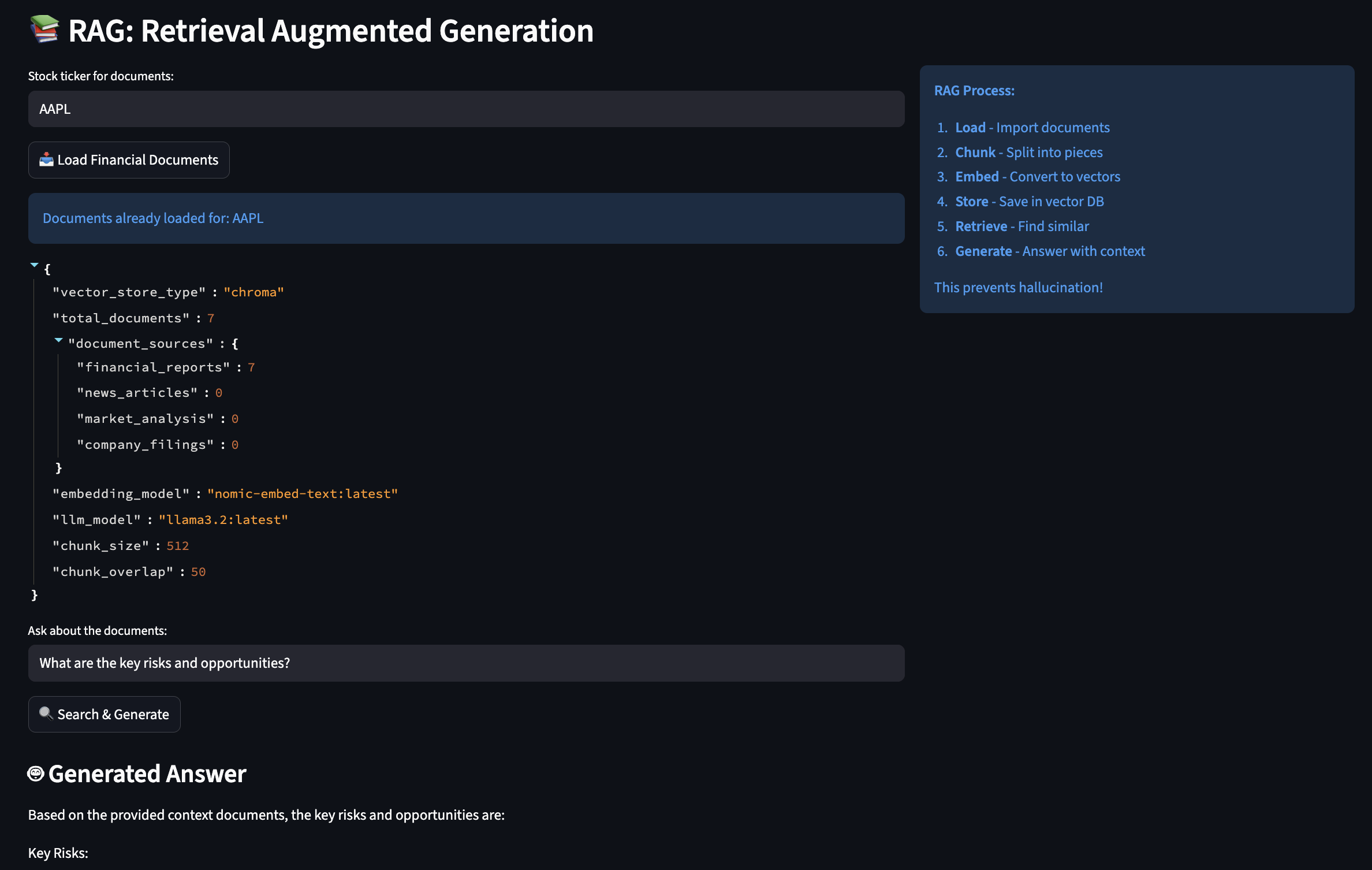
Early in my experiments, I had to deal with a bit of hallucinations when querying financial data with AI so I applied RAG (Retrieval-Augmented Generation) to give AI access to a searchable library of documents.

How RAG Actually Works
You can think of RAG like having a research assistant who, instead of relying on memory, always checks the source documents before answering:
class RAGEngine:
    """
    This engine solved my hallucination problems by grounding
    all responses in actual documents. It's like giving the AI
    access to your company's document database.
    """

    def __init__(self):
        # Initialize embeddings - this converts text to searchable vectors
        # Using Ollama's local embedding model (free!)
        self.embeddings = OllamaEmbeddings(
            model="nomic-embed-text:latest"  # 274MB model, runs fast
        )

        # Text splitter - crucial for handling large documents
        self.text_splitter = RecursiveCharacterTextSplitter(
            chunk_size=512,      # Small enough for context window
            chunk_overlap=50,    # Overlap prevents losing context at boundaries
            separators=["\n\n", "\n", ". ", " "]  # Smart splitting
        )

        # Vector store - where we keep our searchable documents
        self.vector_store = FAISS.from_texts(["init"], self.embeddings)

    def load_financial_documents(self, ticker: str):
        """
        In production, this would load real 10-Ks, 10-Qs, earnings calls.
        For now, I'm using sample documents to demonstrate the concept.
        """

        # Imagine these are real SEC filings
        documents = [
            {
                "content": f"""
                {ticker} Q3 2024 Earnings Report

                Revenue: $94.9 billion, up 6% year over year
                iPhone revenue: $46.2 billion
                Services revenue: $23.3 billion (all-time record)

                Gross margin: 45.2%
                Operating cash flow: $28.7 billion

                CEO Tim Cook: "We're incredibly pleased with our record
                September quarter results and strong momentum heading into
                the holiday season."
                """,
                "metadata": {
                    "source": "10-Q Filing",
                    "date": "2024-10-31",
                    "document_type": "earnings_report",
                    "ticker": ticker
                }
            },
            # ... more documents
        ]

        # Process each document
        for doc in documents:
            # Split into chunks
            chunks = self.text_splitter.split_text(doc["content"])

            # Create document objects with metadata
            for i, chunk in enumerate(chunks):
                metadata = doc["metadata"].copy()
                metadata["chunk_id"] = i
                metadata["total_chunks"] = len(chunks)

                # Add to vector store
                self.vector_store.add_texts(
                    texts=[chunk],
                    metadatas=[metadata]
                )

        print(f"? Loaded {len(documents)} documents for {ticker}")

    def answer_with_sources(self, question: str) -> Dict[str, Any]:
        """
        This is where RAG shines - every answer comes with sources
        """
        # Find relevant document chunks
        relevant_docs = self.vector_store.similarity_search_with_score(
            question,
            k=5  # Top 5 most relevant chunks
        )

        # Build context from retrieved documents
        context_parts = []
        sources = []

        for doc, score in relevant_docs:
            # Only use highly relevant documents (score < 0.5)
            if score < 0.5:
                context_parts.append(doc.page_content)
                sources.append({
                    "content": doc.page_content[:100] + "...",
                    "source": doc.metadata.get("source"),
                    "date": doc.metadata.get("date"),
                    "relevance_score": float(score)
                })

        context = "\n\n---\n\n".join(context_parts)

        # Generate answer grounded in retrieved context
        prompt = f"""Based on the following verified documents, answer the question.
        If the answer is not in the documents, say "I don't have that information."

        Documents:
        {context}

        Question: {question}

        Answer (cite sources):"""

        response = self.llm.invoke(prompt)

        return {
            "answer": response,
            "sources": sources,
            "confidence": len(sources) / 5  # Simple confidence metric
        }
MCP-Style Tools: Extending AI Capabilities Beyond Text
Model Context Protocol (MCP) helped me to build a flexible tool system. Instead of hardcoding every capability, we give the AI tools it can discover and use:
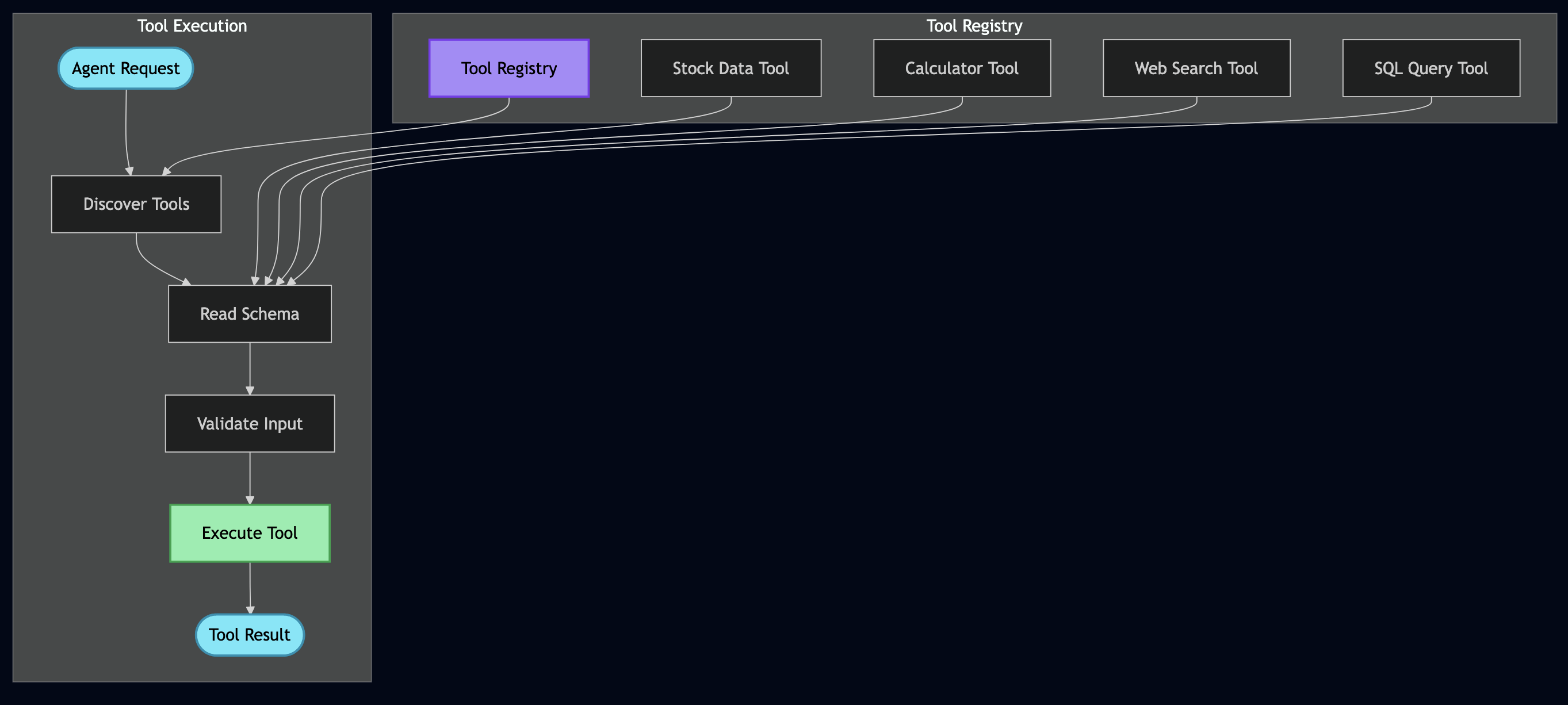
class BaseTool(ABC):
    """
    Every tool self-describes its capabilities.
    This is like giving the AI an instruction manual for each tool.
    """

    @abstractmethod
    def get_schema(self) -> ToolSchema:
        """Define what this tool does and how to use it"""
        pass

    @abstractmethod
    def execute(self, **kwargs) -> Any:
        """Actually run the tool"""
        pass

class StockDataTool(BaseTool):
    """
    Real example: This tool replaced my entire market data microservice
    """

    def get_schema(self) -> ToolSchema:
        return ToolSchema(
            name="stock_data",
            description="Fetch real-time stock market data including price, volume, and fundamentals",
            category=ToolCategory.DATA_RETRIEVAL,
            parameters=[
                ToolParameter(
                    name="ticker",
                    type="string",
                    description="Stock symbol like AAPL or GOOGL",
                    required=True
                ),
                ToolParameter(
                    name="metrics",
                    type="array",
                    description="Specific metrics to retrieve",
                    required=False,
                    default=["price", "volume", "pe_ratio"],
                    enum=["price", "volume", "pe_ratio", "market_cap",
                          "dividend_yield", "beta", "rsi", "moving_avg_50"]
                )
            ],
            returns="Dictionary containing requested stock metrics",
            examples=[
                {"ticker": "AAPL", "metrics": ["price", "pe_ratio"]},
                {"ticker": "TSLA", "metrics": ["price", "volume", "rsi"]}
            ]
        )

    def execute(self, **kwargs) -> Dict[str, Any]:
        """
        This connects to real market data APIs.
        In my old system, this was a 500-line service.
        """
        ticker = kwargs["ticker"].upper()
        metrics = kwargs.get("metrics", ["price", "volume"])

        # Using yfinance for real market data
        import yfinance as yf
        stock = yf.Ticker(ticker)
        info = stock.info

        result = {"ticker": ticker, "timestamp": datetime.now().isoformat()}

        # Fetch requested metrics
        metric_mapping = {
            "price": lambda: info.get("currentPrice", stock.history(period="1d")['Close'].iloc[-1]),
            "volume": lambda: info.get("volume", 0),
            "pe_ratio": lambda: info.get("trailingPE", 0),
            "market_cap": lambda: info.get("marketCap", 0),
            "dividend_yield": lambda: info.get("dividendYield", 0) * 100,
            "beta": lambda: info.get("beta", 1.0),
            "rsi": lambda: self._calculate_rsi(stock),
            "moving_avg_50": lambda: stock.history(period="50d")['Close'].mean()
        }

        for metric in metrics:
            if metric in metric_mapping:
                try:
                    result[metric] = metric_mapping[metric]()
                except Exception as e:
                    result[metric] = f"Error: {str(e)}"

        return result
class ToolParameter(BaseModel):
    """Actual parameter definition from project"""
    name: str
    type: str  # "string", "number", "boolean", "object", "array"
    description: str
    required: bool = True
    default: Any = None
    enum: Optional[List[Any]] = None

class CalculatorTool(BaseTool):
    """Actual calculator implementation from project"""

    def execute(self, **kwargs) -> float:
        """Safely evaluate mathematical expression"""
        self.validate_input(**kwargs)

        expression = kwargs["expression"]
        precision = kwargs.get("precision", 2)

        try:
            # Security: Remove dangerous operations
            safe_expr = expression.replace("__", "").replace("import", "")

            # Define allowed functions (from actual code)
            safe_dict = {
                "abs": abs, "round": round, "min": min, "max": max,
                "sum": sum, "pow": pow, "len": len
            }

            # Add math functions
            import math
            for name in ["sqrt", "log", "log10", "sin", "cos", "tan", "pi", "e"]:
                if hasattr(math, name):
                    safe_dict[name] = getattr(math, name)

            result = eval(safe_expr, {"__builtins__": {}}, safe_dict)

            return round(result, precision)

        except Exception as e:
            raise ValueError(f"Calculation error: {e}")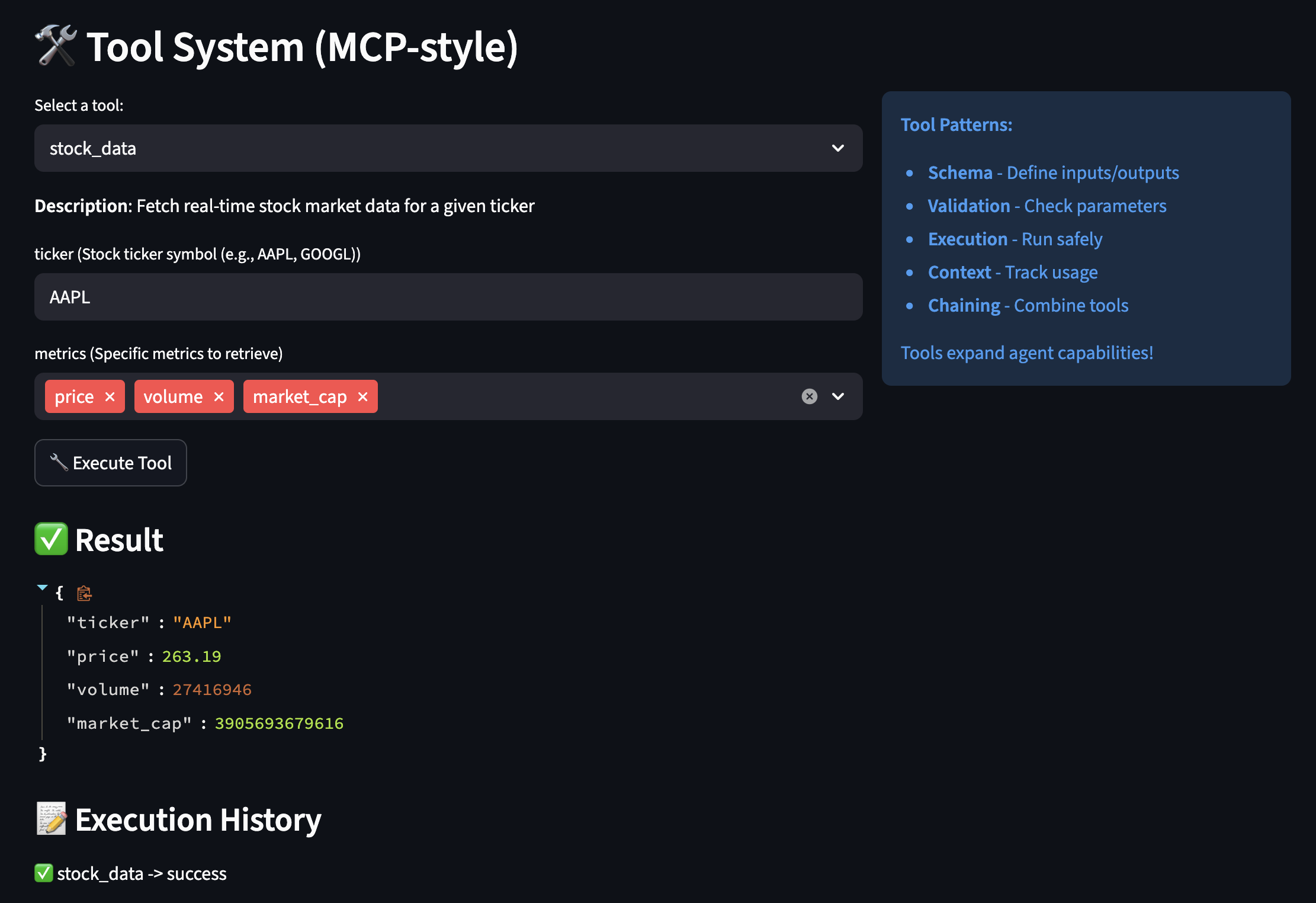
Orchestrating Everything with LangGraph
This is where all the pieces come together. LangGraph allows coordinating multiple agents and tools in sophisticated workflows:
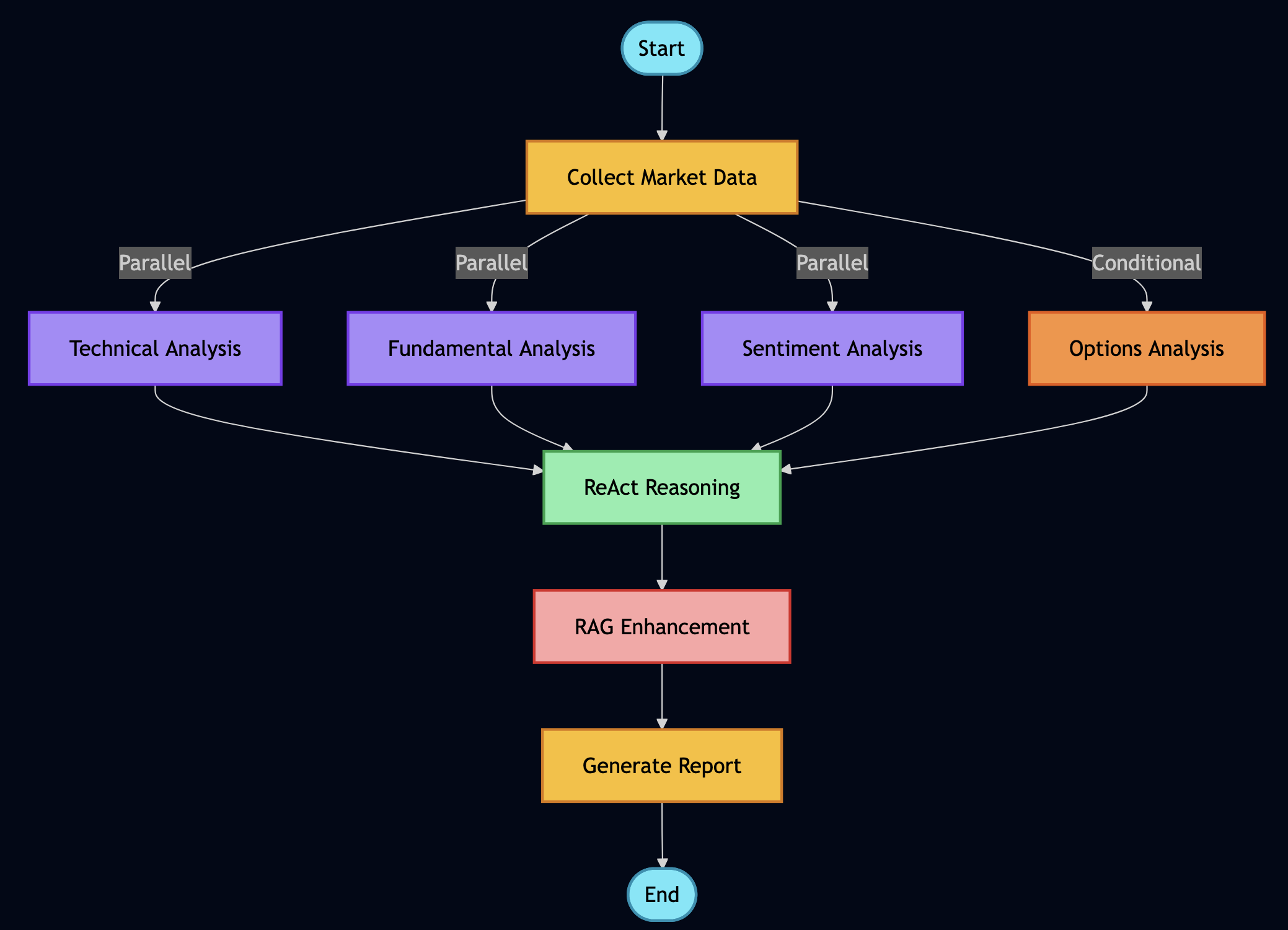
class FinancialAnalysisWorkflow:
    """
    This workflow replaces what used to be multiple microservices,
    message queues, and orchestration layers. It's beautiful.
    """

    def _build_graph(self) -> StateGraph:
        """
        Define how different analysis components work together
        """
        workflow = StateGraph(AgentState)

        # Add all our analysis nodes
        workflow.add_node("collect_data", self.collect_market_data)
        workflow.add_node("technical_analysis", self.run_technical_analysis)
        workflow.add_node("fundamental_analysis", self.run_fundamental_analysis)
        workflow.add_node("sentiment_analysis", self.analyze_sentiment)
        workflow.add_node("options_analysis", self.analyze_options)
        workflow.add_node("portfolio_optimization", self.optimize_portfolio)
        workflow.add_node("rag_research", self.search_documents)
        workflow.add_node("react_reasoning", self.reason_about_data)
        workflow.add_node("generate_report", self.create_final_report)

        # Entry point
        workflow.set_entry_point("collect_data")

        # Define the flow - some parallel, some sequential
        workflow.add_edge("collect_data", "technical_analysis")
        workflow.add_edge("collect_data", "fundamental_analysis")
        workflow.add_edge("collect_data", "sentiment_analysis")

        # These can run in parallel
        workflow.add_conditional_edges(
            "collect_data",
            self.should_run_options,  # Only if options are relevant
            {
                "yes": "options_analysis",
                "no": "rag_research"
            }
        )

        # Everything feeds into reasoning
        workflow.add_edge(["technical_analysis", "fundamental_analysis",
                          "sentiment_analysis", "options_analysis"],
                          "react_reasoning")

        # Reasoning leads to report
        workflow.add_edge("react_reasoning", "generate_report")

        # End
        workflow.add_edge("generate_report", END)

        return workflow

    def analyze_stock_comprehensive(self, ticker: str, investment_amount: float = 10000):
        """
        This single function replaces what used to be an entire team's
        worth of manual analysis.
        """
        initial_state = {
            "ticker": ticker,
            "investment_amount": investment_amount,
            "timestamp": datetime.now(),
            "messages": [],
            "market_data": {},
            "technical_indicators": {},
            "fundamental_metrics": {},
            "sentiment_scores": {},
            "options_data": {},
            "portfolio_recommendation": {},
            "documents_retrieved": [],
            "reasoning_trace": [],
            "final_report": "",
            "errors": []
        }

        # Run the workflow
        try:
            result = self.app.invoke(initial_state)
            return self._format_comprehensive_report(result)
        except Exception as e:
            # Graceful degradation
            return self._run_basic_analysis(ticker, investment_amount)
class WorkflowNodes:
    """Collection of workflow nodes from actual project"""

    def collect_market_data(self, state: AgentState) -> AgentState:
        """Node: Collect market data using tools"""
        print("? Collecting market data...")

        ticker = state["ticker"]

        try:
            # Use actual stock data tool from project
            tool = self.tool_registry.get_tool("stock_data")
            market_data = tool.execute(
                ticker=ticker,
                metrics=["price", "volume", "market_cap", "pe_ratio", "52_week_high", "52_week_low"]
            )

            state["market_data"] = market_data

            # Add message to history
            state["messages"].append(
                AIMessage(content=f"Collected market data for {ticker}")
            )

        except Exception as e:
            state["error"] = f"Failed to collect market data: {str(e)}"
            state["market_data"] = {}

        return state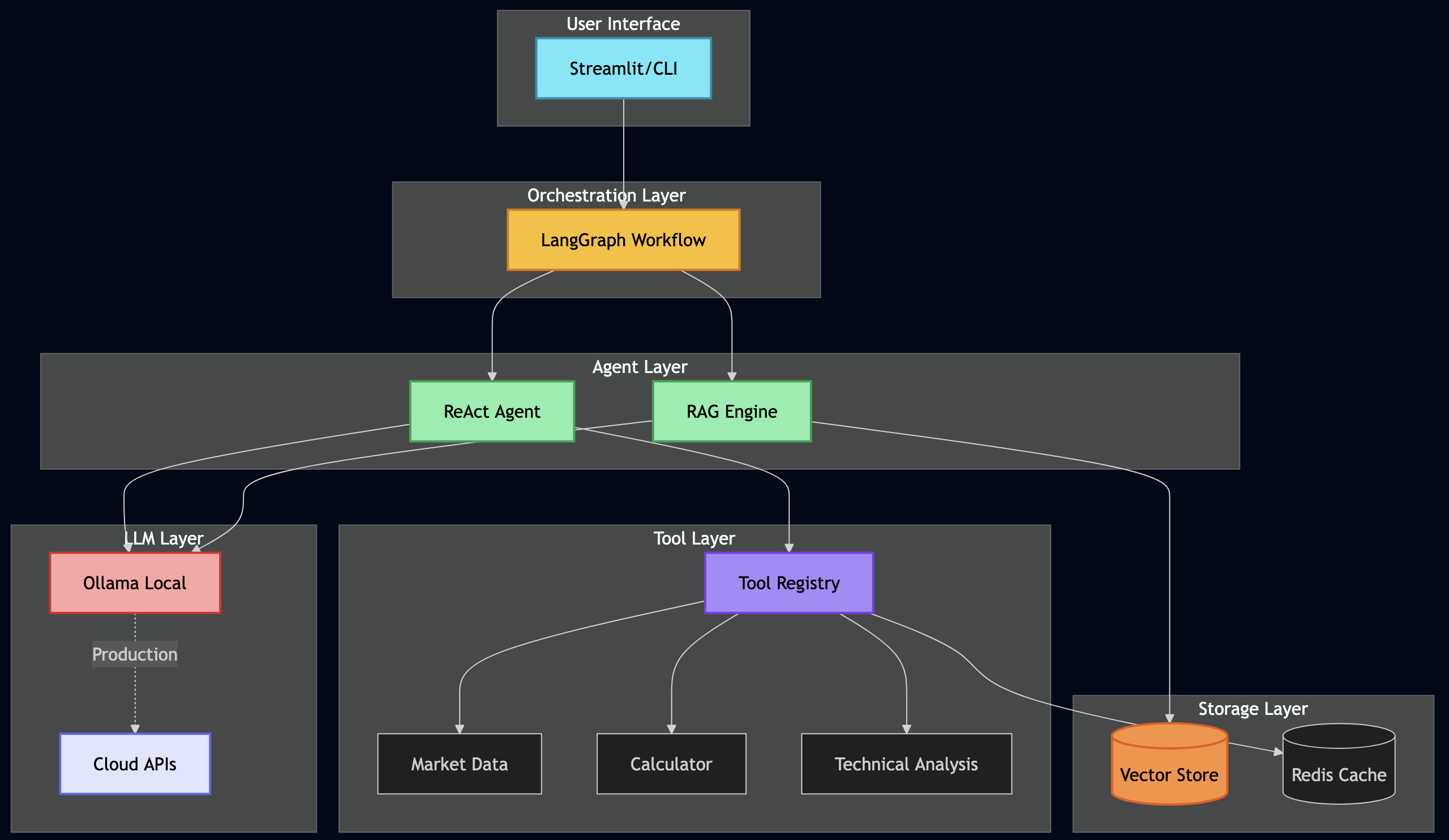
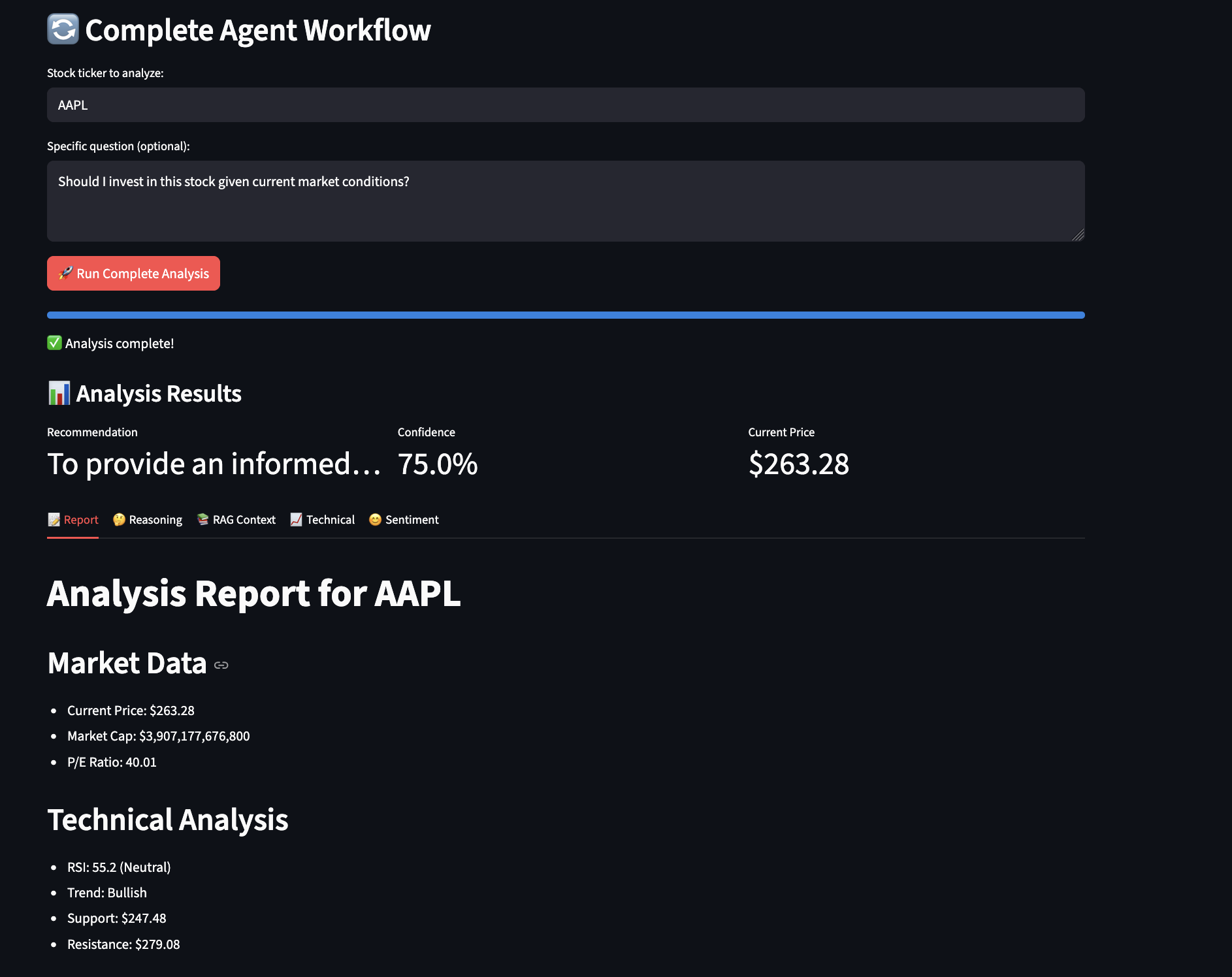
Here is a screenshot from the example showing workflow analysis:
Production Considerations: From Tutorial to Trading Floor
This tutorial demonstrates core concepts, but let me be clear – production deployment in financial services requires significantly more rigor. Having deployed similar systems in regulated environments, here’s what you’ll need to consider:
The Reality of Production Deployment
Production financial systems require months of parallel running and validation. In my experience, you’ll need:
class ProductionValidation:
    """
    Always run new systems parallel to existing ones
    """
    def validate_against_legacy(self, ticker: str):
        # Run both systems
        legacy_result = self.legacy_system.analyze(ticker)
        agent_result = self.agent_system.analyze(ticker)

        # Compare results
        discrepancies = self.compare_results(legacy_result, agent_result)

        # Log everything for audit
        self.audit_log.record({
            "ticker": ticker,
            "timestamp": datetime.now(),
            "legacy": legacy_result,
            "agent": agent_result,
            "discrepancies": discrepancies,
            "approved": len(discrepancies) == 0
        })

        # Require human review for discrepancies
        if discrepancies:
            return self.escalate_to_human(discrepancies)

        return agent_result
Integrating Traditional Financial Algorithms
While this tutorial uses general-purpose LLMs, production systems should combine AI with proven financial algorithms:
class HybridAnalyzer:
    """
    Combine traditional algorithms with AI reasoning
    """
    def analyze_options(self, ticker: str, strike: float, expiry: str):
        # Use traditional Black-Scholes for pricing
        traditional_price = self.black_scholes_pricer.calculate(
            ticker, strike, expiry
        )

        # Use AI for market context
        ai_context = self.agent.analyze_market_conditions(ticker)

        # Combine both
        if ai_context["volatility_regime"] == "high":
            # AI detected unusual conditions, adjust model
            adjusted_price = traditional_price * (1 + ai_context["vol_adjustment"])
            confidence = "low - unusual market conditions"
        else:
            adjusted_price = traditional_price
            confidence = "high - normal market conditions"

        return {
            "model_price": traditional_price,
            "adjusted_price": adjusted_price,
            "confidence": confidence,
            "reasoning": ai_context["reasoning"]
        }
Fitness Functions for Financial Accuracy
Financial data cannot tolerate hallucinations. Implement strict validation:
class FinancialFitnessValidator:
    """
    Reject hallucinated or impossible financial data
    """
    def validate_metrics(self, ticker: str, metrics: Dict):
        validations = {
            "pe_ratio": lambda x: -100 < x < 1000,
            "price": lambda x: x > 0,
            "market_cap": lambda x: x > 0,
            "dividend_yield": lambda x: 0 <= x <= 20,
            "revenue_growth": lambda x: -100 < x < 200
        }

        for metric, validator in validations.items():
            if metric in metrics:
                value = metrics[metric]
                if not validator(value):
                    raise ValueError(f"Invalid {metric}: {value} for {ticker}")

        # Cross-validation
        if "pe_ratio" in metrics and "earnings" in metrics:
            calculated_pe = metrics["price"] / metrics["earnings"]
            if abs(calculated_pe - metrics["pe_ratio"]) > 1:
                raise ValueError("P/E ratio doesn't match price/earnings")

        return True
Leverage Your Existing Data
If you have years of financial data in databases, you don’t need to start over. Use RAG to make it searchable:
# Convert your SQL database to vector-searchable documents
existing_data = sql_query("SELECT * FROM financial_reports")
rag_engine.add_documents([
    {"content": row.text, "metadata": {"date": row.date, "ticker": row.ticker}}
    for row in existing_data
])
Human-in-the-Loop
No matter how sophisticated your agents become, financial decisions affecting real money require human oversight. Build it in from day one:
- Confidence thresholds that trigger human review
- Clear audit trails showing agent reasoning
- Easy override mechanisms
- Gradual automation based on proven accuracy
class HumanInTheLoopWorkflow:
    """
    Ensure human review for critical decisions
    """
    def execute_trade_recommendation(self, recommendation: Dict):
        # Auto-approve only for low-risk, small trades
        if (recommendation["risk_score"] < 0.3 and
            recommendation["amount"] < 10000):
            return self.execute(recommendation)

        # Require human approval for everything else
        approval_request = {
            "recommendation": recommendation,
            "agent_reasoning": recommendation["reasoning_trace"],
            "confidence": recommendation["confidence_score"],
            "risk_assessment": self.assess_risks(recommendation)
        }

        # Send to human reviewer
        human_decision = self.request_human_review(approval_request)

        if human_decision["approved"]:
            return self.execute(recommendation)
        else:
            self.log_rejection(human_decision["reason"])
Cost Management and Budget Controls
During development, Ollama gives you free local inference. In production, costs add up quickly so you need to build proper controls for calculating cost of analysis:
- GPT-4: ~$30 per million tokens
- Claude-3: ~$20 per million tokens
- Local Llama: Free but needs GPU infrastructure
class CostController:
    """
    Prevent runway costs in production
    """
    def __init__(self, daily_budget: float = 100.0):
        self.daily_budget = daily_budget
        self.costs_today = 0.0
        self.cost_per_token = {
            "gpt-4": 0.00003,  # $0.03 per 1K tokens
            "claude-3": 0.00002,
            "llama-local": 0.0  # Free but has compute cost
        }

    def check_budget(self, estimated_tokens: int, model: str):
        estimated_cost = estimated_tokens * self.cost_per_token.get(model, 0)

        if self.costs_today + estimated_cost > self.daily_budget:
            # Switch to local model or cache
            return "use_local_model"

        return "proceed"

    def track_usage(self, tokens_used: int, model: str):
        cost = tokens_used * self.cost_per_token.get(model, 0)
        self.costs_today += cost

        # Alert if approaching limit
        if self.costs_today > self.daily_budget * 0.8:
            self.send_alert(f"80% of daily budget used: ${self.costs_today:.2f}")
Caching Is Essential
Caching is crucial for both performance and cost effectiveness when running expensive analysis using LLMs.
class CachedRAGEngine(RAGEngine):
    """
    Caching reduced our costs by 70% and improved response time by 5x
    """

    def __init__(self):
        super().__init__()
        self.cache = Redis(host='localhost', port=6379, db=0)
        self.cache_ttl = 3600  # 1 hour for financial data

    def retrieve_with_cache(self, query: str, k: int = 5):
        # Create cache key from query
        cache_key = f"rag:{hashlib.md5(query.encode()).hexdigest()}"

        # Check cache first
        cached = self.cache.get(cache_key)
        if cached:
            return json.loads(cached)

        # If not cached, retrieve and cache
        docs = self.vector_store.similarity_search(query, k=k)

        # Cache the results
        self.cache.setex(
            cache_key,
            self.cache_ttl,
            json.dumps([doc.to_dict() for doc in docs])
        )

        return docs
Fallback Strategies
A Cascading Fallback can help execute a task using a sequence of operations, ordered from the most preferred (highest quality/cost) to the least preferred (lowest quality/safest default).
class ResilientAgent:
    """
    Production agents need multiple fallback options
    """

    def analyze_with_fallbacks(self, ticker: str):
        strategies = [
            ("primary", self.run_full_analysis),
            ("fallback_1", self.run_simplified_analysis),
            ("fallback_2", self.run_basic_analysis),
            ("emergency", self.return_cached_or_default)
        ]

        for strategy_name, strategy_func in strategies:
            try:
                result = strategy_func(ticker)
                result["strategy_used"] = strategy_name
                return result
            except Exception as e:
                logger.warning(f"Strategy {strategy_name} failed: {e}")
                continue

        return {"error": "All strategies failed", "ticker": ticker}
Observability and Monitoring
Track token usage, latency, accuracy, and costs immediately. What you don’t measure, you can’t improve.
class ObservableWorkflow:
    """
    You need to know what your AI is doing in production
    """

    def __init__(self):
        self.metrics = PrometheusMetrics()
        self.tracer = JaegerTracer()

    def execute_with_observability(self, state: AgentState):
        with self.tracer.start_span("workflow_execution") as span:
            span.set_tag("ticker", state["ticker"])

            # Track token usage
            tokens_start = self.llm.get_num_tokens(state)

            # Execute workflow
            result = self.workflow.invoke(state)

            # Record metrics
            tokens_used = self.llm.get_num_tokens(result) - tokens_start
            self.metrics.record_tokens(tokens_used)
            self.metrics.record_latency(span.duration)

            # Log for debugging
            logger.info(f"Workflow completed", extra={
                "ticker": state["ticker"],
                "tokens": tokens_used,
                "duration": span.duration,
                "strategy": result.get("strategy_used", "primary")
            })

            return result
Closing Thoughts
This tutorial demonstrates how agentic AI transforms financial analysis from rigid pipelines to adaptive, thinking systems. The combination of ReAct reasoning, RAG grounding, tool use, and workflow orchestration creates capabilities that surpass traditional approaches in flexibility and ease of development.
Start Simple, Build Incrementally:
- Week 1: Basic ReAct agent to understand reasoning loops
- Week 2: Add tools for external capabilities
- Week 3: Implement RAG to ground responses in real data
- Week 4: Orchestrate with workflows
- Develop everything locally with Ollama first – it’s free and private
The point of agentic AI is automation. Here’s the pragmatic approach:
Automate in Tiers:
- Tier 1 (Fully Automated): Data collection, technical calculations, report generation
- Tier 2 (Auto + Audit): Sentiment analysis, risk scoring, anomaly detection
- Tier 3 (Human Required): Large trades, strategy changes, regulatory decisions
Clear Escalation Rules:
ESCALATE_IF = {
    "confidence_below": 0.8,
    "amount_above": 100000,
    "regulatory_flag": True,
    "anomaly_detected": True
}
Reinforcement Learning:
Instead of permanent human-in-the-loop, use RL to train agents that learn from feedback:
class ReinforcementLearningLoop:
    """
    Gradually reduce human involvement through learning
    """

    def ai_based_reinforcement(self, decision, outcome):
        """AI learns from market outcomes directly"""
        # Did the prediction match reality?
        reward = self.calculate_reward(decision, outcome)

        if decision["action"] == "buy" and outcome["price_change"] > 0.02:
            reward = 1.0  # Good decision
        elif decision["action"] == "hold" and abs(outcome["price_change"]) < 0.01:
            reward = 0.5  # Correct to avoid volatility
        else:
            reward = -0.5  # Poor decision

        # Update agent weights/prompts based on reward
        self.agent.update_policy(decision["context"], reward)

    def human_feedback_learning(self, decision, human_override=None):
        """Learn from human corrections when they occur"""
        if human_override:
            # Human disagreed - strong learning signal
            self.agent.record_correction(
                agent_decision=decision,
                human_decision=human_override,
                weight=10.0  # Human feedback weighted heavily
            )
        else:
            # Human agreed (implicitly by not overriding)
            self.agent.reinforce_decision(decision, weight=1.0)

    def adaptive_automation_threshold(self):
        """Dynamically adjust when human review is needed"""
        recent_accuracy = self.get_recent_accuracy(days=30)

        if recent_accuracy > 0.95:
            self.confidence_threshold *= 0.9  # Require less human review
        elif recent_accuracy < 0.85:
            self.confidence_threshold *= 1.1  # Require more human review

        return self.confidence_threshold
This approach reduces human involvement over time: use that feedback to train, gradually automate decisions where the agent consistently agrees with humans, and only escalate novel situations or low-confidence decisions.
Complete code at github.com/bhatti/agentic-ai-tutorial. Start local, validate thoroughly, scale confidently.