The first chapter defines the remote API fundamentals that defines contract for the desired behavior, communication protocol, network endpoints and policies regarding failures. The chapter also surveys history of remote APIs such as TCP/IP based FTP, RPC based DCE/CORBA/RMI/gRPC, queue/messaging based, REST style, and data streams/pipelines. The authors then examines cloud native applications (CNA) and a set of principles described in IDEAL that include Isolated State, Distribution, Elasticity, Automation and Loose Coupling. These traits are then summarized as:
Fit for purpose
Rightsized and modular
Resilient and protected
Controllable and adaptable
Workfload-aware and resource-efficient
Agile and tool-supported
The authors describes how service-oriented architecture originated and evolved into Microservices that has a single responsibility within a domain-specific business capability. Microservices facilitate software reuse but also bring new challenges that include fallacies of distributed computing, data consistency and state management. These APIs should be considered as products and they may form ecosystems. API business value, visibility and lifetime help make API successful by enabling rapid integration of systems with support of the autonomy and independent evolution of those systems. The API design may differ based on:
One general vs many specialized endpoints
Fine vs coarse-grained endpoint and operation scope
Few operations carrying much data vs chatty interactions carrying little data
Data currentness vs correctness
Stable contracts vs fast changing ones
The authors reviews architecturally significant requirements such as understandability, information sharing vs hiding, amount of coupling, modifiability, performance & scalability, data parsimony, and security & privacy. The authors then describes developer experience as:
DX = function, stability, ease of use, and clarity
The developer experience includes quality attributes throughout the lifecycle of API such as development qualities, operational qualities and managerial qualities. The chapter ends with definition of a domain model for remote APIs that include communication participants, endpoints with contracts that describe operations, message structure, and API contract.
2. Lakeside Mutual Case Study
The chapter 2 introduces a fake Lakeside Mutual case study to illustrate API design. This chapter examines the user-stories and quality attributes for the case study, analsysis-level domain model and architecture overview. The architecture overviews describes system context and application architecture including service components. The chapter then describes an example of API specification using MDSL (Microservice Domain-Specific-Language).
3. API Decision Narratives
This chapter goes over the API design options and decisions where each decision includes criteria, alternative options and recommendations based on why-statement and architecture-decision-record format. The first pattern starts with Foundation API decisions and patterns that include:
3.1 API Visibility
This decision that is primarily managerial and organizational looks at the different visibility options such as Public API, Community API and Solution-Internal API.
3.2 API Integration
The chapter looks at the decision looks for the API integration types where an API can be integrated with backend horizontally or can be integrated with frontend and backend vertically. In the former option, backend exposes its services via a message-based remote backend integration API. In the latter option, the APIs are exposed via a message-based remote frontend integration API.
The API designers have to find an appropriate business granularity for the service and handle cohesion & coupling criteria. The drivers for this decision is to define the architectural role that an API endpoint should play and define the responsibility of each API operation. The role of an API endpoint can be Processing Resource for processing incoming commands or Information Holder Resource for storage and retrieval of data or metadata. The information holder roles can be further divided into operational/transactional short-lived data, master long-lived data for business transactions, reference long-lived data for looking up delivery status, zip codes, etc., link lookup resource to identify links to resources and data transfer resource to offer a shared data exchange between clients.
3.5 Defining Operation Responsibilities
The operation responsibilities include defining read-write characteristics of each API operation and can be categorized into Computing Function, State Creation Operation, State Transition Operation and Retrieval Operation. The Computation Function computes a result solely from the client input without reading or writing a server-side state. The State Creation Operation creates states with reliability on an write-only API endpoint. The State Transition Operation performs one or more activities, causing a server-side state change with considerations for network efficiency and data parsimony. The Retrieval Operation represents a read-only access operation to find the data.
3.6 Selecting Message Representation Patterns
The structural representation patterns deal with designing message representation structures with considerations for finding the optimal number of message parameters and semantic meaning and stereotypes of the representation elements. This structural representation needs to take four decisions: responsibility of message elements, structure of the parameter representation, exchange of context information required and meaning of stereotypes of message elements. The structure of parameter representation can be nested or flat with types: Atomic Parameter, Atomic Parameter List, Parameter Tree, and Parameter Forrest. The Atomic Parameter defines a single parameter or body element. The Atomic Parameter List aggregates multiple atomic parameters as list. The Parameter Tree defines a hierarchical structure with one or more child nodes. The Parameter Forest comprises two or more Parameter Trees. Security and privacy concerns such as data integrity and confidentiality as well as semantic proximity will determine choosing the right option for these structure types.
3.7 Element Stereotypes
The element stereotype patterns include Data Element and Metadata Element, Link Element, ID Element. Security and data privacy concerns drive Data Elements and Metadata Elements and messages may become larger if Metadata Elements are included. The unique ID Element is used to identify to API endpoints, operations, and message representation elements. The Link Element act as human and machine readable network accessible pointers to other endpoints and operations.
3.8 Governing API Quality
The quality of service (QoS) for API include reliability, performance, security and scalability. The themes of the decisions for quality governance include:
3.8.1 Identification and Authentication of the API Client
Identification, authentication and authorization are important for APIs security but they also enable measures for ensuring many other qualities.
3.8.2 API Key
The API Key identifies the client and additional signature made with the secret key, which are never transmitted. You may use OAuth 2.0, OpenID, Kerberos in combination with LDAP, CHAP, and EAP.
3.8.3 Pricing Plan
The pricing plan looks at the metering and charging for API consumption and its variants include Freemium Model, Flat-Rate Subscription, Usage-based Pricing and Market-based Pricing based on economic aspects.
3.8.4 Rate Limit
The Rate Limit safeguards against API clients that overuse the API.
3.8.5 Service Level Agreement
The service Level Agreement defines testable service-level objectives to establish a structured, quality-oriented agreement with the API product owner.
3.8.6 Error Report
The Error Report uses error codes in response message that indicate and classify the faults in a simple and machine-readable ways.
3.8.7 Context Representation
The context representation uses Metadata Elements to carry contextual information in request and response messages. It can be used to cope with the diversity of protocols for distributed applications and transport security tokens and digital signatures.
3.8.8 Pagination
The pagination divides large response data into smaller chunks and its variants include Page-Based Pagination, Cursor-Based Pagination, Offset-Based Pagination, and Time-Based Pagination. It can optionally allow filtering capabilities and pagination structure can be defined as Atomic Parameter List, or Parameter Forest or Parameter Tree.
3.8.9 Wish List and Wish Template
A Wish List allows API clients to provide desired data elements of requested resource in the request. When response contains a nested data, Wish Template can be used to specify parameters in the request message that should be included in the corresponding response message.
3.8.10 Conditional Request
This pattern makes a Conditional Request by adding Metadata Elements to the request message and the API service processes the request only the condition specified by the metadata is met.
3.8.11 Request Bundle
Request Bundle is defined as a data container that assembles multiple requests with unique identifiers in a single request message.
3.8.12 Embedded Entity
This pattern embeds a Data Element in the request or response instead of link or identifier.
3.8.13 Linked Information Holder
Linked Information Holder adds a Link Element to message that points to the API endpoint that represent the linked element.
3.9 API Evolution
API Evolution patterns define governing rules balancing stability and compatibility with maintainability and extensibility such as:
3.9.1 Version Identifier
Version identifier is added as a Metadata Element to the endpoint address, protocol header or the message payload to indicate possibly incompatible changes to clients.
3.9.2 Semantic Versioning
Semantic Versioning introduces a hierarchical three-number versioning schema x.y.z, which allows API providers to denote level of changes as major, minor and patch versions.
3.9.3 Commissioning and Decommissioning
The variants for version introduction and decommissioning decision include Two in Production, Limited Lifetime Guarantee, and Aggressive Obsolescence.
3.9.4 Experimental Preview
Experimental Preview provides access to an API to receive early feedback from consumers without making any commitments about the functionality, stability and longevity.
4. Pattern Language Introduction
This chapter introduces a pattern language, basic scoping and structural patterns. Many of the patterns builds upon Enterprise Integration Patterns and Gof Design Patterns when defining structure of a message. This chapter categorizes patterns into Foundation patterns, Responsibility patterns, Structure patterns, Quality patterns and Evolution patterns. These patterns also follow Design Refinement Phases based on Unified Process:
Inception – Foundation
Elaboration – Responsibility and Quality
Construction – Structure, Responsibility and Quality
Transition – Foundation, Quality and Evolution
4.1 Foundations: API Visibility and Integration Types
These patterns deal with types of systems, subsystems and components as well as where should an API be accessible. The API integration types can be Frontend Integration and Backend Integration. The Frontend Integrations, also referred as vertical integrations are consumed by API clients in application frontends. The cloud-native applications and microservices-based system benefit with Backend Integration, sometimes called horizontal integration to access information or activity in other systems. The API visibility alternatives can be Public API, Community API and Solution-Internal API. Public API specifies endpoints, operations, message representation, quality of service and lifecycle model that can be accessed by unlimited or unknown number of API clients and can be controlled with API keys. You may apply other patterns such as Version Identifiers, Pricing Plan, Rate Limit and Service Level Agreement with Public APIs. The Community API are only available to a community that may consists of different organizations. The Solution-Internal API is also referred as Platform API that may be exposed in a single cloud provider offering.
4.2 Basic Structure Patterns
The structure patterns looks at the number of representation elements for request and response messages and decides how these elements should be grouped. These patterns include Atomic Parameter that describes plain data such as text and numbers; Atomic Parameter List that groups several elementary parameters; Parameter Trees that provide nested parameters; and Parameter Forest that groups multiple tree parameters.
5. Define Endpoint Types and Operations
This chapter corresponds to Define phase of the Align-Define-Design-Refine (ADDR) process and describes high-level endpoint identification activities. The authors looks at user stories, event storming or other collaboration techniques to define API roles and responsibilities. The design of API contracts also have to define developer experience in terms of function, stability, ease of use, clarity. Other quality attributes that the API designer have to decide include: Accuracy for functional correctness including preconditions, invariants and postconditions; Distribution of control and autonomy between API client and provider; Scalability, performance and availability with Service Level Agreements for mission-critical APIs; Manageability for monitoring APIs; Consistency and atomicity for all-or-nothing semantics; Idempotence property; Auditability for risk management.
5.1 Endpoint Roles (aka Service Granularity)
The two general endpoint roles are Processing Resource and Information Holder Resource. The Processing Resource role allows remote clients to trigger an action and related design concerns include contract expressiveness and service granularity; learnability and manageability; semantic interoperability; response time; security and privacy; and compatibility and evolvability. Information Holder Resource exposes domain data in API and it may use Domain-driven design and object-oriented analysis and design to model the data. Other related concerns include quality attribute conflicts and trade-offs; security; data freshness vs consistency; and compliance with architectural design principles. Related patterns include:
Operational Data Holder to create, read, update and delete its data often and fast.
Master Data Holder to access master data that lives for long time, doesn’t change and will be referenced from many clients. The request and response messages of Master Data often take the form of Parameter Trees and master data update may come in the form of coarse-grained full updates or fine-grained partial updates.
Reference Data Holder is used to lookup reference data that is long lived and is immutable for clients using API endpoints. Its desired qualities include Do not repeat yourself (DRY) and performance vs consistency trade-off for read access.
Link Lookup Resource allows referring to other resources so that clients remain loosely coupled if API provider changes the destination of links. The design challenges include: coupling between clients and endpoints; dynamic endpoint references; centralization vs decentralization; message sizes, number of calls, resource use; dealing with broken links; and number of endpoints and API complexity.
Data Transfer Resource allows exchanging data between participants without knowing each other, without being available at the same time. The design considerations include coupling (time and location dimensions); communication constraints; reliability; scalability; storage space efficiency; latency; and ownership management. You may introduce a shared storage endpoint with a State Creation Operation and Retrieval Operation. The pattern properties include coupling (time and location dimensions); communication constraints; reliability; scalability; storage space efficiency; latency; ownership management; access control; (lack of) coordination; optimistic locking; polling; and garbage collection.
5.2 Operation Responsibilities
The four operation responsibilities include:
State Creation Operation to allow its clients that something has happened, e.g. to trigger instant or later processing. This design concerns include: coupling trade-offs (accuracy and expressiveness vs information parsimony); timing; consistency; and reliability. It may or may not have fire-and-forget semantics and idempotency may be needed for the transaction boundary. A popular variant of this pattern is Event Notification Operation, notifying the endpoint about an external event.
Retrieval Operation to retrieve information and allow further client-side processing. The design issues include: veracity, variety, velocity and volume; workload management; network efficiency vs data parsimony.
State Transition Operation to allow a client initiate a processing action that causes the provider-side application state to change. The design concerns include service granularity; consistency and auditability; dependencies on state changing being made beforehand; workload management; and network efficiency vs data parsimony. State Transition Operations are generally transactional supporting ACID behavior and may use ABAC for compliance and security controls.
Computation Function to allow client invoke side-effect-free remote processing on the provider side based on the input parameters. The relevant design issues include reproducibility and trust; performance; and workload management. Its examples include a Transformation service, Validation service, and Long Running Computation.
6. Design Request and Response Message Representations
This chapter corresponds to Design phase of the Align-Define-Design-Refine (ADDR) process and examines structural patterns for requests and responses. The challenges when designing message representations include interoperability on protocol and message-content; latency; throughput and scalability; maintainability; and developer experience.
6.1 Data Element
The Data Element pattern allow exchanging application-level information between API clients and API providers without decoupling them. The competing force concerns include rich functionality vs ease of processing and performance; security and data privacy vs ease of configuration; and maintainability vs flexibility.
6.2 Metadata Element
Metadata Element pattern allows enriching messages with additional information so that receiver can interpret the message content correctly. The design concerns include interoperability; concerns; and ease of use vs runtime efficiency. The variants of this pattern include Control Metadata Element such as identifiers, flags, filter, ACL, API eys, etc; Aggregated Metadata Elements such as counters of Pagination and statistical information; Provenance Metadata Elements such as message/request IDs, creation date, version numbers, etc.
6.3 ID Element
ID Element pattern helps identify elements of the Published Language using UUID or surrogate key when applying domain-driven design. The identification problems include effort vs stability; reliability for machines and humans; and security.
6.3 Link Element
Link Element is used to reference API endpoints and operations in request and response message payloads so that they can be called remotely.
6.4 API Key
API Key allows API provider to identify and authenticate clients and their requests. The design issues include establishing basic security; access control; avoiding the need to store or transmit user credentials; decoupling clients form their organizations; security vs ease of use; and performance.
6.5 Error Report
Error Report allows API provides inform its clients about communication and processing faults. The design concerns include expressiveness and target audience expectations; robustness and reliability; security and performance; interoperability and portability; and internationalization.
6.6 Context Representation
Context Representation allows API consumers and providers exchange context information without relying on any particular remoting protocols. The design considerations include interoperability and modifiability; dependency on evolving protocols; developer productivity (control vs convenience); diversity of clients and their requirements; end-to-end security; and logging and auditing on business domain level.
7. Refine Message Design for Quality
This chapter reviews API Quality patterns related to the Design and Refine phases of the Align-Define-Design-Refine (ADDR) process. The major challenges with API Quality include message sizes vs number of requests; information needs of individual clients; network bandwidth usage vs computation efforts; implementation complexity vs performance; statelessness vs performance; and ease of use vs legacy.
7.1 Message Granularity
The message granularity patterns deal with performance and scalability; modifiability and flexibility; data quality; data privacy; and data freshness vs consistency. These patterns include:
Embedded Pattern allows placing Data Element in the request or response to avoid exchanging multiple messages.
Linked Information Holder can be used to keep the message small when an API deals with multiple information elements that reference each other.
These patterns deal with performance, scalability, and resource use; information needs of individual clients; loose coupling and interoperability; developer experience; security and data privacy; and test and maintenance effort. These patterns include:
Pagination allows an API provider deliver large sequence of structured data without overwhelming clients. The design concerns include session awareness and isolation; and data set size and data access profile. The variants of this pattern include Page-Based Pagination, Cursor-Based Pagination, Time-Based Pagination and Offset-Based Pagination.
Wish List allows an API client inform the API provider at runtime about the data it is interested in.
Wish Template allows API client inform the API provider about nested data that it is interested in. For example, Wish Templates of GraphQL are the query and mutation schemas providing declarative descriptions of the client requirements.
These patterns provide balance competing forces for complexity of endpoint, client, and message payload design; and accuracy of reporting and billing. These patterns include:
Conditional Request prevents unnecessary server-side processing and bandwidth usage by invoking API operation only when the condition is true. The design concerns include size of message; client workload; provider workload; and data currentness vs correctness. Its variants include Time-Based Conditional Request (e.g. If-Modified-Since HTTP header) and Fingerprint-Based Conditional Request (e.g. ETag and If-None-Match HTTP headers).
Request Bundle works as a data container that assembles multiple independent requests in a single request message with unique request identifiers.
8. Evolve API
This chapter reviews API Evolution patterns related to the Refine phase of the Align-Define-Design-Refine (ADDR) process. The major challenges with API Evolution autonomy, loose coupling, extensibility, compatibility and sustainability. The patterns in this chapter include:
8.1 Versioning and Compatibility Management
These patterns include:
Version Identifier allows an API provider indicate its current capabilities as well as existence of possibly incompatible changes to clients. The design concerns include accuracy vs exact identification; no accidental breakage of comparability; client-side impact; and traceability of API versions in use.
Semantic versioning allow stakeholders compare API versions to detect incompatible changes. The design concerns include minimal effort to detect version incompatibility; clarity of change impact; clear separation of changes with different levels of impact and compatibility; manageability of API versions and related governance effort; and clarity with regard to evolution timeline. The common numbering scheme in Semantic Versioning include major version, minor version and patch version.
8.2 Life-Cycle Management Guarantees
These patterns include:
Experimental Preview allows providers make the introduction of a new API or new API versions, less risky for their clients and obtain early adopter feedback without freezing the API design prematurely. The design considerations include innovation and new features; feedback; focus effort; early learning and security.
Aggressive Obsolescence allows API providers reduce the effort for maintaining an entire API by removing unused or deprecated features. The design concerns include minimizing the maintenance effort; reducing forced changes to clients in a given time span as a consequence of API changes; repeating/acknowledging power dynamics; and commercial goals and constraints. The API version is marked as Release, Deprecate or Decommission in the lifecycle of Aggressive Obsolescence.
Limited Lifetime Guarantee allows a provider let clients know for how long they can rely on the published version of an API. The design considerations include make client-side changes caused by API changes plannable; and limit the maintenance effort for supporting old clients.
Two in Production allows a provider gradually update an API without breaking existing clients but also without maintaining a large number of API versions in production. The design concerns include allow the provider and the client to follow different life cycles; guarantee that API changes do not lead to undetected backward compatibility problems between clients and provider; ensure the ability to rollback if a new API version is designed badly; minimize changes to the client; minimize the maintenance effort for supporting clients relying on old API versions.
9. Document and Communicate API Contracts
This chapter does not correspond to any phase of the Align-Define-Design-Refine (ADDR) process. The challenges for Documenting APIs include interoperability; compliance; information hiding; economic aspects; performance and reliability; meter granularity; attractiveness from a consumer point of view. The patterns in the chapter include:
API Description to share knowledge between API provider and its clients and related concerns include interoperability; consumability; information hiding; extensibility and evolvability.
Pricing Plan to allow API provider meter API service consumption and charge for it. Its variants include Subscription-based Pricing, Usage-based Pricing, and Market-based Pricing.
Rate Limit to allow API provider prevent API clients from excessive API usage with design considerations for economic aspects; performance; reliability; impact and severity of risks of API abuse; and client awareness.
Service Level Agreement to allow API client learn about the specific quality-of-service characteristics of an API and its endpoint operations. The design concerns include business agility and vitality; attractiveness from the consumer point of view; availability; performance and scalability; security and privacy; government regulations and legal obligations; and cost-efficiency and business risks from a provider point of view.
10. Real-World Pattern Stories
This chapter examines API design and evolution in real-world business domains. The first case-study discusses large-scale process integration in Terravis, a Swiss Mortgage business had to adopt a new law for the digitization of Swiss land registry businesses. In the context dimensions defined by Philippe Krutchten, the Terravis platform was characterized in terms of system size, system criticality, system age, team distribution, rate of change, preexistence of stable architecture, governance and business model. Terravis applied role and status of API as well as other patterns such as Solution-Internal API, Community API, API Description, Service Level Agreements, Semantic Versioning, Error Report, Pricing Plan, Rate Limit, Context Representation, State Creation Operation, State Transition Operations, Pagination, etc. The other case-study showed how an internal system at the concrete column manufacturer SACAC had to integrate different existing software such as ERP and CAD systems. The chapter used the Philippe Krutchten’s project dimensions to describe the project. The key challenges included correctness of all calculations and the solution applied book’s guidelines for roles and status of API. The API used Solution-Internal, Frontend Integration, Backend Integration, State Creation Operations, State Transition Operations, Retrieval Operations, Computations Functions, etc.
11. Conclusion
The last chapter concludes with how the pattern language in the book helps integration architects, API developers and other roles involved with API design and evolution. The authors also suggest how APIs can be refactored to the patterns described in the book and use Microservice Domain Specific Language (MDSL) Tools for refactoring. The chapter also describes advancements in API protocols and standards such as HTTP/2, HTTP/3, and gRPC. OpenAPI Specification is the dominant API description language for HTTP-based APIs and AsyncAPI is gaining adoption for message-based APIs, which can also generate MDSL bindings.
The code maintenance and readability are important aspects of writing software systems and the “Code That Fits in Your Head” comes with a lot of practical advice for writing maintainable code. Following are a few important heuristics from the book:
1. Art or Science
In the first chapter, the author compares software development with other fields such as Civil engineering that deals with design, construction, and maintenance of components. Though, software development has these phases among others but the design and construction phases in it are intimately connected and requires continuous iteration. Another metaphor discussed in the book is thinking software development as a living organism like garden, which makes more sense as like pruning weeds in garden, you have to refactor the code base and manage technical debt. Another metaphor described in the book is software craftsmanship and software developer may progress from apprentice, journeyman to master. Though, these perspectives help but software doesn’t quite fit the art metaphor and author suggests heuristics and guidelines for programming. The author introduces software engineering that allows a structured framework for development activities.
2. Checklists
A lot of professions such as airplane pilots and doctors follow a checklist for accomplishing a complex task. You may use similar checklist for setting up a new code-base such as using Git, automating the build, enabling all compiler error messages, using linters, static analysis, etc. Though, software engineering is more than following a checklist but these measures help make small improvements.
3. Tackling Complexity
This chapter defines sustainability and quality as the purpose for the book as the software may exists for decades and it needs to sustain its organization. The software exists to provide a value, though in some cases the value may not be immediate. This means at times, worse technology succeeds because it provides faster path to the value and companies which are too focus on perfection can run out of business. Richard Gabriel coined the aphorism that worse is better. The sustainability chooses middle ground by moving in right direction with checklists and balanced software development practices. The author compares computer with human brain and though this comparison is not fair and working memory of humans is much smaller that can hold from four to seven pieces of information. This number is important when writing a code as you spend more time reading the code and a code with large number of variables or conditional logic can make it harder to understand. The author refers to the work of Daniel Kahneman who suggested model of thoughts comprising two systems: System 1 and System 2. When a programmer is in the zone or in a flow, the system 1 always active and try to understand the code. This means that writing modular code with a fewer dependencies, variables and decisions is easier to understand and maintain. The human brain can deal with limited memory and if the code handles more than seven things at once then it will lead to the complexity.
4. Vertical Slice and Walking Skeleton
This chapter recommends starting and deploying a vertical slice of the application to get to the working software. A vertical slice may consists of multiple layers but it gives an early feedback and is a working software. A number of software development methodologies such as Test-driven development, Behavioral-driven development, Domain-driven design, Type-driven development and Property-driven development help building fine-grained implementations with tests. For example, if you don’t have tests then you can use characterization test to describe the behavior of existing software. The tests generally follow Arranage-Act-Assert phases where the arrange phase prepares the test, the act phase invokes the operation under test and the assert phase verifies the actual outcome. The documentation can further explain why decisions in the code were made. The walking skeleton helps vertical slice by using acceptance-test-driven development or outside-in-test-driven development. For example, you can pick a simplest feature to implement that aims for the happy path to demonstrate that the system has a specific capability. The unit-tests will test this feature by using Fake Object, data-transfer-object (DTO) and interfaces (e.g. RepositoryInterface). The dependencies are injected into tests with this mock behavior. The real objects that are difficult tests can use a Humble Object pattern and drain the object of branching logic. Making small improvements that are continuously delivered also keep stakeholders updated so that they know when you will be done.
5. Encapsulation
The encapsulation hides details by defining a contract that describes the valid interactions between objects and callers. The parameterized tests can capture the desired behavior and assert the invariants. The incremental changes can be added using test-driven development that uses red-green-refactor where you first write a failing test, then make the test pass and then refactor to improve the code. When using a contract to capture the interactions, you can use Postel’s law to build resilient systems, i.e.,
Be conservative in what you send, be liberal in what you accept.
The encapsulation guarantees that an object is always valid, e.g. you can use a constructor to validate all invariants including pre-conditions and post-conditions.
6. Triangulation
As the working memory for humans is very small, you have to decompose and compartmentalize the code structure into smaller chunks that can be easily understood. The author describes a devil’s advocate technique for validating behavior in the unit tests where you try to pass the tests with incomplete implementation, which tells you that you need more test cases. This process can be treated as kind of triangulation:
As the tests get more specific, the code gets more generic
7. Decomposition
The code rot occurs because no one pays attention to the overall quality when making small changes. You can use metrics to track gradual decay such as cyclomatic complexity should be below seven. In order to improve the code readability, the author suggests using 80/24 rule where you limit a method size to be no more than 24 lines and width of each line to be no more than 80 characters. The author also suggests hex flower rule:
No more than seven things should be going on in a single piece of code.
The author defines abstraction to capture essence of an object, i.e.,
Abstraction is the elimination of the irrelevant and the amplification of the essential.
Another factor that influences decomposition is cohesion so that code that works on the same data structure or all of its attributes is defined in the same module or class. The author cautions against the feature envy to decrease the complexity and you may need to refactor the code to another method or class. The author refers to a technique “parse, don’t validate” when validating an object so that the validate method takes less-structured input and produces more-structured output. Next, author describes fractal architecture where a large system is decomposed into smaller chunks and each chunk hides details but can be zoomed in to see the structure. The fractal architecture helps organize the code so that lower-level details are captured in a single abstract chunk and can easily fit in your brain.
8. API Design
This chapter describes principles of API design such as affordance, which uses encapsulation to preserve the invariants of objects involved in the API. The affordance allows a caller to invoke an API only when preconditions are met. The author strengthen the affordance with a poka-yoke (mistake proof) analogy, which means a good interface design should be hard to misuse. Other techniques in the chapter includes: write code for the readers; favor well-named code over comments; and X out names. The X out names replaces API name with xxx and sees if a reader can guess what the API does. For example, you may identify APIs for command-query separation where a method structure like void xxx() can be considered as command with a side effect. In order to communicate the intent of an API, the author describes a hierarchy of communication such as using API’s distinct types, helpful names, good comments, automated tests, helpful commit messages and good documentation.
9. Teamwork
In this chapter, the author provides tips for teamwork and communication with other team mates such as writing good Git commit messages using 50/72 rule where you first write a summary no wider than 50 characters, followed by a blank line and then detailed text with no wider than 72 characters. Other techniques include Continuous Integration that generally use trunk or main branch for all commits and developers make small changes optionally with feature-flags that are frequently merged. The developers are encouraged to make small commits and the code ownership is collective to decrease the bus factor. The author refers to pair programming and mob programming for collaboration within the team. In order to facilitate the collaboration, the author suggests reducing code review latency and rejecting any large change set. The reviewers should be asking whether they can maintain the code, is the code intent clear and could it be further simplified, etc. You can also pull down the code and test it locally to further gain the insight.
10. Augmenting Code
This chapter focuses on refactoring existing code for adding new functionality, enhancing existing behavior and bug fixes. The author suggests using feature-flags when deploying incomplete code. The author describes the strangler pattern for refactoring with incremental changes and suggests:
For any significant change, don’t make it in-place; make it side-by-side.
The strangler pattern can be applied at method-level where you may add a new method instead of making in-place change to an existing method and then remove the original method. Similarly, you can use class-level strangler to introduce new data structure and then remove old references. The author suggests using semantic versioning so that you can support backward compatible or breaking changes.
11. Editing Unit Tests
Though, with an automated test suite, you can refactor production code safely but there is no safety net when making changes to the test code. You can add additional tests, supplement new assertions to existing tests or change unit tests to parametersized tests without affecting existing behavior. Though, some programmers follow a single assertion per test and consider multiple assertions an Assertion Roulette but author suggests strengthening the postconditions in unit tests with additional assertions, which is somewhat similar to the Liskov Substitution Principle that says that subtypes may weaken precondition and strengthen postconditions. The author suggests separating refactoring of test and production code and use IDE’s supported refactoring tools such as rename, extract or move method when possible.
12. Troubleshooting
When troubleshooting, you first have to understand what’s going on. This chapter suggests using scientific method to make a hypothesis, performing the experiment and comparing the outcome to prediction. The author also suggests simplifying and removing the code to check if a problem goes away. Other ways to simplify the code include composing an object graph in code instead of using complex dependency injection; using pure functions instead of using mock objects; merging often instead of using complex diff tools; learning SQL instead of using convoluted object-relational mapping, etc. Another powerful technique for troubleshooting is rubber ducking where you try to explain the problem and gain a new insight in the process. In order to build quality, you should aim to reduce defects to zero. The tests also help with troubleshooting by writing an automated test to reproduce defects before fixing so that they serve as a regression test. The author cautions against slow tests and non-deterministic defects due race conditions. Finally, the author suggests using bisection that uses a binary search for finding the root cause where you reproduce the defect in half of the code and continue until you find the problem. You can also use bisection feature of Git to find the commit that introduced the defect.
13. Separation of Concerns
The author describes Kent Beck’s aphorism:
Things that change at the same rate belong together. Things that change at different rates belong apart.
The principle of separation of concerns can be used for decomposing working software into smaller parts, which can be decomposed further with nested composition. The author suggests using command query separation principle to keep side effects separated from the query operations. Object-oriented composition tends to focus on composing side effects together such as Composite design pattern, which lead to complex code. The author describes Sequential Composition that chains methods together and Referential Transparency to define a deterministic method without side effects. Next, the author describes cross cutting concerns such as logging, performance monitoring, auditing, metering, instrumentation, caching, fault tolerance, and security. The author finally describes Decorator pattern to enhance functionality, e.g., you can add logging to existing code without changing it and log actions from impure functions.
14. Rhythm
This chapter describes daily and recurring practices that software development teams follow such as daily stand-ups. The personal rhythm includes time-boxing or using Pomodoro technique; taking a break; using time deliberately; and touch type. The team rhythm includes updating dependencies regularly, scheduling other things such as checking certificates. The author describes Conway’s law:
Any organization that design a system […] will inevitably produce a design whose structure is a copy of the organization’s communication structure.
You can use this law to organize the work that impacts the code base.
15. The Usual Suspects
This chapter covers usual suspects of software engineering: architecture, algorithms, performance, security and other approaches. For example, performance is often a critical aspect but premature optimization can be wasteful. Instead correctness, an effort to reduce complexity and defects should be priority. In order to implement security, the author suggests STRIDE threat modelling, which includes Spoofing, Tempering, Repudiation, Information disclosure, Denial of service and Elevation of privilege. Other techniques include property-based testing and Behavioral code analysis can be used to extract information from Git to identify patterns and problems.
16. Tour
In this last chapter, the author shows tips on understanding an unfamiliar code by navigating to the main method and finding the way around. You can check if the application uses broader patterns such as Fractal architecture, Model-View-Controller and understands authentication, authorization, routing, etc. The author provides a few suggestions about code structure and file organization such as putting files in one directory though it’s a contestable advice. The author refers to the Hex flower and fractal architecture where you can zoom in to see more details. When using a monolithic architecture, the entire production code compiles to a single executable file that makes it harder to reuse parts of the code in new ways. Another drawback of monolithic architecture is that dependencies can be hard to manage and abstraction can be coupled with implementation, which violates the Dependency Inversion Principle. Further in order to prevent cyclic dependencies, you will need to detect and prevent Acyclic Dependency Principle. Finally, you can use test suite to learn about the system.
Summary
The book is full of practical advice on writing maintainable code such as:
50/72 Rule for Git commit messages
80/24 Rule for writing small blocks of code
Tests based on Arrange-Act-Assert and Red-Green Refactor
Bisection for troubleshooting
Checklists for a new codebase
Command Query Separation
Cyclomatic Complexity and Counting the Variables
Decorators for cross-cutting concerns
Devil’s advocate for improving assertions
Feature flags
Functional core and imperative shell
Hierarchy of communication
Parse, don’t validate
Postel’s law to maintain invariants
Regularly update dependencies
Reproduce defects as Tests
Review code
Semantic Versioning
Separate refactoring of test and production code
Strangler pattern
Threat modeling using STRIDE
Transformation priority premise to make small changes and keeping the code in working condition
X-driven development by using unit-tests, static code analysis, etc.
X out of Names
These heuristics help make the software development sustainable so that the team can make incremental changes to the code while maintaining high quality.
Comments Off on Heuristics from “Code That Fits in Your Head”
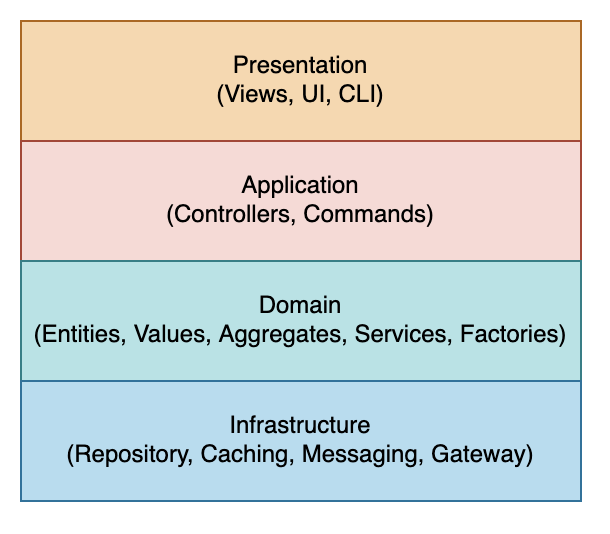
The software development team and domain experts define model using workshop based Event Storming. The domain layer employs defines following types of model:
Entity is a mutable object defined not by their attributes, but rather by a thread of continuity and identity.
Value object is an immutable object defined by their attributes instead of an identifier.
Domain events to notify data update.
The domain-driven design recommends rich behavior in entity objects in addition to the data attributes and cautions against AnemicDomainModel that only hold data attributes.
2.3 Aggregates
The entities and values can be clustered into aggregates that become a unit for retrieving and persisting data together. An aggregate entity becomes root for controlling lifecycle and access to the objects inside its boundary.
2.4 Ubiquitous Language
The domain model employs Ubiquitous Language to bring domain experts and software development team together and eliminate inaccuracies, contradictions and confusion from the model.
2.5 Services
The services define high-level business logic that doesn’t fit within the domain objects. The services are generally designed as stateless with clearly defined interfaces.
2.6 Repositories
The repositories implement data persistence logic for retrieving and persisting aggregate and entity objects.
2.7 Factories
The factories help create complex objects, values and aggregates.
2.8 Bounded Context
The Bounded Context defines the boundaries of the domain model, which may consists of other sub-domains. This becomes foundation for the boundary of microservices, where each service is cohesive and loosely coupled that avoids chatty communication between microservices.
2.9 Context Map
The context map help define boundaries of bounded context explicitly to prevent Big Ball of Mud architecture with following patterns:
Shared Kernel shares a common domain model between teams.
Conformist where the downstream team conforms to the model of the upstream without any translation of models.
Anticorruption Layer isolates and abstracts the downstream’s models from external system’s models by translation.
3. Applying Hexagonal Architecture
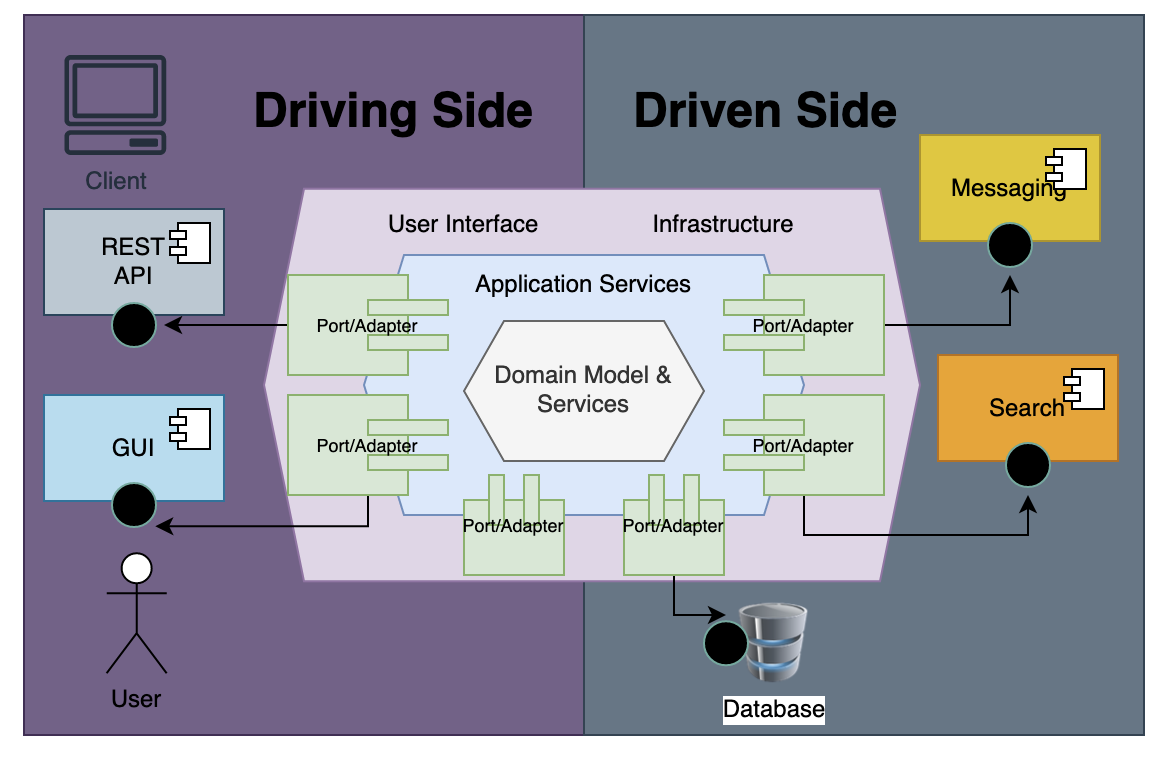
The hexagonal architecture or ports & adapter architecture by Alistair Cockburn defines ports to receive incoming requests, which is then translated to internal message or procedure by an adapter. Similarly, when the application need to connect to external systems on the driven side, it sends a message through a port to an adapter. The port and adapter architecture decouples driver side and driven side from the implementation technology.
Hexagonal Architecture
The port uses a protocol or an application program interface (API) for communicating with the application, which is then translated by the adapter for internal consumption. When the application needs to connect to external systems such as database, it goes through similar port or interface and is then translated into underlying database protocol by the adapter. This architecture essentially uses Dependency Inversion and Inversion of control Principles by only depending on the ports and decoupling external and internal components from the implementation technology. The application is the core of the system that defines use-cases that can be triggered by CLI or UI. The application layer internally contains commands, handlers and services, which receives commands or queries from ports and communicates with external systems via ports and adapters. The application layer may trigger application events as an outcome of a use-case. The domain layer defines domain model and domain specific services, which are used by the application layer. The driver or primary side in hexagonal architecture allows users to initiate communication with the application core and the driven or secondary side within the application core initiates communication with external dependent systems.
4. Applying Onion Architecture
The Onion Architecture defines concentric circles for layers where all code can depend on layers more central, but code cannot depend on layers further out from the core. The Domain Model represents the state and behavior combination that models truth for the organization. The number of layers in application core will vary but it has domain model at the center. The interfaces for repository to to retrieve and persist data surrounds domain model and the interfaces for repository are defined in the application core. The Onion Architecture uses the Dependency Inversion principle to inject implementations for the interfaces defined in the application core.
Onion Architecture
5. Applying Clean Architecture
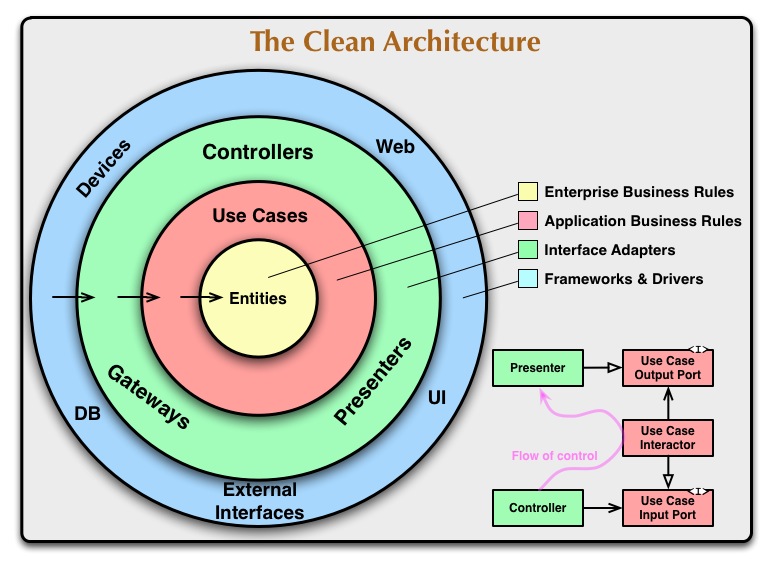
The Clean architecture defines concentric circles to represent different areas of software and uses dependency rule to point dependency inwards.
Clean Architecture
The entities encapsulate business rules with behavior and data structure.
The use-cases encapsulates application specific use-cases and orchestrates flow of data to and from the entities.
The interface adapters convert data from the use cases and entities to external systems, which are used by presenters, views and controllers.
The frameworks and drivers layer is composed of frameworks and tools such as the database and web framework.
Event sourcing tracks internal by reading and committing events to an event store.
7. Putting it all together
Following sections describe how a library management system can be built with the domain driven and hexagonal/clean architecture:
7.1 User Stories
Following is a list of primary user-stories that will be implemented for the library management system:
As a library administrator, I want to add a book to the collection so that patrons of the library may checkout it.
As a library administrator, I want to remove a book from the collection so that it’s no longer available to borrow.
As a library administrator or a patron, I want to search books based on different criteria such as title, author, publisher, dates, etc. so that I may see details or use it to checkout the book later.
As a patron, I want to checkout a book so that I can read it and return later.
As a patron, I want to return a checked out book when I am done with reading.
As a patron, I want to hold a book, which is not currently available so that I can checkout later.
As a patron, I want to cancel the hold that previously made when I am no longer interested in the book.
As a patron, I want to checkout the book hold that previously made so that I can read it.
7.1.1 Constraints and Validation Policies
In addition, the library may impose certain policies and restrictions on the books and checkout/hold actions such as restricted book can be held by a researcher patron or limit the number of books that can be held or checkout at a time.
7.2 Layered Architecture
The library management application divides the application into multiple domains such as patrons, catalog, checkout and hold. Each domain then divides into following layers:
This layer defines operations for commands and queries that are invoked by the controller layer, which depend on underlying domain service layer. The command layer also defines the scope of a transaction so that all changes are persisted atomically.
Note: This layer may use SAGA pattern to handle distributed transactions when you need to invoke multiple services or databases for performing an operation.
7.2.3 Domain Service Layer
This layer defines additional business behavior that is built upon the domain model layer and is used by the commands and queries layer
7.2.4 Domain Model Layer
This layer defines data and behavior of the domain and defines entity, value, aggregates, factories, and interface to model the domain.
7.2.5 Infrastructure Layer
This layer defines repositories and gateways to persist domain entities and connect to external services such as messaging and logging.
7.3 Domain Model
Following domain model was defined as a result of above use-stories and an event-storming exercise:
Class Diagram
7.3.1 Party Pattern
Above design uses party-pattern to model patrons, library administrator and library branches because they share a lot of common attributes to describe people and organizations. The base Party class uses Address class to store physical address, so the Party class acts as an Aggregate for all related data about people and organizations.
7.3.2 Book
The book class models a library book that can be added to the library collection, queried by the administrators or patrons and then checked out or held by the patrons.
7.3.3 Checkout
The Checkout class abstracts the data when checking out a book, which can be returned later.
7.3.4 Hold
The Hold class abstracts the data when holding a book that is not currently available so that it can be checked out later.
Note: The domain driven design considers anemic domain without business behavior an antipattern so above domain model defines invariant business rules and behavior along with the data attributes.
The core, utils and gateway module is shared by other modules; the parties and books module define low-level modules and catalog, patrons, checkout and hold modules define high-level modules, which also act as bounded context for managing books-catalog, patrons for managing library members and checkout/hold modules for defining behavior for the library operations.
7.4.1 core module
The core module abstracts common domain model, domain events and interfaces for command pattern, repository and controllers.
7.4.2 parties module
The parties module defines domain model for the party class and data access methods for persisting and querying parties (people and organizations).
7.4.3 books module
The books module defines domain model and data transfer model for books as well as repository for persisting and querying books using AWS DynamoDB.
7.4.4 patrons module
The patron module built upon the parties module and defines service sub-module for business logic to query and persisting patrons. The patron module also includes controller, command classes and binary/main module to define microservices based on AWS Lambda.
7.4.5 checkout module
The checkout module implements services for checking out and returning book, which are then made available as microservices using controller, command and binary sub-modules.
7.4.6 hold module
The hold module implements services for holding a book or canceling/returning it later, which are then made available as microservices using controller, command and binary sub-modules.
7.4.7 gateway module
The gateway module defines interfaces to connect to external services such as AWS CloudWatch for managing metrics and AWS SNS for publishing events from the domain and user-action changes.
7.5 Domain-Driven Design Patterns
The library management systems applies following design patterns from the domain driven design and hexagonal/clean architecture:
7.5.1 Ubiquitous Language
The domain model uses the same terminology used by the stakeholders and experts from underlying problem space such as library patrons, books, checkout, hold, etc. so that software development team can model the business problem as close as possible.
7.5.2 Domain Events
The domain events capture data change in the domain model specifically aggregate objects. This decouples domains in different bounded context as other domains can listen to the domain events asynchronously and make a local change. Following is an example of domain events in the library management systems:
The library management application uses repository pattern to persist or query data, which can be implemented based on any supported implementation (such as DynamoDB). Also, it uses polymorphic associations for managing inheritance, e.g. parties DynamoDB table can store patrons, administrators and library branches. The repository implementation can be pointed to a local DynamoDB or AWS managed DynamoDB service, e.g.,
#[async_trait]
impl Repository<BookEntity> for DDBBookRepository {
    async fn create(&self, entity: &BookEntity) -> LibraryResult<usize> {
        let table_name: &str = self.table_name.as_ref();
        let val = serde_json::to_value(entity)?;
        self.client
            .put_item()
            .table_name(table_name)
            .condition_expression("attribute_not_exists(book_id)")
            .set_item(Some(parse_item(val)?))
            .send()
            .await.map(|_| 1).map_err(LibraryError::from)
    }

    async fn update(&self, entity: &BookEntity) -> LibraryResult<usize> {
        let now = Utc::now().naive_utc();
        let table_name: &str = self.table_name.as_ref();

        self.client
            .update_item()
            .table_name(table_name)
            .key("book_id", AttributeValue::S(entity.book_id.clone()))
            .update_expression("SET version = :version, title = :title, book_status = :book_status, dewey_decimal_id = :dewey_decimal_id, restricted = :restricted, updated_at = :updated_at")
            .expression_attribute_values(":old_version", AttributeValue::N(entity.version.to_string()))
            .expression_attribute_values(":version", AttributeValue::N((entity.version + 1).to_string()))
            .expression_attribute_values(":title", AttributeValue::S(entity.title.to_string()))
            .expression_attribute_values(":book_status", AttributeValue::S(entity.book_status.to_string()))
            .expression_attribute_values(":restricted", AttributeValue::Bool(entity.restricted))
            .expression_attribute_values(":dewey_decimal_id", AttributeValue::S(entity.dewey_decimal_id.to_string()))
            .expression_attribute_values(":updated_at", string_date(now))
            .condition_expression("attribute_exists(version) AND version = :old_version")
            .send()
            .await.map(|_| 1).map_err(LibraryError::from)
    }
  ...
}
7.5.6 Factories
The library management application uses factories to create instance of repositories, event publishers and services based on different implementations, e.g.,
pub(crate) async fn create_checkout_repository(store: RepositoryStore) -> Box<dyn CheckoutRepository> {
    match store {
        RepositoryStore::DynamoDB => {
            let client = build_db_client(store).await;
            Box::new(DDBCheckoutRepository::new(client, "checkout", "checkout_ndx"))
        }
        RepositoryStore::LocalDynamoDB => {
            let client = build_db_client(store).await;
            let _ = create_table(&client, "checkout", "checkout_id", "checkout_status", "patron_id").await;
            Box::new(DDBCheckoutRepository::new(client, "checkout", "checkout_ndx"))
        }
    }
}

pub(crate) async fn create_checkout_service(
  config: &Configuration, store: RepositoryStore) -> Box<dyn CheckoutService> {
    let checkout_repo = factory::create_checkout_repository(store).await;
    let catalog_svc = create_catalog_service(config, store).await;
    let patron_svc = create_patron_service(config, store).await;
    let publisher = create_publisher(store.gateway_publisher()).await;
    Box::new(CheckoutServiceImpl::new(config, checkout_repo,
                                      patron_svc, catalog_svc, publisher))
}
7.5.7 Data Transfer Objects
The library management application uses immutable data transfer objects when invoking a business service, a command or a method on controller so that these objects are free of side effects and can be safely shared with other modules in concurrent environment.
7.5.8 CQRS Pattern
The library management application uses command-query separation principle to bridge application services with the domain services. Each command handles a unique behavior implemented by the high-level modules for managing patrons, book-catalog, and checkout/hold behavior, e.g.,
The application services/controller layer defines remote APIs, which are built on top of AWS Lambda APIs, e.g.,
pub(crate) async fn checkout_book(
    State(state): State<AppState>,
    json: Json<Value>) -> Result<Json<CheckoutBookCommandResponse>, ServerError> {
    let req: CheckoutBookCommandRequest = serde_json::from_value(json.0).map_err(json_to_server_error)?;
    let svc = build_service(state).await;
    let res = CheckoutBookCommand::new(svc).execute(req).await?;
    Ok(Json(res))
}
7.5.10 Bounded Context
As, the Bounded Context defines the boundaries of the domain model, the library system is defines bounded context for managing library members (patrons), managing books (catalog), checkout and hold operations. In addition each domain also decomposes other subdomains that reflect business process within the problem space.
7.5.11 Monads and Error Handling
The library management application uses Result monad for returning results from a service, command or controller so that caller can handle errors properly. In addition, it uses Option monad is used for defining any optional data properties so that the compiler can enforce all type checking.
7.5.12 Main
The high-level modules define a main module, which instantiates the API controllers for remote invocation. The AWS Lambda requires that Rust based Lambda functions are deployed with the binary executable, which is spawned by the Lambda runtime, e.g.,
If you need to remove all infrastructure, simply run:
cd cdk
cdk destroy
9. Summary
A sample library management system demonstrates how to apply domain driven design and hexagonal/clean architecture to build microservices. It is implemented in Rust and uses AWS Dynamo DB, AWS SNS, AWS CloudWatch and AWS Lambda to build modern microservices. The sample domain-driven application also uses AWS CDK to manage infrastructure as a code so that you can deploy services consistently across all environments. You can download the sample application from https://github.com/bhatti/ddd-sample-microservice.
Patterns are typical solutions to common problems in various phases of the software development lifecycle and you may find many books and resources on various types of patterns such as:
However, you may also find low-level implementation patterns that developers often apply to common coding problems. Following are a few of these coding patterns that I have found particularly fascinating and pragmatic in my experience:
Functional Options Pattern
The options pattern is used to pass configuration options to a method, e.g. you can pass a struct that holds configuration settings. These configuration properties may have default values that are used when they are not explicitly defined. You may implement options patter using builder pattern to initialize config properties but it requires explicitly building the configuration options even when there is nothing to override. In addition, error handling with the builder pattern poses more complexity when chaining methods. The functional options pattern on the other hand defines each configuration option as a function (referenced in Functional Options in Go and 100 Go Mistakes and How to Avoid), which can validate the configuration option and return an error for invalid data. For example:
type options struct {
  port *int
  timeout *time.Duration
}
type Option func(opts *options) error

func WithPort(port int) Option {
  return func(opts *options) error {
    if port < 0 {
      return errors.New("port shold be positive")
    }
    options.port = &port
    return nil
  }
}

func NewServer(addr string, opts ...Option) (*http.Server, error) {
  var options options
  for _, opt := range opts {
    err := opt(&options)
    if err != nl {
      return nil, err
    }
  }
  var port int
  if options.port == nil {
    port = defaultHTTPPort
  } else {
    if *options.port == 0 {
      port = randomPort()
    } else {
      port = *options.port
    }
  }
  ...
}
You can then pass configuration options as follows:
Above solution allows handling errors when overriding default values fails and passing empty list of options. In other languages where errors can be implicitly passed to the calling code may still use builder pattern for configuration such as:
However, above solution still requires building config options even when no properties are overridden.
State Pattern with Enum
The state pattern is part of GoF design patterns, which is used to implement finite-state machines or strategy pattern. The state pattern can be easily implemented using “sum” (alternative) algebraic data types with use of union or enums constructs. For example, here is an implementation of state pattern in Rust:
However, above implementation relies on runtime to validate state transitions. Alternatively, you can use struct to check valid transitions at compile time, e.g.,
The recursion uses divide and conquer to solve complex problems where a function calls itself to break down a problem into smaller problems. However, each recursion requires adding stack frame to the call stack so many functional languages converts recursive implementation into an iterative solution by eliminating tail-call where recursive call is the final action of a function. In languages that don’t support tail-call optimization, you can use thunks and trampolines to implement it. A thunk is a no-argument function that is evaluated lazily, which in turn may produce another thunk for next function call. Trampolines define a Computation data structure to return result of a computation. For example, following code illustrates an implementation of a Trampoline in Rust:
trait FnThunk {
    type Out;
    fn call(self: Box<Self>) -> Self::Out;
}

pub struct Thunk<'a, T> {
    fun: Box<dyn FnThunk<Out=T> + 'a>,
}

impl<T, F> FnThunk for F where F: FnOnce() -> T {
    type Out = T;
    fn call(self: Box<Self>) -> T { (*self)() }
}

impl<'a, T> Thunk<'a, T> {
    pub fn new(fun: impl FnOnce() -> T + 'a) -> Self {
        Self { fun: Box::new(fun) }
    }
    pub fn compute(self) -> T {
        self.fun.call()
    }
}

pub enum Computation<'a, T> {
    Done(T),
    Call(Thunk<'a, Computation<'a, T>>),
}

pub fn compute<T>(mut res: Computation<T>) -> T {
    loop {
        match res {
            Computation::Done(x) => break x,
            Computation::Call(thunk) => res = thunk.compute(),
        }
    }
}

fn factorial(n: u128) -> u128 {
    fn fac_with_acc(n: u128, acc: u128) -> Computation<'static, u128> {
        if n > 1 {
            Computation::Call(Thunk::new(move || fac_with_acc(n-1, acc * n)))
        } else {
            Computation::Done(acc)
        }
    }
    compute(fac_with_acc(n, 1))
}

fn main() {
    println!("factorial result {}", factorial(5));
}
Memoization
The memoization allows caching results of expensive function calls so that repeated invocation of the same function returns the cached results when the same input is used. It can be implemented using thunk pattern described above. For example, following implementation shows a Rust based implementation:
use std::borrow::Borrow;
use std::marker::PhantomData;
use std::ops::{Deref, DerefMut};


enum Memoized<I: 'static, O: Clone, Func: Fn(I) -> O> {
    UnInitialized(PhantomData<&'static I>, Box<Func>),
    Processed(O),
}

impl<I: 'static, O: Clone, Func: Fn(I) -> O> Memoized<I, O, Func> {
    fn new(lambda: Func) -> Memoized<I, O, Func> {
        Memoized::UnInitialized(PhantomData, Box::new(lambda))
    }
    fn fetch(&mut self, data: I) -> O {
        let (flag, val) = match self {
            &mut Memoized::Processed(ref x) => (false, x.clone()),
            &mut Memoized::UnInitialized(_, ref z) => (true, z(data))
        };
        if flag {
            *self = Memoized::Processed(val.clone());
        }
        val
    }
    fn is_initialized(&self) -> bool {
        match self {
            &Memoized::Processed(_) => true,
            _ => false
        }
    }
}

impl<I: 'static, O: Clone, Func: Fn(I) -> O> Deref for Memoized<I, O, Func> {
    type Target = O;
    fn deref(&self) -> &Self::Target {
        match self {
            &Memoized::Processed(ref x) => x,
            _ => panic!("Attempted to derefence uninitalized memoized value")
        }
    }
}

impl<I: 'static, O: Clone, Func: Fn(I) -> O> DerefMut for Memoized<I, O, Func> {
    fn deref_mut(&mut self) -> &mut Self::Target {
        //self.get()
        if self.is_initialized() {
            match self {
                &mut Memoized::Processed(ref mut x) => return x,
                _ => unreachable!()
            };
        } else {
            *self = Memoized::Processed(unsafe { std::mem::zeroed() });
            match self {
                &mut Memoized::Processed(ref mut x) => return x,
                _ => unreachable!()
            };
        }
    }
}

impl<I: 'static, O: Clone, Func: Fn(I) -> O> Borrow<O> for Memoized<I, O, Func> {
    fn borrow(&self) -> &O {
        match self {
            &Memoized::Processed(ref x) => x,
            _ => panic!("Attempted to borrow uninitalized memoized value")
        }
    }
}


enum Memoized<I: 'static, O: Clone, Func: Fn(I) -> O> {
    UnInitialized(PhantomData<&'static I>, Box<Func>),
    Processed(O),
}

impl<I: 'static, O: Clone, Func: Fn(I) -> O> Memoized<I, O, Func> {
    fn new(lambda: Func) -> Memoized<I, O, Func> {
        Memoized::UnInitialized(PhantomData, Box::new(lambda))
    }
    fn fetch(&mut self, data: I) -> O {
        let (flag, val) = match self {
            &mut Memoized::Processed(ref x) => (false, x.clone()),
            &mut Memoized::UnInitialized(_, ref z) => (true, z(data))
        };
        if flag {
            *self = Memoized::Processed(val.clone());
        }
        val
    }
    fn is_initialized(&self) -> bool {
        match self {
            &Memoized::Processed(_) => true,
            _ => false
        }
    }
}

impl<I: 'static, O: Clone, Func: Fn(I) -> O> Deref for Memoized<I, O, Func> {
    type Target = O;
    fn deref(&self) -> &Self::Target {
        match self {
            &Memoized::Processed(ref x) => x,
            _ => panic!("Attempted to derefence uninitalized memoized value")
        }
    }
}

impl<I: 'static, O: Clone, Func: Fn(I) -> O> DerefMut for Memoized<I, O, Func> {
    fn deref_mut(&mut self) -> &mut Self::Target {
        //self.get()
        if self.is_initialized() {
            match self {
                &mut Memoized::Processed(ref mut x) => return x,
                _ => unreachable!()
            };
        } else {
            *self = Memoized::Processed(unsafe { std::mem::zeroed() });
            match self {
                &mut Memoized::Processed(ref mut x) => return x,
                _ => unreachable!()
            };
        }
    }
}

impl<I: 'static, O: Clone, Func: Fn(I) -> O> Borrow<O> for Memoized<I, O, Func> {
    fn borrow(&self) -> &O {
        match self {
            &Memoized::Processed(ref x) => x,
            _ => panic!("Attempted to borrow uninitalized memoized value")
        }
    }
}


mod test {
    use super::Memoized;

    #[test]
    fn test_memoized() {
        let lambda = |x: i32| -> String {
            x.to_string()
        };
        let mut dut = Memoized::new(lambda);
        assert_eq!(dut.is_initialized(), false);
        assert_eq!(&dut.fetch(5), "5");
        assert_eq!(dut.is_initialized(), true);
        assert_eq!(&dut.fetch(2000), "5");
        let x: &str = &dut;
        assert_eq!(x, "5");
    }
}
Type Conversion
The type conversion allows converting an object from one type to another, e.g. following interface defined in Spring shows an example:
public interface Converter<S, T> {
	@Nullable
	T convert(S source);
	default <U> Converter<S, U> andThen(Converter<? super T, ? extends U> after) {
		Assert.notNull(after, "'after' Converter must not be null");
		return (S s) -> {
			T initialResult = convert(s);
			return (initialResult != null ? after.convert(initialResult) : null);
		};
	}
}
This kind of type conversion looks very similar to the map/reduce primitives defined in functional programming languages, e.g. Java 8 added Function interface for such as transformation. In addition, Scala also supports implicit conversion from one type to another, e.g.,
Rust also supports From and Into traits for converting types, e.g.,
use std::convert::From;

#[derive(Debug)]
struct Number {
    value: i32,
}

impl From<i32> for Number {
    fn from(item: i32) -> Self {
        Number { value: item }
    }
}

fn main() {
    let num1: Number = Number::from(10);
    let num2: Number = 20.into();

    println!("{:?} {:?}", num1, num2);
}
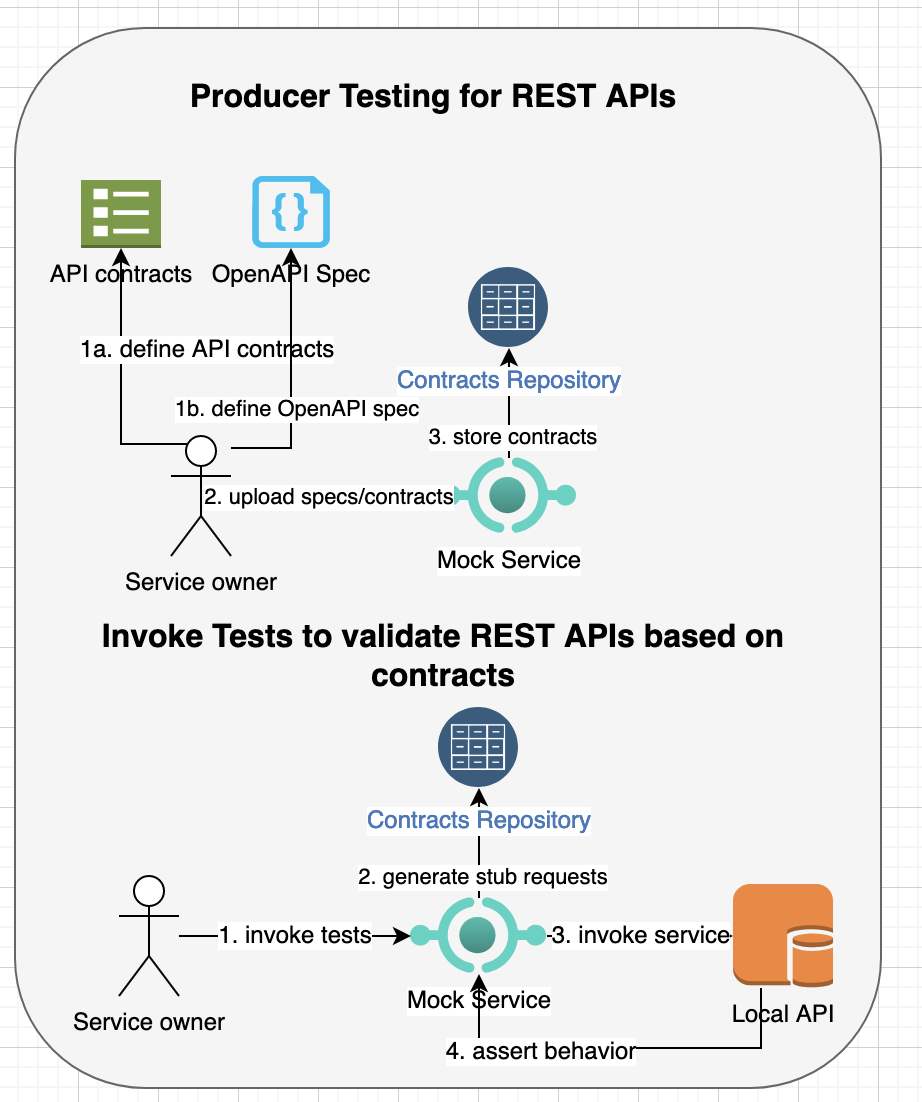
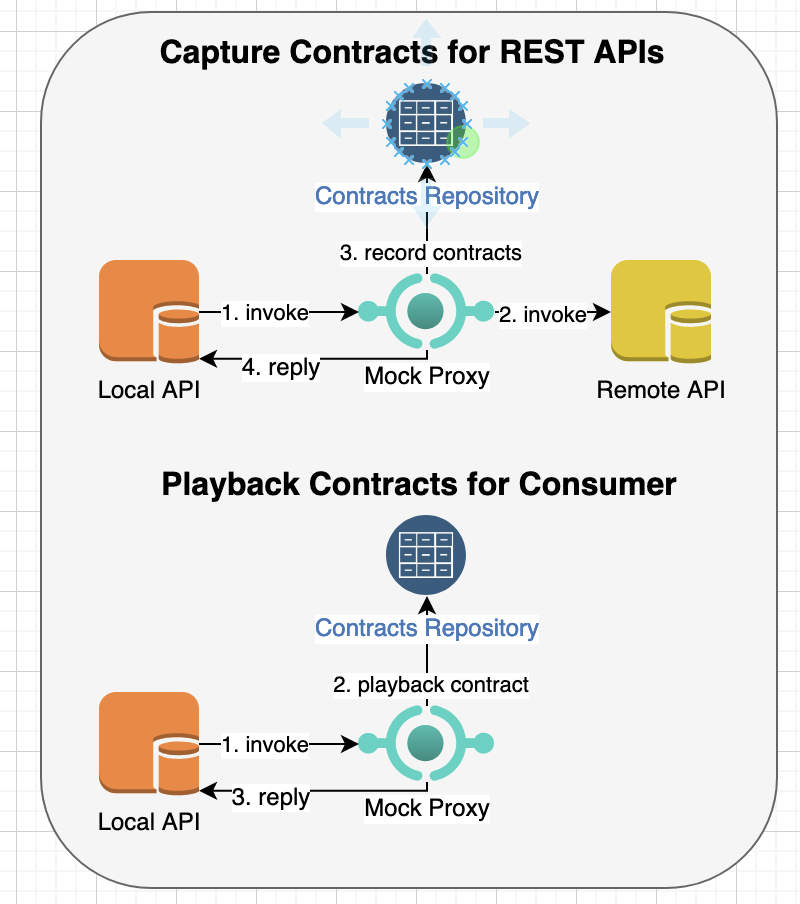
Though, REST standard for remote APIs is fairly loose but you can document API shape and structure using standards such as Open API and swagger specifications. The documented API specification ensures that both consumer/client and producer/server side abide by the specifications and prevent unexpected behavior. The API provider may also define service-level objective (SLO) so that API meets specified latency, security and availability and other service-level indicators (SLI). The API provider can use contract tests to validate the API interactions based on documented specifications. The contract testing includes both consumer and producer where a consumer makes an API request and the producer produces the result. The contract tests ensures that both consumer requests and producer responses match the contract request and response definitions per API specifications. These contract tests don’t just validate API schema instead they validate interactions between consumer and producer thus they can also be used to detect any breaking or backward incompatible changes so that consumers can continue using the APIs without any surprises.
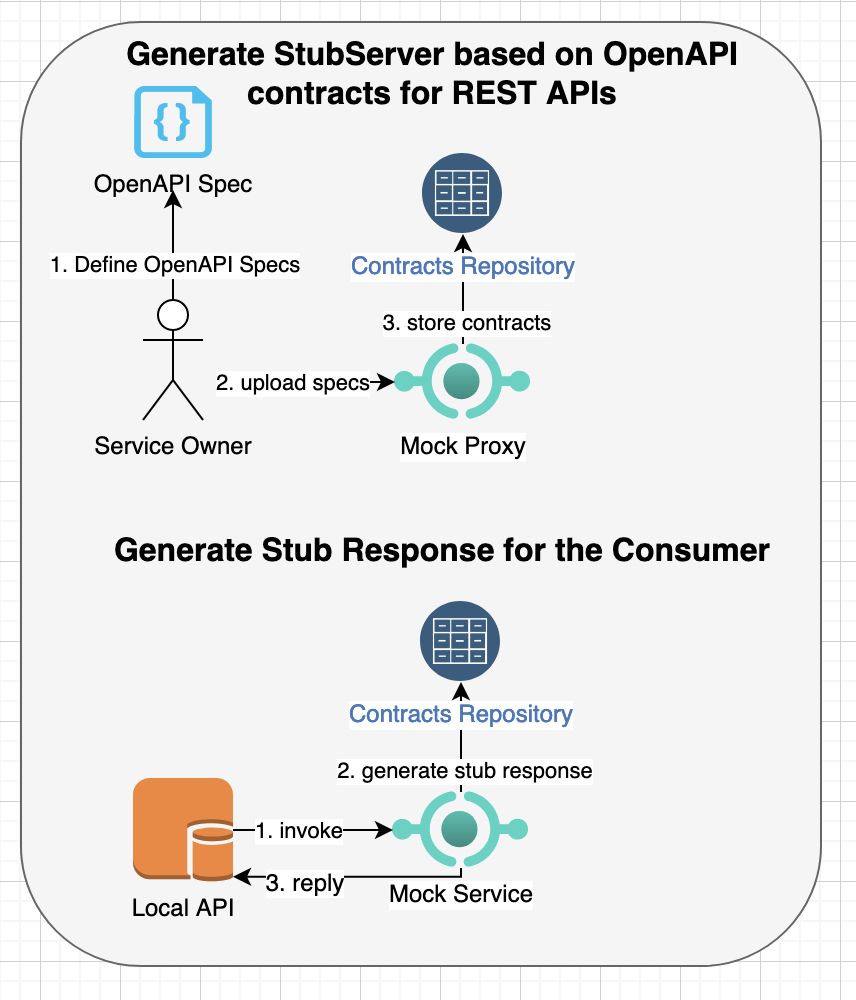
In order to demonstrate contract testing, we will use api-mock-service library to generate mock/stub client requests and server responses based on Open API specifications or customized test contracts. These test contracts can be used by both consumers and producers for validating API contracts and evolve the contract tests as API specifications are updated.
Sample REST API Under Test
A sample eCommerce application will be used to demonstrate contracts testing. The application will use various REST APIs to implement online shopping experience. The primary purpose of this example is to show how different request structures can be passed to the REST APIs and then generate a valid result or an error condition for contract testing. You can view the Open-API specifications for this sample app here.
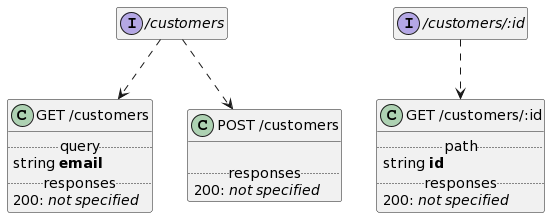
Customer REST APIs
The customer APIs define operations to manage customers who shop online, e.g.:
Customer APIs
Product REST APIs
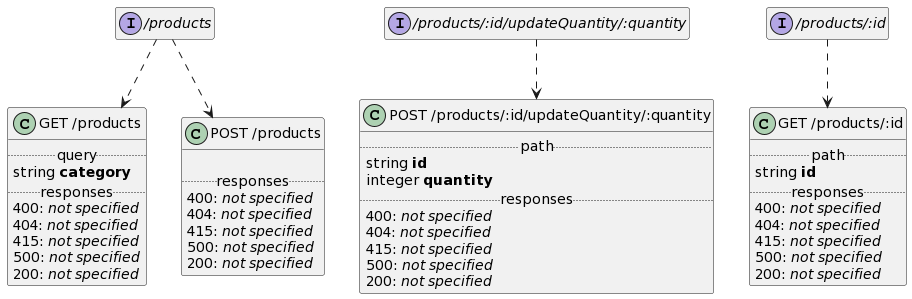
The product APIs define operations to manage products that can be shopped online, e.g.:
Product APIs
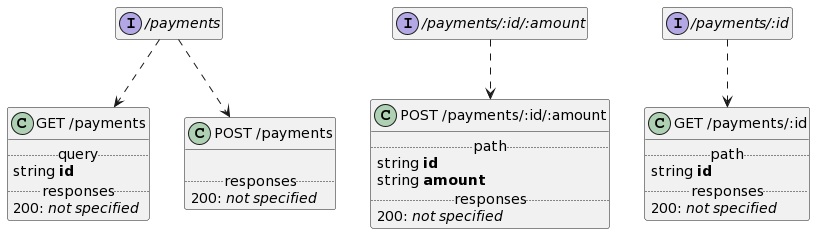
Payment REST APIs
The payment APIs define operations to charge credit card and pay for online shopping, e.g.:
Payment APIs
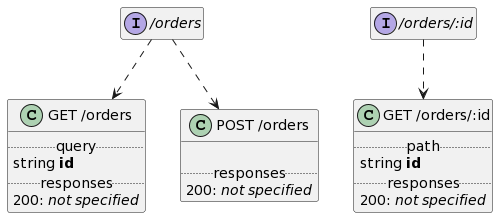
Order REST APIs
The order APIs define operations to purchase a product from the online store and it will use above APIs to validate customers, check product inventory, charge payments and then store record of orders, e.g.:
Order APIs
Generating Stub Server Responses based on Open-API Specifications
In this example, stub server responses will be generated by api-mock-service based on open-api specifications ecommerce-api.json by starting the mock service first as follows:
It will generate test contracts with stub/mock responses for all APIs defined in the ecommerce-api.json Open API specification. For example, you can produce result of customers REST APIs, e.g.:
Above response is randomly generated based on the types/formats/regex/min-max limits of properties defined in Open-API and calling this API will automatically generate all valid and error responses, e.g. calling “curl http://localhost:8000/customers” again will return:
* Mark bundle as not supporting multiuse
< HTTP/1.1 500 Internal Server Error
< Content-Type:
< Vary: Origin
< X-Mock-Path: /customers
< X-Mock-Request-Count: 9
< X-Mock-Scenario: getCustomerByEmail-customers-500-8a93b6c60c492e730ea149d5d09e79d85701c01dbc017d178557ed1d2c1bad3d
< Date: Sun, 01 Jan 2023 20:41:17 GMT
< Content-Length: 67
<
* Connection #0 to host localhost left intact
{"logRef":"achieve_output_fresh","message":"buffalo_rescue_street"}
Consumer-driven Contract Testing
Upon uploading the Open-API specifications of microservices, the api-mock-service generates test contracts for each REST API and response statuses. You can then customize these test cases for consumer-driven contract testing.
For example, here is the default test contract generated for finding a customer by id with path “/customers/:id”:
You can customize above response contents using builtin template functions in the api-mock-service library or create additional test contracts for each distinct input parameter. For example, following contract defines interaction between consumer and producer to add a new customer:
Above template defines interaction for adding a new customer where request section defines format of request and matching criteria using match_content property. The response section includes the headers and contents that are generated by the stub/mock server for consumer-driven contract testing. You can then invoke test contract using:
curl -X POST http://localhost:8000/customers -d '{"address":{"city":"rwjJS","countryCode":"US","id":"4a788c96-e532-4a97-9b8b-bcb298636bc1","streetAddress":"Cura diu me, miserere me?","zipCode":"24121"},"creditCard":{"balance":{"amount":57012,"currency":"USD"},"cardNumber":"5566-2222-8282","customerId":"tgzwgThaiZqc5eDwbKk23nwjZqkap7","expiration":"70/6666","id":"d966aafa-c28b-4078-9e87-f7e9d76dd848","type":"VISA"},"email":"andrew.recorder@ipsas.net","firstName":"quendam","id":"071396bb-f8db-489d-a8f7-bbcce952ecef","lastName":"formaeque","phone":"1-345-6666-0618"}'
Note: The response will not match the request body as the contract testing only tests interactions between consumer and producer without maintaining any server side state. You can use other types of testing such as integration/component/functional testing for validating state based behavior.
Producer-driven Generated Tests
The process of defining contracts to generate tests for validating producer REST APIs is similar to consumer-driven contracts. For example, you can upload open-api specifications or user-defined contracts to the api-mock-service provided mock/stub server.
For example, you can upload open-API specifications for ecommerce-api.json as follows:
Upon uploading the specifications, the mock server will generate contracts for each REST API and status. You can customize those contracts with additional validation or assertion and then invoke server generated tests either by specifying the REST API or invoke multiple REST APIs belonging to a specific group. You can also define an order for executing tests in a group and can optionally pass data from one invocation to the next invocation of REST API.
For testing purpose, we will customize customer REST APIs for adding a new customer and fetching a customer by its id, i.e.,
The request section defines content property that will build the input request, which will be sent to the producer provided REST API. The server section defines match_contents to match regex of each response property. In addition, the response section defines assertions to compare against response contents, headers or status against expected output.
Above template defines similar properties to generate request body and defines match_contents with assertions to match expected output headers, body and status. Based on order of tests, the generated test to add new customer will be executed first, which will be followed by the test to find a customer by id. As we are testing against real REST APIs, the REST API path is defined as “/customers/{{.id}}” for finding a customer will populate the id from the output of first test based on the pipe_properties.
Uploading Contracts
Once you have the api-mock-service mock server running, you can upload contracts using:
You can start your service before invoking generated tests, e.g. we will use sample-openapi for the testing purpose and then invoke the generated tests using:
Above command will execute all tests for customers group and it will invoke each REST API 5 times. After executing the APIs, it will generate result as follows:
Though, generated tests are executed against real services, it’s recommended that the service implementation use test doubles or mock services for any dependent services as contract testing is not meant to replace component or end-to-end tests that provide better support for integration testing.
Recording Consumer/Producer interactions for Generating Stub Requests and Responses
The contract testing does not always depend on API specifications such as Open API and swagger and instead you can record interactions between consumers and producers using api-mock-service tool.
For example, if you have an existing REST API or a legacy service such as above sample API, you can record an interaction as follows:
export http_proxy="http://localhost:9000"
export https_proxy="http://localhost:9000"
curl -X POST -H "Content-Type: application/json" http://localhost:8080/customers -d \
	'{"address":{"city":"rwjJS","countryCode":"US","id":"4a788c96-e532-4a97-9b8b-bcb298636bc1","streetAddress":"Cura diu me, miserere me?","zipCode":"24121"},"creditCard":{"balance":{"amount":57012,"currency":"USD"},"cardNumber":"5566-2222-8282","customerId":"tgzwgThaiZqc5eDwbKk23nwjZqkap7","expiration":"70/6666","id":"d966aafa-c28b-4078-9e87-f7e9d76dd848","type":"VISA"},"email":"andrew.recorder@ipsas.net","firstName":"quendam","id":"071396bb-f8db-489d-a8f7-bbcce952ecef","lastName":"formaeque","phone":"1-345-6666-0618"}'
This will invoke the remote REST API, record contract interactions and then return server response:
You can then invoke consumer-driven contracts to generate stub response or invoke generated tests to test against producer implementation as described in earlier section. Another benefit of capturing test contracts using recorded session is that it can accurately capture all URLs, parameters and headers for both requests and responses so that contract testing can precisely validate against existing behavior.
Summary
Though, unit-testing, component testing and end-to-end testing are a common testing strategies that are used by most organizations but they don’t provide adequate support to validate API specifications and interactions between consumers/clients and producers/providers of the APIs. The contract testing ensures that consumers and producers will not deviate from the specifications and can be used to validate changes for backward compatibility when APIs are evolved. This also decouples consumers and producers if the API is still in development as both parties can write code against the agreed contracts and test them independently. A service owner can generate producer contracts using tools such as api-mock-service based on Open API specification or user-defined constraints. The consumers can provide their consumer-driven contracts to the service providers to ensure that the API changes don’t break any consumers. These contracts can be stored in a source code repository or on a registry service so that contract testing can easily access them and execute them as part of the build and deployment pipelines. The api-mock-service tool greatly assists in adding contract testing to your software development lifecycle and is freely available from https://github.com/bhatti/api-mock-service.
Comments Off on Consumer-driven and Producer-generated Contract Testing for RESTÂ APIs
I recently needed a way to control access to shared resources in a distributed system for concurrency control. Though, you may use Consul or Zookeeper (or low-level Raft / Paxos implementations if you are brave) for managing distributed locks but I wanted to reuse existing database without adding another dependency to my tech stack. Most databases support transactions or conditional updates with varying degree of support for transactional guarantees, but they can’t be used for distributed locks if the business logic you need to protect resides outside the databases. I found a lock client library based on AWS Databases but it didn’t support semaphores. The library implementation was tightly coupled with concerns of lock management and database access and it wasn’t easy to extend it easily. For example, following diagram shows how cyclic dependencies in the code:
class diagram
Due to above deficiencies in existing solutions, I decided to implement my own implementation of distributed locks in Rust with following capabilities:
Allow creating lease based locks that can either protect a single shared resource with a Mutex lock or protect a finite set of shared resources with a Semaphore lock.
Allow renewing leases based on periodic intervals so that stale locks can be acquired by other users.
Allow releasing Mutex and semaphore locks explicitly after the user performs a critical action.
CRUD APIs to manage Mutex and Semaphore entities in the database.
Multi-tenancy support for different clients in case the database is shared by multiple users.
Fair locks to support first-come and first serve based access grant when acquiring same lock concurrently.
Scalable solution for supporting tens of thousands concurrent mutexes and semaphores.
Support multiple data stores such as relational databases such as MySQL, PostgreSQL, Sqlite and as well as NoSQL/Cache data stores such as AWS Dynamo DB and Redis.
High-level Design
I chose Rust to build the library for managing distributed locks due to strict performance and correctness requirements. Following diagram shows the high-level components in the new library:
LockManager Interface
The client interacts with the LockManager that defines following operations to acquire, release, renew lock leases and manage lifecycle of Mutexes and Semaphores:
#[async_trait]
pub trait LockManager {
    // Attempts to acquire a lock until it either acquires the lock, or a specified additional_time_to_wait_for_lock_ms is
    // reached. This method will poll database based on the refresh_period. If it does not see the lock in database, it
    // will immediately return the lock to the caller. If it does see the lock, it will note the lease expiration on the lock. If
    // the lock is deemed stale, (that is, there is no heartbeat on it for at least the length of its lease duration) then this
    // will acquire and return it. Otherwise, if it waits for as long as additional_time_to_wait_for_lock_ms without acquiring the
    // lock, then it will return LockError::NotGranted.
    //
    async fn acquire_lock(&self, opts: &AcquireLockOptions) -> LockResult<MutexLock>;

    // Releases the given lock if the current user still has it, returning true if the lock was
    // successfully released, and false if someone else already stole the lock. Deletes the
    // lock item if it is released and delete_lock_item_on_close is set.
    async fn release_lock(&self, opts: &ReleaseLockOptions) -> LockResult<bool>;

    // Sends a heartbeat to indicate that the given lock is still being worked on.
    // This method will also set the lease duration of the lock to the given value.
    // This will also either update or delete the data from the lock, as specified in the options
    async fn send_heartbeat(&self, opts: &SendHeartbeatOptions) -> LockResult<MutexLock>;

    // Creates mutex if doesn't exist
    async fn create_mutex(&self, mutex: &MutexLock) -> LockResult<usize>;

    // Deletes mutex lock if not locked
    async fn delete_mutex(&self,
                          other_key: &str,
                          other_version: &str,
                          other_semaphore_key: Option<String>) -> LockResult<usize>;

    // Finds out who owns the given lock, but does not acquire the lock. It returns the metadata currently associated with the
    // given lock. If the client currently has the lock, it will return the lock, and operations such as release_lock will work.
    // However, if the client does not have the lock, then operations like releaseLock will not work (after calling get_lock, the
    // caller should check mutex.expired() to figure out if it currently has the lock.)
    async fn get_mutex(&self, mutex_key: &str) -> LockResult<MutexLock>;

    // Creates or updates semaphore with given max size
    async fn create_semaphore(&self, semaphore: &Semaphore) -> LockResult<usize>;

    // Returns semaphore for the key
    async fn get_semaphore(&self, semaphore_key: &str) -> LockResult<Semaphore>;

    // find locks by semaphore
    async fn get_semaphore_mutexes(&self,
                                   other_semaphore_key: &str,
    ) -> LockResult<Vec<MutexLock>>;

    // Deletes semaphore if all associated locks are not locked
    async fn delete_semaphore(&self,
                              other_key: &str,
                              other_version: &str,
    ) -> LockResult<usize>;
}
The LockManager interacts with LockStore to access mutexes and semaphores, which delegate to implementation of mutex and semaphore repositories for lock management. The library defines two implementation of LockStore: first, DefaultLockStore that supports mutexes and semaphores where mutexes are used to acquire a singular lock whereas semaphores are used to acquire a lock from a set of finite shared resources. The second, FairLockStore uses a Redis specific implementation of fair semaphores for managing lease based semaphores that support first-come and first-serve order. The LockManager supports waiting for the lock to be available if lock is not immediately available where it periodically checks for the availability of mutex or semaphore based lock. Due to this periodic polling, the fair semaphore algorithm won’t support FIFO order if a new client requests a lock while previous lock request is waiting for next polling interval.
Create Lock Manager
You can instantiate a Lock Manager with relational database store as follows:
let config = LocksConfig::new("test_tenant");
let mutex_repo = factory::build_mutex_repository(RepositoryProvider::Rdb, &config)
	.await.expect("failed to build mutex repository");
let semaphore_repo = factory::build_semaphore_repository(
  	RepositoryProvider::Rdb, &config)
	.await.expect("failed to build semaphore repository");
let store = Box::new(DefaultLockStore::new(&config, mutex_repo, semaphore_repo));

let locks_manager = LockManagerImpl::new(
  	&config, store, &default_registry()).expect("failed to initialize lock manager");
Alternatively, you can choose AWS Dynamo DB as follows:
let mutex_repo = factory::build_mutex_repository(
  	RepositoryProvider::Ddb, &config).await.expect("failed to build mutex repository");
let semaphore_repo = factory::build_semaphore_repository(
  	RepositoryProvider::Ddb, &config).await.expect("failed to build semaphore repository");
let store = Box::new(DefaultLockStore::new(&config, mutex_repo, semaphore_repo));
Or Redis based data-store as follows:
let mutex_repo = factory::build_mutex_repository(
  	RepositoryProvider::Redis, &config).await.expect("failed to build mutex repository");
let semaphore_repo = factory::build_semaphore_repository(
  	RepositoryProvider::Redis, &config).await.expect("failed to build semaphore repository");
let store = Box::new(DefaultLockStore::new(&config, mutex_repo, semaphore_repo));
Note: The AWS Dynamo DB uses strongly consistent reads feature as by default it is eventually consistent reads.
Acquiring a Mutex Lock
You will need to build options for acquiring with key name and lease period in milliseconds and then acquire it:
let opts = AcquireLockOptionsBuilder::new("mylock")
	.with_lease_duration_secs(10).build();
let lock = lock_manager.acquire_lock(&opts)
	.expect("should acquire lock");
The acquire_lock operation will automatically create mutex lock if it doesn’t exist otherwise it will wait for the period of lease-time if the lock is not available. This will return a structure for mutex lock that includes:
A lock is only available for the duration specified in lease_duration period, but you can renew it periodically if needed:
let opts = SendHeartbeatOptionsBuilder::new("one", "258d513e-bae4-4d91-8608-5d500be27593")
                .with_lease_duration_secs(15)
                .build();

let updated_lock = lock_manager.send_heartbeat(&opts)
					.expect("should renew lock");
Note: The lease renewal will also update the version of lock so you will need to use the updated version to renew or release the lock.
Releasing the lease of Lock
You can build options for releasing from the lock returned by above API as follows and then release it:
let opts = ReleaseLockOptionsBuilder::new("one", "258d513e-bae4-4d91-8608-5d500be27593")
                .build();
lock_manager.release_lock(&release_opts)
				.expect("should release lock");
Acquiring a Semaphore based Lock
The semaphores allow you to define a set of locks for a resource with a maximum size. The operation for acquiring semaphore is similar to acquiring regular lock except you specify semaphore size, e.g.:
let opts = AcquireLockOptionsBuilder::new("my_pool")
                    .with_lease_duration_secs(15)
                    .with_semaphore_max_size(10)
                    .build();
let lock = lock_manager.acquire_lock(&opts)
				.expect("should acquire semaphore lock");
The acquire_lock operation will automatically create semaphore if it doesn’t exist and it will then check for available locks and wait if all the locks are busy. This will return a structure for lock that includes:
The fair semaphores is only available for Redis due to internal implementation, and it requires enabling it via fair_semaphore configuration option, otherwise its usage is similar to above operations, e.g.:
let mut config = LocksConfig::new("test_tenant");
config.fair_semaphore = Some(fair_semaphore);
let fair_semaphore_repo = factory::build_fair_semaphore_repository(
RepositoryProvider::Redis, &config)
.await.expect("failed to create fair semaphore");
let store = Box::new(FairLockStore::new(&config, fair_semaphore_repo));
let locks_manager = LockManagerImpl::new(
&config, store, &default_registry())
.expect("failed to initialize lock manager");
Then acquire lock similar to the semaphore syntax as before:
let opts = AcquireLockOptionsBuilder::new("my_pool")
.with_lease_duration_secs(15)
.with_semaphore_max_size(10)
.build();
let lock = lock_manager.acquire_lock(&opts)
.expect("should acquire semaphore lock");
The acquire_lock operation will automatically create semaphore if it doesn’t exist and it will then check for available locks and wait if all the locks are busy. This will return a structure for lock that includes:
The fair semaphore lock does not use mutexes internally but for the API compatibility, it builds a mutex with a key based on combination of semaphore-key and version. You can then query semaphore state as follows:
let semaphore = locks_manager.get_semaphore("one").await
                .expect("failed to find semaphore");
In addition to a Rust based interface, the distributed locks library also provides a command line interface for managing mutex and semaphore based locks, e.g.:
Mutexes and Semaphores based Distributed Locks with databases.

Usage: db-locks [OPTIONS] [PROVIDER] <COMMAND>

Commands:
  acquire

  heartbeat

  release

  get-mutex

  delete-mutex

  create-mutex

  create-semaphore

  get-semaphore

  delete-semaphore

  get-semaphore-mutexes

  help
          Print this message or the help of the given subcommand(s)

Arguments:
  [PROVIDER]
          Database provider [default: rdb] [possible values: rdb, ddb, redis]

Options:
  -t, --tenant <TENANT>
          tentant-id for the database [default: local-host-name]
  -f, --fair-semaphore <FAIR_SEMAPHORE>
          fair semaphore lock [default: false] [possible values: true, false]
  -j, --json-output <JSON_OUTPUT>
          json output of result from action [default: false] [possible values: true, false]
  -c, --config <FILE>
          Sets a custom config file
  -h, --help
          Print help information
  -V, --version
          Print version information
For example, you can acquire fair semaphore lock as follows:
% REDIS_URL=redis://192.168.1.102 cargo run -- --fair-semaphore true --json-output true redis acquire --key one --semaphore-max-size 10
You can run following command for renewing above lock:
% REDIS_URL=redis://192.168.1.102 cargo run -- --fair-semaphore true --json-output true redis heartbeat --key one_69816448-7080-40f3-8416-ede1b0d90e80 --semaphore-key one --version 69816448-7080-40f3-8416-ede1b0d90e80
And then release it as follows:
% REDIS_URL=redis://192.168.1.102 cargo run -- --fair-semaphore true --json-output true redis release --key one_69816448-7080-40f3-8416-ede1b0d90e80 --semaphore-key one --version 69816448-7080-40f3-8416-ede1b0d90e80
Summary
I was able to meet the initial goals for implementing distributed locks and though this library is early in development. You can download and try it from https://github.com/bhatti/db-locks. Feel free to send your feedback or contribute to this library.
Comments Off on Implementing Distributed Locks (Mutex and Semaphore) with Databases
As businesses grow with larger customers size and hire more employees, they face challenges to meet the customer demands in terms of scaling their systems and maintaining rapid product development with bigger teams. The businesses aim to scale systems linearly with additional computing and human resources. However, systems architecture such as monolithic or ball of mud makes scaling systems linearly onerous. Similarly, teams become less efficient as they grow their size and become silos. A general solution to solve scaling business or technical problems is to use divide & conquer and partition it into multiple sub-problems. A number of factors affect scalability of software architecture and organizations such as the interactions among system components or communication between teams. For example, the coordination, communication and data/knowledge coherence among the system components and teams become disproportionately expensive with the growth in size. The software systems and business management have developed a number of laws and principles that can used to evaluate constraints and trade offs related to the scalability challenges. Following is a list of a few laws from the technology and business domain for scaling software architectures and business organizations:
Amdhal’s Law
Amdahl’s Law is named after Gene Amdahl that is used to predict speed up of a task execution time when it’s scaled to run on multiple processors. It simply states that the maximum speed up will be limited by the serial fraction of the task execution as it will create resource contention:
Speed up (P, N) = 1 / [ (1 - P) + P / N ]
Where P is the fraction of task that can run in parallel on N processors. When N becomes large, P / N approaches 0 so speed up is restricted to 1 / (1 – P) where the serial fraction (1 – P) becomes a source of contention due to data coherence, state synchronization, memory access, I/O or other shared resources.
Amdahl’s law can also be described in terms of throughput using:
N / [ 1 + a (N - 1) ]
Where a is the serial fraction between 0 and 1. In parallel computing, a class of problems known as embarrassingly parallel workload where the parallel tasks have a little or no dependency among tasks so their value for a will be 0 because they don’t require any inter-task communication overhead.
Amdah’s law can be used to scale teams as an organization grows where the teams can be organized as small and cross-functional groups to parallelize the feature work for different product lines or business domains, however the maximum speed up will still be limited by the serial fraction of the work. The serial work can be: build and deployment pipelines; reviewing and merging changes; communication and coordination between teams; and dependencies for deliverables from other teams. Fred Brooks described in his book The Mythical Man-Month how adding people to a highly divisible task can reduce overall task duration but other tasks are not so easily divisible: while it takes one woman nine months to make one baby, “nine women can’t make a baby in one month”.
The theoretical speedup of the latency of the execution of a program according to Amdahl’s law (credit wikipedia).
Brooks’s Law
Brooks’s law was coined by Fred Brooks that states that adding manpower to a late software project makes it later due to ramp up time. As the size of team increases, the ramp up time for new employees also increases due to quadratic communication overhead among team members, e.g.
Number of communication channels = N x (N - 1) / 2
The challenge with adding more engineers to a project. Just moving from 3 developers to 4 doubles the number of lines of communication. pic.twitter.com/TkI2NcHVT2
The organizations can build small teams such as two-pizza/single-threaded teams where communication channels within each team does not explode and the cross-functional nature of the teams require less communication and dependencies from other teams. The Brook’s law can be equally applied to technology when designing distributed services or components so that each service is designed as a loosely coupled module around a business domain to minimize communication with other services and services only communicate using a well designed interfaces.
Universal Scalability Law
The Universal Scalability Law is used for capacity planning and was derived from Amdahl’s law by Dr. Neil Gunther. It describes relative capacity in terms of concurrency, contention and coherency:
C(N) = N / [1 + a(N – 1) + B.N (N – 1) ]
Where C(N) is the relative capacity, a is the serial fraction between 0 and 1 due to resource contention and B is delay for data coherency or consistency. As data coherency (B) is quadratic in N so it becomes more expensive as size of N increases, e.g. using a consensus algorithm such as Paxos is impractical to reach state consistency among large set of servers because it requires additional communication between all servers. Instead, large scale distributed storage services generally use sharding/partitioning and gossip protocol with a leader-based consensus algorithm to minimize peer to peer communication.
The Universal Scalability Law can be applied to scale teams similar to Amdahl’s law where a is modeled for serial work or dependency between teams and B is modeled for communication and consistent understanding among the team members. The cost of B can be minimized by building cross-functional small teams so that teams can make progress independently. You can also apply this model for any decision making progress by keeping the size of stake holders or decision makers small so that they can easily reach the agreement without grinding to halt.
The gossip protocols also applies to people and it can be used along with a writing culture, lunch & learn and osmotic communication to spread knowledge and learnings from one team to other teams.
Where L is the average number of items within the system or queue, A is the average arrival time of items and W is the average time an item spends in the system. The Little’s law and queuing theory can be used for capacity planning for computing servers and minimizing waiting time in the queue (L).
The Little’s law can be applied for predicting task completion rate in an agile process where L represents work-in-progress (WIP) for a sprint; A represents arrival and departure rate or throughput/capacity of tasks; W represents lead-time or an average amount of time in the system.
WIP = Throughput x Lead-Time
Lead-Time = WIP / Throughput
You can use this relationship to reduce the work in progress or lead time and improve throughput of tasks completion. Little’s law observes that you can accomplish more by keeping work-in-progress or inventory small. You will be able to better respond to unpredictable delays if you keep a buffer in your capacity and avoid 100% utilization.
King’s formula
The King’s formula expands Little’s law by adding utilization and variability for predicting wait time before serving of requests:
(credit wikipedia)
where T is the mean service time, m (1/T) is the service rate, A is the mean arrival rate, p = A/m is the utilization, ca is the coefficient of variation for arrivals and cs is the coefficient of variation for service times. The King’s formula shows that the queue sizes increases to infinity as you reach 100% utilization and you will have longer queues with greater variability of work. These insights can be applied to both technical and business processes so that you can build systems with a greater predictability of processing time, smaller wait time E(W) and higher throughput ?.
Note: See Erlang analysis for serving requests in a system without a queue where new requests are blocked or rejected if there is not sufficient capacity in the system.
Gustafson’s Law
Gustafson’s law improves Amdahl’s law with a keen observation that parallel computing enables solving larger problems by computations on very large data sets in a fixed amount of time. It is defined as:
S = s + p x N
S = (1 – s) x N
S = N + (1 – N) x s
where S is the theoretical speed up with parallelism, N is the number of processors, s is the serial fraction and p is the parallel part such that s + p = 1.
Gustafson’s law shows that limitations imposed by the sequential fraction of a program may be countered by increasing the total amount of computation. This allows solving bigger technical and business problems with a greater computing and human resources.
Conway’s Law
Conway’s law states that an organization that designs a system will produce a design whose structure is a copy of the organization’s communication structure. It means that the architecture of a system is derived from the team structures of an organization, however you can also use the architecture to derive the team structures. This allows defining building teams along the architecture boundaries so that each team is a small, cross functional and cohesive. A study by the Harvard Business School found that the often large co-located teams tended to produce more tightly-coupled and monolithic codebases whereas small distributed teams produce more modular codebases. These lessons can be applied to scaling teams and architecture so that teams and system modules are built around organizational boundaries and independent concerns to promote autonomy and reduce tight coupling.
Pareto Principle
The Pareto principle states that for many outcomes, roughly 80% of consequences come from 20% of causes. This principle shows up in numerous technical and business problems such as 20% of code has the 80% of errors; customers use 20% of functionality 80% of the time; 80% of optimization improvements comes from 20% of the effort, etc. It can also be used to identify hotspots or critical paths when scaling, as some microservices or teams may receive disproportionate demands. Though, scaling computing resources is relatively easy but scaling a team beyond an organization boundary is hard. You will have to apply other management tools such as prioritization, planning, metrics, automation and better communication to manage critical work.
Number of possible pair connections = N * (N – 1) / 2
Reed’s Law expanded this law and observed that the utility of large networks can scale exponentially with the size of the network.
Number of possible subgroups of a network = 2N – N – 1
This law explains the popularity of social networking services via viral communication. These laws can be applied to model information flow between teams or message exchange between services to avoid peer to peer communication with extremely large group of people or a set of nodes. A common alternative is to use a gossip protocol or designate a partition leader for each group that communicates with other leaders and then disseminate information to the group internally.
Dunbar Number
The Dunbar’s number is a suggested cognitive limit to the number of people with whom one can maintain stable social relationships. It has a commonly used value of 150 and can be used to limit direct communication connections within an organization.
Wirth’s Law and Parkinson’s Law
The Wirth’s Law is named after Niklaus Wirth who observed that the software is getting slower more rapidly than hardware is becoming faster. Over the last few decades, processors have become exponentially faster as a Moor’s Law but often that gain allows software developers to develop more complex software that consumes all gains of the speed. Another factor is that it allows software developers to use languages and tools that may not generate more efficient code so the code becomes bloated. There is a similar law in software development called Parkinson’s law that work expands to fill the time available for it. Though, you also have to watch for Hofstadter’s Law that states that “it always takes longer than you expect, even when you take into account Hofstadter’s Law”; and Brook’s Law, which states that “adding manpower to a late software project makes it later.”
The Wirth’s Law, named after Niklaus Wirth, posits that software tends to become slower at a rate that outpaces the speed at which hardware becomes faster. This observation reflects a trend where, despite significant advancements in processor speeds as predicted by Moor’s Law , software complexity increases correspondingly. Developers often leverage these hardware improvements to create more intricate and feature-rich software, which can negate the hardware gains. Additionally, the use of programming languages and tools that do not prioritize efficiency can lead to bloated code.
In the realm of software development, there are similar principles, such as Parkinson’s law, which suggests that work expands to fill the time allotted for its completion. This implies that given more time, software projects may become more complex or extended than initially necessary. Moreover, Hofstadter’s Law offers a cautionary perspective, stating, “It always takes longer than you expect, even when you take into account Hofstadter’s Law.” This highlights the often-unexpected delays in software development timelines. Brook’s Law further adds to these insights with the adage, “Adding manpower to a late software project makes it later.” These laws collectively emphasize that the demand upon a resource tends to expand to match the supply of the resource but adding resources later also poses challenges due to complexity in software development and project management.
Principle of Priority Inversion
In modern operating systems, the concept of priority inversion arises when a high-priority process needs resources or data from a low-priority process, but the low-priority process never gets a chance to execute due to its lower priority. This creates a deadlock or inefficiency where the high-priority process is blocked indefinitely. To avoid this, schedulers in modern operating systems adjust the priority of the lower-priority process to ensure it can complete its task and release the necessary resources, allowing the high-priority process to continue.
This same principle applies to organizational dynamics when scaling teams and projects. Imagine a high-priority initiative that requires collaboration from another team whose priorities do not align. Without proper coordination, the team working on the high-priority initiative may never get the support they need, leading to delays or blockages. Just as in operating systems, where a priority adjustment is needed to keep processes running smoothly, organizations must also ensure alignment across teams by managing a global list of priorities. A solution is to maintain a global prioritized list of projects that is visible to all teams. This ensures that the most critical initiatives are recognized and appropriately supported by every team, regardless of their individual workloads. This centralized prioritization ensures that teams working on essential projects can quickly receive the help or resources they need, avoiding bottlenecks or deadlock-like situations where progress stalls because of misaligned priorities.
Load Balancing (Round Robin, Least Connection)
Load balancing algorithms distribute tasks across multiple servers to optimize resource utilization and prevent any single server from becoming overwhelmed. Common strategies include round-robin (distributing tasks evenly across servers) and least connection (directing new tasks to the server with the fewest active connections).
Load balancing can be applied to distribute work among teams or individuals. For instance, round-robin can ensure that tasks are equally assigned to team members, while the least-connection principle can help assign tasks to those with the lightest workload, ensuring no one is overloaded. This leads to more efficient task management, better resource allocation, and balanced work distribution.
MapReduce
MapReduce splits a large task into smaller sub-tasks (map step) that can be processed in parallel, then aggregates the results (reduce step) to provide the final output. In a large project, teams or individuals can be assigned sub-tasks that they can work on independently. Once all the sub-tasks are complete, the results can be aggregated to deliver the final outcome. This fosters parallelism, reduces bottlenecks, and allows for scalable team collaboration, especially for large or complex projects.
Deadlock Prevention (Banker’s Algorithm)
The Banker’s Algorithm is used to prevent deadlocks by allocating resources in such a way that there is always a safe sequence of executing processes, avoiding circular wait conditions. In managing interdependent teams or tasks, it’s important to avoid deadlocks where teams wait on each other indefinitely. By proactively ensuring that resources (e.g., knowledge, tools, approvals) are available before committing teams to work, project managers can prevent deadlock scenarios. Prioritizing resource allocation and anticipating dependencies can ensure steady progress without one team stalling another.
Consensus Algorithms (Paxos, Raft)
Consensus algorithms ensure that distributed systems agree on a single data value or decision, despite potential failures. Paxos and Raft are used to maintain consistency across distributed nodes. In projects involving multiple stakeholders or teams, reaching consensus on decisions can be challenging, especially with different priorities and viewpoints. Consensus-building techniques, inspired by these algorithms, could involve ensuring that key stakeholders agree before any significant action is taken, much like how Paxos ensures agreement across distributed systems. This avoids misalignment and fosters collaboration and trust across teams.
Rate Limiting
Rate limiting controls the number of requests or operations that can be performed in a given timeframe to prevent overloading a system. This concept applies to managing expectations, particularly in teams with multiple incoming requests. Rate limiting can be applied to protect teams from being overwhelmed by too many requests at once. By limiting how many tasks or requests a team can handle at a time, project managers can ensure a sustainable work pace and prevent burnout, much like how rate limiting helps protect system stability.
Summary
Above laws offer strategies for optimizing both technical systems and team dynamics. Amdahl’s Law and the Universal Scalability Law highlight the challenges of parallelizing work, emphasizing the need to manage coordination and communication overhead as bottlenecks when scaling teams or systems. Brook’s and Metcalfe’s Laws reveal the exponential growth of communication paths, suggesting that effective team scaling requires managing these paths to avoid coordination paralysis. Little’s Law and Kingman’s Formula suggest limiting work in progress and preventing 100% resource utilization to ensure reliable throughput, while Conway’s Law underscores the alignment between team structures and system architecture. Teams and their responsibilities should mirror modular architectures, fostering autonomy and reducing cross-team dependencies.
The Pareto Principle can guide teams to make small but impactful changes in architecture or processes that yield significant productivity improvements. Wirth’s Law and Parkinson’s Law serve as reminders to prevent work bloat and unnecessary complexity by setting clear deadlines and objectives. Dunbar’s Number highlights the human cognitive limit in maintaining external relationships, suggesting that team dependencies should be kept minimal to maintain effective collaboration. The consensus algorithms used in distributed systems can be applied to decision-making and collaboration, ensuring alignment among teams. Error correction algorithms are useful for feedback loops, helping teams iteratively improve. Similarly, techniques like load balancing strategies can optimize task distribution and workload management across teams.
Before applying these laws, it is essential to have clear goals, metrics, and KPIs to measure baselines and improvements. Prematurely implementing these scalability strategies can exacerbate issues rather than resolve them. The focus should be on global optimization of the entire organization or system, rather than focusing on local optimizations that don’t align with broader goals.
Comments Off on Applying Laws of Scalability to Technology and People
A task is defined as a unit of work and a task scheduler is responsible for selecting best task for execution based on various criteria. The criteria for selecting best scheduling policy includes:
Maximize resource utilization such as CPU or Memory but not exceeding a certain limit such as 80%.
Maximize throughput such as tasks per seconds.
Minimize turnaround or wall time from task submission to the completion time.
Minimize waiting time in ready queue before executing the task.
Above criteria assumes that pending tasks will be stored in a bounded ready-queue before execution so that no new tasks will be stored when the queue reaches the maximum capacity. In this context, the task is more coarse grained and executes to the completion as compared to CPU scheduling that may use preemptive or cooperative scheduling with context switching to dispatch different processes for execution.
Following is a list of common scheduling algorithms:
First-Come First-Serve (FCFS)
This algorithm simply uses FIFO queue to process the tasks in the order they are queued. On the downside, a long-running task can block other tasks and yield very large average wait times in the queue.
Shortest Job-First (SJF)
This algorithm picks smallest job that needs to be done and then next smallest job. It results in best performance, however it may not be possible to predict runtime of a job before the execution. You may need to pass hints about the job runtime or use historical data to predict the job runtime with exponential average such as:
where alpha is between 0.0 and 1.0 and represents a weighting factor for the relative importance of recent data compared to older data, e.g. alpha with 0 value ignores previous actual time and 1.0 ignores past history of estimates.
Priority Scheduling
This algorithm picks highest priority job that needs to be done and then next highest priority job. It may result in starvation of low-priority tasks and they may wait indefinitely. You can fix this drawback by supporting aging where priority of old tasks is slowly bumped.
Earliest Deadline
This algorithm gives highest priority to the task with the earliest deadline, which is then used to pick the next task to execute. This scheduler improves resource utilization based on the estimated runtime and data requirements.
Speculative Scheduler
The speculative scheduler detects slow running task and starts another instance of the task as a backup to minimize the response time. This generally works for short jobs with homogeneous resources but it doesn’t guarantee complete reliability.
Multilevel Queues
This algorithm allows categorizing tasks and then dispatching the task to the queue based on the category, e.g. you may define distinct queues for small/medium/large tasks based on runtime or definer queues for interactive/background/system/batch tasks. In some cases, a task may need to be jumped from one queue to another based on runtime characteristics of the task and you can use aging and priority inversion to promote low-priority tasks.
Resource aware scheduler
This scheduler tracks provisioned resources and their utilization required by the tasks. The scheduler may simply allocate resources they need when scheduling the tasks or use admission-control algorithm to prevent certain tasks to start until the required resources are available.
Matchmaking scheduler
This scheduler uses affinity based scheduling so that it routes the tasks to workers or nodes where the data resides locally and provide greater data locality.
Delay scheduler
This scheduler waits until the data required by the task is available on the node or worker where task will run to improve data locality. However, in order to prevent starvation, it allows scheduling tasks to another worker or node.
Capacity scheduler
This scheduler shares system resources among tasks where tasks specify the required resources such as memory and CPU. The scheduler tracks resource utilization and allocates resources specified by the tasks.
Fair scheduler
This scheduler ensures that common resources such as CPU, memory, disk and I/O are shared fairly among different tasks.
A number of messaging apps such as FB Messenger, Telegram, Matrix Element, Signal, Status.im, Threema, Whatsapp, etc. offer an end-to-end encryption messaging, however they all use proprietary APIs for message storage/relaying, contacts discovery, keys management, group-administration and other services. These centralized APIs can be used to extract metadata from messages, to build social graph from the contacts or to forge message order/acknowledgements or group membership with malicious access. Though, most of these apps support forward secrecy and post-compromise security (PCS) for pairwise communication but some discard PCS guarantees in groups communication and incur high cost for updating users’ keys with large groups. This paper reviews popular messaging apps for their capabilities and security profile. It explores industry standards for open messaging protocols that can be used to build a secured, decentralized and scalable messaging system with end-to-end encryption and post-compromise security guarantees for both pairwise and group communication. It then proposes an architecture with open standards and decentralized building blocks such as identity, keys management, storage and messaging protocol that can be used to build a trustless and secured messaging system. Lastly, this paper shows how this decentralized architecture can be used to build other high-level decentralized applications for communication, collaboration, payments, social platforms, etc.
Note: This paper only examines text messaging between two parties or among groups and other features such as public channels, bots, payments, WebRTC, audio and video chat are out of scope for this discussion.
Messaging Apps
Following section surveys popular messaging apps and evaluates their strengths and weaknesses:
Survey of Popular Messaging Apps
Briar
Briar is a decentralized messaging app with end-to-end encryption that is designed for activists, journalists and general public. It can sync messages via a variety of network protocols such as Bluetooth, Wi-Fi or Tor [51]. The messages are encrypted using Bramble Transport Protocol (BTP) that supports confidentiality, integrity, authenticity, and forward secrecy. BTP establishes a root key between two parties and derives a temporary key for encrypting communication. The temporary key is rotated periodically based on time periods. It supports group communication by defining a group as a label that can subscribe to a channel similar to Usenet.
Facebook Messenger
Facebook Messenger is a closed-source messaging app that uses Signal protocol for end-to-end encryption. Facebook uses centralized authentication and delivery services for message routing. Its privacy policies are quite appalling and per Apple’s privacy polices, it collects a lot of metadata from users such as [59]:
Purchase History
Other Financial Info
Precise Location
Coarse Location
Physical Address
Email Address
Name
Phone Number
Other User Contact Info
Contacts
Photos or Videos
Gameplay Content
Other User Content
Search History
Browsing History
User ID
Device ID
Product Interaction
Advertising Data
Other Usage Data
Crash Data
Performance Data
Other Diagnostic Data
Other Data Types
Browsing History
Health
Fitness
Payment Info
Photos or Videos
Audio Data
Gameplay Content
Customer Support
Other User Content
Search History
Sensitive Info
iMessage
Email address
Phone number Search history
Device ID
The IOS Messenger disables App Protection (ATS) that can lead to insecure network connections and uses audio, fetch, location, remote-notification and void modes in background. The Android Messenger apps uses smaller than 1024 bits for signing the app and allows dynamic code loading that can be used to inject malicious code. The Android app also uses addJavaScriptInterface() that allows calling native operations from Javascript that can be used for malicious access.
Session App
Session is an open source application that uses decentralized infrastructure for messaging using decentralized storage and onion routing protocol to send end-to-end encrypted messages. It originally used Signal protocol to provide end-to-end encryption for pairwise communication and Sender Keys for group communication. However, Session recently updated its messaging app to use Session protocol instead of Signal protocol that is backward compatible with Signal protocol and provides similar guarantees for end-to-end encryption. Session guarantees Perfect Forward Secrecy (PFS) and deniability, which are further strengthened by using anonymous accounts and disappearing messages. The new Session protocol uses a long-term shared key instead of sender-key for group communication that are shared via pairwise channels and are recreated when a user leaves the group. This also helps better support for multiple devices that shares user’s long-term keypair to a new device and duplicates sent messages into their own swarm [57].
Session reduces metadata collection by using X25519 public/private keypair as identity as opposed to using phone number and using decentralized network of nodes for routing messages, which use onion protocol to hide IP-addresses of users. Session uses a network of Loki Service Node based on Loki blockchain, which itself is based on the Cryptonote protocol [20]. It uses proof-of-stake to prevent against Sybil attack and rewards service-node providers with Loke cryptocurrency that helps create a sustainable network as opposed to public networks such as Tor or I2P. The storage provided by a subset of swarm nodes on this network can be used for storing encrypted-messages when recipients are offline or sharing encrypted attachments with other members of the group. As session app does not use any centralized services, it shares prekey bundles via friend request and adds additional metadata to each message for routing purpose. Also, it uses Loki Name Service (LNS) to map keypair based identity with a short text or username that can be used to share identity with friends [42, 57].
Mobile Clients
The IOS Session app uses CommonCrypto API, Sodium, Curve25519Kit and SessionProtocolKit frameworks for crypto/DR primitivies and includes fetch and remote-notification in background mode. The IOS app also stores sensitive encryption key data in Sqlite database, which is not protected with NSFileProtectionComplete or NSFileProtectionCompleteUntilFirstUserAuthentication flags.
Signal
Signal is an open source messaging app that uses Curve25519, HMAC-SHA256, X3DH and Double Ratchet algorithm to support end-to-end encryption and forward secrecy. It uses phone number as identity and Signal server generates a random password upon installation, which is sent to Signal server with each request. It supports both direct communication between two users and group communication with multiple members.
A group message in Signal is treated as a direct message but with 128-bit group-id. The Signal app sends a message for each member of the group to Signal server for delivery. The server forwards the message and acknowledges messages from sender. The recipient acknowledges receipt to Signal server. The acknowledgements do not use end-to-end encryption [5, 18, 32]. Signal doesn’t enforce any access control for group management and any user can add members and it does not allow any user to remove other members but a member can remove herself from the group. Due to lack of any access control and validation of group membership by invitee, a malicious user can add a member and eavesdrop messages if he acquires a member’s phone number and group id. The server acknowledges messages from sender and receivers acknowledges the receipt to server but these acknowledgements are susceptible to forging. As all messages are routed through Signal server containing plaintext metadata such as sender, receiver, timestamps, IP-addresses, etc, a malicious user with access to the server can change timestamps thus affecting message order or collect metadata about relationships among users [4, 18, 48, 83].
Signal app recently added a feature “Secured Value Recovery” to upload contact list without being accessible by Signal. Signal uses Intel SGX (Software Guard Extension) to enclave data processing. However, Signal uses a low-entropy 4-digit PIN for encryption that is susceptible to dictionary attacks. Also, SGX is vulnerable to “speculative execution” side channels attacks, which can allow an attacker to extract secrets from SGX [16, 17].
Signal also uses dark pattern to automatically opt users into this cloud backup by asking users to generate PIN code without explaining the ramifications of their actions [27, 30]. Though, Signal receives favorable coverage in tech world, but it suffers from WhatsApp envy and it tends to copy dubious features from WhatsApp instead of building a trustless security and federated delivery services like email for secured communication [52]. Instead, Moxie has actively tried to stop other open source projects such as LibreSignal to use their servers [60]. Moxie also has declined collaboration with open messaging specifications such as Matrix [63]. The open source nature of Signal is also questionable because their server code hasn’t been updated for almost a year and it’s unclear what changes they have added locally [78, 83].
Mobile Clients
The IOS Signal app uses audio, fetch, remote-notification and void modes in background. The Android Signal app uses smaller than 1024 bit key for signing the app and allows dynamic code loading that can lead to malicious code injection. The Android Manifest file does not protect broadcast receivers with permissions such as Signature/SignatureorSystem that can result in data leak.
Status.im
Status is an open source messaging platform and Web 3.0 browser based on Ethereum Network and Status Network Token (STN) utility crypto-token. Status supports confidentiality, authenticity, end-to-end encryption and forward secrecy. The end-to-end encryption is implented using Double Ratchet protocol and X3DH based prekeys. The cryptographic primitives include Curve25519, AES-256-GCM, KECCAK-256, SECP256K1, ECDSA, ECIES and AES-256-CTR with HMAC-SHA-256 [55]. Status uses Swarm for decentralized storage and Whisper for peer-to-peer communication. It has recently switched to Waku for peer-to-peer communication for better scalability, spam-resistance and support for libp2p. It uses a modified Signal protocol to suit decentralized infrastructure for end-to-end encryption and mobile app also supports payments and crypto asset wallet. The users are identified by SECP256k1 public key and STN token holders can regiser their usernames to Ehereum Name Service (ENS) to make readable and recoverable access point. As Status doesn’t use phone number or email for identity, it provides better privacy and protection against censorship. Status lacks self-destructing/disappearing messages, audio and video calls. As push notifications generally requires central services, Status supports notifications while the application is running but with Whisper V5 protocol it can store offline inbox, which can also be used for decentralized push notification [43, 44, 46].
Telegram
Telegram is a closed-source messaging app that was created by Pavel Durov. Telegram uses a in-house encryption protocol as opposed to Signal protocol in most other apps, thus it has not been vetted with comprehensive security analysis. It has been found to be lacking security and privacy that it claims, e.g. an investigation by Vice found that Telegram doesn’t enable end-to-end encryption by default. It also stores chat messages in cloud that can be spied by government or spy agencies. Telegram copies all contacts from your phone to their servers for matching other Telegram users. As all outgoing messages are routed through Telegram server, it collects metadata including IP-addresses, device profile, etc that can be used to track users. Telegram was also found to be exposing users’ locations when viewing nearby users [25, 26, 40]. Researches also have found “crime-pizza†vulnerability where attacker could alter the order of messages coming from a client to the telegram server in cloud [81]. Due to its use of customized encryption protocol and implementation, severe security bugs have been found in Telegram [62, 72, 81].
Mobile Clients
The IOS Telegram app does not use App Protection (ATS) that can lead to insecure network connections and uses deprecated and insecure methods unarchiveObjectWithData / unarchiveObjectWithFile for deserialization instead of decodeObjectForKey / decodeObjectOfClass. It uses audio, fetch, location, remote-notification and voip modes in background. The Android app uses hard coded API keys including Google Maps and Android Manifest file does not protect broadcast receivers with permissions such as Signature/SignatureorSystem that can result in data leak.
Threema
Threema started as closed-source but it open sourced its messaging app recently in December 2020 under AGPLv3. Threema messaging app uses federated servers to deliver messages and distribute user keys but they don’t provide relaying messages from server to another. Threema uses a variation of Signal protocol that uses Diffie-Hellman key exchanges (DHKEs) using Curve25519, implements end-to-end encryption using XSalsa20 cipher and validates integrity using Poly1305-AES MAC. Threema limits the maximum members in a group to 50 and allows only creator to manage group membership. All group communication uses same protocol as pairwise communication except group messages are not end-to-end acknowledged. However, all group communication reuses same DHKE of their long term public keys, thus it does not provide forward secrecy. Threema orders messages by received data similar to Signal and WhatsApp, which can be forged by someone with access to Threema server [18].
WhatsApp
WhatsApp is a closed source messaging app that uses Signal protocol for pairwise communication and uses variation of sender-keys for group communication. WhatsApp uses Noise Pipes based on 128-bit Curve25519, AES-GCM and SHA256 to protect communication between client and server [38]. WhatsApp uses libsignal-protocol-c library that uses Signal key exchange protocol based on X3DH and Double Ratchet algorithm to communicate among users [37]. A group contains a unique id, a set of admins and members with max limit of 256 members. Each user generates sender-key upon joining the group that are shared with other members using pairwise channels. The group communication does not provide future secrecy as sender-keys are reused for encrypting group communication. The group’s sender-keys are rotated when a member is removed otherwise a compromised member can passively read future messages [5]. WhatsApp uses centralized servers for all group management instead of using cryptography to protect integrity of group members. As a result, server may add a member to eavesdrop on the conversation [18, 32, 35]. All outgoing messages are routed through WhatsApp server that can collect metadata, forge acknowledgements or change order of the messages. WhatsApp uses a mobile phone to identify each user and supports multiple devices per user by connecting secondary devices via QR code. The incoming message is first received by primary device and it then shares message with secondary devices using pairwise channel. The secondary devices cannot receive messages if the primary device is offline [2, 18].
As Facebook now owns WhatsApp, it now mandates sharing all metadata with Facebook such as phone numbers, contacts, profile names, profile pictures, status messages, diagnostic data, etc from phone [22, 31]. Due to widespread use of WhatsApp, a lot security companies now provide hacking tools to governments to monitor journalists or activists as reported on [28, 29, 45, 47, 54]. Apple’s privacy policies for WhatsApp now includes all metadata collected by the app, which is now shared with Facebook [50].
Mobile Clients
The Android WhatsApp uses smaller than 1024 bit key to sign the app and hard codes API keys including Google Maps and Android Manifest file does not protect broadcast receivers with permissions such as Signature/SignatureorSystem that can result in data leak.
Strengths of aforementioned Messaging Apps
Following are major strengths of the messaging apps discussed above:
Ease of Use
WhatsApp is the gold standard for ease of use and simple messaging and other apps such as Signal, Telegram and Threema also offer similar user experience.
Scalability
The messaging apps such as WhatsApp have been scaled to send 100B+ messages/day. This is biggest strength of tech giants that owns these platforms because they have built huge data centers for supporting this scale of messaging. On the other hand, these tech giants also use this infrastructure to extract as much data as they can from users and store them for marketing purpose or surveillance.
Confidentiality and Data Integrity
All of the messaging apps discussed above provide end-to-end encryption and provide reasonable data integrity. Though closed source apps such as FB Messenger, WhatsApp and Telegram cannot be fully trusted because they use servers for group administration and collect a lot of metadata that hinders data privacy.
Rapid Development
The centralized and controlled server environment allows messaging providers such as FB Messenger, WhatsApp, Signal, Telegram to rapidly develop and deploy new features. This also keeps development cycle of server side and mobile app separate as server side can be easily updated without updating mobile apps.
Weaknesses of aforementioned Messaging Apps
Following are major drawbacks of the messaging apps discussed above:
Single Point of Failure
The centralized API used by above messaging apps become a single point of failure and messaging apps cannot function without these APIs [69].
Bug Fixes
The centralized API adds dependency on the provider for fixing any bugs or updates and despite using open sourcing their code they may not accept issues or fix bugs reported by their users [75].
Walled Gardens
The popular messaging apps such as WhatsApp, FB Messenger, Signal and Threema do not use standard protocols for messaging and you cannot easily create a new client to use their services [79].
Centralized Authentication
The messaging apps discussed above either use provider account for authentication or generate an account upon installation. This account is used to authenticate all requests for message routing, contacts discovery, acknowledgements, presence, notification and other operations. This design adds dependency on the central server for sending or receiving messages and you cannot use messaging when the centralized servers are not accessible [69].
Service outage
As messaging is now part of critical communication infrastructures and any disruption in availability of data centers of messaging providers affects millions of people who cannot connect with others [68].
I think the @signalapp apps DDoS'ed the server. Servers ran over capacity due to influx of users and started to return HTTP 508 which was not handled by the app and millions of apps started retrying the connection at once. Judging from recent commits in https://t.co/KD6kS2o9wt
The messaging apps discussed above use proprietary protocols and customized APIs to lock users into their platforms. The messaging apps with large user-base such as WhatsApp, Signal and Telegram use network effect to make it harder to interact with their system from third party clients or switch to another messaging system. These messaging platforms use network effect to prevent competition and grow larger and larger with time. This is true even for open-source messaging platforms such as Signal that does not collaborate with other open messaging specifications and prohibits use of its branding for setting up federated Signal servers or use its servers from other apps such as LibreSignal [52, 60, 63].
Phone or Email as Identity
Most of messaging apps discussed above use phone or email as identity that weakens security and privacy. The requirement of having a phone number before using end-to-end encryption burdens users who don’t have a phone number or who want to use other computing devices such as tablets for messaging. They also require sharing phone numbers with other users for messaging that infringes upon user’s privacy. The phone numbers are owned by telecommunication companies that can ban users or transfer control to malicious users via SIM swapping, social engineering or other attacks. Though, messaging apps such as WhatsApp or Signal send a warning when identity keys are changed but users rarely pay attention in practice. Both Signal and WhatsApp also supports “registration PIN lock” for account recovery that requires both phone number and registration PIN code to modify identity keys, thus reducing the efficacy of PIN locks. Most countries require identity card to obtain phone number that thwarts user privacy and can be used by governments to track whistleblowers or activists [19, 20, 54]. Recent Princeton study found that five major US carriers are vulnerable to SIM-swapping attacks to gain access to victim’s phone number [32, 33].
User Data and Privacy
Big tech companies control data and privacy policies for many of these messaging apps and often integrate messaging system with other parts of their platforms such as recent changes in WhatsApp privacy policies for sharing user data with Facebook. Other messaging apps such as Signal, which recently gained a large user-base that migrated off WhatsApp lacks proper policies regarding data privacy and improper use of their services [73]. Due to low hardware cost, this user data is often stored indefinitely and is not only used for ad tracking but is also shared with law enforcement or government agencies without informing users.
Metadata Collection
Though, end-to-end encryption guarantees confidentiality of message contents so that only recipient can see the contents but the message includes metadata related to sender, receiver and timestamps, which is needed for routing, delivering or ordering of the message. The messenger services can easily tap into this metadata, Geo-location via IP-addresses of requests because all messages are relayed through their servers. This data is a liability even when the messaging systems such as Signal are not actively collecting it because any malicious user or rogue employee may scrape or leak this data.
Lack of Trustless Security
The messaging apps with centralized APIs such as WhatsApp, Signal and Telegram require trust in the company for securing data and services, which breaks basic tenant of security because truly secure systems don’t require trust [52].
Usage Statistics
A number of messaging apps with centralized servers collect aggregate user statistics such as number of messages, type of messages, Geo-location, etc that can be used to censor activists, journalists or human right defenders [23, 54].
Message Acknowledgement
Messaging apps such as WhatsApp or Signal send acknowledgement when a message is sent or received, which is not secured by the end-to-end encryption. The results of security research showed how these messages can be intercepted or forged by someone with malicious access to the servers.
Censorship
Messaging apps such as WhatsApp and Signal use phone number as identity that can be used to censor or ban users from using the messaging apps. As these apps use centralized APIs for relaying all messages, these servers can refuse to send or receive messages based on metadata from the API request such as sender, receiver, or Geo-location via IP-address. Due to centralized APIs, governments can easily disable access to the messaging servers and some apps including Signal support proxy servers but it’s implemented in leaky fashion that can be easily traced [76].
Complexity and Attack Surface
In order to excel from with other messaging apps, messaging providers have added a variety of additional features that have increased the complexity of messaging system. This complexity has become a liability for user security and privacy because it has increased the attack surface. Major security companies such as NSO Group makes millions of dollars for selling zero-day exploits that are used to decrypt messages that are supposed to be guarded by end-to-end encryption. These exploits are often used to hack, persecute or kill journalists, activists or human rights defenders [18, 45, 47, 48, 54, 66].
Closed Source or Customized implementation
Though, some of messaging apps such as Session, Signal are open source but many other apps remain close-source. An end-to-end encryption can only be trusted if the implementation is fully source-code and properly audited by an independent third party. Though, a number of messaging apps use Signal protocol for end-to-end encryption but they use a customized encryption libraries, implementation of Signal protocol and messaging protocol for authentication, communication or group management. Despite availability of open source libraries such as libsodium for encryption, olm/megolm for double-ratchet implementation, MLS standard for group chat, they have gained very little adoption in these messaging apps. As a result, there is very little interoperability among these messaging apps.
Summary of Evaluation
Following table summarizes capabilities and characteristics of messaging apps discussed above:
Following section reviews open standards for providing encrypted communication between two parties or among multiple participants in a group conversation:
Pairwise Communication Protocols
Email and PGP
Email uses SMTP (Simple Mail Transfer Protocol) for sending outgoing messages that was defined by IETF in 1982. Phil Zimmerman defined PGP (Pretty Good Privacy) in 1991 to support confidentiality, authenticity and end-to-end encryption, which was later became IETF standard in 1997 as OpenPGP. Email also supports S/MIME standard that uses a centralized public key infrastructure as opposed to decentralized architecture of PGP. There has been very little adoption of these standards despite their long history and have difficult to use in practice. Email envelop includes a lot of metadata such as sender, recipient, timestamps that can be used for tracking communication. Also, Email/PGP lacks adoption of modern cryptography algorithms and does not support future secrecy or post-compromise security [23, 41].
XMPP
XMPP (eXtensible Message and Presence Protocol) is a chat protocol that became an IETF standard in 2004. XMPP uses XML streams to support asynchronous, end-to-end exchange of data. There is an ongoing work to add end-to-end encryption to XMPP [23].
Off-the-record protocol (OTR)
OTR protocol was released in 2004 as an extension to XMPP to provide end-to-end encryption, forward secrecy and deniability. OTR is designed for synchronous communication and requires both sender and receivers to be online and it does not work for group communication or when recipients are offline [23].
Matrix
Matrix.org is an open specification for decentralized communication using JSON. It uses Olm library that implements Signal protocol for providing end-to-end encryption between two users and uses MegOlm for group chat. The Olm/MegOlm libraries use Curve25519 for generating identity keys and prekeys, Ed25519 for signing keys before upload and 3DH/Double-Ratchet algorithms for asynchronous encrypted messages [23, 24]. Matrix also provides interoperability with other protocols and can be used as a bridge to support other messaging apps [36, 65].
Open Whisper System Signal Protocol
The Signal protocol was created by Moxie Marlinspike for Open Whisper System and TextSecure messaging app to provide end-to-end encryption so that only intended recipient can see the plaintext message. It was later adopted by Signal app, WhatsApp, Google Allo (defunct), FB Messenger and other messaging apps. The Signal Protocol uses a rachet system that changes the encryption key after each message for providing forward secrecy or post-compromise security.
This protocol requires each user to generate a long-term identity key-pair, a medium-term signed prekey pair and several ephemeral keys using Curve25519 algorithm. The public keys of these pairs are packed into prekey bundle and uploaded to a Key Exchange Server/Key Distribution Center for dissemination. The prekey bundle is downloaded by other users before sending a message, which is then used to build a new session key based on message sender and recipient keys using Extended Triple Diffie-Hellman (X3DH) key agreement protocol. This protocol can work with offline users where a third party server can store and forward the messages when the user is back online.
The Signal protocol uses AES-256 for encryption and HMAC-SHA256 for validating data integrity. The X3DH generates a shared secret key from X3DH, which is used to derive “root key” and “sending chain key”. These keys are used by Double Ratchet (DR) Algorithm, which is derived from Off-the-Record protocol. The DR algorithm derives a unique message key using a key derivation function (KDF) that is then used to send and receive encrypted messages. The outputs of the DH ratchet at each stage with some additional information to advance receiving key chain are attached to each encrypted message. The “sending chain key” is advanced when a message is sent and sender derives a new “sending chain key”. Similarly, receiver advances “receiving chain key” to generate new decryption key. The “root key” is advanced upon initialization session so that each message uses new ephemeral or ratchet key that guarantees forward-secrecy and post-compromise security. The first message also attaches sender’s prekey bundle so that receiver derive the complementary session [12, 13].
OMEMO
OMEMO is an extension of XMPP develped in 2015 to provide end-to-end encryptio using Signal protocol [23].
The Messaging Layer Security (MLS) Protocol
Messaging Layer Security (MLS) is a standard protocol being built by IETF working group for providing end to end encryption. It defines specification for security context in architecture document and specification for protocol itself in protocol document. Each user publishes init keys consisting of credentials and public keys ahead of time that are handled by delivery service. There are two types of messages: handshake messages, which are control messages for group membership with global order and application messages with text/multimedia contents.
Group Messaging Protocols
Group messaging with 3+ members require additional complexity with end-to-end encryption. Each messaging app uses its own protocol for group management and communication among members. Following are some solutions that are used in messaging apps:
mpOTR
The multi-party off-the-shelf messaging (mpOTR) [3] extends OTR for providing security and deniability. It uses a number of interactive rounds of communication where all parties have to be online, which doesn’t work in presence of unreliable or mobile networks [2].
Sender-keys with Signal Protocol
Sender-keys was developed by Signal protocol and is used by a number of messaging apps such as libSignal, Whatsapp, Google Allo (defunt), FB Messenger, Session and Keybase for group messaging but it’s no longer used by Signal app. A user generates the sender-key randomly, encrypts it for each user using the pair key and then sends it to that user. As this sender key is reused for group communication and is not refreshed or removed after each message, this protocol cannot guarantee forward-secrecy or PCS. This protocol allows messenger to send a message once to their delivery server that then fans out the message to each member of the group. These messaging apps regenerate sender-key when a membership is updated, which creates O(N^2) messages for a group of size N because each member has to create a new sender key and send it to other group members. However, a bad actor in the group can eavesdrop message communication until that member is removed and sender keys are refreshed [2, 5, 18].
Open Whisper System Signal Protocol
As Signal protocol uses sender-keys for group communication, it requires encrypting and sending message for each group member, which takes O(N^2) messages for a group with size N. Also, the double ratchet algorithm is very expensive in group chat because it requires each message has to generate new session keys for each other group member. Group messaging also adds more complexity to authentication, participant consistency for group membership and ordering of messages.
The Double-Rachet does not preserve forward-secrecy or post-compromise-security (PCS) in group messaging due to high computation and bandwidth overhead and Signal messenger instead uses sender-keys in group-communication that can compromise entire group without informing the users even if a single member is compromised. Regularly, rebroadcasting sender-keys over secure pairwise channel can prevent this attack but it doesn’t scale as group size increases [1, 2].
When sending a message to group, the Signal app sends a message for each message to their delivery API that then stores and forward the message to the recipients.
Asynchronous Ratcheting Trees (ART)
Asynchronous Ratcheting Trees (ART) offers confidentiality, authenticity, strong security (PCS) with better scalability as group size increases. The ART protocol trusts initiator and in order to support asynchronicity, it supports weaker security if members are offline similar to zero round-trip mode of TLS 1.3. It uses signature to authenticate initial group message and a MAC to authenticate subsequent updates. A tree-based group DH protocol is used to manage group members and a member updates personal keys in this tree structure to guarantee PCS [2].
The Messaging Layer Security (MLS) Protocol for Groups
The MLS protocol is an IETF standard for providing asynchronous end-to-end encrypted messaging. The MLS protocol provides more efficient key change for providing end-to-end encryption with forward security and PCS for group messaging where group size can scale up to thousands of members [4]. The MLS protocol uses a rachet tree, which is a left-balanced binary tree whose leaves represent a member and intermediate nodes carry a Diffie-Hellman public key and private key [5].
Each member retains a copy of the rachet tree with public keys but private keys are shared using the rachet-tree property:
If a member M is a descendant of intermediate node N, then M knows the private key of N.
The root is labeled with shared symmetric key known to all users. The sender keys are derived using key-derivation function (KDF) from the root node’s key and the private keys are distributed to copath nodes when a member is removed [2]. Unlike signal-protocol that results in O(N^2) messages after a membership change, MLS only costs O(N) for initially adding users and O(N log N) thereafter when keys are refreshed [7].
Each group in MLS is identified by a unique ID and it keeps a epoch number or a version to track changes to the membership. The epoch number is incremented upon each change to the membership, e.g.
The MLS protocol guarantees membership consistency by including group membership in shared key derivation during key negotiations. For example, a group operation includes group-identifier, epoch number that represents version and content-type to determine the ordering requirements [4].
Casual TreeKEM
Causal TreeKEM [7] uses CRDT (Conflict-free Replicated Data Type) to improve TreeKEM by eliminating the need for a linear order on changes to group membership. The CRDTs allow replication of mutable data among group of users with the guarantee that all users see the same state regardless of the order in which updates are received. This allows building collaborative applications with end-to-end encryption. The CRDTs requires casual order to support partial order for each sender but it doesn’t require linear order. However, users cannot delete old until they have received all concurrent state change messages, which diminishes guarantees of forward secrecy.
Essential Features and Design Goals of a New Messaging System
Based on evaluation of current landscape of messaging apps and lack of adoption of open standards and decentralized architecture, this section recommends essential features and design goals for a new messaging system that can address these limitations and provide better support for decentralization, trustless security, scalability of group conversation, minimization of data collection, censorship, etc. Following sections delineate these features and design goals:
Open Protocols and Standards
Internet was designed by ARPA in 1960s to replace centralized network switches with a network of nodes. Internet defined open protocols such as TCP/UDP/IP for network communication, RIP/BGP for routing, DNS for domain name lookup, TELNET/FTP for remote access, POP3/IMAP/SMTP for emails, IRC for chat, NNTP for usenet groups. Sir Tim Berner-Lee used similar design principles for world-wide-web when he designed HTTP protocols. These protocols were designed with decentralized architecture to withstand partial failure in case of attacks by atomic bomb. For example, DNS architecture is designed as a hierarchical tree where root level node manages DNS nodes for top-level-domains (TLD), secondary authoritative TLD DNS node maintains list of authoritative DNS nodes for each domain and lower level nodes maintains subdomains.
Similarly, SMTP for email delivery uses MX record in DNS to find Message transfer agent (MTA) server and delivers the message. In addition, SMTP uses a relay protocol when target MTA is not on the same network as sender to forward the message to another MTA that keeps forwarding the message until it reaches the target MTA.
The proposed messaging system will instead use open standards and protocols similar to Email/SMTP and HTTP(s) as advocated by Protocols, Not Platforms: A Technological Approach to Free Speech. Also, in absence of open standards, de-facto industry standards such as Signal protocol will be used.
Decentralized Architecture
Previous section discussed deficiencies of centralized messaging systems such as FB Messenger, WhatsApp, Signal, Telegram, etc. The proposed messaging system will use decentralized or federated servers similar to Email/SMTP design that can relay messages from one server to another or deliver messages to recipients.
Baran, P. (1964). On Distributed Communications, Memorandum RM-3420-PR.
The decentralized architecture may need peer-to-peer communication layer such as Tor or I2P used by Briar, libp2p used by Status.im app or a network of nodes and onion routing used by Session app.
Open Source
The proposed messaging system will use open source libraries such as libsodium for encryption, olm/megolm for double-ratchet implementation, MLS standard for group chat and matrix for bridging with existing messaging systems.
Asynchronicity
Asynchronicity feature requires that users are able to send messages, share keys or manage group members when other users are offline. The decentralized storage is used as a temporary queue to store encrypted messages that are yet to be delivered. Also, users may share large attachments or media files such as pictures/videos/audios, which can be stored on the decentralized storage and then a link to the attachments are shared with other users via secure messaging. This will be further protected by symmetric encryption and decentralized identity claims to provide safe access to the shared file. A number of decentralized storage services such as IPFS, Storj, Sia, Skynet, etc are already available that can be used to build decentralized messaging.
Secrecy and Confidentiality
The proposed messaging system will guarantee secrecy and confidentiality so that only recipient user can compute the plaintext of the message when communicating in one-to-one conversation or in a group conversation.
Authenticity with Decentralized Identity
The proposed messaging system will use decentralized identity and will allow participants to validate identity of other members of conversations.
Authentication, Deniability and Non-repudiation
Deniability or deniable authentication allows conversation participants to authenticate the origin of the message but prevents either party from proving the origin of the message to a third party post-conversation. Non-repudiation is opposite of deniability and it is a legal term that provides proof of the origin of data and integrity of the data. Centralized messengers such as FB Messenger uses Authentication to prevent impersonation or deniability but public/private keypair based authentication supports deniability and it is considered a feature in protocols such as OTR, mOTR and WhatsApp. One of the ways to provide deniability is to use ephemeral signature keys when messages are signed by medium-term signature keys [7].
Data Integrity
The data integrity guarantees that data is not tempered or modified during transmission and the messaging system will use Message Authentication Code (MAC) to validate message integrity and detect any modification to the message.
Forward Secrecy and Post-Compromise Security
Forward secrecy protects former messages from being read when long-term key information is exposed. Similarly, Post-compromise security guarantees that if adversary gets hold of keys, they cannot be used to decrypt messages indefinitely after the compromise is healed. The proposed messaging system will use Signal and Message Layer Security (MLS) protocols to guarantee forward secrecy and post-compromise security. These protocols use Diffie-Hellman Exchange to establish an pre-computed/ephemeral DH prekeys for each conversation. The forward secrecy for each message is achieved by additionally using deterministic key ratcheting that derives shared key using a chain of hash functions and deletes keys after the use [10].
Minimize Metadata Collection
The decentralized architecture will protect from collecting metadata from centralized servers but proposed messaging system will further reduce any exposure to metadata by using design principles from Session app such as using self-hosted infrastructure for storing attachments, using onion routing to hide IP-addresses of users in transport message-exchange layer and using public/private keypair for identity as opposed to phone number or email address [19].
Network Anonymity
The proposed messaging system may use P2P standards such as Tor or I2P to protect metadata or routing data. For example, Pond, Ricochet, Briar provides network anonymity by using Tor network but they don’t hide metadata such as sender, receiver, timestamp, etc. The Session app protects metadata such as IP-addresses of senders and receivers using onion network [19, 23].
Message Acknowledgement
The proposed messaging system will use end-to-end encrypted messages for acknowledgement so that they cannot be intercepted or forged by someone with access to centralized server [18].
Turn off Backup
In order to guarantee robust data privacy, the messaging app will turn off any backup of chat history offered by IOS or Android APIs.
Access Control for Group Administration
A member in a group will be able to perform following actions:
Create a group and invite others to join
Update personal keys
Request to join an existing group
Leave an existing group
Send a message to members of the group
Receive a message from another member in the group
The creator of group will automatically become admin of the group but additional admins may be added who can perform other actions such as:
Add member(s) to join an existing group
Remove member(s) from an existing group
Kick a member from an existing group
A group will define set of administrators who can update the membership and will be signed by the administrator’s group signature key. Further, a group secret or ticket will be used for proof of membership so that each member verifies the ticket and guest list of group [18].
Group Communication
The proposed messaging system will use Message Layer Security (MLS) protocol and Tree-KEM based ratchet trees to manage group keys in scalable fashion and to support large groups. This will provide better support forward-secrecy in a group conversation where keys can be refreshed with O(N Log N) messages as opposed to O(N^2) messages in Signal protocol.
Multiple Devices
A user can use multiple devices where each device is considered a new client. Though, a user can add new device but that device won’t be able to access message history. The multiple devices by same user can be represented by a sub-tree under the user-node in Tree-KEM. User can publish the public key of their sub-tree as an ephemeral prekey and hide actual identity of the device so that you cannot reveal the device that triggered the update [2].
Account Recovery
The messaging app will use 12-24 words mnemonic seed to generate long-term identity keypair similar to BIP39 standard to generate deterministic wallets for Bitcoin. Alternatively, the messaging system may implement social recovery similar to Argent wallet and the Loopring wallet [61].
Monetary Incentive
Decentralized architecture requires new infrastructure for peer-to-peer communication, decentralized identity, keys management, etc. Public peer-to-peer infrastructures are not designed to handle the needs of modern messaging throughput of 100B+ messages/day. In order to scale this infrastructure, the node-runners will require a monetary incentive to expand this infrastructure. For example, a number of blockchain based projects such as Sia, Storj, and Serto use crypto rewards for providing storage or network services.
Disappearing Messages
This feature will be implemented by the mobile messaging app to automatically delete old messages in order to bolster the security in case the phone is seized or stolen.
Contacts Discovery
As contacts on the phone are generally searchable by phone number or email so they can be readily used for connecting with others on the messaging system that use Phone number or email for identity. Decentralized messaging systems that use a local a public/private keypair for identity such as Status and Session cannot use these features. Instead, they rely on a different lookup service, e.g. Session uses Loki Name Service and Status uses Ethereum Name Service to register usernames that can be used to connect with friends.
Attachments/Multimedia Messages
Small attachments and multi-media files can be embedded with the messages using the same end-to-end encryption but large attachments and multimedia files can be shared via a decentralized storage system. The large files can be uploaded with symmetric encryption that will be available for a limited time and symmetric password can be shared via exchange of encrypted messages.
Compromise of User Devices
Due to its decentralized nature, this messaging system does not suffer any security risk if decentralized authentication is compromised. All user data and keys will be stored locally and if an attacker gets hold of user or group’s private keys, he may be able to send messages impersonating as the user. However, the attacker won’t be able to access future messages if user or group’s keys are refreshed and old keys are deleted from the device.
Data Privacy Regulations
This messaging system will provide better support for the data privacy regulations such as General Data Protection Regulations (GDPR) from the EU or the California Consumer Privacy Act that allow users to control their data and privacy.
Offline Members
As forward-secrecy and post-compromise-security rely on updating member keys, an offline member will be holding old keys and thus may be susceptible to compromise.
Proposed Messaging Architecture
The architecture for building a new messaging system is largely inspired by design philosophy of Internet that was designed as decentralized to withstand nuclear attack and by vision of Sir Tim Berners-Lee for using open protocols such as SMTP, FTP, HTTP(S). The data privacy architecture is influenced by Web 3.0 architecture for building decentralized applications (DApps) that keep user data private and securely communicate with other systems using encrypted channels in a trustless fashion. As the users use increasingly powerful devices with high-bandwidth network, this architecture leverages edge computing to bring computation closer to the user device where private data is securely stored as opposed to storing this data in cloud services. However, this does not preclude storing user-data remotely as long as it’s encrypted and the owner of data can control who can access it based on privacy preferences.
Following building blocks are defined for designing this messaging system based on open standards and decentralized architecture.
High level components
Decentralized Services
The proposed messaging architecture uses following decentralized services:
Decentralized Identity
The Decentralized Identity Foundation (DIF) and the W3C Credentials Community Group are standard bodies that are building open standards for decentralized identity such as Decentralized identifiers (DID) that use public/private keypair for generating user identities. The users hold their identities in their digital wallet that can be used to control access to personal data or identity hubs, form relationships with other entities and communicate with other users. The user identity contain a decentralized identifier (DID) that resemble Uniform Resource Identifier (URI) and specifies location of service that hosts DID document, which includes additional information for identity verification [8]. A user manages access control via private keys accessible only to the user. A user may also create multiple identities for different service providers using multiple DID based identifiers and user consent is required to access claims for providing granular access control [9].
Though, using this standard is not a strict requirement for this architecture but it will be beneficial to describe user identity in a self-describing format so that dependent services can handle identity consistently.
Decentralized Key Exchange Servers
The key-exchange servers are needed to store and disseminate public keys or prekey-bundles for each user based on their identities. Each user uploads their public keys/prekey bundles when they join and updates those prekey bundles periodically when new ephemeral keys are generated. However, such a service can be breached or a malicious directory service may impersonate a user so a public log such as Key Transparency may be needed that publishes the binding between identity and keys in a public log.
Decentralized Storage
Asynchronicity feature requires that users are able to send messages, share keys or manage group members when other users are offline. The decentralized storage will be used to store encrypted messages. Also, users may share large attachments or media files such as pictures/videos/audios, which can be stored on the decentralized storage and then a link to the attachments are shared with other users via secure messaging. This will be further protected by symmetric encryption and decentralized identity claims to provide safe access to the shared file. A number of decentralized storage services such as IPFS, Storj, Sia, Skynet, etc are already available that can be used to build decentralized messaging.
Federation and Peer to Peer Communication
A decentralized system may need a peer to peer communication such as libp2p or i2p for communication. Alternatively, it may just use a federated servers similar to Email/SMTP that can route a messages from one server to another or deliver the message to a local user.
Mobile App / Desktop Client
The mobile app or desktop client will use following components to provide secured messaging:
Encryption and MLS Libraries
The mobile app will use open source encryption libraries such as as libsodium for encryption, olm/megolm for double-ratchet implementation and MLS for group communication.
Digital Wallet for Keys
The digital wallet behaves as a registry of keys, which will be created after app installation and it will securely store key-pairs and key-bundles of user, contacts and groups. This wallet will be encrypted using user’s master password and a local device password, which is automatically generated. The wallet is updated when a user updates the ephemeral keys or other members update their key-bundles. In order to satisfy post compromise security, it removes old ephemeral keys and keys of deleted group member. The messaging app will use open standards such as BIP39/BIP43 to create deterministic identity using mnemonic seed of phrases and BIP32/BIP44 for hierarchical deterministic format for storing keys so that they can be easily exported to another device by the owner. Another benefit of using these standards is that this hierarchy allows storing crypto-keys for crypto-assets and using them for payments.
Group Management
This component provides group administration such as
Create a group and invite others to join
Join an existing group
Leave an existing group
Add member(s) to join an existing group
Remove member(s) from an existing group
Status / Presence
It’s hard to sync contacts with status and presence in a decentralized architecture because no single server maintains all contacts. However, this architecture may use a Gossip Protocol that periodically exchanges presence with a subset of contacts along with other list of contacts who are known to be online.
Local Push Notification
The push notification is also hard to implement in a decentralized architecture and decentralized messaging apps such as Session supports push notification in foreground mode. Alternatively, the mobile app can wake up periodically to poll for messages in background and use a local notification to notify users when new messages arrive. However, periodic waking up the app may drain phone battery if it’s run too often.
Local Authentication
A unique device password will be automatically generated upon installation and the user will then create a master password, which will be used for local authentication. The device and master password will be used to encrypt identity, signature and ephemeral keypairs in the digital wallet. The user will be required to authenticate locally before using the app to decrypt these keys, which in turn will be used to decrypt outgoing or incoming messages.
Local Delivery Service for Message Broadcast
The delivery service in this decentralized architecture will run locally on the client side to send outgoing messages. It will use the transport layer to send messages asynchronously that may use protocol-bridge to integrate with other messaging systems or use decentralized storage to store messages when recipients are offline. The delivery service interacts with local digital wallet to encrypt outgoing messages using Signal/MLS protocols. The delivery service routes both user-messages and meta-messages that include user-invitation, changes to group membership, etc. The local delivery service also receives incoming messages, decrypt them using double-ratchet algorithm and user’s private keys in the key registry. The incoming messages are then stored in local message store for direct access from the messaging app.
Transport Message-Exchange
The transport message-exchange is a network layer for sending or receiving messages. This component only handles encrypted outgoing and incoming messages without access to private keys. If message recipients are not online, it will use decentralized storage to store and forward messages. It may use protocol bridge to support other protocols such as email/SMTP, XMPP, Matrix, Gossip Protocol, P2P, etc. to synchronize message datasets directly [13, 14].
Protocol Bridge
This component will provide interoperability with other messaging protocols and may use Matrix protocol to bridge with other messaging apps [36, 65].
Local Message Store
The local message-store stores all outgoing and incoming messages that can be viewed by user in messaging app. The local message store keeps messages secured using symmetric encryption using user’s master password and device specific password. The messages will only be displayed after local authentication. The local message-store may subscribe to local delivery service to display new messages when they are received. The user may also specify retention policy for messages to archive or remove old messages.
Local Directory of Contacts
The local directory of contacts keeps metadata about contacts and groups such as name, avatar, etc.
Messaging Adapter
The messaging adapter abstracts core messaging functionality and provides high level APIs that UI can use to manage contacts, groups or send/receive messages.
Self-Destruct Button
In order to protect user’s private data when their phone is stolen or seized, the messaging app may allow users to delete all data that can be triggered remotely using a special poison message, self-destruct timer or poison PIN [39].
High-level Applications
Decentralized messaging with end-to-end encryption is an indispensable component for building decentralized applications. A message can be used to represent data, an event or a command that can be communicated with end-to-end encryption and validate integrity of messages using digital signatures based on public/private keypair. Following section describes a few examples of such decentralized applications that can be built on top of secure messaging:
Social platforms
The social platform such as Facebook, YouTube, Twitter are facing increasingly demands to address wide spread hatred, fake news and conspiracy theories on their platform. The Communications Decency Act, Section 230 protects these platforms from being liable due to user contents but tech companies face increasing pressure to police their contents. These problems were highlighted by Mike Masnick in his article Protocols, Not Platforms: A Technological Approach to Free Speech [6]. He advocated building protocols like Internet protocols such as SMTP, IRC, NNTP and HTTP as opposed to platforms controlled by tech giants. It would delegate responsibility of tolerating speech to end users and controlling contents to the end of network. For example, ActivityPub and OpenSocial are open specification for social network platforms and a number of decentralized social platforms are already growing such as Scuttlebutt, Gurlic, Mastodon, PeerTube, Serto, Fediverse, Pixelfed, WriteFreely, Plume, Funkwhale, etc.
Source Code Management
The source code management systems such as Git or Mercurial were designed as distributed and decentralized architecture but commercial offerings such as Github, Atlassian, Gitlab hijacked them by packaging it with additional features such as code-reviews, release management, continuous integration, etc. However, as with any central control systems such services are subject to censorship, e.g.
@GitHubHelp , you blocked our entire company account after one employee opened his laptop while visiting is parents in Iran. We are completely blocked from deploying!
The decentralized identity, key management system and storage systems discussed in this paper can help revive original vision of these systems. As decentralized systems require smart clients or edge computing, many of additional features such as code-reviews can be built directly into the clients or other decentralized applications. The messaging protocol can be used to trigger an event for integration with other systems, e.g. when a source code is checked, it fires a message to the build system that kicks off build/integration, which in turn can send message(s) to developer group or other systems upon completion or failure.
Audio and Video Communication
A messaging app will be incomplete without audio and video communication but these features can be built on top of messaging protocols with end-to-end encryption.
Collaborative Tools
You can build communication / collaborative tools such as Google docs using a layer of Conflict-free Replicated Data Types (CRDTs) on top of end-to-end encryption [7].
Document Signing
The document signing features such as offered by DocuSign can be implemented using digital identities and signatures primitives used in secure messaging to sign documents safely and share these documents with other stake holders.
IoT Software/Firmware Upgrades
Despite widespread adoption of IoT devices, their software/firmware rarely use strong encryption for upgrades and can be susceptible to hacking. Instead, end-to-end encryption, signed messages by vendor and attachments can be used to securely upgrade software.
Health Privacy
The health privacy laws such as HIPAA can benefit from strong end-to-end encryption so that patients and doctors can safely communicate and share medical records.
Edge Computing
Modern consumer and IoT devices such as smart phones, tablets provide powerful processing and network capabilities that can be used to move computation closer to the devices where user data is stored safely. Edge computing will improve interaction with applications because data is available locally and will provide stronger security.
Conclusion
Secure and confidential messaging is an indispensable necessity to communicate with your family, friends and work colleagues safely. However, most popular messaging apps use centralized architecture to control access to their services. These messaging apps lack trustless security and truly secure systems don’t require trust. The tech companies running these services use network effect as a moat to prevent competition because people want to use the messaging platform that is used by their friends, thus these platforms get gigantic with time. Further, a number of messaging apps collect metadata that is integrated with other products for tracking users, marketing purpose or surveillance. This paper reviews open standards and open source libraries that can be used to build a decentralized messaging system that provides better support for data privacy, censorship, anonymity, deniability and confidentiality. It advocates using protocols rather than building platforms. Unfortunately, protocols are difficult to monetize and slow to adopt new changes so most messaging apps use centralized servers, proprietary APIs and security protocols. Using open standards and libraries will minimize security issues due to bad implementation or customized security protocols. It also helps interoperability so that users can choose any messaging app and securely communicate with their friends. Decentralized architecture prevents reliance on a single company that may cut off your access or disrupt the service due to outage. The open standards help build other decentralized applications such as communication, collaboration and payments on top of messaging. This architecture makes use of powerful devices in hands of most people to store private data instead of storing it in the cloud. Internet was built with decentralized protocols such as Email/SMTP and DNS that allows you to setup a federated server with your domain to process your requests or relay/delegate requests to other federated servers. The messaging apps such as Briar, Matrix, Session and Status already support decentralized architecture, however they have gained a little adaption due to lack of features such as VoIP and difficulty of use. This is why open standards and interoperability is critical because new messaging apps can be developed with better user experience and features. This will be challenging as decentralized systems are harder than centralized ones and security protocols or messaging standards such as Signal protocol or MLS are not specifically designed with decentralized architecture in mind. But the benefits of decentralized architecture outweigh these hardships. Just as you can choose your email provider whether it be GMail, Outlook, or other ISPs and choose any email client to read/write emails, open standards and decentralization empowers users to choose any messaging provider or client. In the end, decentralized messaging systems with end-to-end encryption provide trustless security, confidentiality, better protection of data privacy and a freedom to switch messaging providers or clients when trust of the service is broken such as recent changes to WhatsApp’s privacy policies.
References
Katriel Cohn-Gordon, Cas Cremers, and Luke Garratt. 2016. On post-compromise security. In Computer Security Foundations Symposium (CSF), 2016 IEEE 29th.IEEE, 164–178.
Ian Goldberg, Berkant Ustaoglu, Matthew Van Gundy, and Hao Chen. 2009. Multi-party off-the-record messaging. In ACM CCS 09. Ehab Al-Shaer, SomeshJha, and Angelos D. Keromytis, (Eds.) ACM Press, (Nov. 2009), 358–368.
Prince Mahajan, Srinath Setty, Sangmin Lee, Allen Clement, Lorenzo Alvisi, MikeDahlin, and Michael Walfish. Depot: Cloud storage with minimal trust.ACM Trans.Comput. Syst., 29(4):12:1–12:38, December 2011.
Joel Reardon, Alan Kligman, Brian Agala, Ian Goldberg, and David R. Cheriton.KleeQ : Asynchronous key management for dynamic ad-hoc networks. Tech report, 2007.
Paul R ?osler, Christian Mainka, and J ?org Schwenk. More is less: On the end-to-endsecurity of group chats in Signal, WhatsApp, and Threema. In2018 IEEE EuropeanSymposium on Security and Privacy (EuroSP), pages 415–429, April 2018. https://eprint.iacr.org/2017/713.pdf.
In this fourth part of the series on structured concurrency (Part-I, Part-II, Part-III, Swift-Followup), I will review Kotlin and Swift languages for writing concurrent applications and their support for structured concurrency:
Kotlin
Kotlin is a JVM language that was created by JetBrains with improved support of functional and object-oriented features such as extension functions, nested functions, data classes, lambda syntax, etc. Kotlin also uses optional types instead of null references similar to Rust and Swift to remove null-pointer errors. Kotlin provides native OS-threads similar to Java and coroutines with async/await syntax similar to Rust. Kotlin brings first-class support for structured concurrency with its support for concurrency scope, composition, error handling, timeout/cancellation and context for coroutines.
Structured Concurrency in Kotlin
Kotlin provides following primitives for concurrency support:
suspend functions
Kotlin adds suspend keyword to annotate a function that will be used by coroutine and it automatically adds continuation behavior when code is compiled so that instead of return value, it calls the continuation callback.
Launching coroutines
A coroutine can be launched using launch, async or runBlocking, which defines scope for structured concurrency. The lifetime of children coroutines is attached to this scope that can be used to cancel children coroutines. The async returns a Deferred (future) object that extends Job. You use await method on the Deferred instance to get the results.
Dispatcher
Kotlin defines CoroutineDispatcher to determine thread(s) for running the coroutine. Kotlin provides three types of dispatchers: Default – that are used for long-running asynchronous tasks; IO – that may use IO/network; and Main – that uses main thread (e.g. on Android UI).
Channels
Kotlin uses channels for communication between coroutines. It defines three types of channels: SendChannel, ReceiveChannel, and Channel. The channels can be rendezvous, buffered, unlimited or conflated where rendezvous channels and buffered channels behave like GO’s channels and suspend send or receive operation if other go-routine is not ready or buffer is full. The unlimited channel behave like queue and conflated channel overwrites previous value when new value is sent. The producer can close send channel to indicate end of work.
Using async/await in Kotlin
Following code shows how to use async/await to build the toy web crawler:
package concurrency

import concurrency.domain.Request
import concurrency.domain.Response
import concurrency.utils.CrawlerUtils
import kotlinx.coroutines.*
import org.slf4j.LoggerFactory
import java.util.concurrent.atomic.AtomicInteger

class CrawlerWithAsync(val maxDepth: Int, val timeout: Long) : Crawler {
    private val logger = LoggerFactory.getLogger(CrawlerWithCoroutines::class.java)
    val crawlerUtils = CrawlerUtils(maxDepth)

    // public method for crawling a list of urls using async/await
    override fun crawl(urls: List<String>): Response {
        var res = Response()
        // Boundary for concurrency and it will not return until all
        // child URLs are crawled up to MAX_DEPTH limit.
        runBlocking {
            res.childURLs = crawl(urls, 0).childURLs
        }
        return res
    }

    suspend private fun crawl(urls: List<String>, depth: Int): Response {
        var res = Response()
        if (depth >= maxDepth) {
            return res.failed("Max depth reached")
        }
        var size = AtomicInteger()

        withTimeout(timeout) {
            val jobs = mutableListOf<Deferred<Int>>()
            for (u in urls) {
                jobs.add(async {
                    val childURLs = crawlerUtils.handleCrawl(Request(u, depth))
                    // shared
                    size.addAndGet(crawl(childURLs, depth + 1).childURLs + 1)
                })
            }
            for (j in jobs) {
                j.await()
            }
        }
        return res.completed(size.get())
    }
}
In above example, CrawlerWithAsync class defines timeout parameter for crawler. The crawl function takes list of URLs to crawl and defines high-level scope of concurrency using runBlocking. The private crawl method is defined as suspend so that it can be used as continuation. It uses async with timeout to start background tasks and uses await to collect results. This method recursively calls handleCrawl to crawl child URLs.
Following unit tests show how to test above crawl method:
package concurrency

import org.junit.Test
import org.slf4j.LoggerFactory
import kotlin.test.assertEquals

class CrawlerAsynTest {
    private val logger = LoggerFactory.getLogger(CrawlerWithCoroutinesTest::class.java)
    val urls = listOf("a.com", "b.com", "c.com", "d.com", "e.com", "f.com",
            "g.com", "h.com", "i.com", "j.com", "k.com", "l.com", "n.com")

    @Test
    fun testCrawl() {
        val crawler = CrawlerWithAsync(4, 1000L)
        val started = System.currentTimeMillis()
        val res = crawler.crawl(urls);
        val duration = System.currentTimeMillis() - started
        logger.info("CrawlerAsync - crawled %d urls in %d milliseconds".format(res.childURLs, duration))
        assertEquals(19032, res.childURLs)
    }

    @Test(expected = Exception::class)
    fun testCrawlWithTimeout() {
        val crawler = CrawlerWithAsync(1000, 100L)
        crawler.crawl(urls);
    }
}
Following are major benefits of using this approach to implement crawler and its support of structured concurrency:
The main crawl method defines high level scope of concurrency and it waits for the completion of child tasks.
Kotlin supports cancellation and timeout APIs and the crawl method will fail with timeout error if crawling exceeds the time limit.
The crawl method captures error from async response and returns so that client code can perform error handling.
The async syntax in Kotlin allows easy composition of asynchronous code.
Kotlin allows customized dispatcher for more control on the asynchronous behavior.
Following are shortcomings using this approach for structured concurrency and general design:
As Kotlin doesn’t enforce immutability by default, you will need synchronization to protect shared state.
Async/Await support is still new in Kotlin and lacks stability and proper documentation.
Above design creates a new coroutine for crawling each URL and it can strain expensive network and IO resources so it’s not practical for real-world implementation.
Using coroutines in Kotlin
Following code uses coroutine syntax to implement the web crawler:
package concurrency

import concurrency.domain.Request
import concurrency.domain.Response
import concurrency.utils.CrawlerUtils
import kotlinx.coroutines.coroutineScope
import kotlinx.coroutines.runBlocking
import kotlinx.coroutines.withTimeout
import org.slf4j.LoggerFactory
import java.util.concurrent.atomic.AtomicInteger

class CrawlerWithCoroutines(val maxDepth: Int, val timeout: Long) : Crawler {
    private val logger = LoggerFactory.getLogger(CrawlerWithCoroutines::class.java)
    val crawlerUtils = CrawlerUtils(maxDepth)

    // public method for crawling a list of urls using coroutines
    override fun crawl(urls: List<String>): Response {
        var res = Response()
        // Boundary for concurrency and it will not return until all
        // child URLs are crawled up to MAX_DEPTH limit.
        runBlocking {
            res.childURLs = crawl(urls, 0).childURLs
        }
        return res
    }

    suspend private fun crawl(urls: List<String>, depth: Int): Response {
        var res = Response()
        if (depth >= maxDepth) {
            return res.failed("Max depth reached")
        }
        var size = AtomicInteger()
        withTimeout(timeout) {
            for (u in urls) {
                coroutineScope {
                    val childURLs = crawlerUtils.handleCrawl(Request(u, depth))
                    // shared
                    size.addAndGet(crawl(childURLs, depth + 1).childURLs + 1)
                }
            }
        }
        return res.completed(size.get())
    }
}
Above example is similar to async/await but uses coroutine syntax and its behavior is similar to async/await implementation.
Following example shows how async coroutines can be cancelled:
package concurrency

import concurrency.domain.Request
import concurrency.domain.Response
import concurrency.utils.CrawlerUtils
import kotlinx.coroutines.Deferred
import kotlinx.coroutines.async
import kotlinx.coroutines.runBlocking
import kotlinx.coroutines.withTimeout
import org.slf4j.LoggerFactory
import java.util.concurrent.atomic.AtomicInteger

class CrawlerCancelable(val maxDepth: Int, val timeout: Long) : Crawler {
    private val logger = LoggerFactory.getLogger(CrawlerWithCoroutines::class.java)
    val crawlerUtils = CrawlerUtils(maxDepth)

    // public method for crawling a list of urls to show cancel operation
    // internal method will call cancel instead of await so this method will
    // fail.
    override fun crawl(urls: List<String>): Response {
        var res = Response()
        // Boundary for concurrency and it will not return until all
        // child URLs are crawled up to MAX_DEPTH limit.
        runBlocking {
            res.childURLs = crawl(urls, 0).childURLs
        }
        return res
    }

    ////////////////// Internal methods
    suspend private fun crawl(urls: List<String>, depth: Int): Response {
        var res = Response()
        if (depth >= maxDepth) {
            return res.failed("Max depth reached")
        }
        var size = AtomicInteger()

        withTimeout(timeout) {
            val jobs = mutableListOf<Deferred<Int>>()
            for (u in urls) {
                jobs.add(async {
                    val childURLs = crawlerUtils.handleCrawl(Request(u, depth))
                    // shared
                    size.addAndGet(crawl(childURLs, depth + 1).childURLs + 1)
                })
            }
            for (j in jobs) {
                j.cancel()
            }
        }
        return res.completed(size.get())
    }
}
Swift was developed by Apple to replace Objective-C and offer modern features such as closures, optionals instead of null-pointers (similar to Rust and Kotlin), optionals chaining, guards, value types, generics, protocols, algebraic data types, etc. It uses same runtime system as Objective-C and uses automatic-reference-counting (ARC) for memory management, grand-central-dispatch for concurrency and provides integration with Objective-C code and libraries.
Structured Concurrency in Swift
I discussed concurrency support in Objective-C in my old blog [1685] such as NSThread, NSOperationQueue, Grand Central Dispatch (GCD), etc and since then GCD has improved launching asynchronous tasks using background queues with timeout/cancellation support. However, much of the Objective-C and Swift code still suffers from callbacks and promises hell discussed in Part-I. Chris Lattner and Joe Groff wrote a proposal to add async/await and actor-model to Swift and provide first-class support for structured concurrency. As this work is still in progress, I wasn’t able to test it but here are major features of this proposal:
Coroutines
Swift will adapt coroutines as building blocks of concurrency and asynchronous code. It will add syntactic sugar for completion handlers using async or yield keywords.
Async/Await
Swift will provide async/await syntactic sugar on top of coroutines to mark asynchronous behavior. The async code will use continuations similar to Kotlin so that it suspends itself and schedules execution by controlling context. It will use Futures (similar to Deferred in Kotlin) to await for the results (or errors). This syntax will work with normal error handling in Swift so that errors from asynchronous code are automatically propagated to the calling function.
Actor model
Swift will adopt actor-model with value based messages (copy-on-write) to manage concurrent objects that can receive messages asynchronously and the actor can keep internal state and eliminate race conditions.
Kotlin and Swift are very similar in design and both have first-class support of structured concurrency such as concurrency scope, composition, error handling, cancellation/timeout, value types, etc. Both Kotlin and Swift use continuation for async behavior so that async keyword suspends the execution and passes control to the execution context so that it can be executed asynchronously and control is passed back at the end of execution.
Structured Concurrency Comparison
Following table summarizes support of structured concurrency discussed in this blog series:
Feature
Typescript (NodeJS)
Erlang
Elixir
GO
Rust
Kotlin
Swift
Structured scope
Built-in
manually
manually
manually
Built-in
Built-in
Built-in
Asynchronous Composition
Yes
No
No
No
Yes
Yes
Yes
Error Handling
Natively using Exceptions
Manually storing errors in Response
Manually storing errors in Response
Manually storing errors in Response
Manually using Result ADT
Natively using Exceptions
Natively using Exceptions
Cancellation
Cooperative Cancellation
Built-in Termination or Cooperative Cancellation
Built-in Termination or Cooperative Cancellation
Built-in Cancellation or Cooperative Cancellation
Built-in Cancellation or Cooperative Cancellation
Built-in Cancellation or Cooperative Cancellation
Built-in Cancellation or Cooperative Cancellation
Timeout
No
Yes
Yes
Yes
Yes
Yes
Yes
Customized Execution Context
No
No
No
No
No
Yes
Yes
Race Conditions
No due to NodeJS architecture
No due to Actor model
No due to Actor model
Possible due to shared state
No due to strong ownership
Possible due to shared state
Possible due to shared state
Value Types
No
Yes
Yes
Yes
Yes
Yes
Yes
Concurrency paradigms
Event loop
Actor model
Actor model
Go-routine, CSP channels
OS-Thread, coroutine
OS-Thread, coroutine, CSP channels
OS-Thread, GCD queues, coroutine, Actor model
Type Checking
Static
Dynamic
Dynamic
Static but lacks generics
Strongly static types with generics
Strongly static types with generics
Strongly static types with generics
Suspends Async code using Continuations
No
No
No
No
Yes
Yes
Yes
Zero-cost based abstraction ( async)
No
No
No
No
Yes
No
No
Memory Management
GC
GC (process-scoped)
GC (process-scoped)
GC
(Automated) Reference counting, Boxing
GC
Automated reference counting
Performance Comparison
Following table summarizes runtime of various implementation of web crawler when crawling 19K URLs that resulted in about 76K messages to asynchronous methods/coroutines/actors discussed in this blog series:
Language
Design
Runtime (secs)
Typescript
Async/Await
0.638
Erlang
Spawning Process
4.636
Erlang
PMAP
4.698
Elixir
Spawning OTP Children
43.5
Elixir
Task async/await
187
Elixir
Worker-pool with queue
97
GO
Go-routine/channels
1.2
Rust
Async/Await
4.3
Kotlin
Async/Await
0.736
Kotlin
Coroutine
0.712
Swift
Async/Await
63
Swift
Actors/Async/Await
65
Note: The purpose of above results was not to run micro-benchmarks but to show rough cost of spawning thousands of asynchronous tasks.
Summary
Overall, Typescript/NodeJS provides a simpler model for concurrency but lacks proper timeout/cancellation support and it’s not suitable for highly concurrent applications that require blocking APIs. The actor based concurrency model in Erlang/Elixir supports high-level of concurrency, error handling, cancellation and isolates process state to prevent race conditions but it lacks composing asynchronous behavior natively. Though, you can compose Erlang processes with parent-child hierarchy and easily start or stop these processes. GO supports concurrency via go-routines and channels with built-in cancellation and timeout APIs but GO statements are considered harmful by structured concurrency and it doesn’t protect against race conditions due to mutable state. Erlang and GO are the only languages that were designed from ground-up with support for actors and coroutines and their schedulers have strong support for asynchronous IO and non-blocking APIs. Erlang also offers process-scoped garbage collection to clean up related data easily as opposed to global GC in other languages. The async/await support in Rust is still immature and lacks proper support of cancellation but strong ownership properties of Rust eliminate race conditions and allows safe concurrency. Rust, Kotlin and Swift uses continuation for async/await that allows composition for multiple async/await chained together. For example, instead of using await (await download()).parse() in Javascript/Typescript/C#, you can use await download().parse(). The async/await changes are still new in Kotlin and lack stability whereas Swift has not yet released these changes as part of official release. As Kotlin, Rust, and Swift built coroutines or async/await on top of existing runtime and virtual machine, their green-thread schedulers are not as optimal as schedulers in Erlang or GO and may exhibit limitations on concurrency and scalability.
Finally, structured concurrency helps your code structure with improved data/control flow, concurrency scope, error handling, cancellation/timeout and composition but it won’t solve data races if multiple threads/coroutines access mutable shared data concurrently so you will need to rely on synchronization mechanisms to protect the critical section.