In any complex operational environment, the most challenging processes are often those that can’t be fully automated. A CI/CD pipeline might be 99% automated, but that final push to production requires a sign-off. A disaster recovery plan might be scripted, but you need a human to make the final call to failover. These “human-in-the-loop” scenarios are where rigid automation fails and manual checklists introduce risk.
Formicary is a distributed orchestration engine designed to bridge this gap. It allows you to codify your entire operational playbook—from automated scripts to manual verification steps—into a single, version-controlled workflow. This post will guide you through Formicary‘s core concepts and demonstrate how to build two powerful, real-world playbooks:
- A Secure CI/CD Pipeline that builds, scans, and deploys to staging, then pauses for manual approval before promoting to production.
- A Semi-Automated Disaster Recovery Playbook that uses mocked Infrastructure as Code (IaC) to provision a new environment and waits for an operator’s go-ahead before failing over.
Formicary Features and Architecture
Formicary combines the robust workflow capabilities with the practical CI/CD features, all in a self-hosted, extensible platform.
Core Features
- Declarative Workflows: Define complex jobs as a Directed Acyclic Graph (DAG) in a single, human-readable YAML file. Your entire playbook is version-controlled code.
- Versatile Executors: A task is not tied to a specific runtime. Use the
methodthat fits the job:KUBERNETES,DOCKER,SHELL, or evenHTTPAPI calls. - Advanced Flow Control: Go beyond simple linear stages. Use
on_exit_codeto branch your workflow based on a script’s result, create polling “sensor” tasks, and define robust retry logic. - Manual Approval Gates: Explicitly define
MANUALtasks that pause the workflow and require human intervention to proceed via the UI or API. - Security Built-in: Manage secrets with database-level encryption and automatic log redaction. An RBAC model controls user access.
Architecture in a Nutshell
Formicary operates on a leader-follower model. The Queen server acts as the control plane, while one or more Ant workers form the execution plane.
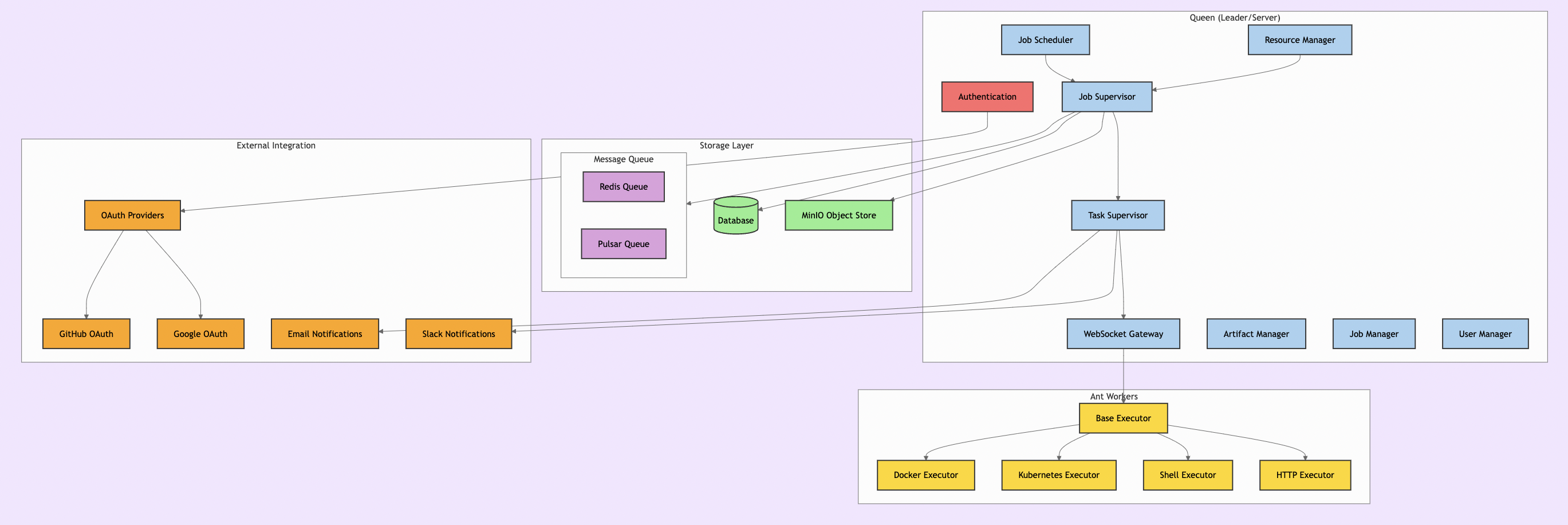
- Queen Server: The central orchestrator. It manages job definitions, schedules pending jobs based on priority, and tracks the state of all workers and executions.
- Ant Workers: The workhorses. They register with the Queen, advertising their capabilities (e.g., supported executors and tags like
gpu-enabled). They pick up tasks from the message queue and execute them. - Backend: Formicary relies on a database (like Postgres or MySQL) for state, a message queue (like Go Channels, Redis or Pulsar) for communication, and an S3-compatible object store for artifacts.
Getting Started: A Local Formicary Environment
The quickest way to get started is with the provided Docker Compose setup.
Prerequisites
- Docker & Docker Compose
- A local Kubernetes cluster (like Docker Desktop’s Kubernetes, Minikube, or k3s) with its
kubeconfigfile correctly set up. The embedded Ant worker will use this to run Kubernetes tasks.
Installation Steps
- Clone the Repository:
git clone https://github.com/bhatti/formicary.git && cd formicary - Launch the System:
This command starts the Queen server, a local Ant worker, Redis, and MinIO object storage.docker-compose up - Explore the Dashboard:
Once the services are running, open your browser to http://localhost:7777.
Example 1: Secure CI/CD with Manual Production Deploy
Our goal is to build a CI/CD pipeline for a Go application that:
- Builds the application binary.
- Runs static analysis (
gosec) and saves the report. - Deploys automatically to a staging environment.
- Pauses for manual verification.
- If approved, deploys to production.
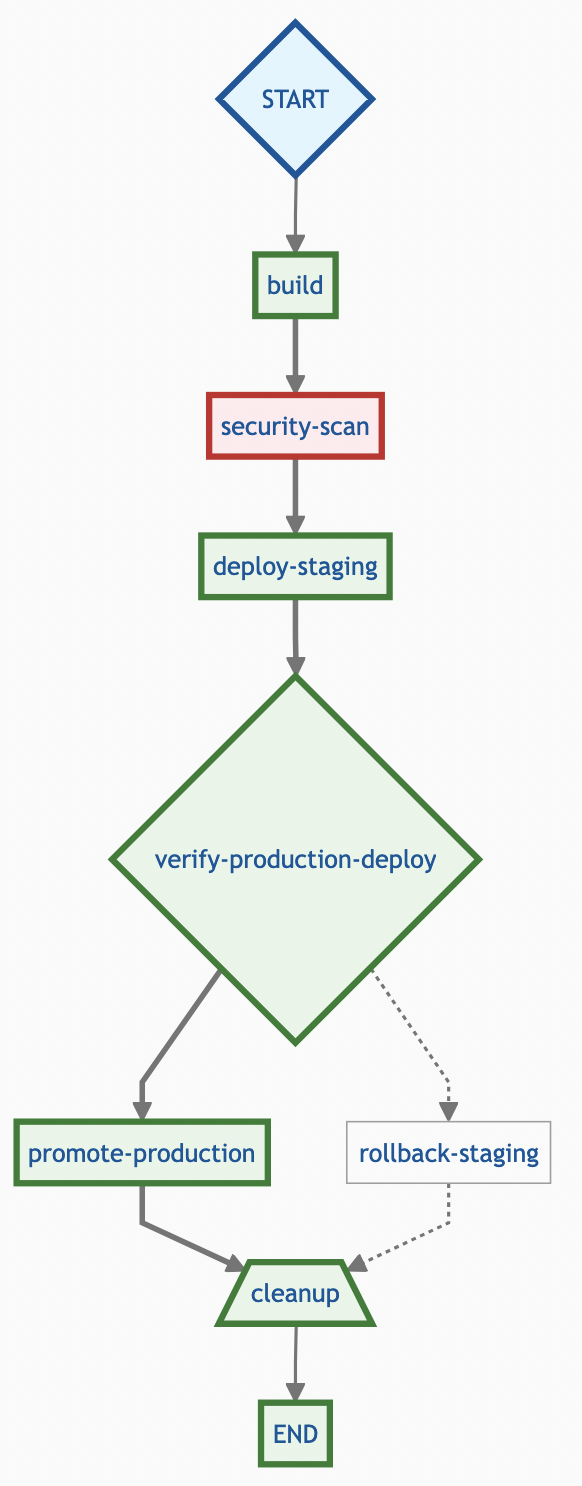
Here is the complete playbook definition:
job_type: secure-go-cicd
description: Build, scan, and deploy a Go application with a manual production gate.
tasks:
- task_type: build
  method: KUBERNETES
  container:
    image: golang:1.24-alpine
  script:
    - echo "Building Go binary..."
    - go build -o my-app ./...
  artifacts:
    paths: [ "my-app" ]
  on_completed: security-scan

- task_type: security-scan
  method: KUBERNETES
  container:
    image: securego/gosec:latest
  allow_failure: true # We want the report even if it finds issues
  script:
    - echo "Running SAST scan with gosec..."
    # The -no-fail flag prevents the task from failing the pipeline immediately.
    - gosec -fmt=sarif -out=gosec-report.sarif ./...
  artifacts:
    paths: [ "gosec-report.sarif" ]
  on_completed: deploy-staging

- task_type: deploy-staging
  method: KUBERNETES
  dependencies: [ "build" ]
  container:
    image: alpine:latest
  script:
    - echo "Deploying ./my-app to staging..."
    - sleep 5 # Simulate deployment work
    - echo "Staging deployment complete. Endpoint: http://staging.example.com"
  on_completed: verify-production-deploy

- task_type: verify-production-deploy
  method: MANUAL
  description: "Staging deployment complete. A security scan report is available as an artifact. Please verify the staging environment and the report before promoting to production."
  on_exit_code:
    APPROVED: promote-production
    REJECTED: rollback-staging

- task_type: promote-production
  method: KUBERNETES
  dependencies: [ "build" ]
  container:
    image: alpine:latest
  script:
    - echo "PROMOTING ./my-app TO PRODUCTION! This is a critical, irreversible step."
  on_completed: cleanup

- task_type: rollback-staging
  method: KUBERNETES
  container:
    image: alpine:latest
  script:
    - echo "Deployment was REJECTED. Rolling back staging environment now."
  on_completed: cleanup

- task_type: cleanup
  method: KUBERNETES
  always_run: true
  container:
    image: alpine:latest
  script:
    - echo "Pipeline finished."
Executing the Playbook
- Upload the Job Definition:
curl -X POST http://localhost:7777/api/jobs/definitions \ -H "Content-Type: application/yaml" \ --data-binary @playbooks/secure-ci-cd.yaml - Submit the Job Request:
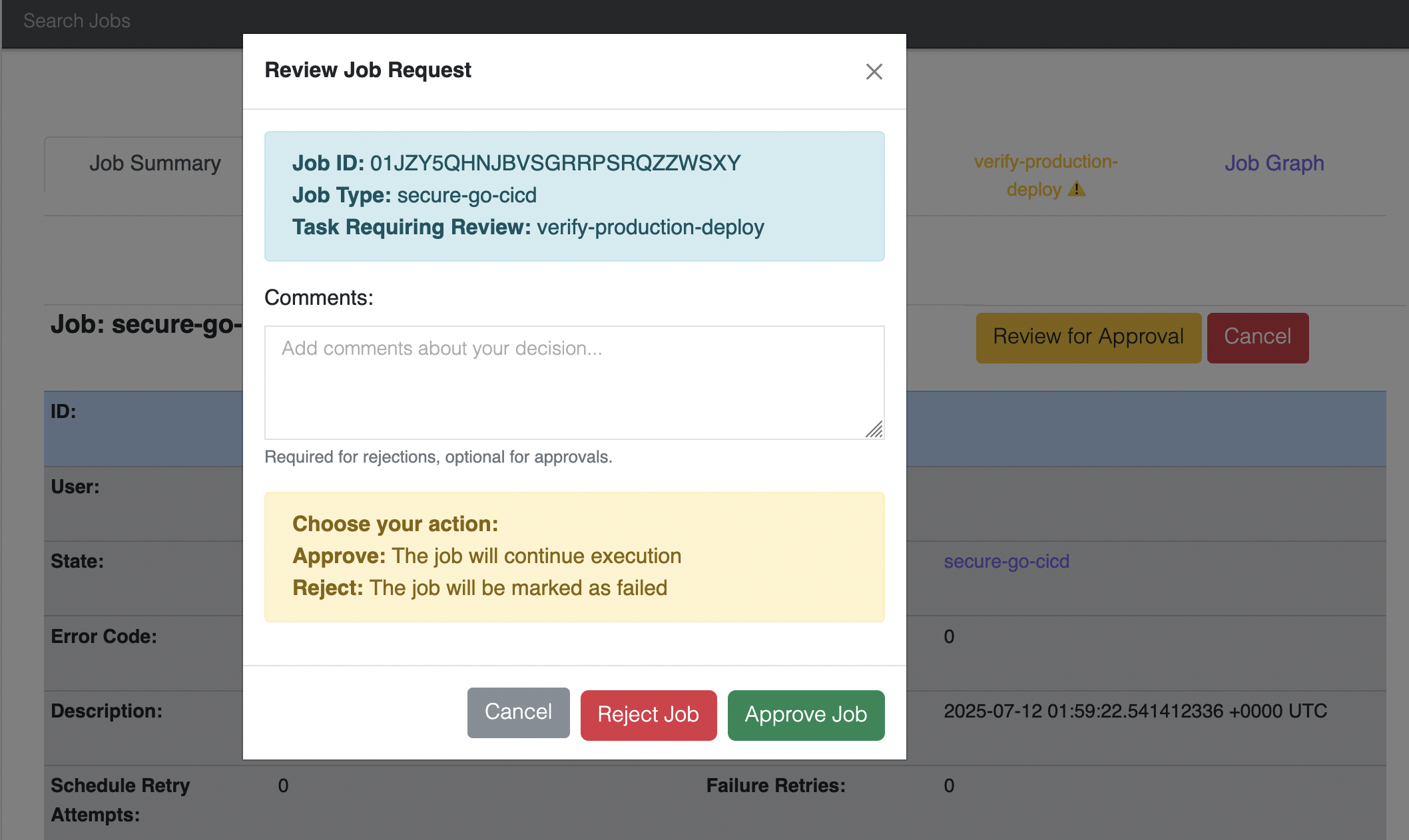
curl -X POST http://localhost:7777/api/jobs/requests \ -H "Content-Type: application/json" \ -d '{"job_type": "secure-go-cicd"}' - Monitor and Approve:
- Go to the dashboard. You will see the job run through
build,security-scan, anddeploy-staging. - The job will then enter the
MANUAL_APPROVAL_REQUIREDstate. - On the job’s detail page, you will see an “Approve” button next to the
verify-production-deploytask.
- To approve via the API, get the
Job Request IDand theTask Execution IDfrom the UI or API, then run:
- Go to the dashboard. You will see the job run through
Once approved, the playbook will proceed to promote-production and run the final cleanup step.
Example 2: Semi-Automated Disaster Recovery Playbook
Now for a more critical scenario: failing over a service to a secondary region. This playbook uses mocked IaC steps and pauses for the crucial final decision.
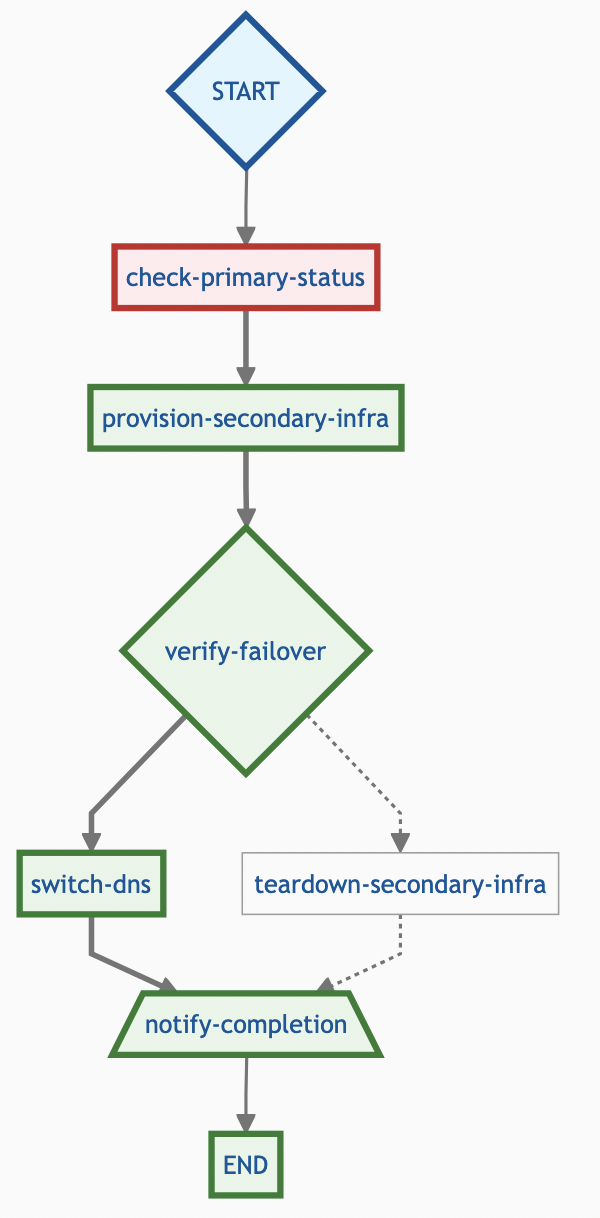
job_type: aws-region-failover
description: A playbook to provision and failover to a secondary region.
tasks:
- task_type: check-primary-status
  method: KUBERNETES
  container:
    image: alpine:latest
  script:
    - echo "Pinging primary region endpoint... it's down! Initiating failover procedure."
    - exit 1 # Simulate failure to trigger the 'on_failed' path
  on_completed: no-op # This path is not taken in our simulation
  on_failed: provision-secondary-infra

- task_type: provision-secondary-infra
  method: KUBERNETES
  container:
    image: hashicorp/terraform:light
  script:
    - echo "Simulating 'terraform apply' to provision DR infrastructure in us-west-2..."
    - sleep 10 # Simulate time for infra to come up
    - echo "Terraform apply complete. Outputting simulated state file."
    - echo '{"aws_instance.dr_server": {"id": "i-12345dr"}}' > terraform.tfstate
  artifacts:
    paths: [ "terraform.tfstate" ]
  on_completed: verify-failover

- task_type: verify-failover
  method: MANUAL
  description: "Secondary infrastructure in us-west-2 has been provisioned. The terraform.tfstate file is available as an artifact. Please VERIFY COSTS and readiness. Approve to switch live traffic."
  on_exit_code:
    APPROVED: switch-dns
    REJECTED: teardown-secondary-infra

- task_type: switch-dns
  method: KUBERNETES
  container:
    image: amazon/aws-cli
  script:
    - echo "CRITICAL: Switching production DNS records to the us-west-2 environment..."
    - sleep 5
    - echo "DNS failover complete. Traffic is now routed to the DR region."
  on_completed: notify-completion

- task_type: teardown-secondary-infra
  method: KUBERNETES
  container:
    image: hashicorp/terraform:light
  script:
    - echo "Failover REJECTED. Simulating 'terraform destroy' for secondary infrastructure..."
    - sleep 10
    - echo "Teardown complete."
  on_completed: notify-completion

- task_type: notify-completion
  method: KUBERNETES
  always_run: true
  container:
    image: alpine:latest
  script:
    - echo "Disaster recovery playbook has concluded."
Executing the DR Playbook
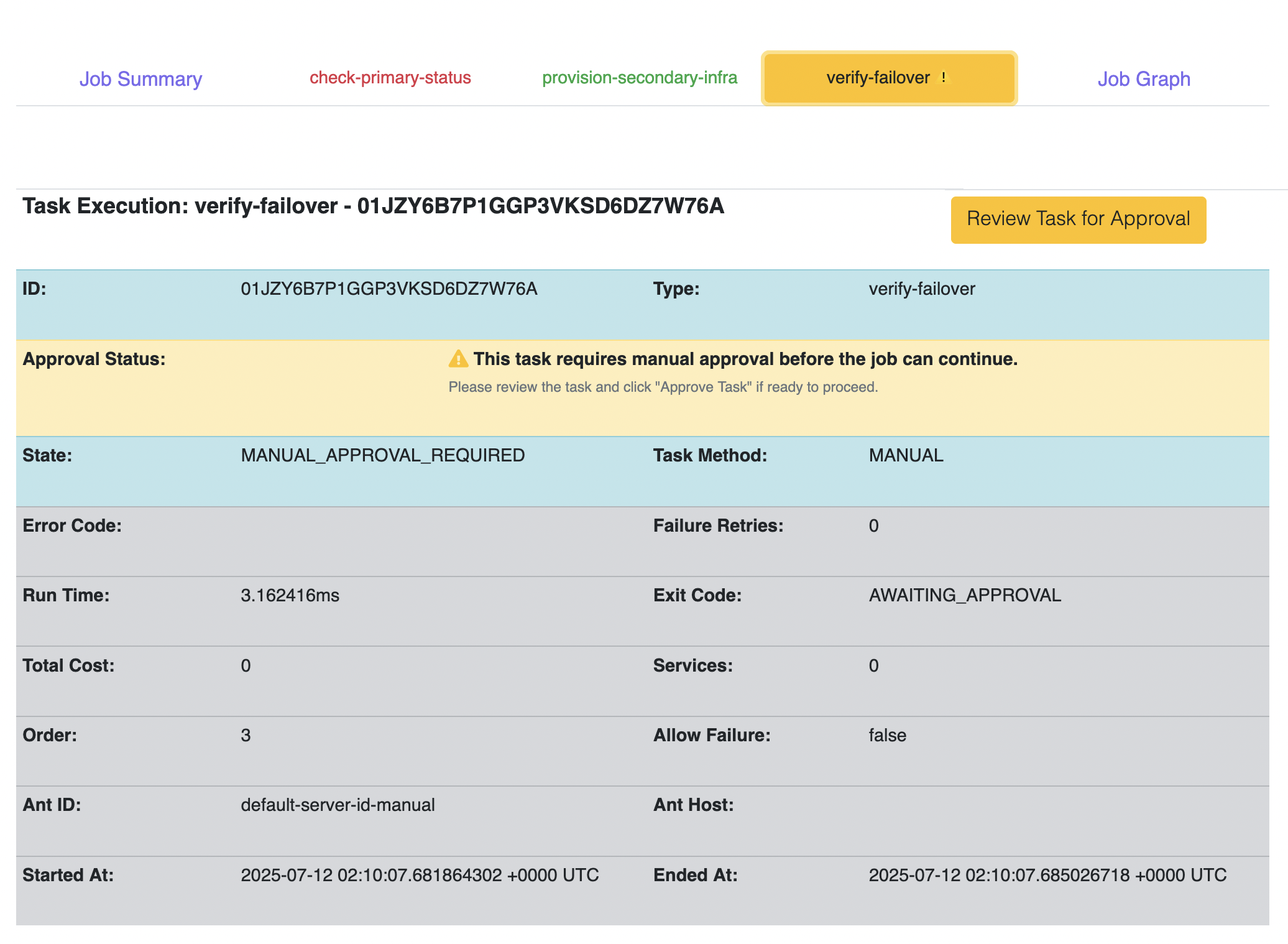
The execution flow is similar to the first example. An operator would trigger this job, wait for the provision-secondary-infra task to complete, download and review the terraform.tfstate artifact, and then make the critical “Approve” or “Reject” decision.
Conclusion
Formicary helps you turn your complex operational processes into reliable, trackable workflows that run automatically. It uses containers to execute tasks and includes manual approval checkpoints, so you can automate your work with confidence. This approach reduces human mistakes while making sure people stay in charge of the important decisions.